
Package Exports
- @cristiancorreau/forge
This package does not declare an exports field, so the exports above have been automatically detected and optimized by JSPM instead. If any package subpath is missing, it is recommended to post an issue to the original package (@cristiancorreau/forge) to support the "exports" field. If that is not possible, create a JSPM override to customize the exports field for this package.
Readme
English · Español

Forge AI
Set up any project to work with AI agents in a single command
One agent team, every runtime — 19 runtimes (4 native + 15 rules-based editors) from a single project.yaml.




Landing • Documentation • npm • Issues
npx @cristiancorreau/forge init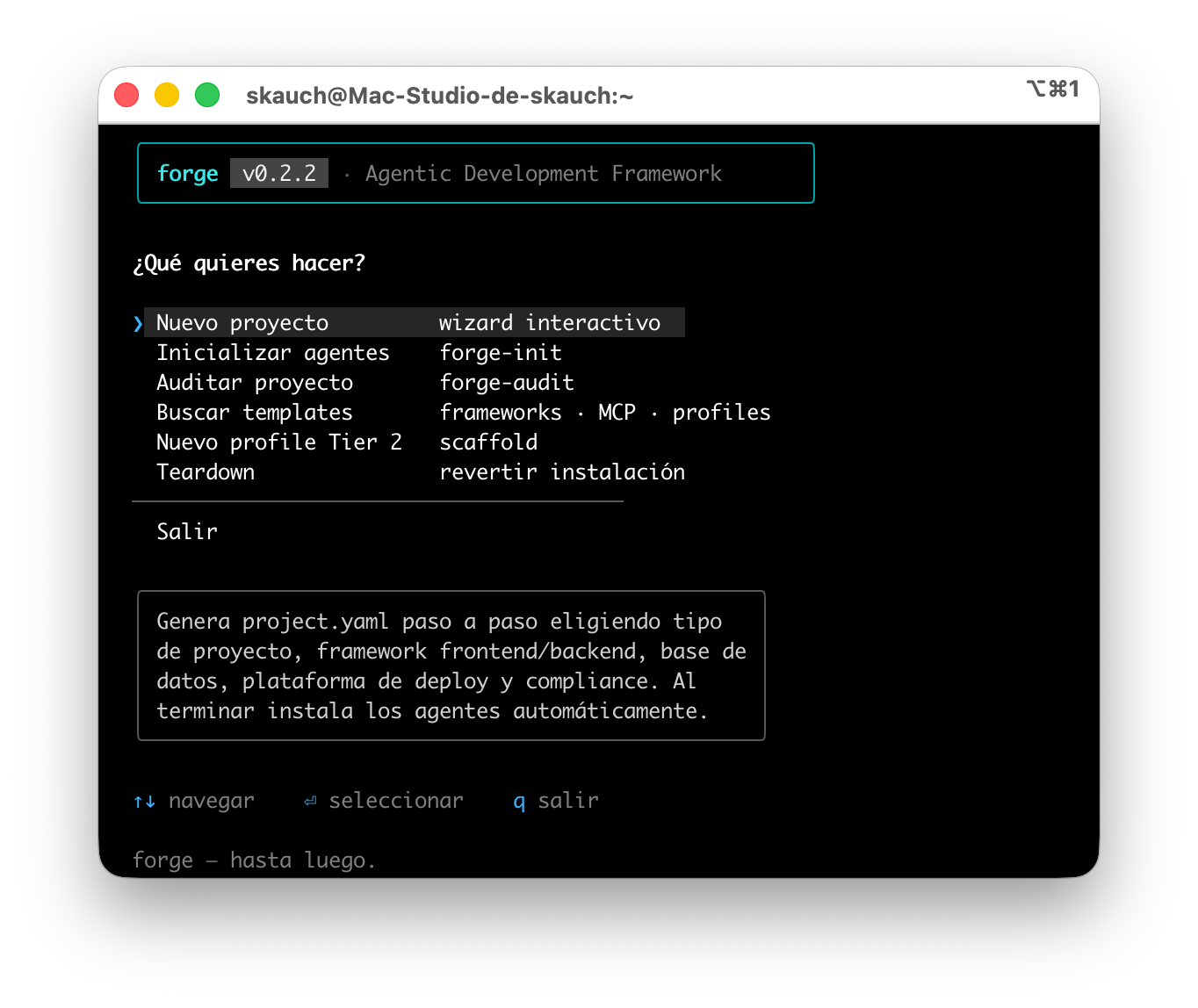
The forge interactive panel (forge panel) requires Bun (OpenTUI) — explore agents, skills, hooks and profiles without leaving the terminal.
What is Forge AI?
Forge AI (the forge CLI) is a multi-runtime agentic development framework. A single command analyzes your project, installs a team of specialized agents, wires up security guardrails, and leaves a project.yaml as the single source of truth from which each AI runtime's native configuration is regenerated.
Instead of copy-pasting agent rules across projects and across tools, you define the team once and forge materializes it for all 19 supported runtimes.
- 🤖 Multi-runtime agent teams — 7 universal agents + 19 stack profiles
- 📐 Spec-first SDD flow — no code task without an
APPROVEDspec - 🪝 Guardrail hooks in pure JS — branch-guard, debug, secrets and prod-safety, zero Python
- 🔁 One
project.yaml, every CLI — 19 runtimes: 4 native + 15 rules-based - ⚖️ Compliance with binding veto — GDPR/LGPD/CCPA reviewer that blocks the merge
- 🔄 Reversible operations — SHA-256 manifest +
--dry-runto audit every change - 📚 Project knowledge base — wiki that ingests, lints and answers with citations
Why forge?
vs. hand-made agent rules
- One
project.yaml, four runtimes — you write the team once, not four times. - Spec-first by default — the
orchestratorrefuses to spawn agents without an approved spec. - Guardrails already wired — security hooks ready to go, no Python to install.
- Regenerable —
forge generaterebuilds the entire team from the source of truth.
vs. copy-pasting agents across projects
- Composable TIERs — universal → stack → domain, with predictable collision resolution.
- 19 stack profiles ready to go — Next.js, FastAPI, Django, Rails, Laravel, Go, Rust, Flutter…
- Reversible operations — SHA-256 manifest detects drift;
forge teardownuninstalls cleanly. - Drift under control —
forge updatere-syncs with the catalog while preserving your edits.
Installation
forge runs on Node.js 20+. With Bun you unlock the full-screen panel (OpenTUI, @opentui/core); on Node it falls back to @clack prompts; on legacy consoles, to ASCII.
Try without installing:
npx @cristiancorreau/forge initInstall the global forge command — pick your package manager:
npm  install -g @cristiancorreau/forge   # npm
pnpm add     -g @cristiancorreau/forge   # pnpm  (run `pnpm setup` once)
bun  add     -g @cristiancorreau/forge   # bun   (needs ~/.bun/bin on PATH)
The
forge initwizard runs the cross-platform@clackprompts by default — identical on Windows, macOS and Linux. The full-screen OpenTUI wizard is opt-in: setFORGE_ENABLE_OPENTUI=1(it requires Bun and a capable terminal). If you have forge installed with both bun and npm, whichever is first on yourPATHwins — update that same manager (e.g.bun add -g @cristiancorreau/forge@latest).
PATH troubleshooting
Is the forge command not recognized after the global install? The global binaries directory is not on your PATH. npx @cristiancorreau/forge <cmd> always works without installing; for the bare command:
- npm:
export PATH="$(npm prefix -g)/bin:$PATH" - pnpm: run
pnpm setupand reopen the terminal - bun: add
export PATH="$HOME/.bun/bin:$PATH"to your shell rc
Quickstart (30 s)
# 1. Inicializa forge en tu proyecto
#    (wizard: detecta stack, instala agentes + hooks, escribe el manifest)
npx @cristiancorreau/forge init

# 2. Verifica el entorno y la conformidad
forge doctor
forge validate

# 3. Regenera la configuración nativa de cada runtime desde project.yaml
forge generate
Already have a codebase up and running? Integrate it without starting from scratch:
forge adopt # analiza el repo existente + auto-wikiThe 5 layers
forge is organized into five layers that go from the source of truth to per-runtime materialization.
| Layer | Responsibility |
|---|---|
| 🧠 Memory | project.yaml as the single source of truth — stack, team, skills, rules. |
| 📚 Knowledge | Agents + stack profiles that bring the knowledge of each role and framework. |
| 🛡️ Guardrail | Compliance and security enforcement: hooks, branch-guard, secret detection. |
| 🎯 Delegation | Skill orchestration and dispatch: which agent handles which task. |
| 📡 Distribution | Runtime adapters that translate the source of truth to 19 AI runtimes (4 native + 15 rules-based). |
TIER system
Three composable levels, from the general to the specific. Each tier inherits and specializes the previous one; on a collision, the most concrete one wins.
| Tier | What it is | Examples |
|---|---|---|
| Tier 1 — universal | 7 agents defined by their output, not by the stack. Useful in any project. | orchestrator, backend-engineer, frontend-engineer, test-engineer, docs-writer, compliance-reviewer, security-auditor |
| Tier 2 — stack | The same roles with framework-specific instructions. 19 profiles available. | Next.js, FastAPI, Django, Rails, Laravel, Go-Gin, Rust, NestJS… |
| Tier 3 — domain | Agents that know the project's business. They live in the repo, registered under agents.specialized. |
dsar-specialist, gcm-engineer, policy-engineer… |
Full detail in docs/en/tiers.md.
Commands
The 17 CLI commands.
| Command | What it does |
|---|---|
forge init |
Full wizard: detects the stack, installs agents and hooks, writes the manifest. |
forge adopt |
Onboards forge into an existing codebase (analysis + auto-wiki). |
forge analyze |
Deterministic, offline read of an existing codebase (stack, hotspots, TODO/FIXME, tests, suggested agents). Base for the /onboard skill; --json / --write. |
forge generate |
Regenerates each runtime's native configuration from project.yaml. |
forge update |
Re-syncs managed files with the catalog while preserving local edits (SHA-256 drift). |
forge validate |
Validates that project.yaml and the generated files conform to the schema. |
forge doctor |
Environment health-check: Node.js, git, active AI runtime, permissions. |
forge migrate |
Migrates project.yaml from schema v1 to v2 (--dry-run, --backup). |
forge audit |
Verifies the project against the manifest; detects modified or missing files. |
forge scaffold |
Generates a new agent: Tier 2 profile or Tier 3 domain agent. |
forge teardown |
Cleanly uninstalls forge from the project via the manifest (--dry-run, --keep-config). |
forge skills |
Lists the available skills grouped by category. |
forge aitmpl-search |
Searches the curated offline catalog (frameworks, MCP servers, profiles). |
forge wiki |
Manages the project knowledge base (status | ingest | query | lint). |
forge panel |
Interactive OpenTUI panel (config / monitor / skills / hooks / templates). |
forge session-start |
Opens a work session: detects the repo state and routes. |
forge session-close |
Closes a session: commit → daily note → sync → PR. |
Interactive panel. With Bun,
forge panel(and the post-initdashboard) opens a navigable OpenTUI panel to explore agents, skills, hooks and profiles without leaving the terminal. With Node it falls back to the standard prompt flow.
Stacks / Profiles (19)
Tier 2 profiles ready to activate. Each one brings architecture rules, code conventions and framework patterns.
See all 19 profiles
| TypeScript / JS | Python | PHP | Others |
|---|---|---|---|
astro |
django |
laravel |
go-gin (Go) |
express |
fastapi |
wordpress |
rust |
hono-drizzle |
flask |
springboot (Java) |
|
nestjs |
rails (Ruby) |
||
nextjs-admin |
flutter (Dart) |
||
sveltekit |
|||
vuenuxt |
|||
expo |
|||
playwright-crawler |
Runtimes
A single forge project adapts to four runtimes, each with its native output.
| Runtime | Support | Output |
|---|---|---|
| Claude Code | ✅ Complete | CLAUDE.md, .claude/agents/, .claude/commands/, .claude/settings.json, hooks |
| OpenCode | ✅ Supported | AGENTS.md generated from the root |
| Codex CLI | ✅ Supported | AGENTS.md enriched for project context |
| Kiro | 🔭 Monitoring | steering files (.kiro/steering/*.md) |
Per-runtime detail in docs/en/runtimes/.
VS Code extension
The forge Agent Framework extension (cristiancorreau.forge-agent-framework) surfaces the CLI inside VS Code: run init, audit, doctor, generate and other commands from the Command Palette and the sidebar panel, without leaving the editor.
Status: v0.6.0 is packaged but pending publication to the Marketplace (the current live version is 0.5.0). Publishing requires a valid VSCE_PAT secret loaded in the repository.
Trigger the publish: push tag vscode-v0.6.0 or dispatch the publish-vscode workflow manually — both require the VSCE_PAT secret (Azure DevOps PAT, scope Marketplace › Manage).
Full development and publishing instructions: vscode-extension/README.md.
Skills
12 general skills that encapsulate complete flows, mapped per runtime and triggerable as slash commands (/spec, /new-feature, /db-migrate…), plus per-stack skills.
| Skill | What it's for |
|---|---|
spec |
Drafts SDD specs in docs/specs/. |
new-feature |
Spec-first feature kickoff, from plan to deploy. |
security-audit |
Security audit checklist. |
db-migrate |
Safe migrations (Prisma, Drizzle, ActiveRecord, Alembic, Goose). |
local2prod |
Deploy with a multi-provider production gate. |
browser-test |
UI and critical-flow verification via browser. |
phase-kickoff |
Roadmap phase startup. |
obsidian-sync |
Sync with Obsidian. |
aitmpl-search |
Searches the curated offline catalog. |
wiki-ingest |
Ingests sources into the knowledge base. |
wiki-lint |
Lints the wiki's consistency. |
wiki-query |
Answers queries citing wiki pages. |
In addition,
session-startandsession-closeare available as CLI commands.
Per-stack skills. The Laravel profile adds 5 Laravel 13-oriented skills:
/laravel-eloquent,/laravel-pest,/laravel-security,/laravel-verifyand/laravel-mcp(Boost,laravel/mcp, AI SDK, embeddings/pgvector).
Full catalog in docs/en/skills.md.
SDD: spec-first, not optional
forge enforces Spec-Driven Development with a real gate, not a suggestion:
- No code task starts without a spec in the
APPROVEDstate insidedocs/specs/. - The
orchestratorvetoes spawning implementation agents if there is no approved spec. - The
/specskill drafts the spec;/new-featuretakes it from plan to deploy.
The result: the agent team doesn't improvise code on top of ambiguous requirements — first the what is agreed upon, then the how is generated.
Compliance with binding veto
The compliance-reviewer agent (Tier 1, model opus) reviews every PR against the active compliance frameworks — GDPR / LGPD / CCPA — with binding veto power before merging.
On top of the guardrail hooks in pure JavaScript (zero Python):
- 🚫 branch-guard — prevents direct commits on protected branches.
- 🐛 debug detection — blocks
console.log/printdebug statements. - 🔐 secret detection — stops hardcoded secrets before the commit.
- 🚀 prod-safety — protects sensitive operations against production.
Comparison
| Capability | forge | autoskills | cc-sdd |
|---|---|---|---|
| Focus | End-to-end agentic framework | Skills collection | SDD for Claude Code |
| Spec-first SDD with gate | ✅ orchestrator veto | ❌ | ✅ core |
| Agents by tier (1/2/3) | ✅ | ❌ | ❌ |
| Stack profiles | ✅ 19 | 🚧 partial | ❌ |
| Invokable skills | ✅ 12 | ✅ central focus | 🚧 |
| Multi-runtime | ✅ 19 runtimes | 🚧 mostly Claude Code | 🚧 |
| Compliance with veto (GDPR/LGPD/CCPA) | ✅ binding | ❌ | ❌ |
| Guardrail hooks (branch/secrets/prod) | ✅ no Python | ❌ | ❌ |
| Knowledge base / wiki with citations | ✅ ingest/lint/query | ❌ | ❌ |
| Reversible operations (SHA-256, dry-run) | ✅ | ❌ | ❌ |
| Deploy with production gate | ✅ multi-provider | ❌ | ❌ |
Documentation
- 🌐 Landing — the pitch on one page.
- 📖 Full guide
- 🧩 Skills
- 🏗️ TIERs
- 📚 Wiki / knowledge base
- 📡 Runtimes
Forge your agent team in a single command
npx @cristiancorreau/forge initMade with fire, anvil and a lot of dogfooding.
License
Apache-2.0 — Copyright © 2026 Cristian Correa.