
Package Exports
- @dynamic-mapper/mapper
- @dynamic-mapper/mapper/lib/mapper.cjs.js
- @dynamic-mapper/mapper/lib/mapper.esm.js
This package does not declare an exports field, so the exports above have been automatically detected and optimized by JSPM instead. If any package subpath is missing, it is recommended to post an issue to the original package (@dynamic-mapper/mapper) to support the "exports" field. If that is not possible, create a JSPM override to customize the exports field for this package.
Readme
DynamicMapper


DynamicMapper is a dependency free library that provides support for object to object mapping to JavaScript for both browser and node.js environment. Inspired by AutoMapper.
For best experience, use DynamicMapper together with TypeScript.
Installation
npm i @dynamic-mapper/mapper --save
Documentation
Complete documentation available here.
Motivation
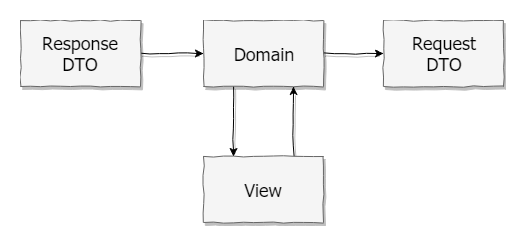
Take a UI application where data are consumed in a form of Response DTO interface that needs to be transformed to Domain interface that is
later transformed into a UI view (i.e. Angular Reactive Form value). Modified view then needs to be transformed back to Domain and
this updated domain object should be send back to the server in form of Request DTO. Pretty tedious to write those mapping in an imperative
way for each individual domain object.
Usage
import { MappingPair, MapperConfiguration } from '@dynamic-mapper/mapper';

interface CustomerDto {
    firstName: string;
    lastName: string;
}

interface Customer {
    firstName: string;
    lastName: string;
    fullName: string;
}

const CustomerDtoToCustomer = new MappingPair<CustomerDto, Customer>();

const configuration = new MapperConfiguration(cfg => {
    cfg.createAutoMap(CustomerDtoToCustomer, {
        fullName: opt => opt.mapFrom(src => `${src.firstName} ${src.lastName}`)
    });
});

const mapper = configuration.createMapper();

const customerDto: CustomerDto = {
    firstName: 'John',
    lastName: 'Doe'
};

const customer = mapper.map(CustomerDtoToCustomer, customerDto);
// {
//      firstName: 'John',
//      lastName: 'Doe',
//      fullName: 'John Doe'
// }