
Package Exports
- @esteemapp/react-native-autocomplete-input
This package does not declare an exports field, so the exports above have been automatically detected and optimized by JSPM instead. If any package subpath is missing, it is recommended to post an issue to the original package (@esteemapp/react-native-autocomplete-input) to support the "exports" field. If that is not possible, create a JSPM override to customize the exports field for this package.
Readme
react-native-autocomplete-input


A pure JS autocomplete component for React Native. Use this component in your own projects or use it as inspiration to build your own autocomplete.
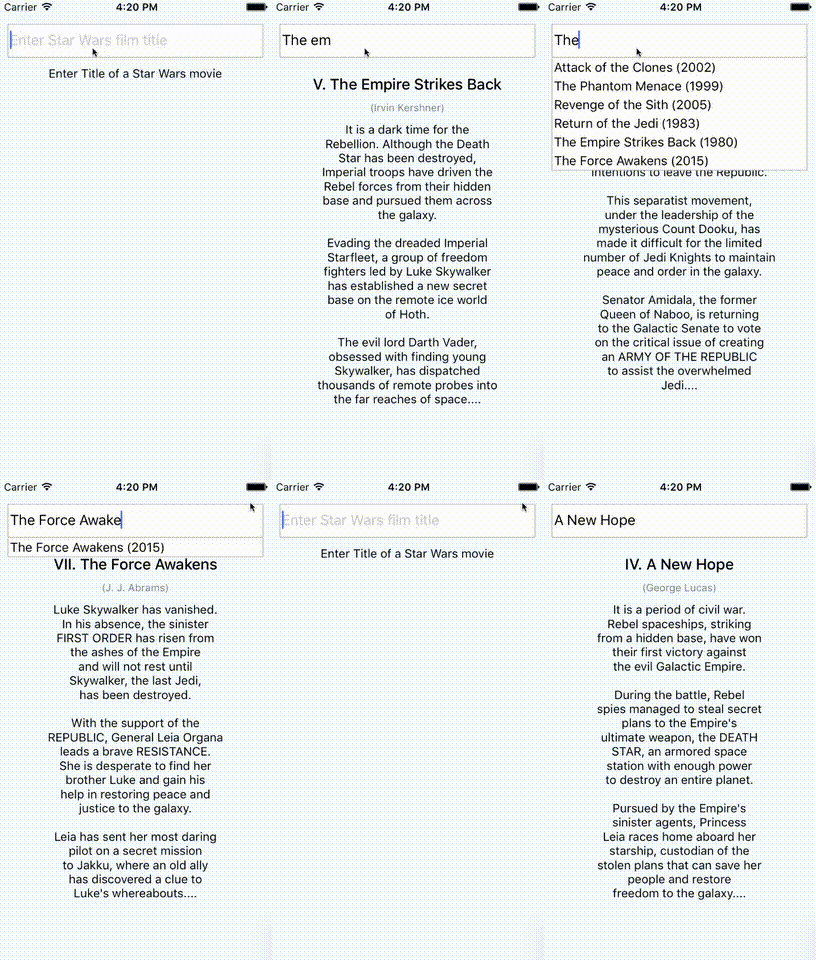
How to use react-native-autocomplete-input
Tested with RN >= 0.26.2. If you want to use RN < 0.26 try to install react-native-autocomplete-input <= 0.0.5.
Installation
$ npm install --save react-native-autocomplete-inputor install HEAD from github.com:
$ npm install --save mrlaessig/react-native-autocomplete-inputExample
// ...

render() {
  const { query } = this.state;
  const data = this._filterData(query);
  return (
    <Autocomplete
      data={data}
      defaultValue={query}
      onChangeText={text => this.setState({ query: text })}
      renderItem={({ item, i }) => (
        <TouchableOpacity onPress={() => this.setState({ query: item })}>
          <Text>{item}</Text>
        </TouchableOpacity>
      )}
    />
  );
}

// ...
A complete example for Android and iOS can be found here.
Android
Android does not support overflows (#20), for that reason it is necessary to wrap the autocomplete into a absolute positioned view on Android. This will allow the suggestion list to overlap other views inside your component.
//...

render() {
  return(
    <View>
      <View style={styles.autocompleteContainer}>
        <Autocomplete {/* your props */} />
      </View>
      <View>
        <Text>Some content</Text>
      </View>
    </View>
  );
}

//...

const styles = StyleSheet.create({
  autocompleteContainer: {
    flex: 1,
    left: 0,
    position: 'absolute',
    right: 0,
    top: 0,
    zIndex: 1
  }
});
Props
| Prop | Type | Description |
|---|---|---|
| containerStyle | style | These styles will be applied to the container which surrounds the autocomplete component. |
| hideResults | bool | Set to true to hide the suggestion list. |
| data | array | An array with suggestion items to be rendered in renderItem({ item, i }). Any array with length > 0 will open the suggestion list and any array with length < 1 will hide the list. |
| inputContainerStyle | style | These styles will be applied to the container which surrounds the textInput component. |
| listContainerStyle | style | These styles will be applied to the container which surrounds the result list. |
| listStyle | style | These style will be applied to the result list. |
| onShowResults | function | onShowResults will be called when the autocomplete suggestions appear or disappear. |
| onStartShouldSetResponderCapture | function | onStartShouldSetResponderCapture will be passed to the result list view container (onStartShouldSetResponderCapture). |
| renderItem | function | renderItem will be called to render the data objects which will be displayed in the result view below the text input. |
| keyExtractor | function | keyExtractor(item, i) will be called to get key for each item. It's up to you which string to return as a key. |
| renderSeparator | function | renderSeparator will be called to render the list separators which will be displayed between the list elements in the result view below the text input. |
| renderTextInput | function | render custom TextInput. All props passed to this function. |
| flatListProps | object | custom props to FlatList]. |
Known issues
- By default the autocomplete will not behave as expected inside a
<ScrollView />. Set the scroll view's prop to fix this:keyboardShouldPersistTaps={true}for RN <= 0.39, orkeyboardShouldPersistTaps='always'for RN >= 0.40. (#5). - If you want to test with Jest add
jest.mock('react-native-autocomplete-input', () => 'Autocomplete');to your test.
Contribute
Feel free to open issues or do a PR!