
Package Exports
This package does not declare an exports field, so the exports above have been automatically detected and optimized by JSPM instead. If any package subpath is missing, it is recommended to post an issue to the original package (@itsautomata/prism) to support the "exports" field. If that is not possible, create a JSPM override to customize the exports field for this package.
Readme
prism
model agnostic, local-first AI coding assistant
Prism is an open source coding assistant that runs locally on your machine through Ollama, or cloud through OpenRouter (300+ models).
actively built and tested. expect breaking changes. decentralized intelligence is cool
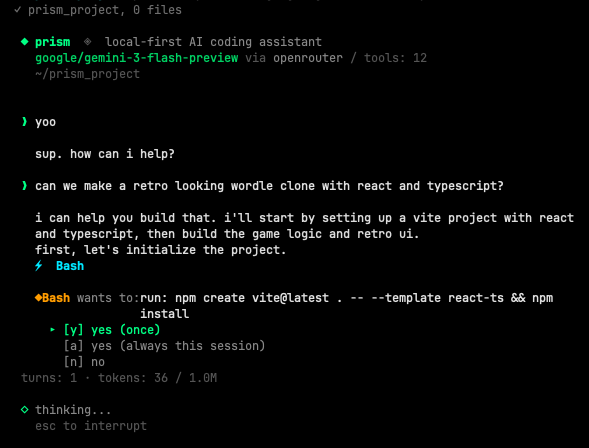
quick start
requires Node.js 20+.
npm install -g @itsautomata/prism
prism
to run local (free, via ollama, requires Ollama v0.20.2+ for proper tool calling):
brew install ollama
ollama serve
ollama pull deepseek-r1:14b
shell completion
prism auto-installs shell completion the first time you run it (zsh and bash supported). after the first launch, restart your shell or run exec $SHELL to reload in place.
then:
prism --<TAB>          # shows all flags
prism --or <TAB>       # shows openrouter models
prism <TAB>            # shows local ollama models
opt out of auto-install: set PRISM_NO_AUTO_COMPLETION=1 in your environment before the first run.
re-install manually (or for a different shell):
prism --install-completion           # auto-detects your shell
prism --install-completion zsh       # explicit
prism --install-completion bash      # explicit
choose your model
local (free, ollama)
prism                       # deepseek-r1:14b (default)
prism qwen3:14b
cloud (openrouter, 300+ models)
add your API key to ~/.prism/config.toml (created on first run), then:
prism --or qwen/qwen3.6-plus                  # $0.325/M tokens
prism --or deepseek/deepseek-v3.2-speciale    # $0.40/M tokens
prism --or google/gemini-2.0-flash-lite-001   # $0.075/M
prism --or anthropic/claude-haiku-4.5         # $1.00/M tokens
the model must support tool calling on openrouter. see openrouter.ai/docs for available models.
sessions
prism auto-saves your conversation after every turn. resume where you left off:
prism --continue                              # resume last session in this directory
prism -c                                      # same
prism --or qwen3:14b --continue               # resume with a different model
prism --sessions                              # list recent sessions (numbered)
prism -r 1                                    # resume the most recent session
prism -r 3                                    # resume the 3rd most recent
prism --resume <full-id>                      # resume by full id (for scripting)
sessions saved at ~/.prism/sessions/.
tools
| tool | what it does |
|---|---|
| Bash | execute shell commands |
| Read | read files, PDFs, Word docs, notebooks |
| Edit | exact string replacement |
| Write | create or overwrite files |
| Glob | find files by pattern |
| Grep | search file contents |
| Agent | spawn read-only subagents for parallel research |
permissions
write operations ask before executing. read operations auto-allow. subagents inherit read-only access; they cannot escalate to write operations.
◆ Bash wants to: run: git push
  ▸ [y] yes (once)
    [a] yes (always this session)
    [n] no
teach it
prism learns per model. rules persist across sessions.
/teach never run git push without asking first
/rules
/forget 2
rules saved at ~/.prism/models/<model>.json.
commands
/model <name>     switch model mid-conversation (keeps context)
/plan             enter plan mode (model proposes before executing)
/exec-plan        exit plan mode and execute the plan
/cancel-plan      exit plan mode without executing
/remember <fact>  add a timestamped fact to project memo
/teach <rule>     teach the model a rule
/rules            show learned rules
/forget <n>       remove a rule
/max-tools <n>    limit tools for this model
/clear            clear conversation
/help             show commands
/exit             quit
type / in the prompt to see the list with arrow-key navigation; press tab to complete the selected command.
plan mode
for ambiguous tasks where the wrong opening move costs time. type /plan, ask the model what you want done, read the plan it proposes, push back and revise as needed, then type /exec-plan when you're ready for it to execute. type /cancel-plan to abandon without executing.

while in plan mode, the banner shows an amber plan mode indicator. the model is told to research with read-only tools and write a markdown plan, not to call Edit, Write, or destructive Bash. the plan stays in conversation context so the model can execute against it after /exec-plan.
iteration: typing feedback without /exec-plan keeps you in plan mode and lets the model revise.
memory
prism remembers per project across sessions in two layers:
- lens.md at your project root: rules you enforce. git-committed, ships with the repo so collaborators inherit them.
- memo at
~/.prism/projects/<id>/memo.md: facts the model and you accumulate as you work. lives outside the repo. add an entry with/remember <fact>. each entry is timestamped with the date so the model can spot stale info.
example lens.md:
use pytest for testing.
never modify files in data/.
this project uses pydantic v2.
opt out at startup: prism --no-scan (skip live project scan), prism --no-memory (skip lens.md + memo). both flags = bare prompt.
shell escape
prefix any input with ! to run it as a shell command without leaving prism. output stays in your terminal (the model never sees it unless you describe it).

the prompt switches to amber $ when you type !, signaling shell mode. press esc to exit shell mode.
useful for: checking state mid-conversation (git status, file existence, processes) without burning model tokens or polluting context.
output tokens
default: 10,000 tokens per response. adjust if needed:
prism --max-tokens 16000      # more for heavy analysis
prism --max-tokens 4000       # less for quick tasks
develop locally
git clone https://github.com/itsautomata/prism.git
cd prism
npm install
npm run dev               # run from source via tsx
npm run build             # produce dist/cli.js (required before global install from this dir)
npm install -g .          # symlink your local build as the global `prism`
dist/ is git-ignored, so npm run build is required before any npm install -g . in a fresh clone.
tests (on going)
npm test            # run all tests
npm run test:watch  # watch mode
covering:
- CLI parsing
- sessions and
--resume - shell completion
- slash command autocomplete
- plan mode dispatch
- memo persistence (per-project memory)
- git context detection
- token counting
- tools and permissions
!cmdshell escape
note
- prism is only as good as the model you point it at. orchestration can only use and optimize what a model already has: better recovery, cleaner context, sharper tool use. but it can't make a model smarter.
- if one model isn't working for a task, you can switch to a smarter model mid-conversation with
/model.