
Package Exports
- @jaydenbeard/clawguard
- @jaydenbeard/clawguard/src/server.js
This package does not declare an exports field, so the exports above have been automatically detected and optimized by JSPM instead. If any package subpath is missing, it is recommended to post an issue to the original package (@jaydenbeard/clawguard) to support the "exports" field. If that is not possible, create a JSPM override to customize the exports field for this package.
Readme
ClawGuard
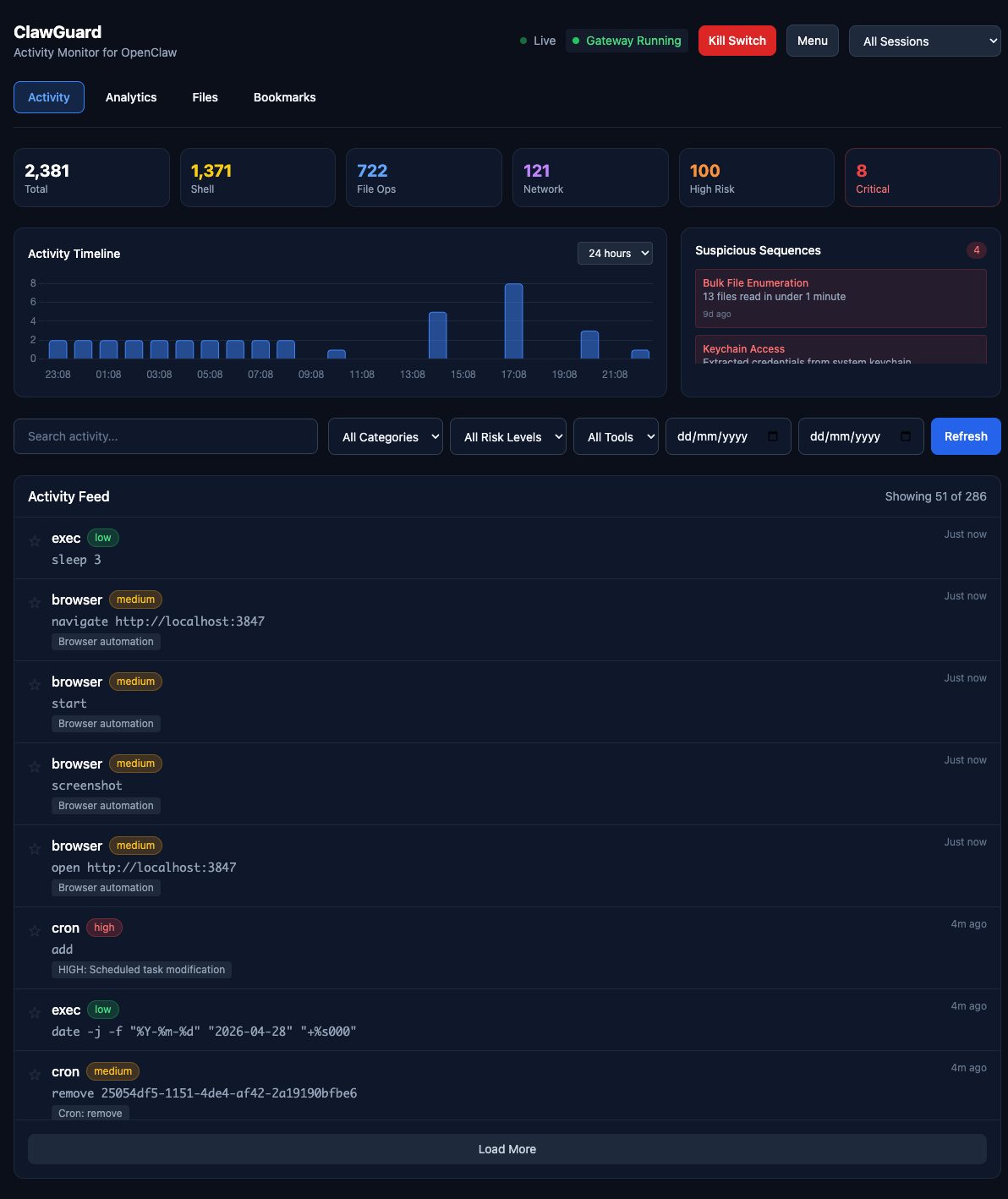
Activity monitor and security dashboard for OpenClaw. See exactly what your AI agent has done, with real-time analytics and emergency kill switch.
Quick Install
# Via npm (recommended)
npm install -g @jaydenbeard/clawguard
clawguard install

# Or clone manually
git clone https://github.com/JaydenBeard/clawguard.git
cd clawguard && npm install && npm start
clawguard install sets up ClawGuard as a background service that auto-starts on login and survives terminal close. Works on macOS, Linux, and Windows.
After install, open http://localhost:3847
Commands
clawguard           # Start in background (default)
clawguard start -f  # Start in foreground (attached to terminal)
clawguard stop      # Stop the running instance
clawguard status    # Check if running + auto-start status
clawguard restart   # Restart the service
clawguard install   # Install as auto-start service (survives reboot)
clawguard uninstall # Remove auto-start service
clawguard update    # Check for and install updates
clawguard version   # Show current version
Features
Real-time Monitoring
- Live activity feed with WebSocket updates
- Filter by category: Shell, File, Network, Browser, Message, System, Memory
- Filter by risk level: Low, Medium, High, Critical
- Full-text search across all activities
- Click-to-expand detail modal
Risk Analysis
- CRITICAL: Keychain extraction, sudo commands, remote code execution, password manager access
- HIGH: Email sending, external messaging (WhatsApp, iMessage, Twitter), cloud CLI operations (AWS/GCP/Azure), camera/mic access, persistence mechanisms, credential file access
- MEDIUM: SSH connections, git push, clipboard access, Docker operations, package installation
- LOW: Standard file reads, web searches, memory operations
Security Features
- Kill Switch: Emergency stop for runaway agents
- Export: Full JSON/CSV export for external analysis
- Webhook Alerts: Discord, Slack, Telegram, or any webhook endpoint — triggered on high-risk activity
- Gateway Status: Real-time monitoring of OpenClaw daemon
- Update Notifications: Dashboard banner when a new version is available
Multi-Gateway Support
ClawGuard works with all versions of the gateway — openclaw, moltbot, and clawdbot. It auto-detects which CLI is installed and finds running gateway processes regardless of the binary name.
Architecture
ClawGuard reads from (auto-detected):
~/.openclaw/agents/main/sessions/*.jsonl
~/.moltbot/agents/main/sessions/*.jsonl
~/.clawdbot/agents/main/sessions/*.jsonl

Dashboard components:
├── bin/clawguard.js           # CLI entry point
├── src/server.js              # Express + WebSocket server
├── src/lib/parser.js          # JSONL session log parser
├── src/lib/risk-analyzer.js   # Comprehensive risk detection
├── src/lib/config.js          # Configuration loader
└── public/
    ├── index.html             # Dashboard UI
    └── app.js                 # Frontend logic
Risk Detection
ClawGuard analyses every tool call for potential security concerns:
| Category | Examples | Risk Level |
|---|---|---|
| Privilege escalation | sudo, keychain access |
CRITICAL |
| Credential access | .ssh/, .aws/, password managers |
HIGH |
| External communication | Email, WhatsApp, Twitter posting | HIGH |
| Cloud operations | AWS/GCP/Azure CLI commands | HIGH |
| Camera/microphone | imagesnap, ffmpeg recording |
HIGH |
| Persistence | Launch agents, crontab modification | HIGH |
| Network listeners | nc -l, socat LISTEN |
HIGH |
| SSH/network | ssh, scp, rsync |
MEDIUM |
| Package install | npm install -g, brew install |
MEDIUM |
| Standard operations | File reads, web search | LOW |
API Endpoints
| Endpoint | Method | Description |
|---|---|---|
/api/activities |
GET | List activities with filters |
/api/sessions |
GET | List available sessions |
/api/stats |
GET | Aggregate statistics |
/api/gateway/status |
GET | Gateway daemon status |
/api/gateway/kill |
POST | Emergency stop |
/api/gateway/restart |
POST | Restart daemon |
/api/export/json |
GET | Full JSON export |
/api/export/csv |
GET | CSV export |
/api/alerts/config |
GET/POST | Webhook alert configuration |
/api/alerts/test |
POST | Send a test alert |
/api/version |
GET | Version info and update check |
Trust Model
Important: ClawGuard provides transparency for cooperative agents. It reads the same log files that the agent can potentially modify.
For truly adversarial protection, you need:
- Remote logging (ship logs off-machine in real-time)
- Separate audit user (run ClawGuard as a user the agent can't access)
- OS-level audit logs (macOS
log show/ audit facilities)
See DESIGN.md for detailed architecture discussion.
Configuration
Create config.json in the ClawGuard directory to customise:
{
  "port": 3847,
  "sessionsPath": "~/.openclaw/agents/main/sessions",
  "alerts": {
    "enabled": true,
    "webhookUrl": "https://discord.com/api/webhooks/...",
    "telegramChatId": "123456789",
    "onRiskLevels": ["high", "critical"]
  }
}
Alert Configuration
| Field | Type | Description |
|---|---|---|
alerts.enabled |
boolean | Enable/disable webhook alerts |
alerts.webhookUrl |
string | Webhook URL (Discord, Slack, Telegram, or generic) |
alerts.telegramChatId |
string | Required for Telegram — your chat or group ID |
alerts.onRiskLevels |
string[] | Risk levels to alert on (default: ["high", "critical"]) |
Telegram webhooks are auto-detected from the URL and formatted with the correct chat_id, text, and parse_mode fields.
Updating
ClawGuard checks for updates automatically and shows a banner in the dashboard when a new version is available.
# Via CLI
clawguard update

# Or manually
npm update -g @jaydenbeard/clawguard
License
MIT - Created by Jayden Beard