Package Exports
- @pavanbhatt/terminal-mcp
- @pavanbhatt/terminal-mcp/dist/index.js
This package does not declare an exports field, so the exports above have been automatically detected and optimized by JSPM instead. If any package subpath is missing, it is recommended to post an issue to the original package (@pavanbhatt/terminal-mcp) to support the "exports" field. If that is not possible, create a JSPM override to customize the exports field for this package.
Readme
@pavanbhatt/terminal-mcp
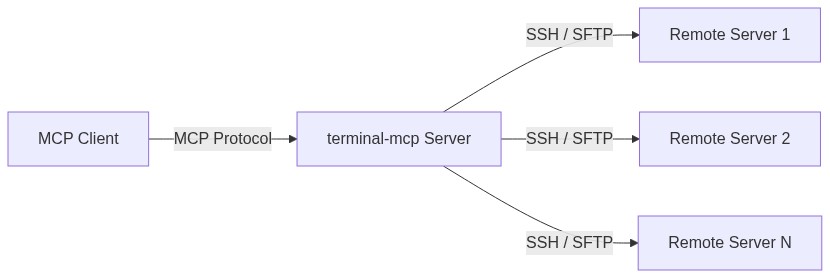
An MCP server for remote terminal access via SSH. Works with any MCP-compatible client.
Tools
| Tool | What it does |
|---|---|
ssh_connect |
Connect to a server (password, private key, or ssh-agent) |
ssh_execute |
Run a command on the remote server |
ssh_upload |
Upload a file via SFTP |
ssh_download |
Download a file via SFTP |
ssh_port_forward |
Tunnel a remote port to localhost (e.g. database access) |
ssh_reconnect |
Reconnect to a previously connected server using stored credentials |
ssh_disconnect |
Close a connection |
ssh_list_connections |
List all active connections (shows default) |
Features
- Multiple concurrent SSH sessions
- Auto-detection of stale connections with reconnect support
- Connection timeout (configurable, default 15s)
- SSH agent, private key, and password authentication
- SFTP file upload and download
- Port forwarding / SSH tunneling
- Default connection tracking for multi-session workflows
Prerequisites
- Node.js v18+ — install from nodejs.org or via package manager:
- macOS:
brew install node - Ubuntu/Debian:
curl -fsSL https://deb.nodesource.com/setup_22.x | sudo -E bash - && sudo apt install -y nodejs - Windows: download installer from nodejs.org
- macOS:
- SSH access to your target server(s)
- If your SSH key has a passphrase,
ssh-agentmust be running with your key loaded:
eval "$(ssh-agent -s)"
ssh-add ~/.ssh/your_key
Verify with ssh-add -l — you should see your key listed.
Setup
Option A: Global install (recommended)
npm install -g @pavanbhatt/terminal-mcpThen add to your MCP client config:
{
  "mcpServers": {
    "terminal": {
      "command": "terminal-mcp",
      "args": [],
      "env": {
        "PATH": "/opt/homebrew/bin:/usr/local/bin:/usr/bin:/bin"
      }
    }
  }
}
Adjust the PATH if your
nodeis installed elsewhere. Runwhich nodeto check.
Option B: npx (no install)
{
  "mcpServers": {
    "terminal": {
      "command": "npx",
      "args": ["-y", "@pavanbhatt/terminal-mcp"]
    }
  }
}
SSH Agent support
If your SSH key has a passphrase, add SSH_AUTH_SOCK to the env block:
echo $SSH_AUTH_SOCK{
"env": {
"SSH_AUTH_SOCK": "<your value>"
}
}MCP config file location
Refer to your MCP client's documentation. Common locations:
| Client | Config location |
|---|---|
| Kiro | ~/.kiro/settings/mcp.json |
| Claude Desktop | ~/Library/Application Support/Claude/claude_desktop_config.json (macOS) |
| Cursor | ~/.cursor/mcp.json |
Verify
Check your MCP client's server panel to confirm terminal is running.
Authentication Options
| Method | How to use |
|---|---|
| SSH Agent (recommended) | Just provide host and username — the agent handles auth automatically |
| Private Key (no passphrase) | Provide host, username, and privateKeyPath |
| Password | Provide host, username, and password |
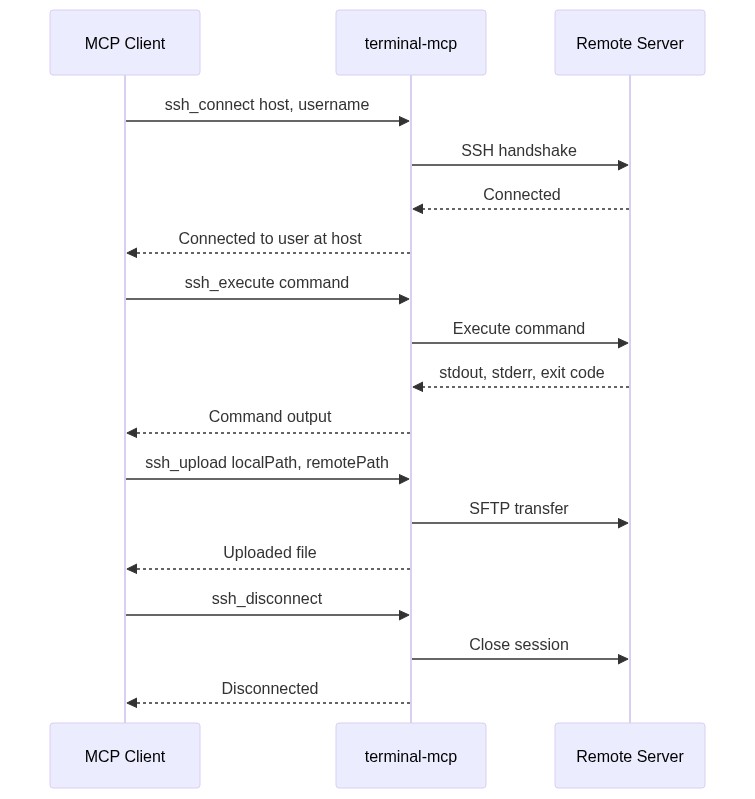
How it works
License
MIT