
Package Exports
This package does not declare an exports field, so the exports above have been automatically detected and optimized by JSPM instead. If any package subpath is missing, it is recommended to post an issue to the original package (@petehsu/lyra-cli) to support the "exports" field. If that is not possible, create a JSPM override to customize the exports field for this package.
Readme
Lyra CLI ✨
Your AI-Powered Terminal Companion — A powerful CLI assistant that brings IDE-like intelligence to your terminal.



📸 Screenshots

Lyra CLI in action - AI-powered terminal assistant
Demo Video
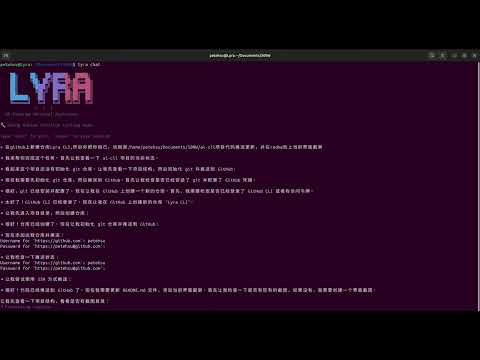
Lyra CLI transforms your terminal into an intelligent development environment. Chat naturally, execute commands, manage files, search code, and leverage dozens of built-in tools — all powered by your choice of LLM (OpenAI, DeepSeek, Claude, and more).
Inspired by Gemini CLI and Cursor, but with unique features like smart media sourcing, intelligent loop detection, and cross-session memory.
Comparison with Gemini CLI
| Feature | Gemini CLI | Lyra CLI |
|---|---|---|
| Memory System | 3-layer GEMINI.md | 3-layer JSON + confidence |
| Loop Detection | Tool/Content/LLM | Tool/Content/Alternating/LLM |
| Conversation Compression | 50% threshold | 50% threshold |
| Code Investigation | Codebase Investigator | Codebase Investigator |
| Semantic Search | ❌ | ✅ Vector retrieval |
| Dependency Analysis | ❌ | ✅ Full dependency graph |
| Code Quality | ❌ | ✅ Complexity analysis |
| Smart Refactoring | ❌ | ✅ Cross-file rename |
| Media Resources | ❌ | ✅ Smart images/videos |
| Multi-Model | Gemini only | OpenAI/DeepSeek/Claude/... |
Features
- 🤖 Multi-Model Support - OpenAI, Claude, DeepSeek, Qwen, and more
- 🔧 Native Function Calling - Clean tool calls without JSON leakage (like Gemini CLI)
- ⚡ Streaming Output - Real-time response display, just like ChatGPT
- 📁 File Operations - Read, write, edit files with intelligent diff
- � Codev Search - Ripgrep-powered code search
- 🔧 Git Integration - Full git workflow support
- 🌐 Web Search - Real-time internet search (DuckDuckGo, Wikipedia)
- �️ *Web Crawler - Advanced crawling with Puppeteer support for dynamic pages
- 🎨 Design Cloning - Clone website designs with full HTML + CSS extraction
- 📸 Screenshot - Cross-platform screenshot capture
- � Linbux Tools - Process, service, port management
- 🔌 MCP Support - Model Context Protocol for extensibility
- � Sesseion Management - Save and restore conversations
- 🧠 Memory System - Remember user preferences across sessions
- � TCask Tracking - Todo list for complex multi-step tasks
- 🌍 Multi-Language - Auto-detect user language
- 🔄 Smart Loop Detection - LLM-assisted loop detection (Gemini CLI style)
- � CodebTase Investigator - Specialized sub-agent for deep code analysis
- 📦 Auto Compression - Intelligent history compression to save tokens
Installation
From npm (Recommended)
npm install -g @petehsu/lyra-cli
lyra chat
From GitHub Packages
# Configure registry (one-time setup)
npm config set @petehsu:registry https://npm.pkg.github.com

# Install globally
npm install -g @petehsu/lyra-cli
lyra chat
From Source
git clone https://github.com/petehsu/Lyra-CLI.git
cd Lyra-CLI
npm install
npm link
Recommended System Tools
Lyra works out of the box, but installing these optional tools significantly improves performance:
| Tool | Description | Speed Improvement |
|---|---|---|
fd |
Fast file search | 5-10x faster than find |
locate |
Instant file location | Millisecond-level search |
ripgrep |
Fast code search | 10x faster than grep |
jq |
JSON processing | Better JSON handling |
Built-in (auto-installed):
- Puppeteer - Integrated as dependency, Chrome browser auto-downloads on install. Enables dynamic page crawling and design cloning.
Quick Install:
# After installing Lyra CLI
lyra setup           # Interactive - choose what to install
lyra setup -y        # Auto-install all recommended tools

# Or manually (Ubuntu/Debian)
sudo apt install fd-find plocate ripgrep jq
sudo updatedb        # Build locate database
Check Status:
lyra setup --checkUsage
# Interactive chat (auto-detects best mode for your API)
lyra chat
lyra-cli chat

# Force specific tool calling mode
lyra chat --native   # Use native function calling (OpenAI, DeepSeek, Claude, etc.)
lyra chat --legacy   # Use JSON parsing mode (works with all APIs)

# Quick question
lyra "What is Docker?"

# Generate and execute commands
lyra exec "list all js files"
lyra exec "find files larger than 100MB" -y  # auto-execute

# View history
lyra history

# Configure
lyra config

# Install recommended system tools
lyra setup           # Interactive installation
lyra setup -y        # Auto-install all tools
lyra setup --check   # Check tool status
lyra setup --script  # Generate install script

# MCP servers
lyra mcp              # list servers
lyra mcp --add name   # add server
lyra mcp --remove name # remove server

# Resume session
lyra chat --resume <session-id>
Configuration
First run will guide you through configuration. You can reconfigure anytime with lyra config.
Language Settings
- Interaction Language: Auto-detect from your input, or set to: en, zh, ja, ko, ru
- Code Comment Language: Same as interaction, or set independently
Model Modes
- Normal Mode: Single model for all requests
- Router Mode: Chat model for simple tasks, Think model for complex reasoning
Supported APIs
| Provider | Base URL | Native Function Calling |
|---|---|---|
| OpenAI | https://api.openai.com/v1 | ✅ Yes |
| DeepSeek | https://api.deepseek.com | ✅ Yes |
| Claude | https://api.anthropic.com/v1 | ✅ Yes |
| Qwen | https://dashscope.aliyuncs.com/compatible-mode/v1 | ✅ Yes |
| Mistral | https://api.mistral.ai/v1 | ✅ Yes |
| Groq | https://api.groq.com/openai/v1 | ✅ Yes |
| Together | https://api.together.xyz/v1 | ✅ Yes |
| Zhipu | https://open.bigmodel.cn/api/paas/v4 | ⚠️ Use legacy mode |
| Ollama | http://localhost:11434/v1 | ⚠️ Depends on model |
Tool Calling Modes:
- Native Mode: Uses OpenAI Function Calling API. Clean separation of text and tool calls. No JSON leakage.
- Legacy Mode: Parses JSON from text responses. Works with all APIs but may occasionally show JSON fragments.
Lyra auto-detects the best mode for your API. You can override with --native or --legacy flags, or set toolMode in config.
Available Tools
File Operations
read_file/read_files- Read file contentswrite_file- Create or overwrite filesedit_file- Precise text replacementbatch_edit- Edit multiple filessearch_replace- Regex search and replace
Code Search
search_code- Search patterns in code (ripgrep)find_files- Find files by namelist_dir- List directory contents
Git
git_status,git_diff,git_loggit_add,git_commit,git_push,git_pullgit_branches,git_checkout,git_stash
Web & API
web_fetch- Fetch web pagesweb_search- Internet search (DuckDuckGo, Wikipedia) - no API key needed!crawl- Advanced web crawler with Puppeteer supportweather- Weather informationwiki- Wikipedia searchgithub_search,github_user- GitHub APInpm_package- NPM package infoexchange_rate- Currency conversion
Design Cloning
clone_design- Clone website design, extract full HTML + CSS for AI reference- Auto-extracts design elements: colors, fonts, headlines, navigation, CTA buttons
- Supports screenshots (with Puppeteer)
- Smart fallback: Uses static fetch when Puppeteer unavailable
Web Crawler (Advanced)
- Static page crawling with
fetch - Dynamic page crawling with Puppeteer (JavaScript-rendered pages)
- CSS selector extraction
- Batch crawling multiple URLs
- Auto-scroll for infinite scroll pages
- Page screenshots
Media Resources (Smart Selection)
smart_image- Recommended: Auto-selects best source with fallbackpexels_photos- High-quality themed photos (free, no attribution)pexels_videos- Free stock videos from Pexelslorem_picsum- 100% reliable random photos (fallback)icon_search- Icons from Heroicons, Lucide, Tabler, etc.audio_search- Free music and sound effectsfont_search- Web fonts (Google Fonts, etc.)color_palette- Generate color palettesavatar_generator- Generate avatarsqr_code- Generate QR codes
Linux System (Linux only)
process_manager- List, kill, tree processessystem_monitor- CPU, memory, disk, networkservice_manager- Systemd servicesport_manager- Port managementclipboard- System clipboardnotify- Desktop notificationsscreenshot- Cross-platform screenshot (Linux/macOS/Windows)
Task Tracking
write_todos- Track complex multi-step tasksget_todos- View current task listclear_todos- Clear task list
Memory (Persistent)
save_memory- Remember user preferencesread_memories- View stored memoriesclear_memories- Clear all memories
Codebase Investigator
Lyra includes a specialized sub-agent for deep codebase analysis. Use it for:
- Bug root-cause analysis
- Understanding large codebases
- System refactoring planning
- Finding all related files for a feature
The investigator uses read-only tools (safe exploration) and returns a structured report with:
- Summary of findings
- Relevant files with key symbols
- Exploration trace
- Recommendations
Example: "Investigate how the authentication system works in this codebase"
Smart Loop Detection
Lyra uses LLM-assisted loop detection (inspired by Gemini CLI):
- Tool Call Loop: Detects 5+ consecutive identical tool calls
- Alternating Pattern: Detects A-B-A-B-A-B cycling
- LLM Check: After 20 turns, uses LLM to detect unproductive states
This means Lyra won't stop in the middle of complex tasks due to arbitrary step limits.
Auto Compression
When conversation history gets too long, Lyra automatically compresses it:
- Triggers at 50% of token limit
- Preserves last 30% of history
- Uses LLM to generate structured summary
- Manual compression:
/compresscommand - Check status:
/statuscommand
Hierarchical Memory System
Lyra uses a JSON-based hierarchical memory system (inspired by Gemini CLI):
Storage Structure
~/.lyra/
├── memory.json          # Global memory (user info, preferences)
└── sessions/            # Chat history

~/your-project/.lyra/
└── memory.json          # Project memory (code style, conventions)
Memory Format (Optimized for LLM)
{
  "name": "Pete Hsu",
  "lang": "zh",
  "facts": ["API endpoint: https://api.example.com"],
  "prefs": { "css": "tailwind", "theme": "dark" },
  "code": { "indent": 2, "quotes": "single" },
  "desc": "React + TypeScript project"
}| Field | Description | Scope |
|---|---|---|
name |
User's name | Global |
lang |
Preferred language | Global |
facts |
Remembered facts | Both |
prefs |
User preferences | Both |
code |
Code style settings | Project |
desc |
Project description | Project |
Session Management
Lyra uses real-time session saving with project isolation.
Storage Structure
~/.lyra/
├── sessions/
│   └── <project-hash>/           # Sessions isolated per project
│       └── 2025-12-14_0830_xxx.json
└── checkpoints/
    └── <project-hash>/           # Git checkpoints per project
        └── cp_1702500000000.json
Features
- Real-time saving: Every message saved immediately (no data loss)
- Project isolation: Sessions stored per project directory
- Checkpoints: Git snapshots before dangerous operations (auto)
Commands (in chat)
| Command | Description |
|---|---|
/save |
Show current session info |
/sessions |
List sessions for this project |
/last |
Resume most recent session |
/checkpoints |
List Git checkpoints |
/restore <id> |
Restore to checkpoint |
exit |
Quit (already saved) |
Vector Search (Advanced)
Lyra includes a smart similarity service that automatically chooses the best method:
Strategy:
- Data < 50 items → Jaccard (fast, no API)
- Data >= 50 items → Vector search (semantic)
- API unavailable → Fallback to local hash vectors
Embedding Providers (auto-detected):
- SiliconFlow (free, recommended for Chinese)
- OpenAI (requires API key)
- Local hash vectors (zero API, always available)
Codebase Semantic Search
Search your codebase using natural language queries instead of regex patterns.
Tools:
semantic_search- Search code by meaningindex_codebase- Build/update search index
Supported files: JavaScript/TypeScript, Python, Go, Rust, Java, C/C++, Config files, Markdown
Dependency Analysis
Understand your project structure and module relationships.
Tools:
analyze_dependencies- Analyze imports/exports, find core modules, detect cyclesanalyze_impact- See which files are affected by modifying a file
Code Quality Analysis
Analyze code quality and get refactoring suggestions.
Tools:
analyze_code_quality- Analyze complexity, find issues, get suggestions
Smart Refactoring
Intelligent multi-file refactoring with automatic import updates.
Tools:
rename_symbol- Rename function/class/variable across all filesmove_file- Move file and update all import pathsextract_function- Extract function to new file
MCP (Model Context Protocol)
Lyra CLI supports MCP servers for extensibility:
# Add a server
lyra mcp --add weather

# Configure in ~/.lyra/mcp.json
{
  "servers": {
    "weather": {
      "command": "uvx",
      "args": ["weather-mcp-server"]
    }
  }
}
Pexels API (Optional)
For best image quality, get a free Pexels API key:
- Sign up at https://www.pexels.com/api/
- Get your API key (free, 200 requests/hour)
- Configure:
lyra config→ "Configure third-party API keys"
Contributing
Contributions are welcome! Please feel free to submit issues and pull requests.
License
Lyra CLI License (Non-Commercial)
- ✅ Personal use: FREE
- ✅ Educational use: FREE
- ✅ Open-source projects: FREE (with attribution)
- ❌ Commercial use: Requires paid license
See LICENSE for full terms.
Made with ❤️ by Pete Hsu