

Package Exports
- @postcss-plugins/button-builder
This package does not declare an exports field, so the exports above have been automatically detected and optimized by JSPM instead. If any package subpath is missing, it is recommended to post an issue to the original package (@postcss-plugins/button-builder) to support the "exports" field. If that is not possible, create a JSPM override to customize the exports field for this package.
Readme
@postcss-plugins/button-builder

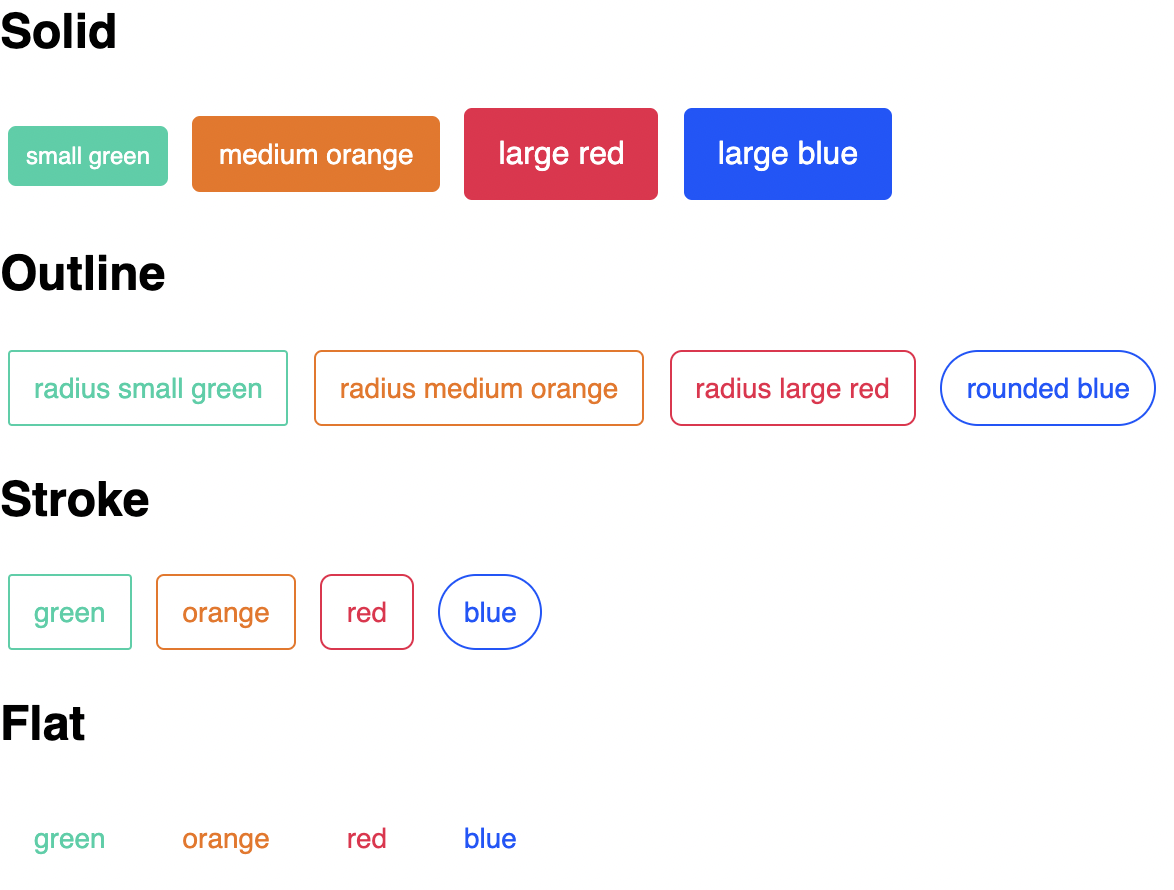
A PostCSS plugin to generate button styles from given colors. At the moment, we generate four kind of appearances: solid, outline, stroke and flat.
If you want to see the styles generated take a look here.
Installation
yarn add @postcss-plugins/button-builderUsage
You should define the colors because the plugin needs them to generate the utility classes of each appearance.
const buttonBuilder = require('@postcss-plugins/button-builder');

postcss([
  buttonBuilder({
    colors: {
      'red-50': '#ec1b49',
      'green-50': '#14d0a6',
      'blue-50': '#0056ff',
    },
  }),
]);
The plugin will generate the following utilities:
.btn.btn-block.btn-disabled
For radius:
.btn-radius-sm.btn-radius-md.btn-radius-lg.btn-radius-rounded
For sizes:
.btn-sm.btn-md.btn-lg
For appearances:
.btn-solid-red-50.btn-outline-red-50.btn-stroke-red-50.btn-flat-red-50
You need to use always .btn + .btn-{solid|outline|stroke|flat}-{color}, for example:
<button class="btn btn-solid-red-50">solid red 50</button>
<button class="btn btn-outline-green-50">outline green 50</button>
<button class="btn btn-stroke-blue-50">stroke blue 50</button>
Utility classes are generated following the same Tailwind's naming convention.
Options
The plugin accepts these configuration options:
export interface ButtonBuilderProps {
  prefix?: string;
  colors: { [key in string]: string };
  base?: { [key in string]: string };
  radius?: { [key in string]: string };
  sizes?: { [key in string]: { [key in string]: string } };
}
Examples:
prefix
Allows you to add a custom prefix only to generated utility classes. For example:
base
You can override the default base style.
/* DEFAULT BASE STYLE */

.btn {
  border: 1px solid transparent !important;
  border-radius: 0.25rem !important;
  color: #fff !important;
  cursor: pointer !important;
  display: inline-block !important;
  text-align: center !important;
  text-decoration: none !important;
  transition: all 0.3s ease !important;
  user-select: none !important;
  padding: 0.375rem 0.75rem !important;
  font-size: 0.875rem !important;
  line-height: 1.5rem !important;
}
For example:
postcss([
  buttonBuilder({
    prefix: 'ez',
    base: {
      textTransform: 'uppercase',
      color: '#000',
    },
  }),
]);
Output:
.ez-btn {
  text-transform: uppercase !important;
  color: #000 !important;
}
radius
You can override the default radius:
/* DEFAULT RADIUS STYLE */

.btn-radius-sm {
  border-radius: 0.125rem !important;
}
.btn-radius-md {
  border-radius: 0.25rem !important;
}
.btn-radius-lg {
  border-radius: 0.375rem !important;
}
.btn-radius-rounded {
  border-radius: 9999px !important;
}
For example:
postcss([
  buttonBuilder({
    prefix: 'ez',
    radius: {
      small: '0.2rem',
      large: '1rem',
    },
  }),
]);
Output:
.ez-btn-radius-small {
  border-radius: 0.2rem !important;
}
.ez-btn-radius-large {
  border-radius: 1rem !important;
}
Sizes
You can override the default sizes:
/* DEFAULT SIZES STYLE */

.btn-sm {
  padding: 0.25rem 0.5rem !important;
  font-size: 0.75rem !important;
  line-height: 1.25rem !important;
}
.btn-md {
  padding: 0.375rem 0.75rem !important;
  font-size: 0.875rem !important;
  line-height: 1.5rem !important;
}
.btn-lg {
  padding: 0.5rem 1rem !important;
  font-size: 1rem !important;
  line-height: 1.75rem !important;
}
For example:
postcss([
  buttonBuilder({
    prefix: 'ez',
    sizes: {
      small: {
        padding: '0.2rem',
        fontSize: '0.7rem',
      },
      large: {
        padding: '1rem',
        fontSize: '1rem',
      },
    },
  }),
]);
Output:
.ez-btn-small {
  padding: 0.2rem !important;
  font-size: 0.7rem !important;
}
.ez-btn-large {
  padding: 1rem !important;
  font-size: 1rem !important;
}
Contributing
- ⇄ Pull requests and ★ Stars are always welcome.
- For bugs and feature requests, please create an issue.