

Package Exports
- @qr-styled/node
- @qr-styled/node/package.json
Readme
🎨 @qr-styled/node
Professional QR Code Generator for Node.js
A powerful Node.js/TypeScript library for generating QR codes with advanced styling options including gradients, rounded modules, and logo support.
💡 Looking for browser support? Check out @qr-styled/browser for frontend/React/Vue applications.



✨ Features
- 🎨 Customizable Styles: Solid colors or multi-color gradients
- 🔷 Rounded Modules: Smooth, modern edges with radius control
- 🖼️ Logo Support: Add logos with circular or square backgrounds
- � Specialized QR Types: vCard, WiFi, Email, SMS, Geo location
- 📄 SVG Export: Vector format for perfect scalability
- 👁️ Eye Customization: Custom colors and shapes (square, rounded, or circular) ✨
- 📏 Proper Margins: Standard QR quiet zone support
- 📦 Multiple Output Formats: PNG, JPEG, SVG, Buffer, Data URL, or Canvas
- 🧩 Dual Module Support: Works with both ESM (
import) and CommonJS (require) - 🛠️ CLI & API: Use from command line or programmatically
- ✅ Built-in Validation: Options validated automatically
- 🎯 Full TypeScript Support: Complete type definitions included
- 🔧 Modular Architecture: Clean, maintainable code
�️ Visual Examples
Advanced Features

vCard Contact Purple gradient with custom eyes |

WiFi Network Green gradient with rounded modules |

Email Contact Pink gradient with eye customization |

Custom Eyes Red eye accents (square modules) |
Basic Styles

Classic Traditional black & white |

Professional Blue rounded design |

Eco Green with custom eyes |

Alert Red attention-grabbing |

Creative Purple artistic |
With Logos

Corporate Circle logo, professional blue |

Eco Brand Square logo, green gradient |

Tech Startup Circle logo, purple gradient |

Restaurant Square logo, red gradient |
Experience modern QR codes with perfectly smooth circular finder patterns instead of traditional squares.

Simple Circular Blue circular eyes with rounded modules |
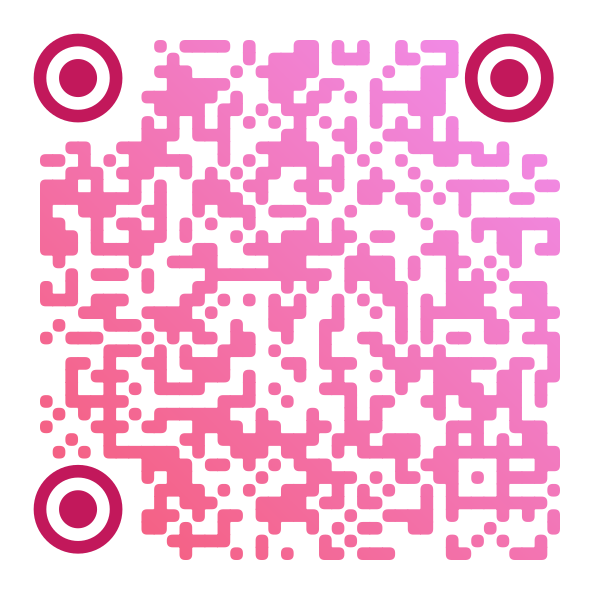
Gradient Circular Pink gradient with circular eyes |
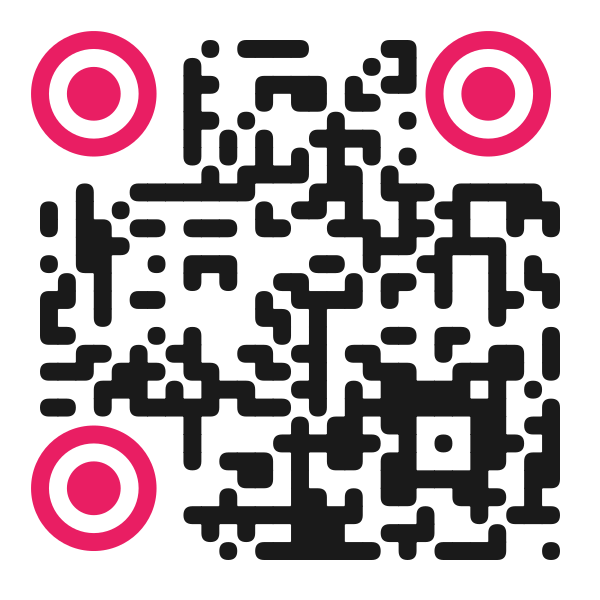
High Contrast Pink circular eyes on dark modules |
// Simple circular eyes
const qr = new QRGenerator({
  url: 'https://example.com',
  eyeColor: '#1e40af',
  eyeShape: 'circle', // ✨ NEW: 'square' | 'rounded' | 'circle'
  rounded: true
});

// Gradient with circular eyes
const gradientQR = new QRGenerator({
  url: 'https://example.com',
  gradient: true,
  gradientColors: '#f093fb, #f5576c',
  eyeColor: '#c2185b',
  eyeShape: 'circle',
  rounded: true
});
💡 Tip: All examples shown above were generated with this library! Check the
examples/directory for source code.
�📦 Installation
npm install @qr-styled/nodeOr for global CLI usage:
npm install -g @qr-styled/node🚀 Quick Start
CLI Usage
# Basic QR code
qr-styled --url "https://github.com"

# QR with gradient
qr-styled --url "https://github.com" --gradient

# QR with logo
qr-styled --url "https://github.com" --logo ./my-logo.png --out my-qr.png
Library Usage
import { QRGenerator, generateQRToFile } from '@qr-styled/node';

// Basic URL QR code
const generator = new QRGenerator({
  url: 'https://github.com',
  gradient: true,
  gradientColors: '#667eea,#764ba2'
});

await generator.generateToFile('qr-output.png');

// vCard contact QR code
const vCardGenerator = new QRGenerator({
  type: 'vcard',
  data: {
    firstName: 'John',
    lastName: 'Doe',
    phone: '+1234567890',
    email: 'john@example.com',
    organization: 'Tech Corp'
  }
});

await vCardGenerator.generateToFile('contact-qr.png');

// WiFi QR code
const wifiGenerator = new QRGenerator({
  type: 'wifi',
  data: {
    ssid: 'MyNetwork',
    password: 'SecurePassword123',
    encryption: 'WPA'
  }
});

await wifiGenerator.generateToFile('wifi-qr.png');

// SVG export for scalability
const svgGenerator = new QRGenerator({
  url: 'https://example.com',
  foregroundColor: '#2196F3',
  eyeColor: '#FF5722',
  eyeRadius: 0.4
});

const svg = await svgGenerator.generateToSVG();
await svgGenerator.generateToSVGFile('qr.svg');

// Helper function
await generateQRToFile(
  {
    url: 'https://github.com',
    foregroundColor: '#2d3748'
  },
  'qr-output.png'
);
CommonJS is also supported:
const { QRGenerator, generateQRToFile } = require('@qr-styled/node');📖 Documentation
Configuration Options
Basic Options
| Option | Type | Default | Description |
|---|---|---|---|
url |
string |
optional | URL or text content |
type |
QRDataType |
'text' |
QR data type (url, text, vcard, wifi, email, sms, geo) |
data |
object |
optional | Structured data for specialized types |
size |
number |
600 |
Canvas size in pixels |
margin |
number |
4 |
Quiet zone margin (4 modules standard) |
padding |
number |
40 |
Canvas padding in pixels |
foregroundColor |
string |
'#000000' |
QR code color (hex format) |
color |
string |
deprecated | Use foregroundColor instead |
rounded |
boolean |
true |
Use rounded module corners |
moduleRadius |
number |
0.35 |
Corner radius (0.0 - 0.5) |
cornerRadius |
number |
60 |
Background corner radius |
backgroundColor |
string |
'#ffffff' |
Background color |
Eye Customization
| Option | Type | Default | Description |
|---|---|---|---|
eyeColor |
string |
'' |
Custom eye (finder pattern) color |
eyeRadius |
number |
0 |
Eye corner radius (0.0 - 0.5) |
eyeShape |
string |
'square' |
Eye shape: 'square', 'rounded', or 'circle' ✨ |
Gradient Options
| Option | Type | Default | Description |
|---|---|---|---|
gradient |
boolean |
false |
Enable gradient |
gradientColors |
string |
'#FEDA75,#FA7E1E,...' |
Comma-separated colors |
gradientAngle |
number |
45 |
Angle in degrees (0-360) |
Logo Options
| Option | Type | Default | Description |
|---|---|---|---|
logo |
string |
'' |
Logo image path or URL |
logoSize |
number |
120 |
Logo size in pixels |
logoPadding |
number |
10 |
Padding around logo |
logoShape |
'circle'|'square' |
'circle' |
Logo background shape |
logoBackgroundColor |
string |
'#ffffff' |
Logo background color |
logoRadius |
number |
20 |
Corner radius for square logos |
Specialized QR Codes
vCard (Contact Card)
{
  type: 'vcard',
  data: {
    firstName: 'John',
    lastName: 'Doe',
    organization: 'Tech Corp',
    title: 'CEO',
    phone: '+1234567890',
    email: 'john@example.com',
    url: 'https://example.com',
    address: '123 Main St',
    city: 'New York',
    state: 'NY',
    zip: '10001',
    country: 'USA'
  }
}
WiFi Network
{
  type: 'wifi',
  data: {
    ssid: 'MyNetwork',
    password: 'SecurePassword123',
    encryption: 'WPA', // 'WPA' | 'WEP' | 'nopass'
    hidden: false      // optional
  }
}{
type: 'email',
data: {
email: 'contact@example.com',
subject: 'Hello', // optional
body: 'Message text' // optional
}
}SMS
{
  type: 'sms',
  data: {
    phone: '+1234567890',
    message: 'Hello!'  // optional
  }
}
Geo Location
{
  type: 'geo',
  data: {
    latitude: 40.7128,
    longitude: -74.0060
  }
}
| logoRadius | number | 20 | Corner radius (for square) |
API Reference
QRGenerator
Main class for generating QR codes.
import { QRGenerator } from '@qr-styled/node';

const generator = new QRGenerator(options);
Methods
generate()
Generates QR code and returns the canvas.
const canvas = await generator.generate();generateToFile(outputPath)
Generates and saves QR code to file.
await generator.generateToFile('output.png');generateToBuffer(format)
Generates and returns a Buffer (useful for APIs/servers).
const buffer = await generator.generateToBuffer('png');
// In Express: res.type('png').send(buffer)
generateToDataURL(format)
Generates and returns a Data URL (useful for HTML).
const dataURL = await generator.generateToDataURL('png');
// In HTML: <img src="${dataURL}" />
updateOptions(options)
Updates generator options.
generator.updateOptions({ gradient: true });
await generator.generateToFile('updated.png');
Helper Functions
generateQR(options)
Quickly generate a QR code and return the canvas.
import { generateQR } from '@qr-styled/node';

const canvas = await generateQR({ url: 'https://example.com' });
generateQRToFile(options, outputPath)
Generate and save a QR code to file.
import { generateQRToFile } from '@qr-styled/node';

await generateQRToFile(
  { url: 'https://example.com', gradient: true },
  'output.png'
);
💻 Usage Examples
Example 1: Instagram Gradient QR
const generator = new QRGenerator({
  url: 'https://instagram.com/your-profile',
  gradient: true,
  gradientColors: '#FEDA75,#FA7E1E,#D62976,#962FBF,#4F5BD5',
  gradientAngle: 45,
  rounded: true
});

await generator.generateToFile('instagram-qr.png');
Example 2: Corporate QR with Logo
const generator = new QRGenerator({
  url: 'https://your-company.com',
  foregroundColor: '#1a365d',
  logo: './company-logo.png',
  logoShape: 'square',
  logoRadius: 15,
  backgroundColor: '#f7fafc'
});

await generator.generateToFile('company-qr.png');
Example 3: QR for HTTP API
import express from 'express';
import { QRGenerator } from '@qr-styled/node';

const app = express();

app.get('/qr', async (req, res) => {
  const generator = new QRGenerator({
    url: req.query.url,
    gradient: true,
    gradientColors: '#667eea,#764ba2'
  });

  const buffer = await generator.generateToBuffer('png');
  res.type('png').send(buffer);
});

app.listen(3000);
Example 4: Dynamic QR in Frontend
// In your Node.js server
app.get('/api/qr-data', async (req, res) => {
  const generator = new QRGenerator({
    url: 'https://example.com',
    gradient: true
  });

  const dataURL = await generator.generateToDataURL('png');
  res.json({ qrCode: dataURL });
});

// In your frontend (React, Vue, etc.)
fetch('/api/qr-data')
  .then(res => res.json())
  .then(data => {
    document.getElementById('qr').src = data.qrCode;
  });
🔧 CLI
Global Installation
npm install -g @qr-styled/nodeAvailable Commands
# Available commands
qr-styled [options]
qrgen [options]  # Short alias
CLI Examples
# Basic QR
qr-styled --url "https://github.com"

# Custom filename
qr-styled --url "https://github.com" --out my-code.png

# QR with gradient
qr-styled --url "https://github.com" --gradient --gradientColors "#ff6b6b,#ee5a6f"

# QR with logo
qr-styled --url "https://github.com" --logo ./logo.png --logoShape square

# QR with all options
qr-styled \
  --url "https://github.com" \
  --size 800 \
  --gradient \
  --gradientColors "#667eea,#764ba2" \
  --gradientAngle 90 \
  --logo ./logo.png \
  --logoShape circle \
  --out custom-qr.png
Help
qr-styled --help🏗️ Architecture
src/
├── index.ts                    # Main entry point
├── lib/
│   ├── QRGenerator.ts         # Main class
│   ├── renderers/             # Rendering modules
│   │   ├── BackgroundRenderer.ts
│   │   ├── GradientRenderer.ts
│   │   ├── ModuleRenderer.ts
│   │   └── LogoRenderer.ts
│   └── utils/                 # Utilities
│       ├── types.ts
│       └── validators.ts
└── cli/
    └── index.ts               # Command line interface
Design Principles
- Separation of Concerns: Each renderer handles a specific function
- Composition over Inheritance: Renderers are composed in QRGenerator
- Input Validation: All options validated before processing
- Flexible API: Supports multiple output formats
- Clean Code: Complete TypeScript types and documentation
🧪 Included Examples
The project includes complete examples you can run:
# Basic examples
npm run example:basic

# Programmatic usage examples
npm run example:programmatic
Examples will generate files in examples/output/ for you to review.
🤝 Framework Integration
Express.js
app.get('/qr/:text', async (req, res) => {
  const generator = new QRGenerator({ url: req.params.text });
  const buffer = await generator.generateToBuffer();
  res.type('png').send(buffer);
});
Next.js (API Route)
// pages/api/qr.ts
import { QRGenerator } from '@qr-styled/node';

export default async function handler(req, res) {
  const { url } = req.query;
  const generator = new QRGenerator({ url });
  const buffer = await generator.generateToBuffer();

  res.setHeader('Content-Type', 'image/png');
  res.send(buffer);
}
Fastify
fastify.get('/qr', async (request, reply) => {
  const generator = new QRGenerator({ url: request.query.url });
  const buffer = await generator.generateToBuffer();

  reply.type('image/png').send(buffer);
});
🛠️ Development
Build
npm run buildDevelopment Mode
npm run dev -- --url "https://example.com"Run Examples
npm run example:basic
npm run example:programmatic
📄 License
MIT © Luis Manuel Yerena Sosa
🙏 Contributing
Contributions are welcome! Please:
- Fork the project
- Create a feature branch (
git checkout -b feature/AmazingFeature) - Commit your changes (
git commit -m 'Add some AmazingFeature') - Push to the branch (
git push origin feature/AmazingFeature) - Open a Pull Request
See CONTRIBUTING.md for more details.
🐛 Report Issues
If you find a bug or have a suggestion, please open an issue.
📚 Resources
⭐ If you find this project useful, consider giving it a star on GitHub!