
Package Exports
This package does not declare an exports field, so the exports above have been automatically detected and optimized by JSPM instead. If any package subpath is missing, it is recommended to post an issue to the original package (@rentmagic/vue3-treeselect) to support the "exports" field. If that is not possible, create a JSPM override to customize the exports field for this package.
Readme
vue3-treeselect

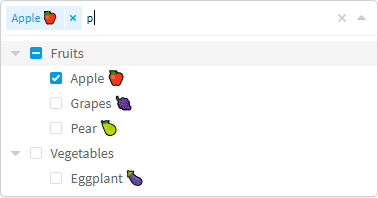
A multi-select component with nested options support for Vue 3. Thank to riophae and his sources and library for vue 2 taken as basis.
Breaking changes from his library:
- property
value=>modelValue - event
input=>updated:modelValue - Now use slots with
<template>
Features
- Single & multiple select with nested options support
- Fuzzy matching
- Async searching
- Delayed loading (load data of deep level options only when needed)
- Keyboard support (navigate using Arrow Up & Arrow Down keys, select option using Enter key, etc.)
- Rich options & highly customizable
- Supports a wide range of browsers (see below)
- RTL support
Requires Vue 3.0+
Getting Started
It's recommended to install vue3-treeselect via npm, and build your app using a bundler like webpack.
npm install --save vue3-treeselectThis example shows how to integrate vue3-treeselect with your Vue SFCs.
<!-- Vue SFC -->
<template>
  <div id="app">
    <treeselect v-model="value" :multiple="true" :options="options" />
  </div>
</template>

<script>
  // import the component
  import Treeselect from 'vue3-treeselect'
  // import the styles
  import 'vue3-treeselect/dist/vue3-treeselect.css'

  export default {
    // register the component
    components: { Treeselect },
    data() {
      return {
        // define the default value
        value: null,
        // define options
        options: [ {
          id: 'a',
          label: 'a',
          children: [ {
            id: 'aa',
            label: 'aa',
          }, {
            id: 'ab',
            label: 'ab',
          } ],
        }, {
          id: 'b',
          label: 'b',
        }, {
          id: 'c',
          label: 'c',
        } ],
      }
    },
  }
</script>
If you just don't want to use webpack or any other bundlers, you can simply include the standalone UMD build in your page. In this way, make sure Vue as a dependency is included before vue3-treeselect.
<html>
  <head>
    <!-- include Vue 2.x -->
    <script src="https://cdn.jsdelivr.net/npm/vue@next"></script>
    <!-- include vue-treeselect & its styles. you can change the version tag to better suit your needs. -->
    <script src="https://cdn.jsdelivr.net/npm/vue3-treeselect@^0.1.0/dist/vue3-treeselect.umd.min.js"></script>
    <link rel="stylesheet" href="https://cdn.jsdelivr.net/npm/vue3-treeselect@^0.1.0/dist/vue3-treeselect.min.css">
  </head>
  <body>
    <div id="app">
      <treeselect v-model="value" :multiple="true" :options="options" />
    </div>
  </body>
  <script>
      createApp({
          data: {
            // define the default value
            value: null,
            // define options
            options: [ {
            id: 'a',
            label: 'a',
            children: [ {
                id: 'aa',
                label: 'aa',
            }, {
                id: 'ab',
                label: 'ab',
            } ],
            }, {
            id: 'b',
            label: 'b',
            }, {
            id: 'c',
            label: 'c',
            } ],
        },
      })
        .component('treeselect', VueTreeselect.Treeselect)
        .mount('#app')

  </script>
</html>
Documentation for vue 2 & Live Demo. Be careful with breaking changes above.
Note: please use a desktop browser since the website hasn't been optimized for mobile devices.
Browser Compatibility
- Chrome
- Edge
- Firefox
- Safari
It should function well on IE9, but the style can be slightly broken due to the lack of support of some relatively new CSS features, such as transition and animation. Nevertheless it should look 90% same as on modern browsers.
Bugs
You can open an issue.
Contributing
- Fork & clone the repo
- Install dependencies by
yarnornpm install - Check out a new branch
npm run dev& hack- Make sure
npm testpasses - Push your changes & file a pull request
Credits
This project is inspired by vue-treeselect. Special thanks go to their respective authors!
Some icons used in this project:
- "link" icon made by Smashicons is licensed under CC 3.0 BY
- "spinner" icon from SpinKit is licensed under the MIT License
- "caret" icon made by Dave Gandy is licensed under CC 3.0 BY
- "delete" icon made by Freepik is licensed under CC 3.0 BY
- "checkmark symbol" & "minus symbol" icons made by Catalin Fertu are licensed under CC 3.0 BY
License
Released under the MIT License.