
Package Exports
- @stackline/multiselect
- @stackline/multiselect/src/stackline-multiselect.js
This package does not declare an exports field, so the exports above have been automatically detected and optimized by JSPM instead. If any package subpath is missing, it is recommended to post an issue to the original package (@stackline/multiselect) to support the "exports" field. If that is not possible, create a JSPM override to customize the exports field for this package.
Readme
@stackline/multiselect
A maintained vanilla JavaScript multiselect dropdown for framework-agnostic applications, with object data, skins, render callbacks, headless/state APIs, body-overlay positioning, and accessibility-focused and keyboard/ARIA tested behavior.





Documentation & Live Demos | Direct Download | StackBlitz | npm | Issues | Repository
Latest vanilla release: 1.1.2
Credits: Current maintenance, vanilla package stewardship, publishing, and documentation by Alexandro Paixao Marques.
Why this library?
@stackline/multiselect is for projects that need a reliable multiselect without a framework dependency. It works with plain HTML, server-rendered pages, static sites, CMS templates, Web Components, and framework apps that prefer to mount a small browser widget directly.
The package ships a styled component API and a lower-level state API. Start with new StacklineMultiSelect(...) for forms, filters, dashboards, and admin screens. Use createStacklineMultiSelectState(...) when your application needs to own every element and CSS class while keeping Stackline selection, filtering, grouping, keyboard handling, ARIA props, and callbacks.
The 1.1.x line ports the React 19.1.3 combobox-contract work to vanilla JavaScript: selected object preservation, aria-selected plus aria-checked, configurable keyboard behavior, focus fixes after mouse selection, headless/state prop getters, render callbacks, body overlays for clipped dialogs, and the same 64-country live test matrix.
Features
| Feature | Supported |
|---|---|
| Framework-agnostic vanilla JavaScript | Yes |
| Multi-select and single-select modes | Yes |
Object data with configurable primaryKey / labelKey |
Yes |
| Styled component API | Yes |
Headless createStacklineMultiSelectState API |
Yes |
| Search and filter | Yes |
| Group by field or function | Yes |
| Select all, clear all, and per-item remove actions | Yes |
| Custom option, badge, empty-state, and footer render callbacks | Yes |
| Lazy rendering and scroll-to-end callbacks | Yes |
Built-in classic, material, dark, custom, and brand skins |
Yes |
| Custom skins through CSS variables | Yes |
| Accessibility-focused and keyboard/ARIA tested navigation | Yes |
Multiselect options expose both aria-selected and aria-checked |
Yes |
| Backspace/Escape/Space/Tab combobox contract controls | Yes |
| Selected object preservation across async data refreshes | Yes |
Dialog and overflow-container support through appendToBody / tagToBody |
Yes |
| Direct browser download | Yes |
Table of Contents
- Installation
- Option 1: npm Usage
- Option 2: Direct Download
- Basic Usage
- Customization Paths
- Headless State Usage
- Combobox Contract
- Settings
- Skins
- Render Callbacks
- Events
- Methods
- Official Vanilla Test Matrix
- Run Locally
- License
Installation
npm install @stackline/multiselect@1.1.2 --save-exactUse this package when your project needs direct browser usage without Angular, React, Vue, or a bundler.
Option 1: npm Usage
Use this option first when the project installs packages with npm.
<link rel="stylesheet" href="./node_modules/@stackline/multiselect/src/stackline-multiselect.css">

<div id="countries"></div>

<script src="./node_modules/@stackline/multiselect/src/stackline-multiselect.js"></script>
Option 2: Direct Download
Use the direct download when your project does not use npm:
https://github.com/alexandroit/stackline-multiselect/releases/download/v1.1.2/stackline-multiselect-1.1.2.zipExtract the archive and reference the copied files:
<link rel="stylesheet" href="./stackline-multiselect.css">
<div id="countries"></div>
<script src="./stackline-multiselect.js"></script>
Basic Usage
<link rel="stylesheet" href="./node_modules/@stackline/multiselect/src/stackline-multiselect.css">

<div id="countries"></div>

<script src="./node_modules/@stackline/multiselect/src/stackline-multiselect.js"></script>
<script>
  var countries = [
    { id: 1, itemName: "Brazil", capital: "Brasilia", region: "South America" },
    { id: 2, itemName: "Canada", capital: "Ottawa", region: "North America" },
    { id: 3, itemName: "Portugal", capital: "Lisbon", region: "Europe" },
    { id: 4, itemName: "United States", capital: "Washington, DC", region: "North America" }
  ];

  var dropdown = new StacklineMultiSelect("#countries", {
    data: countries,
    selected: [countries[1]],
    settings: {
      text: "Select countries",
      primaryKey: "id",
      labelKey: "itemName",
      searchBy: ["itemName", "capital", "region"],
      enableSearchFilter: true,
      badgeShowLimit: 3,
      maxHeight: 260,
      showCheckbox: true,
      showClearAll: true,
      skin: "classic"
    },
    onChange: function (items) {
      console.log("selected", items);
    }
  });
</script>
idKey is still accepted for compatibility. New examples use primaryKey.
Customization Paths
| Layer | Best for | What you own |
|---|---|---|
new StacklineMultiSelect(...) |
Forms, filters, dashboards, reports, and admin screens. | Data, selected values, settings, events, and optional render callbacks. |
| Render callbacks | Custom option rows, custom chips, empty states, and menu footer content. | Small pieces of HTML while the component keeps behavior and ARIA. |
createStacklineMultiSelectState(...) |
Fully custom UI, design systems, or existing combobox shells. | All markup and CSS, while Stackline provides state, prop getters, keyboard flow, grouping, and callbacks. |
For most teams, start with the styled component. Use render callbacks when the layout needs richer rows. Use the headless state API when the application must own the complete HTML structure.
Headless State Usage
createStacklineMultiSelectState exposes state, actions, grouped/visible options, selected badges, and prop getters. It does not render DOM for you.
<div id="headless"></div>

<script>
  var state = createStacklineMultiSelectState({
    data: [
      { id: 1, itemName: "Brazil", region: "South America" },
      { id: 2, itemName: "Canada", region: "North America" },
      { id: 3, itemName: "Portugal", region: "Europe" }
    ],
    selected: [{ id: 1, itemName: "Brazil", region: "South America" }],
    settings: {
      text: "Choose countries",
      primaryKey: "id",
      labelKey: "itemName",
      groupBy: "region",
      enableSearchFilter: true,
      skin: "classic"
    },
    onUpdate: render,
    onChange: function (items) {
      console.log("selected", items);
    }
  });

  function applyProps(node, props) {
    Object.keys(props).forEach(function (key) {
      if (key.indexOf("on") === 0 && typeof props[key] === "function") {
        node.addEventListener(key.slice(2).toLowerCase(), props[key]);
      } else if (props[key] !== false && props[key] != null) {
        node.setAttribute(key, String(props[key]));
      }
    });
    return node;
  }

  function render() {
    var root = document.getElementById("headless");
    root.innerHTML = "";

    var shell = applyProps(document.createElement("div"), state.getRootProps());
    var trigger = applyProps(document.createElement("button"), state.getTriggerProps());
    trigger.textContent = state.label;
    shell.appendChild(trigger);

    if (state.isOpen) {
      var listbox = applyProps(document.createElement("div"), state.getListboxProps());
      state.visibleOptions.forEach(function (option) {
        var row = applyProps(document.createElement("div"), state.getOptionProps(option));
        row.textContent = option.label;
        listbox.appendChild(row);
      });
      shell.appendChild(listbox);
    }

    root.appendChild(shell);
  }

  render();
</script>
Combobox Contract
The default keyboard contract is enabled and can be configured per instance:
settings: {
  keyboard: {
    space: true,
    spaceOptionAction: "toggle",
    tab: true,
    arrows: true,
    escape: true,
    backspaceRemovesLastWhenSearchEmpty: false,
    deleteRemovesFocusedBadge: true
  }
}
Behavior tested in the live routes:
| Key | Contract |
|---|---|
Space on trigger |
Opens or closes the dropdown. |
Space on option |
Toggles the focused option and keeps focus predictable. |
Space in search |
Types a normal space. |
Tab |
Moves to the next focusable control and does not select an option. |
ArrowUp / ArrowDown |
Moves through options when the list is open. |
Escape |
Closes the list without clearing selected values. |
Backspace in empty search |
Disabled by default for removal. Enable backspaceRemovesLastWhenSearchEmpty only if your product wants that behavior. |
Backspace / Delete on focused badge remove button |
Removes that badge when deleteRemovesFocusedBadge is enabled. |
Settings
settings: {
  primaryKey: "id",
  labelKey: "itemName",
  singleSelection: false,
  text: "Select",
  selectAllText: "Select all",
  unSelectAllText: "Clear all",
  enableCheckAll: true,
  enableSearchFilter: true,
  searchPlaceholderText: "Search",
  searchBy: ["itemName"],
  badgeShowLimit: 4,
  showClearAll: true,
  maxHeight: 260,
  showCheckbox: true,
  noDataLabel: "No data",
  groupBy: "",
  limitSelection: 0,
  lazyLoading: false,
  lazyPageSize: 20,
  appendToBody: false,
  tagToBody: false,
  autoPosition: true,
  skin: "classic",
  keyboard: {
    space: true,
    spaceOptionAction: "toggle",
    tab: true,
    arrows: true,
    escape: true,
    backspaceRemovesLastWhenSearchEmpty: false,
    deleteRemovesFocusedBadge: true
  }
}
settings.skin is the current API. settings.theme remains a compatibility alias.
Skins
Built-in skins:
| Skin | Usage |
|---|---|
classic |
Compact classic dropdown styling. |
material |
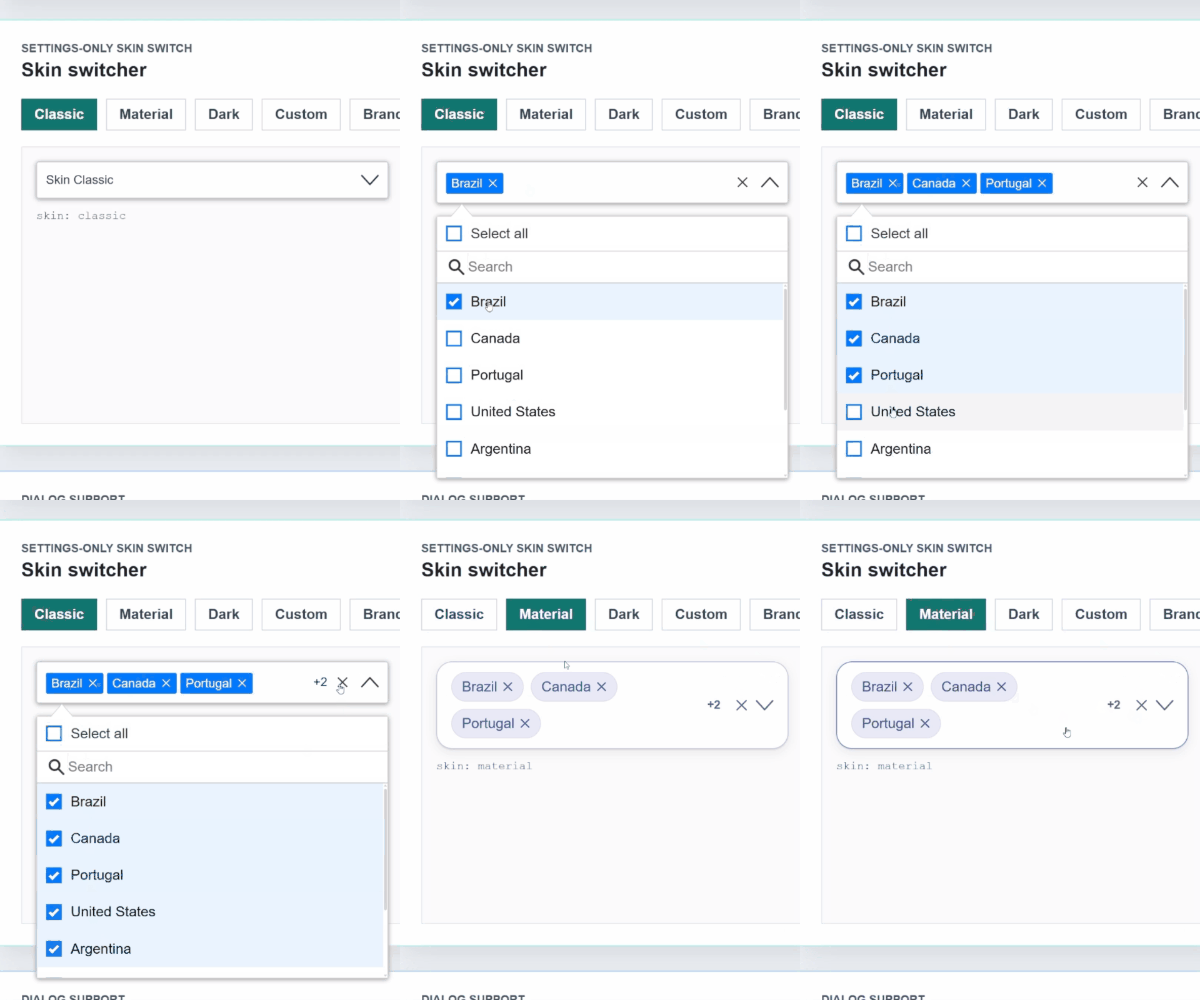
Material-style rounded controls and chips. |
dark |
Dark UI surfaces. |
custom |
CSS-variable starter skin for custom projects. |
brand |
Stackline brand skin. |
Runtime skin switching:
dropdown.setTheme("material");Custom skin example:
.stackline-dropdown.theme-brand,
.dropdown-list.theme-brand {
  --stackline-ms-primary: #7c3aed;
  --stackline-ms-primary-soft: rgba(124, 58, 237, 0.14);
  --stackline-ms-surface: #ffffff;
  --stackline-ms-surface-soft: #f5f3ff;
  --stackline-ms-outline: #c4b5fd;
  --stackline-ms-outline-strong: #7c3aed;
  --stackline-ms-on-surface: #22183f;
  --stackline-ms-on-surface-muted: #6b5d80;
  --stackline-ms-chip-bg: #ede9fe;
  --stackline-ms-chip-text: #5b21b6;
}
Render Callbacks
new StacklineMultiSelect("#countries", {
  data: countries,
  selected: [],
  settings: { primaryKey: "id", labelKey: "itemName", skin: "classic" },
  renderItem: function (item) {
    return "<strong>" + item.itemName + "</strong><small>" + item.capital + "</small>";
  },
  renderBadge: function (item) {
    return item.itemName;
  },
  renderEmpty: function () {
    return "No matching countries";
  },
  renderMenuFooter: function (context) {
    return context.selectedItems.length + " selected";
  }
});
Legacy names itemTemplate, badgeTemplate, emptyTemplate, and footerTemplate are still supported.
Events
Callbacks:
new StacklineMultiSelect("#countries", {
  data: countries,
  selected: [],
  settings: { primaryKey: "id", labelKey: "itemName" },
  onSelect: function (item) {},
  onDeSelect: function (item) {},
  onDeselect: function (item) {},
  onSelectAll: function (items) {},
  onDeSelectAll: function (items) {},
  onDeselectAll: function (items) {},
  onChange: function (items) {},
  onOpen: function (items) {},
  onClose: function (items) {},
  onScrollToEnd: function (payload) {}
});
DOM events are also dispatched from the host element:
document.getElementById("countries").addEventListener("stackline:change", function (event) {
  console.log(event.detail);
});
Event names include stackline:select, stackline:deselect, stackline:select-all, stackline:deselect-all, stackline:change, stackline:open, stackline:close, and stackline:scroll-to-end.
Methods
dropdown.open();
dropdown.close(true);
dropdown.toggle();
dropdown.clear();
dropdown.selectAll();
dropdown.deSelectAll();
dropdown.setSelected([{ id: 2, itemName: "Canada" }]);
dropdown.setData(nextCountries);
dropdown.setSettings({ skin: "dark" });
dropdown.setTheme("brand");
dropdown.destroy();
Official Vanilla Test Matrix
The live app follows the same route structure used by the React 19.1.3 playground. Each route has a live dropdown, code panel, JSON panel, event log, and footer navigation.
| Route | Purpose |
|---|---|
/basic |
Basic usage |
/keyboard-contract |
Keyboard feature switches |
/aria-state |
aria-selected and aria-checked audit |
/headless-aria |
100% custom HTML with ARIA prop getters |
/state-hook |
State-only API controls |
/slots-api |
Render callbacks |
/type-safe-factory |
Factory-style plain object helpers |
/async-object-preservation |
Selected objects survive async data refreshes |
/single-selection |
Single selection |
/search-filter |
Search filter |
/custom-search-api |
Async search pattern |
/search-filter-by-property |
Search by multiple object fields |
/search-add-new-item |
Add-new-item workflow |
/group-by |
Grouped object data |
/templating |
Custom row and badge HTML |
/template-driven-forms |
Plain form state |
/reactive-forms |
State-driven validation |
/virtual-scrolling |
Large list scroll |
/lazy-loading-api |
Lazy loading |
/remote-data |
Remote data refresh |
/list-loop |
Repeated instances |
/dialog |
Overflow-hidden dialog test |
/multiple-dropdowns |
Multiple independent instances |
/dynamic-data |
Runtime setData |
/methods |
Imperative methods |
/events |
Callback and DOM event stream |
/disabled |
Disabled state |
/limit-selection |
Selection limit |
/limit-badges |
Badge overflow counter |
/all-visible-counter |
Counter disappears when all selected badges are visible |
/custom-placeholder |
Vertically centered placeholder |
/styling |
Skins and variables |
/body-overlay-auto |
Body overlay with auto positioning |
Run Locally
npm testFor a quick static live preview, serve the repository root and open /basic.
License
MIT