Package Exports
- as-table
This package does not declare an exports field, so the exports above have been automatically detected and optimized by JSPM instead. If any package subpath is missing, it is recommended to post an issue to the original package (as-table) to support the "exports" field. If that is not possible, create a JSPM override to customize the exports field for this package.
Readme
as-table



A simple function that print objects and arrays as ASCII tables. Supports ANSI styling and weird 💩 Unicode emoji symbols (they won't break the layout), thanks to printable-characters.
npm install as-tablePrinting objects
asTable = require ('as-table')

asTable ([ { foo: true,  string: 'abcde',      num: 42 },
           { foo: false, string: 'qwertyuiop', num: 43 },
           {             string:  null,        num: 44 } ])
foo string num
----------------------
true abcde 42
false qwertyuiop 43
null 44 Printing arrays
asTable ([['qwe',       '123456789', 'zxcvbnm'],
          ['qwerty',    '12',        'zxcvb'],
          ['qwertyiop', '1234567',   'z']])
qwe 123456789 zxcvbnm
qwerty 12 zxcvb
qwertyiop 1234567 zLimiting total width by proportionally trimming cells + setting columns delimiter
asTable.configure ({ maxTotalWidth: 22, delimiter: ' | ' }) (data)qwe | 1234… | zxc…
qwer… | 12 | zxc…
qwer… | 1234… | z Right align
asTable.configure ({ right: true }) (data) foo bar baz
-----------------------------
qwe        123456789  zxcvbnm
qwerty     12         zxcvb
qwertyiop 1234567 zProviding a custom object printer
asTable.configure ({ print: x => (typeof x === 'boolean') ? (x ? 'yes' : 'no') : String (x) }) (data)foo string num
--------------------
yes abcde 42
no qwertyuiop 43
null 44 The callback also receives a field name (in case of objects) or a column index (in case of arrays):
asTable = require ('as-table').configure ({
    print (x, k) {
        if (k === 'timestamp') return new Date (x).toGMTString()
        return String (x)
    }
})

asTable ([ { name: 'A', timestamp: 1561202591572 },
           { name: 'B', timestamp: 1558524240034 } ])
Obtaining a pre-configured function
asTable = require ('as-table').configure ({ maxTotalWidth: 25, delimiter: ' | ' })

asTable (data)
Customizing the title rendering and the header separator
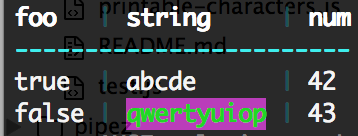
With string coloring by ansicolor (just for the demo purposes, any library will fit):
asTable = require ('as-table').configure ({ title: x => x.bright, delimiter: ' | '.dim.cyan, dash: '-'.bright.cyan })

console.log (
   asTable ([ { foo: true,  string: 'abcde',                             num: 42 },
              { foo: false, string: 'qwertyuiop'.bgMagenta.green.bright, num: 43 } ])