Package Exports
This package does not declare an exports field, so the exports above have been automatically detected and optimized by JSPM instead. If any package subpath is missing, it is recommended to post an issue to the original package (bugpack-mcp) to support the "exports" field. If that is not possible, create a JSPM override to customize the exports field for this package.
Readme

BugPack
Package bug screenshots into AI-ready fix instructions in 30 seconds




Quick Start · MCP Config · OpenClaw · Features · Integrations
English | 中文
What is BugPack?
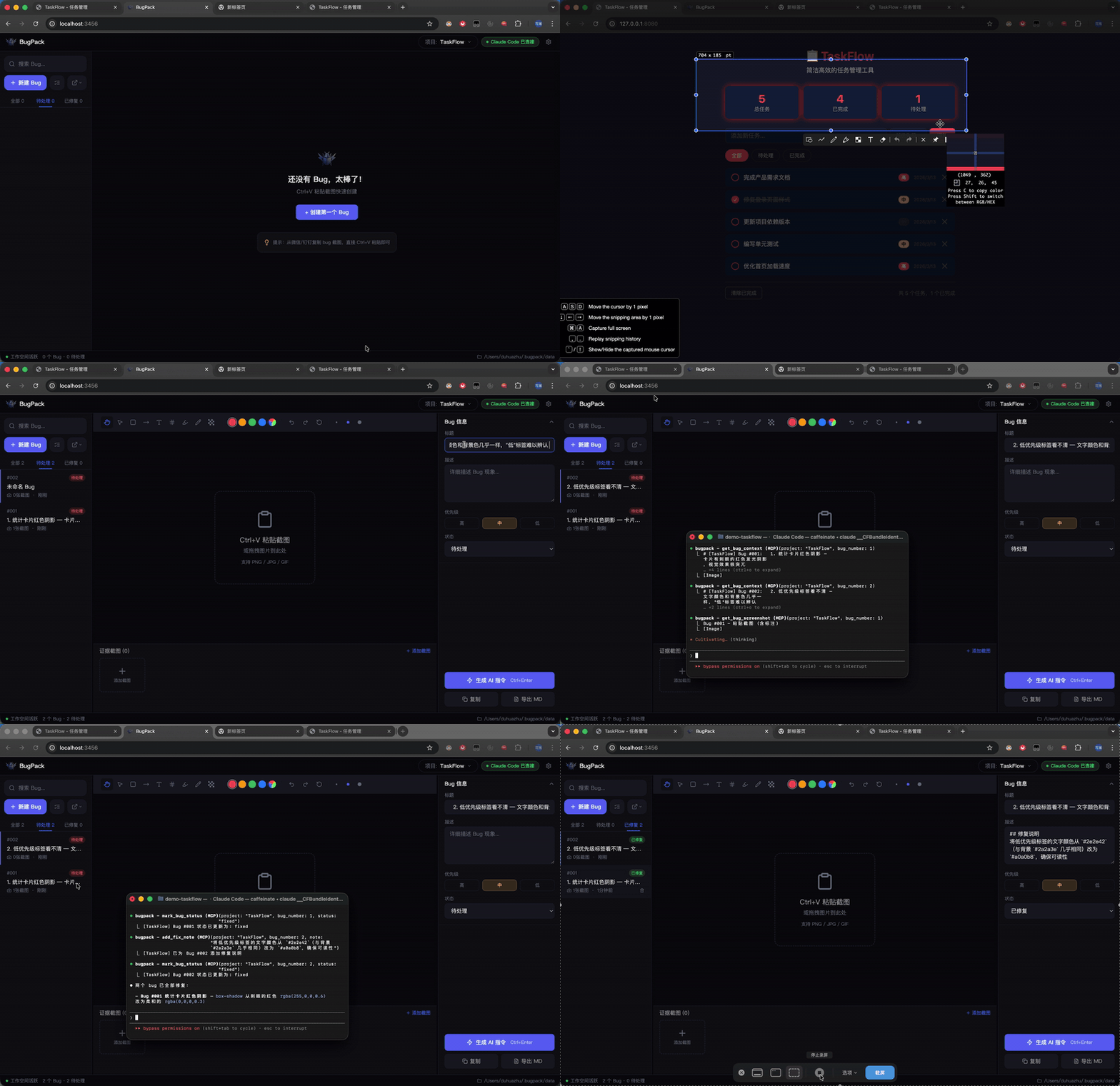
BugPack is a local-first tool that packages bug screenshots into structured, AI-ready fix instructions.
QA drops a screenshot in the chat → you Ctrl+V paste it into BugPack → annotate the issue → generate structured instructions → feed them to your AI coding agent.
Or skip the copy-paste entirely: BugPack's built-in MCP Server lets any MCP-compatible AI coding tool (Claude Code, Cursor, Windsurf, Cline, etc.) read bug context and fix code automatically.
Why BugPack?
AI coding agents changed how we write code, but not how we communicate bug context.
Every bug fix still requires: save screenshot → create file → write paths → describe the issue → paste to AI. 10 bugs a day = 1-2 hours of pure repetition.
BugPack compresses this to 30 seconds.
Requirements
- Node.js >= 18
- OS — Windows / macOS / Linux
- Browser — Chrome / Edge / Firefox (Chrome recommended)
Quick Start
npx bugpack-mcpOpen http://localhost:3456 and Ctrl+V your first bug screenshot to get started.
MCP Configuration
BugPack works with any MCP-compatible AI coding tool. Here are common examples — configure other tools the same way.
Claude Code — add to ~/.claude.json:
{
  "mcpServers": {
    "bugpack": {
      "type": "stdio",
      "command": "npx",
      "args": ["bugpack-mcp", "--mcp"]
    }
  }
}
Cursor / Windsurf / VS Code / Cline / Roo Code / Trae / MarsCode / Augment
Cursor (.cursor/mcp.json):
{
  "mcpServers": {
    "bugpack": {
      "command": "npx",
      "args": ["bugpack-mcp", "--mcp"]
    }
  }
}
Windsurf (~/.codeium/windsurf/mcp_config.json):
{
  "mcpServers": {
    "bugpack": {
      "command": "npx",
      "args": ["bugpack-mcp", "--mcp"]
    }
  }
}
VS Code (.vscode/mcp.json):
{
  "servers": {
    "bugpack": {
      "command": "npx",
      "args": ["bugpack-mcp", "--mcp"]
    }
  }
}
Cline / Roo Code (VS Code Settings):
{
  "cline.mcpServers": {
    "bugpack": {
      "command": "npx",
      "args": ["bugpack-mcp", "--mcp"]
    }
  }
}
Trae (trae/mcp.json):
{
  "mcpServers": {
    "bugpack": {
      "command": "npx",
      "args": ["bugpack-mcp", "--mcp"]
    }
  }
}
MarsCode (Settings → MCP):
{
  "mcpServers": {
    "bugpack": {
      "command": "npx",
      "args": ["bugpack-mcp", "--mcp"]
    }
  }
}
Augment (augment/mcp.json):
{
  "mcpServers": {
    "bugpack": {
      "command": "npx",
      "args": ["bugpack-mcp", "--mcp"]
    }
  }
}
All other MCP-compatible tools follow the same pattern — just point command to npx and args to ["bugpack-mcp", "--mcp"].
Once configured, just tell your AI:
- "Show me pending bugs" → AI calls
list_bugs - "Fix bug #3" → AI calls
get_bug_context, locates code, and fixes it - "Mark bug #3 as fixed" → AI calls
mark_bug_status
OpenClaw Skills
BugPack provides OpenClaw Skills for AI agents that support the OpenClaw protocol.
Install via CLI:
clawhub install bugpackOr add to ~/.openclaw/openclaw.json:
{
  "skills": {
    "entries": {
      "bugpack": {
        "enabled": true
      }
    },
    "extraDirs": ["./skills"]
  }
}
Or manually: copy the skills/ directory from this repo into your workspace or ~/.openclaw/skills/.
BugPack includes 3 built-in skills:
| Skill | Triggers | Description |
|---|---|---|
bugpack-list-bugs |
"show me bugs" / "list bugs" | List all bugs with status filtering |
bugpack-view-bug |
"view bug" / "bug context" | Get full bug details with screenshots and related files |
bugpack-fix-bug |
"fix bug" / "repair bug" | Read context → locate code → apply fix → update status |
Once installed, just tell your AI:
- "Show me bugs" → AI calls
bugpack-list-bugs - "View bug details" → AI calls
bugpack-view-bug, shows screenshots and context - "Fix this bug" → AI calls
bugpack-fix-bug, locates code, fixes it, and marks as done
Note: OpenClaw Skills require BugPack server running (
npx bugpack-mcp). Skills communicate with the local server via REST API onhttp://localhost:3456.
Features
Screenshots & Annotations
- Clipboard paste —
Ctrl+Vto paste screenshots directly from any chat tool - Drag & drop — drop image files onto the canvas
- 9 annotation tools — drag/pan, select, rectangle, arrow, text, numbering, highlight, pen, mosaic
- Compare mode — side-by-side comparison of "current" vs "expected" behavior
- Undo / Redo — full operation history
AI Instruction Generation
- One-click generation — produces structured Markdown fix instructions
- Universal MCP support — works with any MCP-compatible AI coding tool
MCP Server
Built-in MCP Server lets AI coding agents directly access bug context:
| Tool | Description |
|---|---|
list_bugs |
List all bugs with status/project filtering |
get_bug_context |
Get full bug context (description + screenshots + environment + files) |
get_bug_screenshot |
Get a single annotated screenshot (base64) |
mark_bug_status |
Update bug status |
add_fix_note |
Add fix notes after repair |
Platform Integrations
Import bugs from project management platforms, sync fix status back:
- Zentao · Jira · Linear · TAPD
More
- 100% local — data never leaves your machine, SQLite storage
- Multi-project — manage bugs independently per project
- Dark / Light theme — follow your preference
- i18n — Chinese / English
- Keyboard shortcuts — efficient workflow
Workflow
Paste screenshot → Describe issue → Generate instructions → AI fixes code
       │                             │                      │
       │              ┌──────────────┘                      │
       ▼              ▼                                     ▼
   BugPack       Copy Markdown                        MCP Server
    Canvas      paste to AI tool                 AI reads & fixes directly
Data Storage
All data is stored locally:
- Data directory:
~/.bugpack/data/ - Database:
bugpack.db(SQLite) - Screenshots:
uploads/{ProjectName}/{uuid}.{ext}
Tech Stack
| Layer | Technology |
|---|---|
| Frontend | React 18 · TypeScript · Tailwind CSS · Zustand |
| Annotation | Fabric.js v6 |
| Backend | Node.js · Express |
| Database | SQLite (better-sqlite3, WAL mode) |
| MCP | @modelcontextprotocol/sdk |
Contributing
See CONTRIBUTING.md for guidelines.
License
If BugPack saves you time, give it a Star!