
Package Exports
- canvas-meter
This package does not declare an exports field, so the exports above have been automatically detected and optimized by JSPM instead. If any package subpath is missing, it is recommended to post an issue to the original package (canvas-meter) to support the "exports" field. If that is not possible, create a JSPM override to customize the exports field for this package.
Readme
canvas-meter
A configurable JavaScript meter
Getting started
with npm
npm install canvas-meter --saverequire it
const canvasMeter = require ("canvas-meter");with a script tag
<script src="https://storage.googleapis.com/xliberation.com/canvas-meter/canvas-meter.v1.0.min.js"></script>Examples
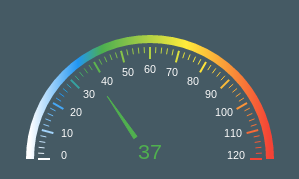
A speedometer
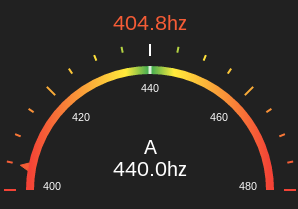
A guitar tuner
API
Create a canvas element
<canvas width="300" height="210" id="meter"></canvas>pass it to an instance of the meter
const meter = new CanvasMeter(document.getElementById("meter"));Update it when you want.
meter.draw(currentValue,lowValue,highValue,idealValue,label);Configuration
Most aspects of the meter are configurable. Here is a complete list of all the things you can set.
Defaults
The defaults are for a guitar tuner and look like this.
  let options = {
    meter: {
      ramp:[
        {stop:0, color:'#F44336'},
        {stop:.4,color:'#FFEB3B'},
        {stop:.49,color:'#4CAF50'},
        {stop:.5,color:'#FFFFFF'},
        {stop:.51,color:'#4CAF50'},
        {stop:.6,color:'#FFEB3B'},
        {stop:1,color:'#F44336'}
      ],
      colors: {
        background:'#212121',
        label:'#FFFFFF',
        tickLabel:'#FAFAFA'
      },
      offsets: {
        ideal:-14,
        value:-160,
        label:-36,
        meter:-20,
        tickLabel:22,
        tick:-26,
        pointer:-12
      },
      ticks: {
        major:{
          height:12,
          width:2,
          count:5
        },
        minor:{
          height:6,
          width:2,
          count:3
        },
        pointer: {
          height:8,
          width:28
        }
      },
      fonts: {
        label:'24pt sans',
        tickLabel:'8pt sans',
        ideal:'16pt sans',
        value:'16pt sans',
      },
      formatters: {
        value:(v) => typeof v===typeof undefined ? "" :`${v.toFixed(1).toString()}hz`,
        ideal:(v) => typeof v===typeof undefined ? "" : `${v.toFixed(1).toString()}hz`,
        label:(v) => typeof v===typeof undefined ? "" : `${v.toString()}`,
        tickLabel:(v) => typeof v===typeof undefined ? "" : `${Math.round(v).toString()}`,
      },
      arc: {
        size:.8,
        width:8
      }
    }
  };
Example
Here's the skin for the speedometer example. Any properties not mentioned here are picked up from the default.
const getSpeedoSkin = () => {
  return {
    meter:{
      offsets:{
        tick:8,
        tickLabel:34,
        value:0,
        pointer:44
      },
      ramp:[
        {stop:0, color:'#FFFFFF'},
        {stop:.2,color:'#2196F3'},
        {stop:.3,color:'#4CAF50'},
        {stop:.65,color:'#FFEB3B'},
        {stop:1,color:'#F44336'}
      ],
      colors:{
        background:'#455A64'
      },
      ticks:{
        major:{
          count:13
        },
        minor: {
          count:4,
          width:1
        },
        pointer: {
          height:50,
          width:8
        }
      },
      formatters: {
        value: function (v) { return Math.round(v.toString())},
        ideal: function (v) { return "";}
      }
    }
  };
};
Use it like this
  const meter = new CanvasMeter(document.getElementById("speedo"));
  meter.setOptions (getSpeedoSkin());