

Package Exports
- code-diff-html
- code-diff-html/index.js
This package does not declare an exports field, so the exports above have been automatically detected and optimized by JSPM instead. If any package subpath is missing, it is recommended to post an issue to the original package (code-diff-html) to support the "exports" field. If that is not possible, create a JSPM override to customize the exports field for this package.
Readme
code-diff-html
一个类似gitlab的代码对比(diff)工具
一个基于diff.js和diff2html封装的库,简化了使用
下载
npm i code-diff-html --save使用
1.引入drawDiff方法
import { drawDiff } from 'code-diff-html'2.定义一个dom元素
<div id="myDiffElement"></div>3.执行drawDiff方法
drawDiff({
    fileName:'人物对比',
    oldObj:a,
    newObj:b,
    domId:'myDiffElement',
    options:{}
})
完整例子
import React from "react";
import { drawDiff } from 'code-diff-html'

const a = {
  "id": 1,
  "name":'小明',
  "age":18,
  "sex":'男'
}

const b = {
  "id": 2,
  "name":'小刚',
  "age":24,
  "sex":'男'
}

export default class APP extends React.Component {

  componentDidMount(){
    drawDiff({
      fileName:'人物对比',
      oldObj:a,
      newObj:b,
      domId:'myDiffElement',
      options:{
          outputFormat:"side-by-side"
      }
    })
  }

  render() {
    return (
      <>
        <div id="myDiffElement"></div>
      </>
    );
  }
}
效果
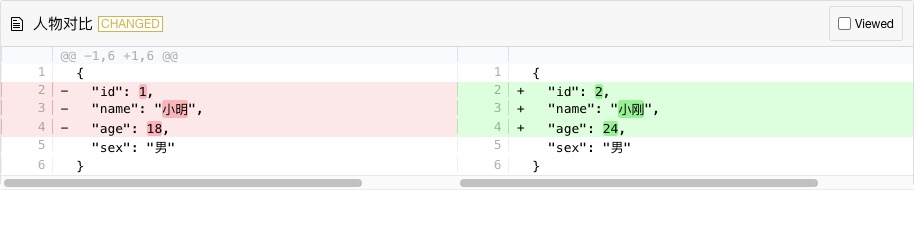
drawDiff方法简述
| 参数 | 类型 | 说明 | 是否必须 |
|---|---|---|---|
| fileName | string | 文件名 | 否 |
| oldObj | object | 旧数据对象 | 是 |
| newObj | object | 新数据对象 | 是 |
| domId | string | 内容承载的dom节点id | 是 |
| options | object | 展现框的配置项 | 否 |
| context | number | 只显示差异项前后多少行的数据,其余折叠,不填则显示全文 | 否 |
options简述
The HTML output accepts a Javascript object with configuration. Possible options:
outputFormat: the format of the output data:'line-by-line'or'side-by-side', default is'line-by-line'drawFileList: show a file list before the diff:trueorfalse, default istruesrcPrefix: add a prefix to all source (before changes) filepaths, default is''. Should match the prefix used when generating the diff.dstPrefix: add a prefix to all destination (after changes) filepaths, default is''. Should match the prefix used when generating the diffdiffMaxChanges: number of changed lines after which a file diff is deemed as too big and not displayed, default isundefineddiffMaxLineLength: number of characters in a diff line after which a file diff is deemed as too big and not displayed, default isundefineddiffTooBigMessage: function allowing to customize the message in case of file diff too big (ifdiffMaxChangesordiffMaxLineLengthis set). Will be given a file index as a number and should return a string.matching: matching level:'lines'for matching lines,'words'for matching lines and words or'none', default isnonematchWordsThreshold: similarity threshold for word matching, default is0.25maxLineLengthHighlight: only perform diff changes highlight if lines are smaller than this, default is10000diffStyle: show differences level in each line:'word'or'char', default is'word'renderNothingWhenEmpty: render nothing if the diff shows no change in its comparison:trueorfalse, default isfalsematchingMaxComparisons: perform at most this much comparisons for line matching a block of changes, default is2500maxLineSizeInBlockForComparison: maximum number os characters of the bigger line in a block to apply comparison, default is200compiledTemplates: object (Hogan.js template values) with previously compiled templates to replace parts of the html, default is{}. For example:{ "tag-file-changed": Hogan.compile("<span class="d2h-tag d2h-changed d2h-changed-tag">MODIFIED</span>") }rawTemplates: object (string values) with raw not compiled templates to replace parts of the html, default is
{}. For example:
{ "tag-file-changed": "<span class="d2h-tag d2h-changed d2h-changed-tag">MODIFIED</span>" }For more information regarding the possible templates look into src/templates