

Package Exports
- code-migrator
This package does not declare an exports field, so the exports above have been automatically detected and optimized by JSPM instead. If any package subpath is missing, it is recommended to post an issue to the original package (code-migrator) to support the "exports" field. If that is not possible, create a JSPM override to customize the exports field for this package.
Readme
code-migrator 
This library help to create code migration tool.
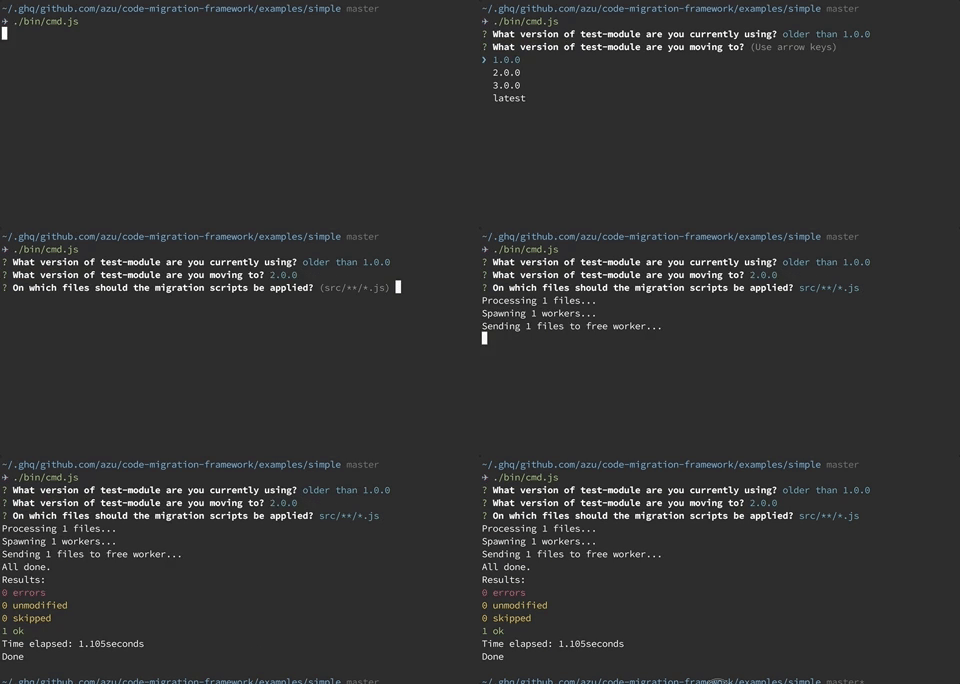
This library help to create migration tool for your library/framework/tool.
- This library aim to provide command line interface for migration
- This library help to run migration scripts
- This library does not provide migration scripts
- You have to write migration script
- You choose codemod tool by own
- Your migration script must not depended on this library
codemod tools
You have to write migration scripts using following codemod tools.
- facebook/jscodeshift: A JavaScript codemod toolkit.
- square/babel-codemod: babel-codemod rewrites JavaScript using babel plugins.
- KnisterPeter/tscodeshift: tscodeshift is a toolkit for running codemods over multiple TS files
code-migrator is a launcher library for the above tools.
Install
Install with npm:
npm install code-migratorRequirements
- Your library/framework/tool should follow Semantic Versioning
- You have to prepare migration scripts
Usage
Define MigrationList
module.exports = {
    scripts: [
        {
            name: "use-strict",
            // absolute path for codemod scripts
            filePath: require.resolve("./scripts/use-strict")
        }
    ],
    versions: [
        // 0.x.x -> 1.0.0 apply "use-strict"
        {
            version: "1.0.0",
            scripts: ["use-strict"]
        },
        // 1.0.0 -> 2.0.0 does not apply anything
        {
            version: "2.0.0",
            scripts: []
        },
        {
            version: "3.0.0",
            scripts: []
        }
    ]
};
Example:
const { CodeMigrator } = require("code-migrator");
const meow = require("meow");

const cli = meow(
    `
    Usage
      $ code-migration-example <input>

    Options:
      --dry-run Enable dry run mode

    Examples
      $ code-migration-example "src/**/*.js"
`,
    {
        flags: {
            dryRun: {
                type: "boolean"
            }
        }
    }
);

const migrator = new CodeMigrator({
    moduleName: "test-module", // <= target npm module name if needed
    migrationList: require("../migrations"), // load migration list
    binCreator: ({ script, filePathList }) => {
        // migration script is executed by jscodeshift
        const binArgs = cli.flags.dryRun ? ["--dry"] : [];
        return {
            binPath: require.resolve(".bin/jscodeshift"),
            binArgs: binArgs.concat(["-t", script.filePath]).concat(filePathList)
        };
    }
});
migrator
    .run({
        filePatterns: cli.input
    })
    .then(() => {
        console.log("Done");
    })
    .catch(error => {
        console.error(error);
    });
For more details, see examples/
How to write unit test?
Code Migrator use Inquirer.js for building interactive interface. It is useful, but it is difficult to test.
You can run Code Migrator with non-interactive mode.
run(options: CodeMigratorRunOption)
If you set all defaultValue option, you can run code without interactive prompt.
const migrationList: MigrationList = require("./fixtures/scripts/migrations.js");
const codeMigrator = new CodeMigrator({
    migrationList: migrationList,
    moduleName: "test",
    binCreator: ({ script, filePathList }) => {
        return {
            binPath: require.resolve(".bin/jscodeshift"),
            binArgs: ["--dry", "-t", script.filePath].concat(filePathList)
        };
    }
});
codeMigrator
    .run({
        force: true,
        defaultValue: {
            currentVersion: "0.1.0",
            nextVersion: "3.0.0",
            files: [path.join(__dirname, "fixtures/scripts/src/**/*.js")]
        }
    });
runScripts(options: RunScriptsOptions)
runScripts is non-interactive mode by default.
const migrationList: MigrationList = require("./fixtures/scripts/migrations.js");
const codeMigrator = new CodeMigrator({
    migrationList: migrationList,
    moduleName: "test",
    binCreator: ({ script, filePathList }) => {
        return {
            binPath: require.resolve(".bin/jscodeshift"),
            binArgs: ["--dry", "-t", script.filePath].concat(filePathList)
        };
    }
});
codeMigrator.runScripts({
    force: true,
    scripts: migrationList.scripts,
    files: [path.join(__dirname, "/fixtures/scripts/src/**/*.js")]
});
User
Following migration tools use code-migrator.
Changelog
See Releases page.
Running tests
Install devDependencies and Run npm test:
npm i -d && npm testContributing
Pull requests and stars are always welcome.
For bugs and feature requests, please create an issue.
- Fork it!
- Create your feature branch:
git checkout -b my-new-feature - Commit your changes:
git commit -am 'Add some feature' - Push to the branch:
git push origin my-new-feature - Submit a pull request :D
Author
License
MIT © azu
Acknowledgment
This library is based on ava-codemods.