

Package Exports
- codesession-cli
- codesession-cli/agents
Readme
codesession-cli
See exactly what every AI agent run costs — tokens, files, commits, duration.



Works with Claude Code, OpenClaw, Codex, Cursor, Windsurf, Cline & any AI agent.
Auto-track via skill/MCP · wrap any script with cs run · local API proxy · manual cs log-ai · budget alerts · web dashboard · JSON export · programmatic API
What's New in v2.6
cs run <command>— one command wraps everything: session + proxy + run + cost summarycs proxy --session "name"— auto-start a session when starting the proxycs today— pick up where you left off: git state, TODOs, PRs, session history across all projects- Dashboard Help tab — full command reference right in the web UI
- Dashboard Changelog tab — see release history right in the dashboard
- Smarter proxy output — shows live session name, auto-detects Windows vs Unix env var syntax
Install
npm install -g codesession-cliRequires Node.js 18+ and C/C++ build tools (details).
Using Claude Code, OpenClaw, or Codex?
Install the skill once. The agent tracks itself so that you never have to run a command manually.
clawhub install codesessionEvery agent task is now automatically tracked: session start/end, every AI call, cost, files changed, commits. Open the dashboard any time:
cs dashboardNo ClawHub? Add the MCP server to Claude Code's settings:
cs mcp # starts Model Context Protocol serverOr copy the skill manually:
cp -r $(npm root -g)/codesession-cli/skills/codesession ~/.openclaw/skills/
Running your own agent script?
Wrap it with cs run — one command, zero config:
cs run python my_agent.py
cs run node agent.js
cs run -- npx my-agent --task "fix the bug"
What happens automatically:
- Session started
- Local proxy launched — Anthropic + OpenAI calls intercepted
- Command runs with the proxy pre-configured (no env vars to export)
- Session ended, cost summary printed on exit
  ● codesession  python my_agent.py
  ↳ proxy active  http://127.0.0.1:3739  (API calls auto-tracked)
  ↳ tracking files, commits, AI usage

  [your agent runs here]

  ✓ Done  python my_agent.py
    14m  •  8 files  •  2 commits  •  $1.43 AI cost
    top model: claude-sonnet-4  (38,000 tokens)

    cs show       full breakdown
    cs dashboard
Options:
cs run --name "Fix auth bug" python agent.py   # custom session name
cs run --port 4000 node agent.js               # custom proxy port
cs run --no-proxy python agent.py              # session only, no proxy
What's tracked
| Data | How |
|---|---|
| AI cost + tokens | Auto-captured through the proxy (or cs log-ai manually) |
| Files changed | Filesystem watcher + git diff on close |
| Git commits | Git log polling during the session |
| Duration | Wall clock, start to end |
Everything stored locally at ~/.codesession/sessions.db. No cloud. No telemetry.
Manual flow
For long-running interactive sessions or when you need more control:
cs start "my task"

# In another terminal — auto-starts a session too:
cs proxy --session "my task"

# In your agent shell
export ANTHROPIC_BASE_URL=http://127.0.0.1:3739
export OPENAI_BASE_URL=http://127.0.0.1:3739/v1

python agent.py

cs end
cs show
Or log manually without the proxy:
cs start "my task"
cs log-ai -p anthropic -m claude-sonnet-4 --prompt-tokens 8000 --completion-tokens 2000
cs end
Web Dashboard
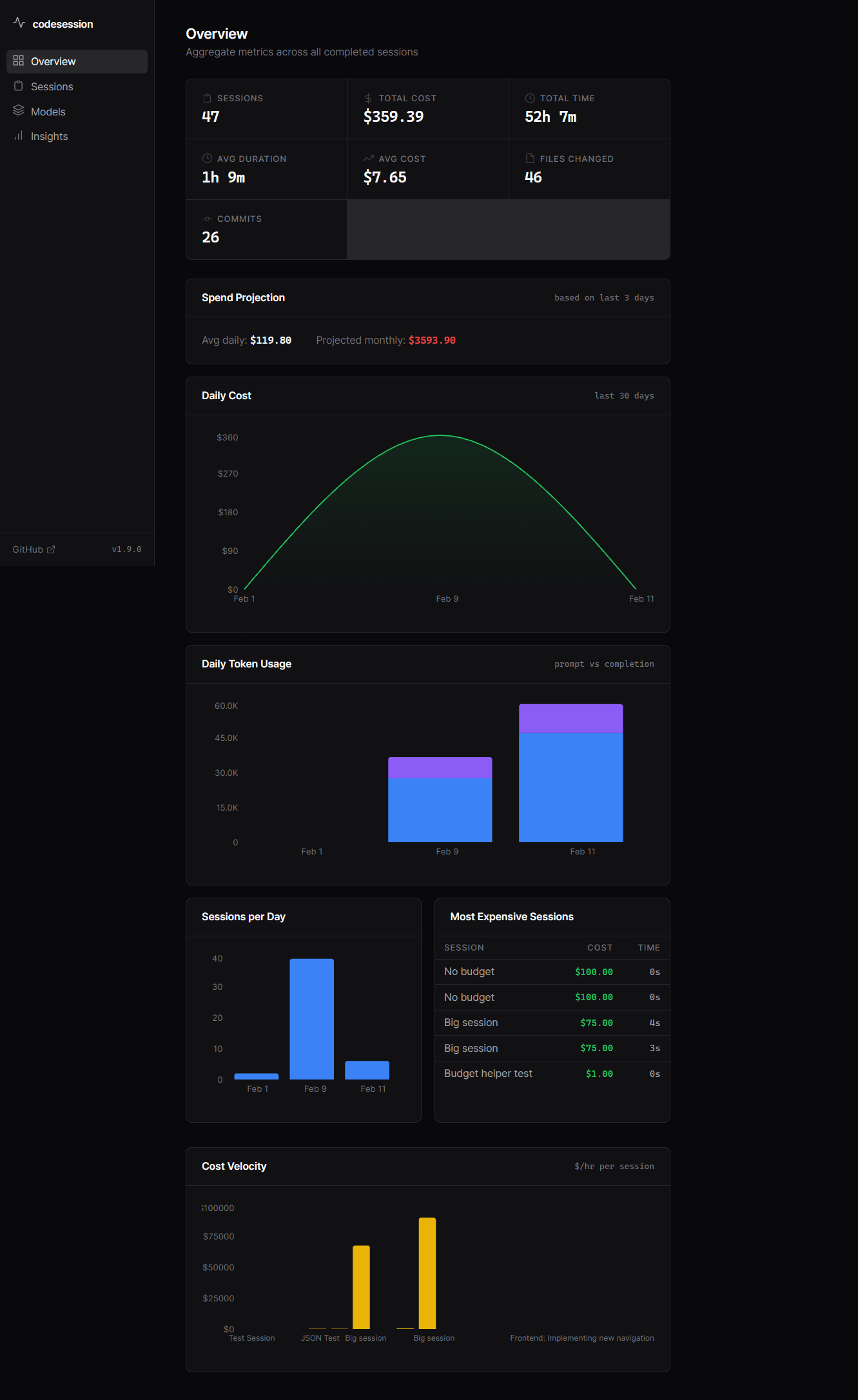
cs dashboardOpens http://localhost:3737 with:
- Overview — daily cost chart, total spend, cost velocity
- Sessions — paginated session list with search and status filter
- Session detail — timeline of files, commits, AI calls, notes, per-file diffs
- Models — per-model cost/token breakdown, prompt:completion ratio
- Insights — file hotspots, activity heatmap, per-project cost
- Alerts — daily/session budget thresholds with browser notifications
- Donate — support the project
- Pricing — view and manage model pricing directly from the dashboard
- Help — full CLI command reference at a glance
- Changelog — release history right in the dashboard
Proxy security
The proxy binds to 127.0.0.1 only and never stores prompt text or API keys.
| Guarantee | How |
|---|---|
| Localhost-only | Binds 127.0.0.1; 403 for any non-loopback connection |
| No prompt storage | Request bodies forwarded and discarded immediately |
| No key storage | Authorization forwarded only, never written to DB |
| SSRF-proof | Upstream hosts hardcoded (api.anthropic.com, api.openai.com) |
| Memory cap | 10 MB incoming + 10 MB response buffer limit |
| No error leakage | 502 returns "upstream connection failed" — no stack traces |
Health check: curl http://127.0.0.1:3739/health
All commands
| Command | What it does |
|---|---|
cs run <cmd> |
One command: session + proxy + run + summary |
cs start <name> |
Start a session manually |
cs end [-n notes] |
End active session |
cs status |
Show active session cost/tokens |
cs proxy [--session name] |
Start the API proxy |
cs log-ai -p <p> -m <m> |
Log AI usage manually |
cs show [id] |
Full session breakdown |
cs list |
Recent sessions |
cs stats |
All-time totals |
cs dashboard |
Web analytics UI |
cs note <text> |
Add timestamped annotation |
cs recover |
End stale sessions |
cs export --format json|csv |
Export session data |
cs pricing list|set|reset |
Manage model prices |
cs mcp |
Start MCP server (Claude Code integration) |
cs today |
Pick up where you left off — git state, TODOs, PRs |
cs today init |
Register current dir as a tracked project |
cs today add <path> |
Add a project to today tracking |
cs today remove <path> |
Remove a project from tracking |
cs today projects |
List tracked projects |
cs auto-log |
Auto-log AI usage from Claude Code hooks |
All commands accept --json for machine-readable output.
Programmatic API
Build codesession into your own agent framework:
import { runAgentSession } from 'codesession-cli/agents';

const summary = await runAgentSession(
  'Fix auth bug',
  { budget: 5.00, directory: './src', git: true },
  async (session) => {
    const res = await anthropic.messages.create({ ... });
    session.logAI('anthropic', 'claude-sonnet-4', promptTokens, completionTokens);
  }
);
// { duration: 720, filesChanged: 8, aiCost: 1.43, commits: 2 }
Full API: AgentSession, BudgetExceededError, runAgentSession — see src/agents.ts.
MCP server
cs mcpTools: session_status, start_session, end_session, log_ai_usage, add_note, get_stats, list_sessions, check_budget.
Pricing
Built-in pricing for 25+ models (Anthropic, OpenAI including Codex, Google, Mistral, DeepSeek). Override or add models:
cs pricing list
cs pricing set my-model 5.00 15.00    # $5/M input, $15/M output
cs pricing reset                       # revert to defaults
Data & privacy
- Stored at
~/.codesession/sessions.db(SQLite, WAL mode) - No telemetry. No cloud sync. No external connections.
- Dashboard binds
127.0.0.1by default. Use--host 0.0.0.0to expose on a network — a random session token is auto-generated when you do.
Build tools
Required for SQLite compilation on first install
| OS | Command |
|---|---|
| Ubuntu/Debian | sudo apt-get install -y build-essential python3 |
| macOS | xcode-select --install |
| Windows | Visual Studio Build Tools |
| Alpine | apk add build-base python3 |
Prebuilt binaries are available for most platforms — compilation is usually skipped.
License
MIT © Brian Munene Mwirigi
Know what your agents cost. Ship with confidence.
Built by Brian Munene Mwirigi — Full Stack Developer, Nairobi 🇰🇪
📖 Full Docs · Changelog · Issues
Keywords
codesession, codesession-cli, code session, AI cost tracker, AI session tracker, token tracker, LLM cost, API cost monitor, Claude Code, OpenClaw, Codex, GPT, Cursor, Windsurf, Cline, AI budget, agent observability, MCP server, session management, Brian Munene Mwirigi, Brian Mwirigi, brian-mwirigi