Package Exports
- create-nilgiri
- create-nilgiri/index.js
This package does not declare an exports field, so the exports above have been automatically detected and optimized by JSPM instead. If any package subpath is missing, it is recommended to post an issue to the original package (create-nilgiri) to support the "exports" field. If that is not possible, create a JSPM override to customize the exports field for this package.
Readme

Nilgiri Automation Framework
Welcome to Nilgiri, An innovative hybrid testing framework combining Cucumber's BDD elegance with Playwright's browser automation for streamlined, behavior-driven web application testing..



Framework Flow
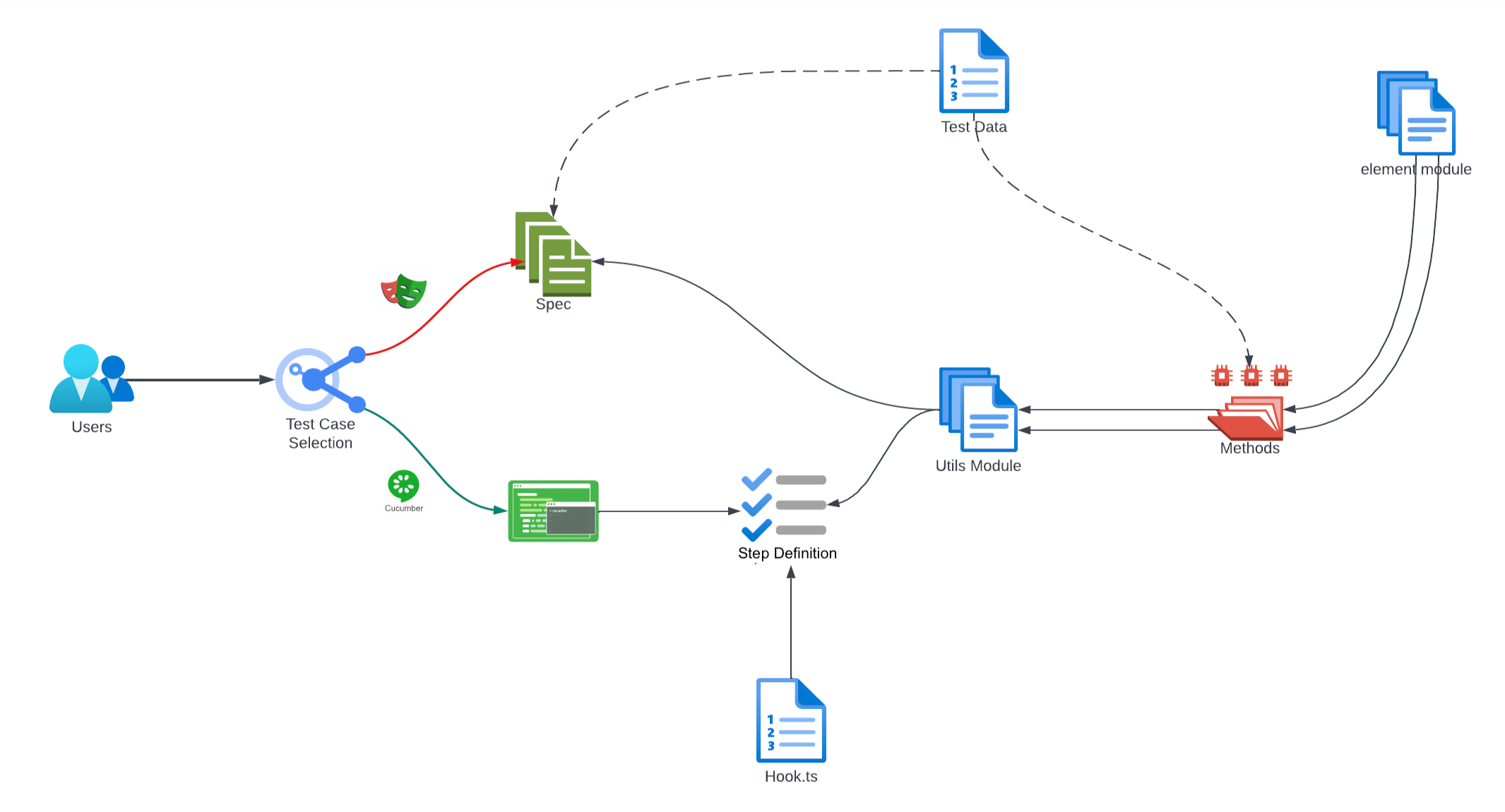
Folder Structure
nilgiri/
├── spec/
│   ├── apiSpec/
│   │   ├── api.spec.ts
|   ├── uiSpec/
|       ├── ui.spec.ts
├── endtoend/
│   ├── features/
│   │   ├── home.feature
|   ├── steps/
|   |   ├── homeStepDef.ts
|   ├── hook.ts
│
├── common/
|   ├── apiBase.ts
│   ├── uiBase.ts
|
├── elementFactory/
│   ├── pageOne.ts
│   ├── pageTwo.ts
|
├── utils/
│   ├── uiCommonMethodModule.ts
│   ├── uiElementFactoryModule.ts
│
├── resource/
│   ├── apiTestData
|   |   ├── apiTestData.json
|   |
│   ├── uiTestData
|       ├── uiTestData.json
|
├── report/
|   ├── teams-webhook.js
|
├── node_modules/
├── package.json
├── package-lock.json
├── .gitignore
├── README.md
├── cucumber.json
├── generateReport.ts
├── tsConfig.jsonnode_modules: Contains all the npm packages required by the project.elementFactory: This directory holds the page element object models,facilitating easy maintenance and readability.common: Shared utilities and functions that can be reused across different tests are located here.resource: Contains subdirectories for different types of test data and other resources:apiTestData: JSON files or other data formats for API testing.uiTestData: Data files specific to UI testing.
spec: Test specifications are divided into two categories:apiSpec: Contains specification files for API tests.uiSpec: Contains specification files for UI tests.
endtoend: Test specifications are divided into two categories:features: Contains feature files for the End to End and business use cases.steps: Contains steps Defination for the Feature Files.
test-results: Stores the output from test executions, such as reports and logs.utils: Helper methods and utility functions to support various testing operations..gitignore: Specifies intentionally untracked files to ignore.package.json&package-lock.json: Define project metadata and lock down the versions of npm packages.playwright.config.ts: Configuration file for Playwright test runner.README.md: Documentation for the project.
Installation
Before you begin, ensure you have Node.js installed on your system.
- Clone the repository:
git clone https://your-repository-url - Navigate to the project directory:
cd nigiri
Record Your Test
Record your test with Playwright CodeGen
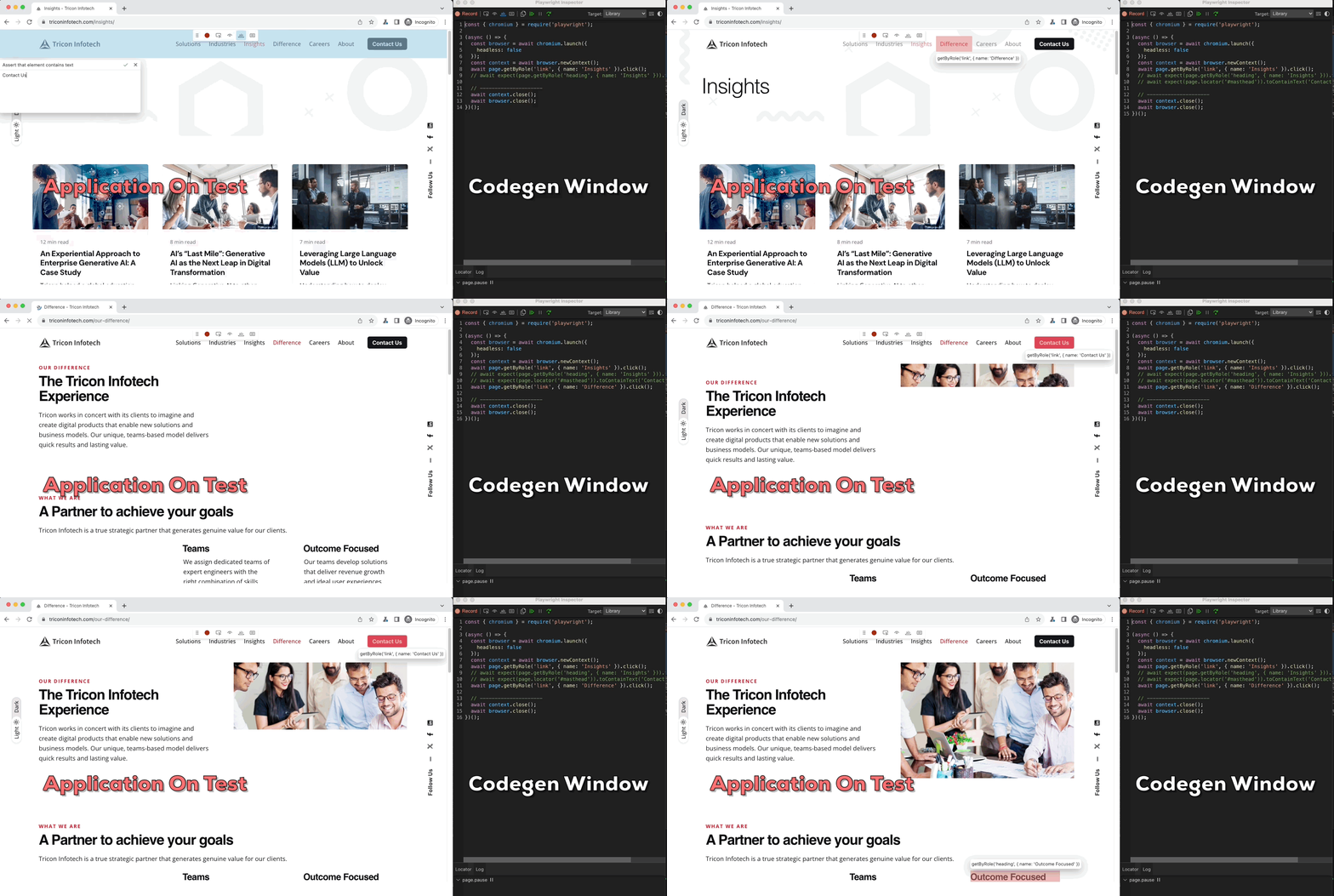
Running Tests
Execute the following command to run all tests:
npm run automationFor running specific tests, you can use:
npx playwright test --grep "test name pattern"For running specific tests to GitHub Action from Curl Command:
curl --location 'https://api.github.com/repos/{repoOwnerName}/{RepoName}/actions/workflows/automation.yml/dispatches' \
--header 'Accept: application/vnd.github+json' \
--header 'X-GitHub-Api-Version: 2022-11-28' \
--header 'Content-Type: application/json' \
--header 'Authorization: Bearer <Your Git Hub Personal Token>' \
--data '{
    "ref": "main",
    "inputs": {
        "custom_feature_file": "endtoend/features/home.feature"
    }
}'
Adding New Tests
To add a new UI test:
- Create a new
.tsfile in thespec/uiSpecdirectory. - Write your test using the Playwright API and the page objects from
elementFactory.
For API tests, follow a similar process in the spec/apiSpec directory.
Contributing
We welcome contributions to the Nilgiri framework. Please read through our contributing guidelines before making a pull request.
Support
If you encounter any issues or have questions, please file an issue on the GitHub repository issue tracker.Nilgiri GitHub repository.
License
Nilgiri is open-source software licensed under the licensed under the MIT license.
Thank you for choosing Nilgiri Framework for your automation needs!
Copyright (c) 2024 Tricon Infotech