
Package Exports
- homebridge-xiaomi-roborock-vacuum-zones
This package does not declare an exports field, so the exports above have been automatically detected and optimized by JSPM instead. If any package subpath is missing, it is recommended to post an issue to the original package (homebridge-xiaomi-roborock-vacuum-zones) to support the "exports" field. If that is not possible, create a JSPM override to customize the exports field for this package.
Readme
Homebridge-xiaomi-roborock-vacuum
Based off nicoh88 xiaomi robot vacuum library with added zone configurations
Config Overview
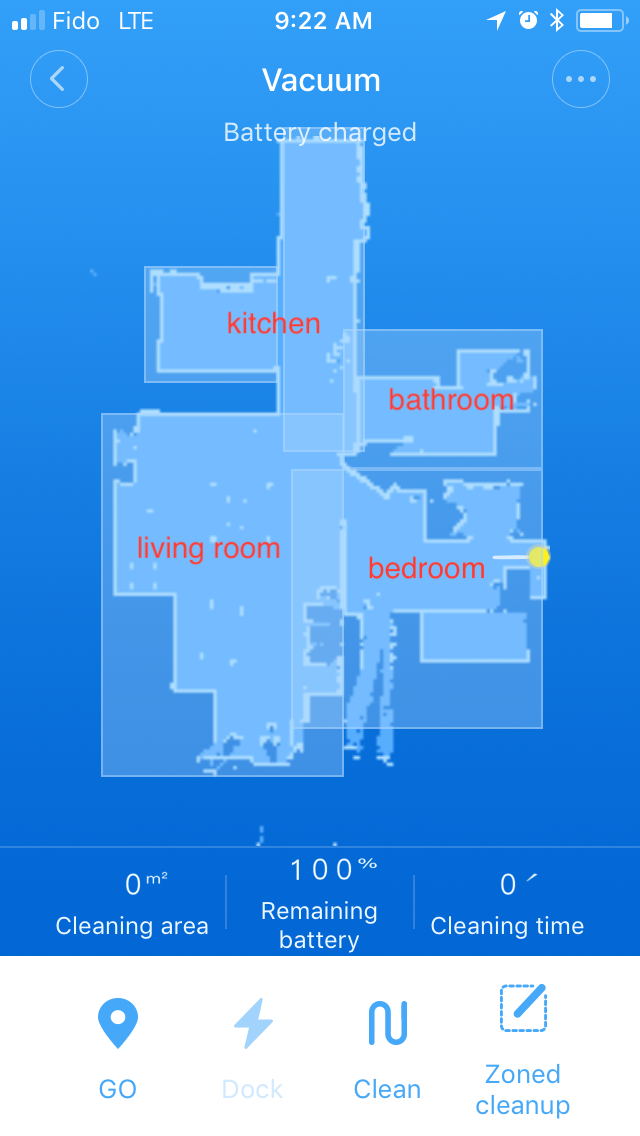
Currently you need to replicate the config for each room, and just change the zones coordinates. You can get the coordinates by either trial and error, then checking the map after sending it off or send it off and and take a screen shot of the zone. Print it out and figure out the scale, and calculate all the zones.
The dock is around the middle [25600, 25600], the whole map can get as big as 51200 x 51200. Mine is no where near that. The coordinate order is [bottom-left-x, bottom-left-y, top-right-x, top-right-y]
You are going to want a zone to represent all the zones, so you can send it off to clean each room in one go. This should still be broken up into sections, if you do it in one big zone it does a horrible job. (atleast from my experince)
If your map gets screwed up because it got stick or you picked it up, just keep starting new full cleanups till it matches again ahould rotate by 90 degrees each time
Example
"accessories": [
    {
            "accessory": "XiaomiRoborockVacuum",
            "name": "Bathroom Vacuum",
            "ip": "ip",
            "token": "token",
            "dock": false,
            "pause": false,
            "zones": [
                [
                    23000,
                    26900,
                    26000,
                    29000
                ]
            ]
        },
        {
            "accessory": "XiaomiRoborockVacuum",
            "name": "Kitchen Vacuum",
            "ip": "ip",
            "token": "token",
            "dock": false,
            "pause": false,
            "zones": [
                [
                    20010,
                    28200,
                    22035,
                    29955
                ],
                [
                    22090,
                    27160,
                    23325,
                    32035
                ]
            ]
        },
        {
            "accessory": "XiaomiRoborockVacuum",
            "name": "Bedroom Vacuum",
            "ip": "ip",
            "token": "token",
            "dock": false,
            "pause": false,
            "zones": [
                [
                    23000,
                    22285,
                    26000,
                    26910
                ]
            ]
        },
        {
            "accessory": "XiaomiRoborockVacuum",
            "name": "Living Room Vacuum",
            "ip": "ip",
            "token": "token",
            "dock": false,
            "pause": false,
            "zones": [
                [
                    19360,
                    22285,
                    23000,
                    27745
                ]
            ]
        },
        {
            "accessory": "XiaomiRoborockVacuum",
            "name": "House Vacuum",
            "ip": "ip",
            "token": "token",
            "dock": false,
            "pause": false,
            "zones": [
                [
                    19360,
                    22285,
                    23000,
                    27745
                ],
                [
                    23000,
                    22285,
                    26000,
                    26910
                ],
                [
                    20010,
                    28200,
                    22035,
                    29955
                ],
                [
                    22090,
                    27160,
                    23325,
                    32035
                ],
                [
                    23000,
                    26900,
                    26000,
                    29000
                ]
            ]
        }
    ]
Token
There are many ways. I followed the none jailbroken iphone way using ibackup viewer
Lisense
The MIT License (MIT)
Copyright (c) 2018 Smileydude
Permission is hereby granted, free of charge, to any person obtaining a copy of this software and associated documentation files (the "Software"), to deal in the Software without restriction, including without limitation the rights to use, copy, modify, merge, publish, distribute, sublicense, and/or sell copies of the Software, and to permit persons to whom the Software is furnished to do so, subject to the following conditions:
The above copyright notice and this permission notice shall be included in all copies or substantial portions of the Software.
THE SOFTWARE IS PROVIDED "AS IS", WITHOUT WARRANTY OF ANY KIND, EXPRESS OR IMPLIED, INCLUDING BUT NOT LIMITED TO THE WARRANTIES OF MERCHANTABILITY, FITNESS FOR A PARTICULAR PURPOSE AND NONINFRINGEMENT. IN NO EVENT SHALL THE AUTHORS OR COPYRIGHT HOLDERS BE LIABLE FOR ANY CLAIM, DAMAGES OR OTHER LIABILITY, WHETHER IN AN ACTION OF CONTRACT, TORT OR OTHERWISE, ARISING FROM, OUT OF OR IN CONNECTION WITH THE SOFTWARE OR THE USE OR OTHER DEALINGS IN THE SOFTWARE.