
Package Exports
- huddleup
This package does not declare an exports field, so the exports above have been automatically detected and optimized by JSPM instead. If any package subpath is missing, it is recommended to post an issue to the original package (huddleup) to support the "exports" field. If that is not possible, create a JSPM override to customize the exports field for this package.
Readme

HuddleUp
Git stash for your AI coding sessions.
Snapshot what your AI was doing. Your teammate runs one command and picks up exactly where you left off — in whichever AI tool they use.





Website · Quick Start · Adapters · Changelog · Contributing
The problem
When teams "vibe code" with AI, context evaporates at every handoff:
- Dev A spends three hours building a feature with Claude Code — plans, retries, dead ends, half-baked decisions.
- Dev A stops for the day. Dev B opens Cursor the next morning. No idea what was tried.
- They ask the AI; the AI hallucinates because it has no shared memory.
- Tokens wasted. Hours wasted. Dev A gets pinged at midnight.
Static rules files (CLAUDE.md, .cursor/rules/, AGENTS.md) help, but they only carry conventions — never the live state of work in progress. That's the gap HuddleUp fills.
The solution
# Dev A — before walking away
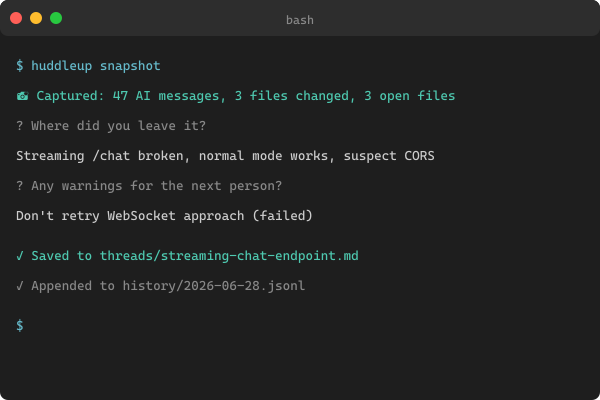
huddleup snapshot

# Dev B — picks up exactly where Dev A left off, in any AI tool
huddleup resume streaming-chat-endpoint
The resume command prints a full YOU ARE HERE briefing, opens the relevant files in your editor, and injects the captured context into your active AI tool. Next prompt has memory of everything. Zero hallucination handoff.
💡 Token Exhaustion Protocol — the AI tool config files HuddleUp generates carry an instruction telling the AI to auto-run
huddleup snapshotwhen it's near token exhaustion (~10% remaining). So even if a human forgets, the AI doesn't.
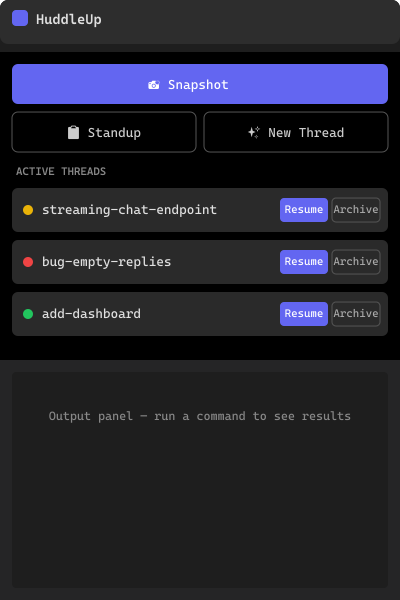
Screenshots (VS Code extension)
| Sidebar | Snapshot | Resume |
|---|---|---|
 |
 |
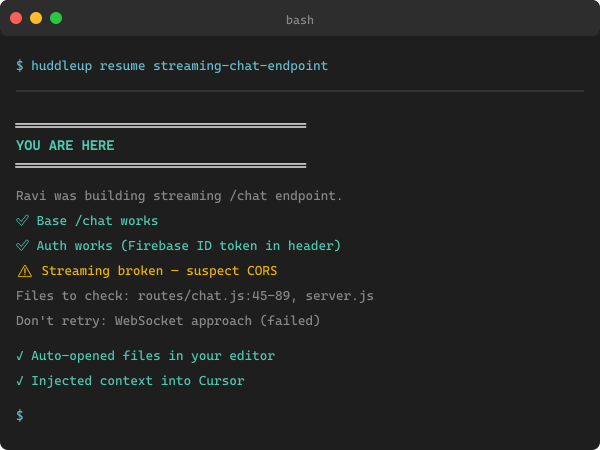 |
The CLI works headlessly too — same commands, same data, same .huddleup/ folder. Use whichever fits your loop.
Quick start
1. Install
# CLI
npm install -g huddleup

# Or use without installing
npx huddleup init
2. Initialise in your project
cd your-project
huddleup init
This scaffolds .huddleup/ and generates one config file per AI tool:
your-project/
├── .huddleup/
│   ├── charter.md          # your project's single source of truth
│   ├── config.json
│   ├── threads/            # active work threads
│   ├── history/            # append-only event log
│   └── playbook/           # reusable team patterns
├── CLAUDE.md               # for Claude Code
├── .cursor/rules/huddleup.mdc   # for Cursor
├── AGENTS.md               # for Codex / Copilot / generic
└── .windsurfrules          # for Windsurf
3. Daily loop
huddleup thread new "streaming-chat-endpoint"   # start a feature
# ...code with your AI tool as usual...
huddleup snapshot                               # save before a break
huddleup resume streaming-chat-endpoint         # tomorrow / teammate picks up
huddleup standup                                # see what the whole team is mid-stream on
huddleup archive streaming-chat-endpoint        # done — file it away
Full walkthrough in docs/getting-started.md.
Commands
| Command | What it does | Frequency |
|---|---|---|
huddleup init |
Scaffold .huddleup/ and AI tool config files |
Once per project |
huddleup snapshot |
Save current work state to a thread | Multiple times daily |
huddleup resume <thread> |
Load briefing + open files + inject context | Multiple times daily |
huddleup sync |
Regenerate AI tool files from charter | After charter edits |
huddleup thread new <name> |
Create a new work thread | Per feature/bug |
huddleup thread list |
List active threads | As needed |
huddleup thread show <name> |
Print a thread | As needed |
huddleup standup |
Team status board (active threads + today's events) | Daily |
huddleup handoff [user] |
Snapshot + auto-commit + notify | Explicit handoffs |
huddleup archive <thread> |
Mark thread complete | Per feature/bug |
hup is a short alias for everything: hup snapshot, hup resume, etc.
How a snapshot is built
You run: huddleup snapshot
        │
        ▼
┌──────────────────────────────────────────────┐
│  AUTO-CAPTURE (zero effort):                 │
│  • git diff (staged + unstaged)              │
│  • currently open files                      │
│  • last N AI messages, detected from         │
│    Claude / Cursor / Copilot / Codex /       │
│    Windsurf session files on disk            │
│  • author, timestamp, tool used              │
└──────────────────────────────────────────────┘
        │
        ▼
┌──────────────────────────────────────────────┐
│  ONE QUESTION (30 seconds):                  │
│  "Where did you leave it?"                   │
└──────────────────────────────────────────────┘
        │
        ▼
┌──────────────────────────────────────────────┐
│  .huddleup/threads/<name>.md  (markdown)     │
│  .huddleup/history/<date>.jsonl  (event log) │
└──────────────────────────────────────────────┘
        │
        ▼
   git commit & push → teammate runs `huddleup resume`
Everything is plain markdown + git — no proprietary format, no backend, no MCP server, no lock-in.
Supported AI tools
| Tool | Adapter | Detection | Status |
|---|---|---|---|
| Claude Code | src/adapters/claude-code.ts |
~/.claude/sessions/*.jsonl |
✅ Production |
| Cursor | src/adapters/cursor.ts |
.cursor/sessions/*.jsonl |
✅ Production |
| GitHub Copilot | src/adapters/copilot.ts |
VS Code globalStorage (github.copilot-chat) |
✅ Production |
| Codex | src/adapters/codex.ts |
~/.codex/ and %APPDATA%/Codex |
✅ Production |
| Windsurf | src/adapters/windsurf.ts |
%APPDATA%/Windsurf, ~/.windsurf/, ~/.codeium/ |
✅ Production |
| Generic | src/adapters/generic.ts |
Fallback — always writes AGENTS.md |
✅ Production |
Adding a new tool is one PR (≈80 LOC). See docs/adapters.md.
What lives where
huddleup/
├── bin/                   CLI entry binary
├── src/                   CLI source (TypeScript, ESM)
│   ├── commands/          one file per command
│   ├── adapters/          one file per AI tool
│   ├── core/              git, files, thread, snapshot, charter, history, markdown
│   ├── templates/         default content for generated files
│   ├── prompts/           interactive CLI prompts
│   └── utils/             logger, colors, editor
├── tests/                 unit + integration tests, captured fixtures
├── scripts/               build-raster-assets.mjs (sharp + to-ico)
├── assets/brand/          logo, colour, type, raster exports, brand.md
├── docs/                  getting-started, adapters, awesome-list-submissions
├── vscode-huddleup/       VS Code extension (separate npm project + .vsix)
└── landing/               Astro 5 static marketing site
Install the VS Code extension
Search HuddleUp in VS Code Extensions, or get it from the Marketplace.
Cursor / VSCodium / Windsurf users — Open VSX publish is in the roadmap.
Brand
Logo, colours, and the full brand kit live in assets/brand/. See assets/brand/brand.md for guidelines.
The mark is Hex Huddle — six teammates arranged in a hexagonal ring around a central huddle point. Primary colour: indigo #6366F1.
Re-export rasters with:
npm run build:assetsDevelopment
Prerequisites
- Node.js 20+ (LTS)
- npm 9+
- Git
Setup
git clone https://github.com/anandsundaramoorthysa/huddleup
cd huddleup
npm install
npm run build
npm test
Scripts
| Script | What it does |
|---|---|
npm run build |
TypeScript compile (dist/) |
npm run build:assets |
Regenerate raster brand assets (PNG/ICO) |
npm run dev |
TypeScript watch mode |
npm test |
Run all 35 tests (Vitest) |
npm run test:watch |
Vitest in watch mode |
npm run typecheck |
tsc --noEmit |
npm run start |
Run the CLI from bin/huddleup.js |
Tests
npm test
# Test Files  7 passed (7)
#      Tests  35 passed (35)
Unit tests cover the data model and templating; integration tests fuzz every adapter against captured-shape session fixtures for all five supported AI tools.
Full contributor workflow in CONTRIBUTING.md.
Contributing
Bug reports, new adapters, features, and doc fixes are all welcome.
- Discuss first for non-trivial changes — open an issue.
- Match the style — TypeScript strict, no emoji in source code, Conventional Commits in PR titles.
- See
CONTRIBUTING.mdfor setup, project structure, testing conventions, and the PR checklist.
This project follows the Contributor Covenant 2.1.
Security
If you find a security issue, don't open a public issue — email sanand03072005@gmail.com. Full disclosure policy in SECURITY.md.
Status
| Phase | Status |
|---|---|
| CLI (8 commands, 6 adapters, Token Exhaustion Protocol) | ✅ Shipped |
| Tests (35 passing — 23 unit + 12 integration) | ✅ Shipped |
| Documentation + community files (CHANGELOG, CONTRIBUTING, CoC, SECURITY) | ✅ Shipped |
| Brand kit (SVG + PNG + ICO, brand guidelines) | ✅ Shipped |
VS Code extension (.vsix packaged, hardened) |
✅ Shipped — Marketplace publish + Open VSX pending |
| Landing site (Astro 5, Cloudflare Pages-ready) | ✅ Built — deploy pending |
| npm publish + Show HN launch | 🟡 Imminent |
| Hosted team dashboard (Phase 6) | 🔲 Gated until ≥500 stars or ≥50 installs |
Full project plan and roadmap in HuddleUp-Plan.md (private — not in this repo).
Acknowledgements
Built by @anandsundaramoorthysa. Inspired by the OSS dev-tools tradition of git stash, git rerere, tmux session save/restore, and the recent surge of "AI coding context" tools — none of which solve cross-tool team handoff.
Honourable mentions to projects that explore adjacent space:
License
Released under AGPL-3.0 with a CLA.
- You can use HuddleUp commercially in-house.
- You can fork and modify, including for hosted services, as long as you publish your changes under AGPL-3.0.
- We retain relicensing rights via the CLA for a future hosted/SaaS layer.
GitHub · npm · VS Code Marketplace · Website