
Package Exports
- hyper-font-ligatures
This package does not declare an exports field, so the exports above have been automatically detected and optimized by JSPM instead. If any package subpath is missing, it is recommended to post an issue to the original package (hyper-font-ligatures) to support the "exports" field. If that is not possible, create a JSPM override to customize the exports field for this package.
Readme
hyper-font-ligatures
Enables font ligatures for hyper 2.1+ via the xterm-addon-ligatures and font-ligatures packages.
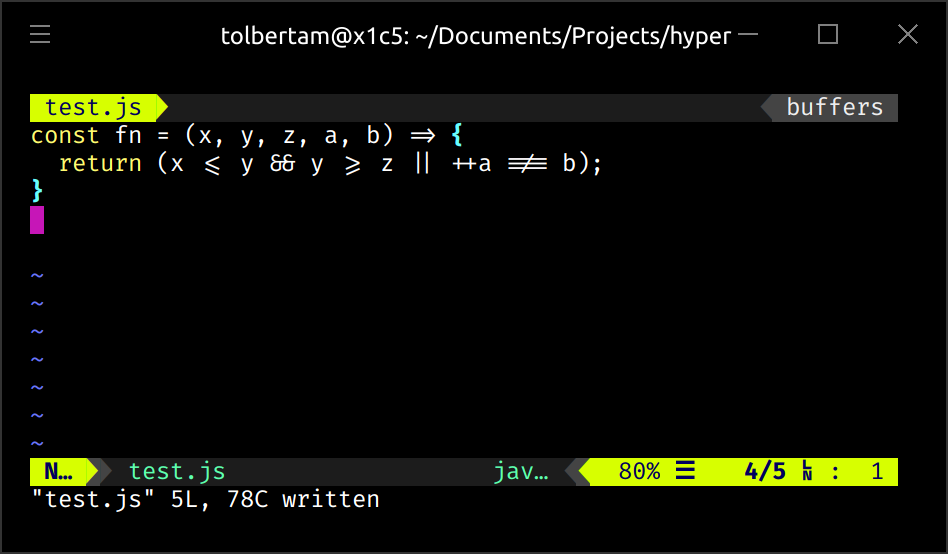
Use fonts supporting ligatures such as Fira Code, Hasklig, and Iosevka to benefit from this plugin.
Installation
Disclaimer: Please note that this plugin requires hyper version 2.1.0 or later.
Also note: For those on hyper 3+, you must disable WebGL rendering for this plugin to function.
Using the built-in hyper plugin manager
$ hyper i hyper-font-ligaturesUsing the .hyper.js file
Open the .hyper.js file using your favorite text editor and edit the
plugins array to include hyper-font-ligatures:
plugins: ['hyper-font-ligatures'],Disabling WebGL Rendering
if you are running hyper 3+, this plugin currently does not work with hyper 3 unless you disable WebGL rendering.
Note that WebGL rendering was a major performance improvement introduced in hyper 3, by disabling it you should expect the same level of performance seen with hyper 2.
To disable WebGL rendering, set webGLRenderer to false in the config
section of your
.hyper.js configuration file, i.e.:
module.exports = {
  config: {
    webGLRenderer: false,
  },
  plugins: [
    "hyper-font-ligatures"
  ],
};
See issue #8 and zeit/hyper#3607 more details.
In all cases, a 'Full Reload' (View -> Full Reload) is required.