Package Exports
- markdown-it-vue
- markdown-it-vue/dist/markdown-it-vue.css
- markdown-it-vue/dist/markdown-it-vue.umd.min.js
This package does not declare an exports field, so the exports above have been automatically detected and optimized by JSPM instead. If any package subpath is missing, it is recommended to post an issue to the original package (markdown-it-vue) to support the "exports" field. If that is not possible, create a JSPM override to customize the exports field for this package.
Readme
markdown-it-vue

The vue lib for markdown-it.
Demo online
http://www.aqcoder.com/markdown
Install
npm install markdown-it-vueRunning Demo
yarn install && yarn devSupports
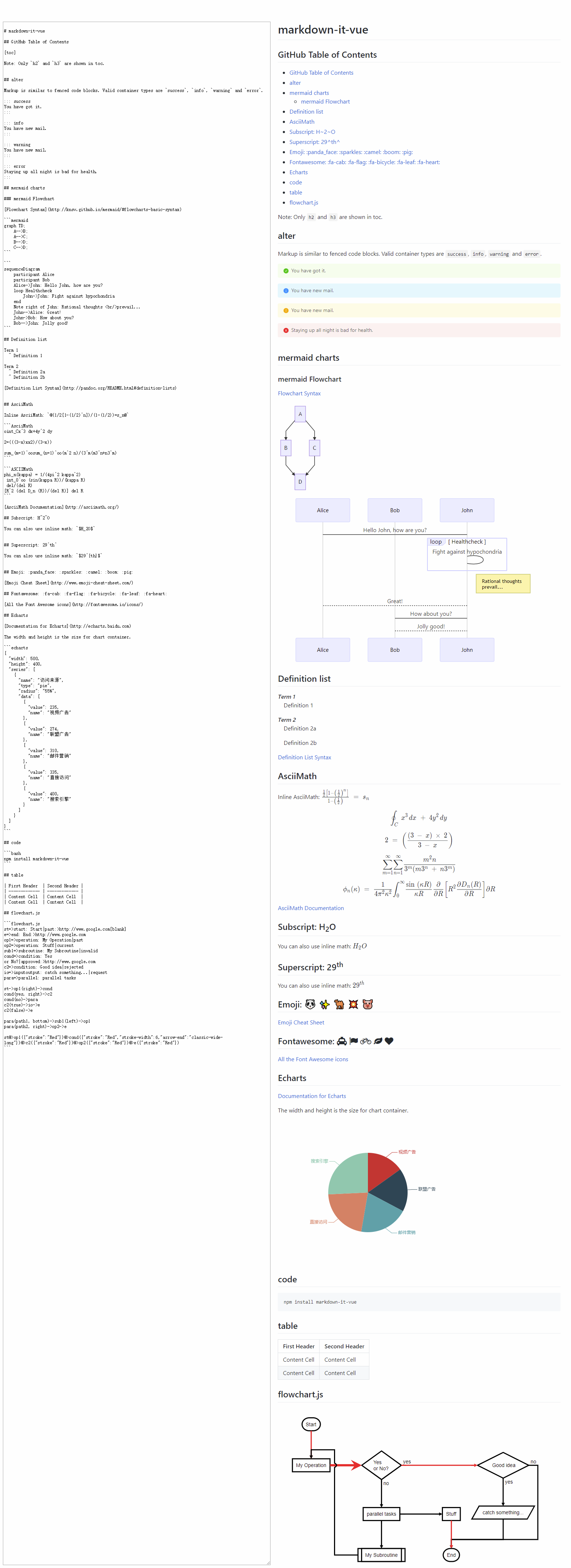
- Image size and Viewer
- Official markdown syntax.
- GFM TOC
- GFM style
- emoji
- mermaid charts
- Echarts simple only
- Flowcharts.js
- Subscript/Superscript
- AsciiMath
- info | error | warning message tip
Plugin list
- markdown-it
- markdown-it-emoji
- markdown-it-sub
- markdown-it-sup
- markdown-it-footnote
- markdown-it-deflist
- markdown-it-abbr
- markdown-it-ins
- markdown-it-mark
- markdown-it-katex
- markdown-it-task-lists
- markdown-it-highlight
- markdown-it-latex
- markdown-it-container
- markdown-it-github-toc
- markdown-it-source-map
- markdown-it-link-attributes
internal plugin list:
- markdown-it-image
- markdown-it-font-awsome
- markdown-it-link-attributes
- markdown-it-highlight
- markdown-it-plugin-echarts
- markdown-it-plugin-mermaid
- markdown-it-plugin-flowchart
Options
use options property to sepcial the options of markdow-it and markdown-it-plugins.
<markdown-it-vue class="md-body" :content="content" :options="options" />options: {
markdownIt: {
linkify: true
},
linkAttributes: {
attrs: {
target: '_blank',
rel: 'noopener'
}
}
}more markdown-it options see https://markdown-it.github.io/markdown-it/.
amd default plugins options:
{
  linkAttributes: {
    attrs: {
      target: '_blank',
      rel: 'noopener'
    }
  },
  katex: {
    throwOnError: false,
    errorColor: '#cc0000'
  },
  icons: 'font-awesome',
  githubToc: {
    tocFirstLevel: 2,
    tocLastLevel: 3,
    tocClassName: 'toc',
    anchorLinkSymbol: '',
    anchorLinkSpace: false,
    anchorClassName: 'anchor',
    anchorLinkSymbolClassName: 'octicon octicon-link'
  },
  mermaid: {
    theme: 'default'
  },
  image: {
    hAlign: 'left',
    viewer: true
  }
}
More plugins
it can add your plugin to markdown-it-vue by the use method.
this.$refs.myMarkdownItVue.use(MyMarkdownItPlugin)support hilight lang
PR for you lang wich you want.
- html
- json
- css
- shell
- bash
- C
- Java
- Python
- C++
- C#
- PHP
- SQL
- R
- Swift
- Go
- MATLAB
- Ruby
- Perl
- Objective-C
- Rust
- Dart
- Delphi
- D
- Kotlin
- Scala
- SAS
- Lisp
- Lua
- Ada
- Fortran
- PowerShell
- VBScript
- VBscript-html
- Groovy
- Julia
- Julia-repl
- LabVIEW
- Haskell
- ActionScript
- Scheme
- TypeScript
- F#
- Prolog
- Erlang
image size


about echarts
use echarts.simple to reduce the bundle size.
markdown-it-vue-light
markdown-it-vue-light remove the mermaid chart to reduce the bundle size.
https://github.com/ravenq/markdown-it-vue/issues/24
for a small bundle size, it better to import the markdown-it-vue-light.
Usage
<template>
  <div>
    <markdown-it-vue class="md-body" :content="content" />
  </div>
</template>

<script>
import MarkdownItVue from 'markdown-it-vue'
import 'markdown-it-vue/dist/markdown-it-vue.css'
export default {
  components: {
    MarkdownItVue
  },
  data() {
    return {
      content: '# your markdown content'
    }
  }
}
</script>
the light model.
<template>
  <div>
    <markdown-it-vue-light class="md-body" :content="content" />
  </div>
</template>

<script>
import MarkdownItVueLight from 'markdown-it-vue/dist/markdown-it-vue-light.umd.min.js'
import 'markdown-it-vue/dist/markdown-it-vue-light.css'
export default {
  components: {
    MarkdownItVueLight
  },
  data() {
    return {
      content: '# your markdown content'
    }
  }
}
</script>
ScreenShot