
Package Exports
- paws-http
- paws-http/dist/cli.js
This package does not declare an exports field, so the exports above have been automatically detected and optimized by JSPM instead. If any package subpath is missing, it is recommended to post an issue to the original package (paws-http) to support the "exports" field. If that is not possible, create a JSPM override to customize the exports field for this package.
Readme
paws-http
A terminal-native HTTP flow runner. Run and explore Rider/IntelliJ
.httpfiles from the command line, with an interactive three-pane TUI or straight-line output for CI.
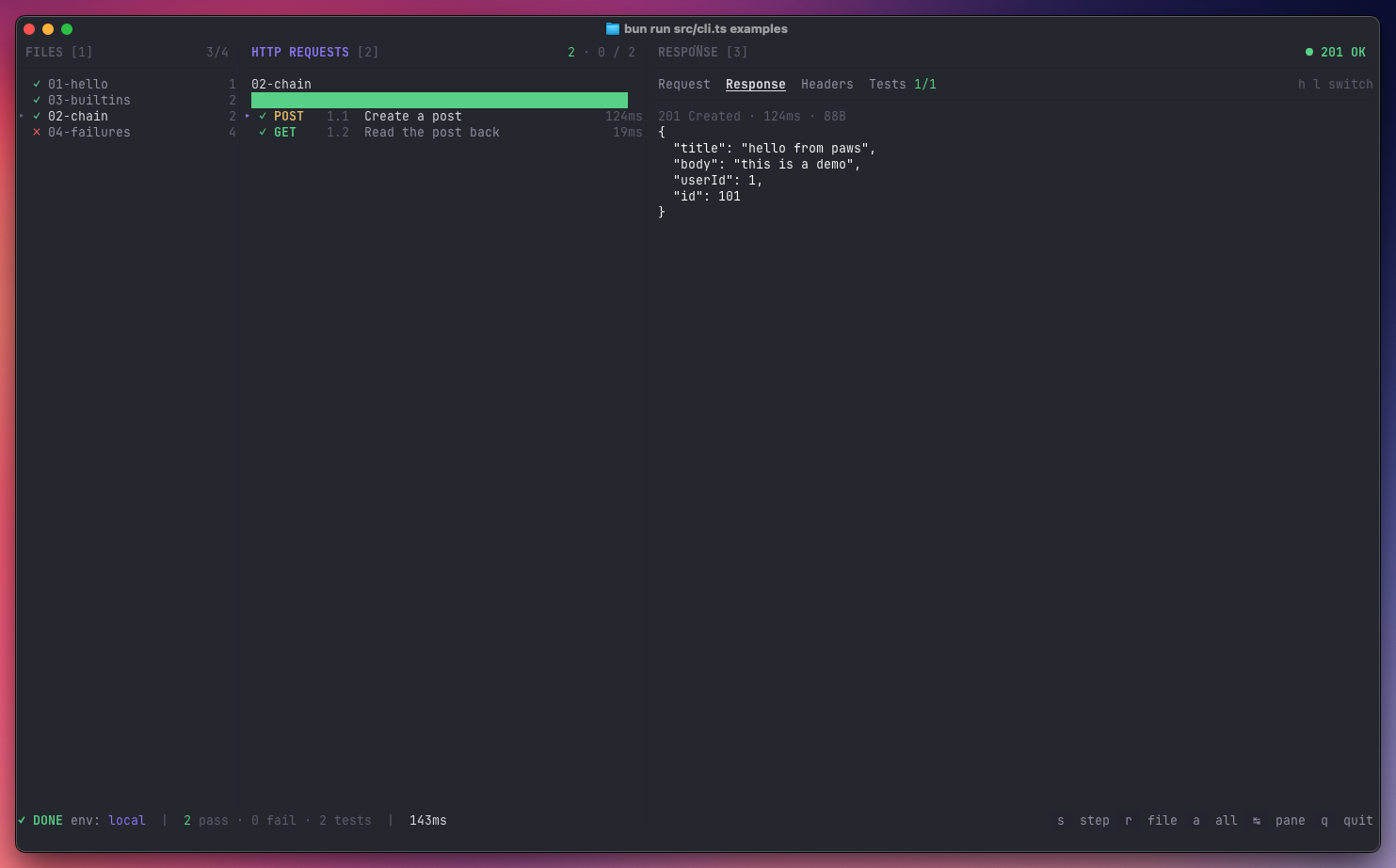
paws-http is to the terminal what the JetBrains HTTP Client is to Rider. Point
it at a .http file (or a directory full of them) and it'll run the requests,
execute the JavaScript pre- and post-scripts, evaluate
client.test/client.assert assertions, and chain values between steps via
client.global.set.
Why
- Runs where Rider can't — CI, remote SSH, containers, Linux boxes.
- Same files as Rider — no separate format to maintain.
- Fast feedback — an interactive TUI for day-to-day exploration, a pretty console reporter for scripts and pipelines.
Install
Run it without installing:
npx paws-httpOr install globally:
npm install -g paws-httpRequires Node.js 22+.
Hacking on
paws-httpitself? See CONTRIBUTING.md for the source-based setup with Bun.
Quick start
Try the bundled examples (they hit public APIs — no local server needed):
paws-http                         # launcher
paws-http run examples            # interactive three-pane view
paws-http run examples/01-hello.http
paws-http run examples/01-hello.http --only 1.1   # single step, non-interactive
Usage
paws-http                         browse files interactively (launcher)
paws-http run <file.http>         run a single .http flow
paws-http run <dir>               run every .http in a directory, recursively
paws-http run <file> --only 1.3   run one step from a file
paws-http env list                list environments in the nearest env.json

  -e, --env <name>          environment (default: local)
  -f, --fail-fast           stop on the first failed step
      --only <step>         run only the step with this num (e.g. 1.2)
  -n, --non-interactive     force the console reporter (skip the TUI)
paws-http auto-picks a mode: if your terminal is a TTY you get the Ink-based
three-pane TUI; otherwise you get a coloured console report and a non-zero exit
code on failure. Pass -n / --non-interactive (or set CI=1, or pipe stdout)
to force the console reporter explicitly — handy for scripts and pipelines.
Interactive keys
Navigation
| key | action |
|---|---|
← / → |
cycle panes (Files → Requests → Response) |
Tab |
next pane |
1 2 3 |
jump to Files / Requests / Response |
↑ / ↓ |
move within the active pane |
, / . |
cycle through files (works in any pane) |
h / l |
switch tab in the Response pane |
Running
| key | action |
|---|---|
s |
run the selected step (only) |
r |
run every step in the active file |
a |
run every step in every file |
Other
| key | action |
|---|---|
q |
quit |
esc |
quit |
Environments
paws-http reads the same environment files as Rider, discovered by walking up
from the .http file:
http-client.env.json— checked into the repo, one object per environment.http-client.private.env.json— gitignored, merged on top for local secrets.
{
  "local": {
    "baseurl": "http://localhost:8080",
    "Security": {
      "Auth": {
        "admin_auth": { "Type": "Mock", "Token": "{{admin_token}}" }
      }
    }
  },
  "dev": {
    "baseurl": "https://api.example.dev",
    "Security": {
      "Auth": { "admin_auth": { "Type": "OAuth2" } }
    }
  }
}
OAuth2 entries in v1 look for a pre-fetched bearer token under
Security.Auth.<name>.Token in the private env file — paws-http won't run the
OAuth2 flow for you.
Supported HTTP file syntax
### 1.1 Titleseparators (numeric labels optional)- All methods:
GET / POST / PUT / PATCH / DELETE / HEAD / OPTIONS - Short-form GET: a bare URL on a line after
### - Optional trailing
HTTP/1.1on the request line - Indented URL continuation lines
- Headers:
Key: Value - Bodies: inline JSON / text, or
< ./path/to/filefor a file upload < {% … %}pre-request script> {% … %}response handler (client.test,client.assert, etc.)- Built-in vars:
{{$timestamp}}{{$uuid}}{{$random.integer(a, b)}}{{$auth.token("name")}} - Environment files (
http-client.env.json+ private overrides) #and//comments
Not yet supported: import … from "utilities", OAuth2 flows, JSONPath body
expansion ({{$.items..name}}).
Example .http file
### 1.1 Create a post
POST {{baseurl}}/posts
Content-Type: application/json

{
  "title": "hello",
  "userId": 1
}

> {%
    client.test("created", function() {
        client.assert(response.status === 201, "expected 201");
    });
    client.global.set("post_id", response.body.id);
%}

### 1.2 Read it back
GET {{baseurl}}/posts/{{post_id}}
License
MIT — see LICENSE.