
Package Exports
This package does not declare an exports field, so the exports above have been automatically detected and optimized by JSPM instead. If any package subpath is missing, it is recommended to post an issue to the original package (pi-voice-stt) to support the "exports" field. If that is not possible, create a JSPM override to customize the exports field for this package.
Readme
Pi Voice STT
Provider-agnostic speech-to-text dictation for the Pi coding agent TUI.
Press Ctrl+R to record your microphone, press it again to transcribe and insert the transcript into the active prompt, press Enter while recording to transcribe and send it directly to chat, or press Esc to cancel recording/transcription.
This project is intentionally small and hackable: a Pi extension, an ffmpeg recorder, and OpenAI-compatible/Mistral transcription providers.
Features
- Pi TUI extension with
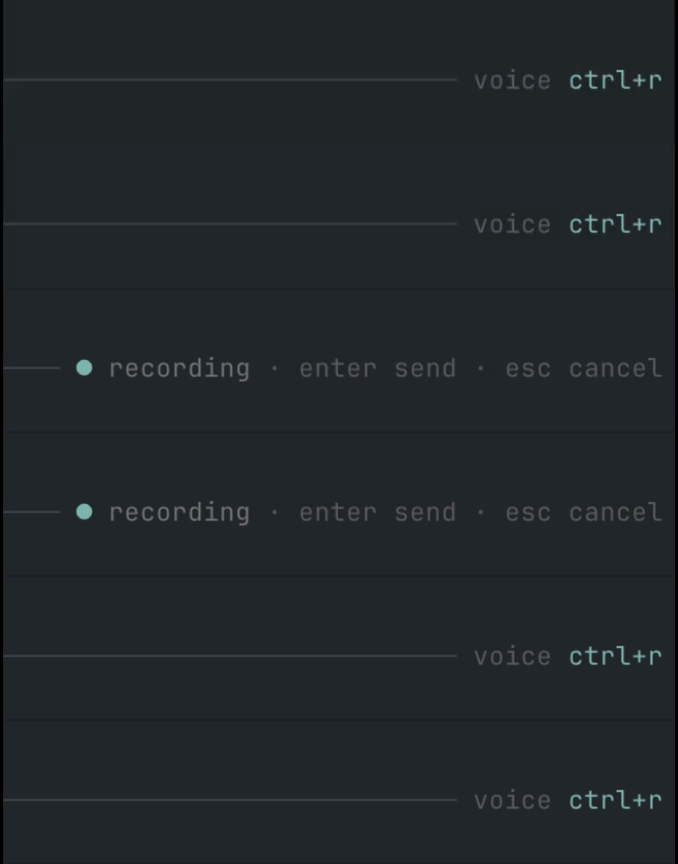
/sttcommand andCtrl+Rshortcut. Enter-to-send andEsc-to-cancel while recording.- Pi-native animated input indicator, right-aligned in the prompt border (
voice ctrl+r,● recording,• transcribing). ffmpegmicrophone capture to temporary WAV files.- Mistral Voxtral provider.
- OpenAI / Groq / generic OpenAI-compatible provider for hosted and local Whisper-style endpoints.
- Native provider integrations for Deepgram, ElevenLabs Scribe, Gladia, and AssemblyAI.
- Environment variable and macOS Keychain secret lookup.
- HTTPS-by-default endpoint policy; plain HTTP is allowed only for loopback hosts.
- TypeScript source loaded directly by Pi; no build step required for runtime.
Requirements
- Pi
>= 0.75. - Node.js
>= 20when developing locally. ffmpegavailable inPATHor configured withcapture.ffmpegPath.- Microphone permission for the terminal app running Pi.
- A transcription backend (Mistral, OpenAI/Groq, Deepgram, ElevenLabs, Gladia, AssemblyAI, or a local OpenAI-compatible server).
Installation
From GitHub
pi install npm:pi-voice-sttRestart Pi or run /reload.
GitHub install also works:
pi install git:github.com/cgarrot/pi-voice-sttLocal development install
git clone https://github.com/cgarrot/pi-voice-stt.git
cd pi-voice-stt
npm install
npm run ci
pi -e .
You can also add the local path to Pi settings:
pi install /absolute/path/to/pi-voice-sttConfiguration
Pi Voice STT reads configuration from the first available source:
PI_STT_CONFIG=/path/to/config.json~/.pi/agent/stt.json- built-in defaults
The shortcut defaults to Ctrl+R. Override it with either:
PI_STT_KEYBIND=ctrl+shift+r pior a top-level keybind in the config file. Environment wins at startup.
Note: the keybinding is registered when the extension loads. After changing
PI_STT_KEYBINDorkeybind, restart Pi or run/reloadfrom a Pi process launched with the new environment.
Mistral Voxtral
{
  "keybind": "ctrl+r",
  "capture": {
    "type": "ffmpeg",
    "inputFormat": "avfoundation",
    "input": ":0",
    "sampleRate": 16000,
    "channels": 1,
    "maxSeconds": 120,
    "minBytes": 4096
  },
  "provider": {
    "type": "mistral",
    "model": "voxtral-mini-2602",
    "apiKeyEnv": "MISTRAL_API_KEY",
    "language": "fr"
  },
  "output": {
    "appendTrailingSpace": true
  }
}
OpenAI
{
  "provider": {
    "type": "openai",
    "model": "gpt-4o-mini-transcribe",
    "apiKeyEnv": "OPENAI_API_KEY",
    "language": "en"
  }
}
You can also use model: "whisper-1" or any OpenAI transcription model supported by your account.
Groq / Whisper
{
  "provider": {
    "type": "groq",
    "model": "whisper-large-v3-turbo",
    "apiKeyEnv": "GROQ_API_KEY",
    "language": "en"
  }
}
Generic OpenAI-compatible endpoint
{
  "provider": {
    "type": "openai-compatible",
    "endpoint": "https://api.openai.com/v1/audio/transcriptions",
    "model": "whisper-1",
    "apiKeyEnv": "OPENAI_API_KEY",
    "language": "en"
  }
}
Deepgram
{
  "provider": {
    "type": "deepgram",
    "model": "nova-3",
    "apiKeyEnv": "DEEPGRAM_API_KEY",
    "language": "en",
    "smartFormat": true
  }
}
ElevenLabs Scribe
{
  "provider": {
    "type": "elevenlabs",
    "model": "scribe_v1",
    "apiKeyEnv": "ELEVENLABS_API_KEY",
    "language": "en"
  }
}
Gladia
{
  "provider": {
    "type": "gladia",
    "apiKeyEnv": "GLADIA_API_KEY",
    "language": "en",
    "pollIntervalMs": 1000
  }
}
"gradium" is accepted as a compatibility alias for "gladia" in case you remember the provider by that name.
AssemblyAI
{
  "provider": {
    "type": "assemblyai",
    "model": "universal",
    "apiKeyEnv": "ASSEMBLYAI_API_KEY",
    "language": "en",
    "pollIntervalMs": 1000
  }
}
Local STT server
{
  "provider": {
    "type": "openai-compatible",
    "endpoint": "http://localhost:10301/v1/audio/transcriptions",
    "model": "whisper-1",
    "apiKeyEnv": "",
    "language": "en"
  }
}
Plain HTTP is accepted only for localhost, 127.0.0.1, or ::1.
Audio capture notes
The extension records through ffmpeg. Platform defaults are:
| OS | inputFormat |
input |
|---|---|---|
| macOS | avfoundation |
:0 |
| Linux | pulse |
default |
| Windows | dshow |
audio=Microphone |
On macOS, list devices with:
ffmpeg -f avfoundation -list_devices true -i ""Then set capture.input, for example ":0" or ":1".
On Linux, you may prefer PulseAudio/PipeWire (pulse) or ALSA (alsa) depending on your system.
Usage
The voice state is displayed inside the input area, right-aligned on the prompt border, so it stays close to where you are typing without taking over the footer/token line. Recording uses a subtle blinking dot; transcription uses a small horizontal moving dot.
| Action | Behavior |
|---|---|
Ctrl+R while idle |
Start recording |
Ctrl+R while recording |
Stop, transcribe, insert transcript into the prompt |
Enter while recording |
Stop, transcribe, insert transcript, send prompt to chat |
Esc while recording/processing |
Cancel recording or transcription |
/stt status |
Show current mode and config source |
/stt doctor |
Check config, provider readiness, and ffmpeg -version |
/stt start |
Start recording |
/stt stop |
Stop and insert transcript |
/stt send |
Stop and send to chat |
/stt cancel |
Cancel active recording/transcription |
Secret handling
Prefer environment variables:
export MISTRAL_API_KEY=...
export OPENAI_API_KEY=...
export GROQ_API_KEY=...
export DEEPGRAM_API_KEY=...
export ELEVENLABS_API_KEY=...
export GLADIA_API_KEY=...
export ASSEMBLYAI_API_KEY=...
On macOS, you can also use Keychain:
{
  "provider": {
    "type": "mistral",
    "keychainService": "pi-voice-stt",
    "keychainAccount": "your-account"
  }
}
The extension calls:
security find-generic-password -w -s <service> -a <account>Development
npm install
npm run check
npm test
npm run smoke
npm run ci
Project layout:
src/index.ts                 Pi extension entry point
src/core/                    dictation state machine
src/audio/                   ffmpeg recorder
src/providers/               STT provider abstraction
src/config/                  config loading and validation
src/ui/                      Pi TUI input indicator and editor wrapper
examples/                    ready-to-copy config files
Design goals
- Keep provider code independent from Pi so new backends are easy to add.
- Keep the Pi integration thin and readable.
- Match Pi's TUI style by default: compact input-border status instead of a separate footer widget.
- Avoid storing secrets in sessions or config examples.
- Use only Node built-ins at runtime.
- Fail safely: clean up temporary files and stop
ffmpegon cancel, reload, or exit.
License
MIT