
Package Exports
- quick-commitizen
This package does not declare an exports field, so the exports above have been automatically detected and optimized by JSPM instead. If any package subpath is missing, it is recommended to post an issue to the original package (quick-commitizen) to support the "exports" field. If that is not possible, create a JSPM override to customize the exports field for this package.
Readme
quick-commitizen
This tool is for quick config on commitizen. Setting your repo to use AngularJS's commit message convention also known as conventional-changelog.
// commit msg format:
<type>(<scope>): <subject>
<BLANK LINE>
<body>
<BLANK LINE>
<footer>
Install
npm install -g quick-commitizenUsage
// All you need to do is
quickcm
// or
quickcm -p yarn
The above command does:
- Installs
commitizen cz-conventional-changelog @commitlint/cli husky conventional-changelog-climodule - Saves it to devDependencies
- adds belowe keys to the root of your package.json
{
  ...

  "config": {
      "commitizen": {
        "path": "./node_modules/cz-conventional-changelog"
      }
    },
    "husky": {
      "hooks": {
        "commit-msg": "commitlint -E HUSKY_GIT_PARAMS"
      }
    },
    "scripts": {
      "std-cm": 'git-cz',
      "changelog": "conventional-changelog -p angular -i CHANGELOG.md -s && git add CHANGELOG.md"
    }
}- adds the
commitlint.config.jsto root directory.
Now, you can use
npm run std-cminsteadgit commit. you'll be you'll be prompted to fill in any required fields and your commit messages will be formatted according to the standards defined by project maintainers. details. like:
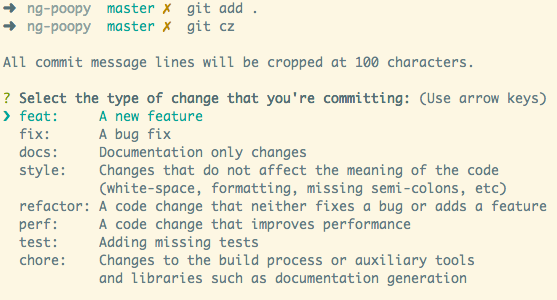
when you release a version, you can run npm run changelog to generate CHANGELOG.md that contains your commit messages.
Related projects
- conventional-changelog – Generate a changelog from conventional commit history
- commitlint - Lint commit messages