
Package Exports
- react-awesome-iframe
This package does not declare an exports field, so the exports above have been automatically detected and optimized by JSPM instead. If any package subpath is missing, it is recommended to post an issue to the original package (react-awesome-iframe) to support the "exports" field. If that is not possible, create a JSPM override to customize the exports field for this package.
Readme
React Awesome IFrame
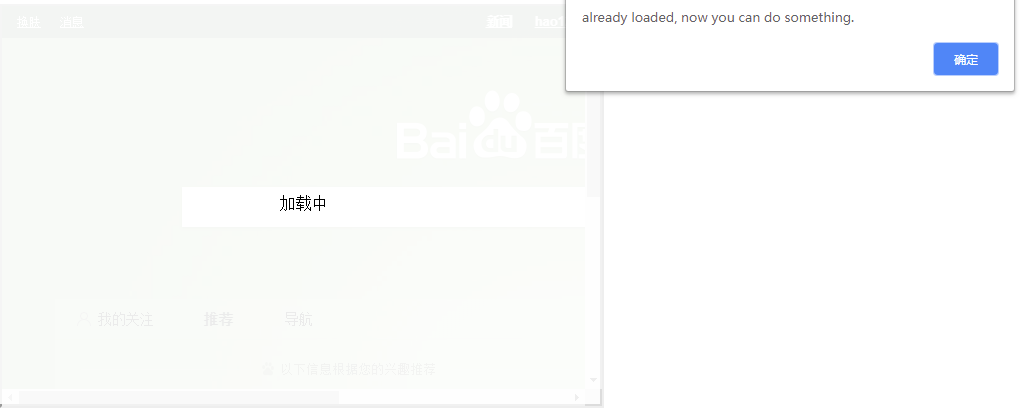
React Awesome IFrame Components. Adding Loading Options and loadFunc, you can do something when load iframe
Installation
npm install react-awesome-iframe
or
yarn add react-awesome-iframe
Usage - Sample
import React from "react";
import IFrame from "react-iframe";

const iframeProps = {
    loading: true,
    loadingText: "加载中",
    width: "100%",
    height: window.innerHeight - 30,
    src: "https://xxx",
    loadFunc: function() {
        alert("already loaded, now you can do something.");
    }
};

const Example = () => <IFrame {...iframeProps} />;

export default Example;
效果图如下
Properties
| Attribute | Desc | Type | Default Value |
|---|---|---|---|
| loading | need show iframe loading | boolean | true |
| loadingText | Loading Text Show | string | Loading |
| loadFunc | loadFunc Function, when Load, you can do something | function(e) |
Tips: You can also use default Props
Default Properties
allow - Specifies a feature policy for the iframe.
allowfullscreen - allow iframe fullscreen.
src - string if set, overrides url.
scrolling - string not set if if not provided (deprecated in HTML5).
frameBorder - number default to "0" (deprecated in HTML5).
longdesc - A URL of a long description of the frame's content. Due to widespread misuse, this is not helpful for non-visual browsers. )
height - string (1px > any number above 0, or 1% to 100%)
width - string (1px > any number above 0, or 1% to 100%)
sandbox - add optional sandbox values ("allow-forms allow-pointer-lock allow-popups allow-same-origin allow-scripts allow-top-navigation")
other props - iframe can support's props
License
MIT