

Package Exports
- tagcloud-hls
- tagcloud-hls/dist/tagcloud-hls.js
This package does not declare an exports field, so the exports above have been automatically detected and optimized by JSPM instead. If any package subpath is missing, it is recommended to post an issue to the original package (tagcloud-hls) to support the "exports" field. If that is not possible, create a JSPM override to customize the exports field for this package.
Readme
English | 中文
TagCloud-HLS



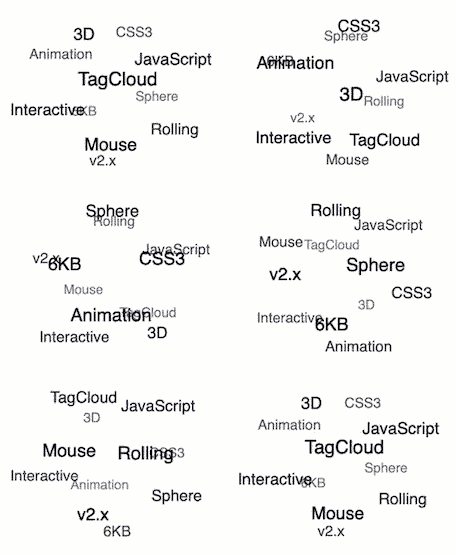
It's 3D TagCloud that rolling with the mouse. It's only 6KB in minsize and doesn't depend on other libraries. Examples
✨ New Features: Weight-based font sizing, HSL color gradients, object format support, rectangular layouts, auto-sizing
- Usage
- Constructor
- Instance
- Advanced Examples
- Custom event handler
- License
Usage
npm
$ npm i -S tagcloud-hlsconst TagCloud = require('tagcloud-hls');
// Or use ES6 modules
import TagCloud from 'tagcloud-hls';
const container = '.tagcloud';
// Traditional string format
const texts = [
'3D', 'TagCloud', 'JavaScript',
'CSS3', 'Animation', 'Interactive',
'Mouse', 'Rolling', 'Sphere',
'6KB', 'v2.x',
];
// Or use object format with weights
const textsWithWeights = [
{text: '3D', pr: 8},
{text: 'TagCloud', pr: 10},
{text: 'JavaScript', pr: 9},
{text: 'CSS3', pr: 6},
{text: 'Animation', pr: 7},
{text: 'Interactive', pr: 5},
{text: 'Mouse', pr: 4},
{text: 'Rolling', pr: 3},
{text: 'Sphere', pr: 2},
{text: '6KB', pr: 1},
{text: 'v2.x', pr: 1}
];
const options = {
radius: 120,
maxSpeed: 'normal',
initSpeed: 'normal',
direction: 135,
keep: true,
hls: true, // Enable weight-based coloring
minFontSize: 12, // Minimum font size
maxFontSize: 24 // Maximum font size
};
TagCloud(container, textsWithWeights, options);Browser
<!-- html -->
<script type="text/javascript" src="./dist/tagcloud-hls.min.js"></script>
// Basic usage
const container = '.tagcloud';
const texts = ['HTML', 'CSS', 'JavaScript', 'React', 'Vue'];
const options = {
hls: true, // Enable HSL color gradients
minFontSize: 14,
maxFontSize: 20,
};
TagCloud(container, texts, options);
// With weight support
const textsWithWeight = [
{ text: 'React', pr: 5 },
{ text: 'Vue', pr: 4 },
{ text: 'Angular', pr: 3 },
{ text: 'jQuery', pr: 2 },
];
TagCloud(container, textsWithWeight, options);React
There is a React Component by Frank-Mayer on npm: @frank-mayer/react-tag-cloud
Constructor
TagCloud(container, texts, options)
Returns tagcloud instance.
container
Type: String or HTMLElement or Array
Container for constructing a tagcloud.
texts
Type: Array
List of tag text for init. Supports both string and object formats:
String format (traditional):
const texts = ['HTML', 'CSS', 'JavaScript', 'React'];Object format (with weight support):
const texts = [
    {text: 'HTML', pr: 1},
    {text: 'CSS', pr: 3},
    {text: 'JavaScript', pr: 10},
    {text: 'React', pr: 8}
];
Mixed format:
const texts = [
    'HTML',                    // Default pr = 0
    {text: 'JavaScript', pr: 8}, // Custom weight
    'CSS'                      // Default pr = 0
];- String format: Traditional usage, automatically assigned
pr = 0 - Object format: Allows custom weight (
prvalue) for font size and color calculation - Mixed format: Combines both string and object formats in the same array
options
Type: Object
options.radius
Type: Number
Default: 100
Unit: px
Rolling radius.
options.maxSpeed
Optional: 'slow', 'normal', 'fast'
Default: 'normal'
Rolling max speed.
options.initSpeed
Optional: 'slow', 'normal', 'fast'
Default: 'normal'
Rolling init speed.
options.direction
Type: Number
Default: 135 (right-bottom)
Unit: clockwise deg
Rolling init direction, e.g. 0 (top) , 90 (left), 135 (right-bottom) ...
options.keep
Type: Boolean
Default: true
Whether to keep rolling after mouse out area. Default true (decelerate to rolling init speed, and keep rolling with mouse).
options.reverseDirection
Type: Boolean
Default: false
Whether to reverse the direction when the mouse controls the direction. Default false.
options.containerClass
Type: String
Default: tagcloud
Css class to be used for the tagcloud container. Default tagcloud
options.itemClass
Type: String
Default: tagcloud--item
Css class to be used for tagcloud items. Default tagcloud--item
options.useContainerInlineStyles
Type: Boolean
Default: true
Add inline styles to the tagcloud container which are required for correct view. When this option is disabled you have to add the css by yourself. Default true
options.useItemInlineStyles
Type: Boolean
Default: true
Add common inline styles to the items which are required for correct view. When this option is disabled you have to add the css by yourself. Default true
options.useHTML
Type: Boolean
Default: false
Add html tags with text.Using this will help you add style on elements. Default false
options.minFontSize
Type: Number
Default: 12
Unit: px
Minimum font size for tags. When minFontSize equals maxFontSize, all tags will have the same font size regardless of their weight.
options.maxFontSize
Type: Number
Default: 12
Unit: px
Maximum font size for tags. Tags with higher weight (pr value) will have larger font sizes up to this maximum.
Font Size Examples:
// Same font size for all tags
TagCloud(container, texts, {
    minFontSize: 14,
    maxFontSize: 14
});

// Dynamic font size based on weight
TagCloud(container, texts, {
    minFontSize: 12,
    maxFontSize: 24
});
options.hls
Type: Boolean
Default: false
Enable HSL color mode based on tag weight. When enabled, tags will be colored from cool to warm colors based on their pr values.
Color Algorithm:
- Low weight: Blue (cool colors)
- Medium weight: Green/Cyan
- High weight: Red/Yellow (warm colors)
- Hue range: 240° (blue) → 0° (red)
- Saturation: 60% → 100%
- Lightness: 65% → 35%
HLS Color Examples:
// Enable weight-based coloring
TagCloud(container, texts, {
    hls: true,
    minFontSize: 12,
    maxFontSize: 20
});

// Disable coloring (default CSS colors)
TagCloud(container, texts, {
    hls: false
});
options.width
Type: Number or null
Default: null
Unit: px
Specify container width. If null, will automatically use parent container's width.
options.height
Type: Number or null
Default: null
Unit: px
Specify container height. If null, will automatically use parent container's height.
options.autoResize
Type: Boolean
Default: true
Enable automatic resizing functionality. When enabled, the tag cloud will automatically recalculate layout when parent container size changes. Supports rectangular layouts (aspect ratio other than 1:1).
Examples:
// Auto-adapt to parent container size (rectangular layout supported)
TagCloud('#container', texts, {
    // width and height will be auto-detected from parent
    autoResize: true
});

// Fixed size rectangular layout
TagCloud('#container', texts, {
    width: 600,
    height: 300,
    autoResize: false
});

// Responsive square layout
TagCloud('#container', texts, {
    width: 400,
    height: 400,
    autoResize: true
});
Instance
tagcloud.update(texts)
Update tag list.
tagcloud.pause()
Pause the tagcloud animation.
tagcloud.resume()
Resume the tagcloud animation.
tagcloud.destroy()
Destroy the tagcloud instance.
Advanced Examples
Weight-based Font Sizes and Colors
// Technology stack with different popularity weights
const techStack = [
    {text: 'JavaScript', pr: 95},
    {text: 'React', pr: 88},
    {text: 'Node.js', pr: 82},
    {text: 'Vue.js', pr: 75},
    {text: 'Angular', pr: 68},
    {text: 'TypeScript', pr: 85},
    {text: 'Express', pr: 72},
    {text: 'MongoDB', pr: 65}
];

TagCloud('.tech-cloud', techStack, {
    radius: 150,
    hls: true,           // Enable color gradients
    minFontSize: 14,     // Smallest font
    maxFontSize: 28,     // Largest font
    maxSpeed: 'normal',
    initSpeed: 'normal'
});
Mixed Format Usage
// Combining strings and objects
const mixedTags = [
    'HTML',                      // Default weight (pr: 0) - Blue color
    'CSS',                       // Default weight (pr: 0) - Blue color
    {text: 'JavaScript', pr: 10}, // High weight - Red color, large font
    {text: 'TypeScript', pr: 7},  // Medium-high weight - Orange color
    'Sass',                      // Default weight (pr: 0) - Blue color
    {text: 'React', pr: 9},       // High weight - Red-orange color
    {text: 'Vue', pr: 6}          // Medium weight - Yellow-green color
];

TagCloud('.mixed-cloud', mixedTags, {
    radius: 120,
    hls: true,
    minFontSize: 12,
    maxFontSize: 22
});
Dynamic Updates with Weights
const cloud = TagCloud('.dynamic-cloud', initialTags, {
    hls: true,
    minFontSize: 12,
    maxFontSize: 20
});

// Update with new weighted data
setTimeout(() => {
    const newTags = [
        {text: 'Svelte', pr: 8},
        {text: 'Next.js', pr: 9},
        {text: 'Nuxt.js', pr: 7},
        {text: 'Vite', pr: 6}
    ];
    cloud.update(newTags);
}, 3000);
Custom event handler
Use event delegation bind event listener to TagCloud instance root element
The following is an example, click the TagCloud sub-item to jump to Google to search for keywords.
let rootEl = document.querySelector('.content');
rootEl.addEventListener('click', function clickEventHandler(e) {
    if (e.target.className === 'tagcloud--item') {
        window.open(`https://www.google.com/search?q=${e.target.innerText}`, '_blank');
        // your code here
    }
});
License
MIT