

Package Exports
- vs-debugger
This package does not declare an exports field, so the exports above have been automatically detected and optimized by JSPM instead. If any package subpath is missing, it is recommended to post an issue to the original package (vs-debugger) to support the "exports" field. If that is not possible, create a JSPM override to customize the exports field for this package.
Readme
RESTful API Debugger for node.js console and Angular 7/8/9/10
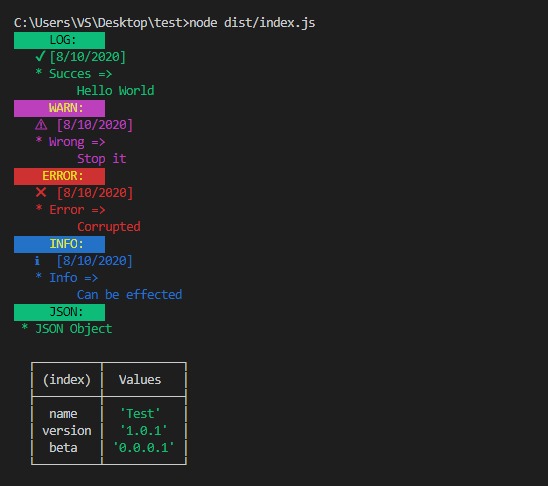
VS-Debugger is the next level console log writer that can be enabled on the development version and deactivated simultaneously on the product version.This module supports browser level consoles and command line level consoles. Added support of Angular ivy engine compatibility. 😎
Installation
npm i vs-debuggerUsage
Typescript
- First you need to use environment.ts file. If not create new file called debugger.ts
import { VSDebugger } from 'vs-debugger';

class Environment {

    _debugger = VSDebugger.getDebugger();

    constructor(enable: boolean = false){
        this._debugger.enable(enable);
    }

    getDebugger(): VSDebugger {
        return this._debugger;
    }

}

export default new Environment(true);
- Then import this environment.ts or debugger.ts file into whatever you want to print colored console logs
import _console from './path_to_environment.ts';
import { CONSOLE_TYPES } 'vs-debugger/dist/types/types'

...


_console._debugger.print(CONSOLE_TYPES.LOG,'Printing name','VS-Debugger');
- There are 4 types of console logs.
- CONSOLE_TYPES.LOG
- CONSOLE_TYPES.ERROR
- CONSOLE_TYPES.WARN
- CONSOLE_TYPES.INFO
- To print a json object then you can use following method and you can see a table in terminal.
const obj = {
    name: 'John Doe',
    age: '23'
};

_console._debugger.print_obj('Printing json object', obj);
Thats all! 😎😎
Feel free to contact me via vish.drck@gmail.com if you have any problems.