
Package Exports
- vue-gridmultiselect
This package does not declare an exports field, so the exports above have been automatically detected and optimized by JSPM instead. If any package subpath is missing, it is recommended to post an issue to the original package (vue-gridmultiselect) to support the "exports" field. If that is not possible, create a JSPM override to customize the exports field for this package.
Readme
Vue GridMultiselect





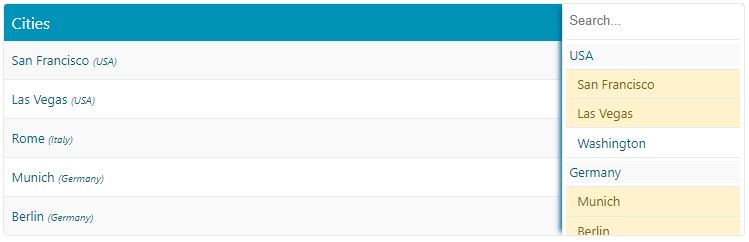
Simple multi-select component with items displayed in a table like UI
Table of Contents
Installation
Run the following npm command:
npm install vue-gridmultiselect --saveOr, place the following tags on your page:
<script src="https://cdn.jsdelivr.net/npm/vue-gridmultiselect"></script>
<link rel="stylesheet" href="https://cdn.jsdelivr.net/npm/vue-gridmultiselect/dist/vue-gridmultiselect.css">
Introduction
A simple multi-select component for Vue framework with items displayed in a table like UI. An alternative to dropdown based select components.
Features and Characteristics
- No dependencies
- Searching
- Grouping
- Split View
- Labeling (title, no data messages, multiple keys as a label source...)
- Disabling Items
- Row Details
- Menu Positioning
- Easily configurable
- Custom slots
- V-model support
- Vuex support
Basic Usage
via NPM
<template>
  <GridMultiSelect
    :items="items"
    item-key="id"
    item-label="name"
    v-model="selectedItems"
  />
</template>

<script>
import GridMultiSelect from 'vue-gridmultiselect';
import 'vue-gridmultiselect/dist/vue-gridmultiselect.css';

export default {
  name: "example",
  components: { GridMultiSelect },
  data() {
    return {
      selectedItems: null,
      items: [
        { id: 1, name: "San Francisco", state: "USA" },
        { id: 2, name: "Las Vegas", state: "USA" },
        { id: 3, name: "Washington", state: "USA" },
        { id: 4, name: "Munich", state: "Germany" },
        { id: 5, name: "Berlin", state: "Germany" },
        { id: 6, name: "Rome", state: "Italy" }
      ]
    };
  }
};
</script>
via CDN
Vue.component('vue-gridmultiselect', VueGridMultiselect);Getting Started and Documentation
Detailed documentation and demos can be found here.
Custom Heading
<GridMultiSelect
  :items="items"
  item-key="id"
  item-label="name"
  v-model="selectedItems"
  title="Cities"
/>
Custom Labels
<GridMultiSelect
  :items="items"
  item-key="id"
  :item-label="['name', 'state|name']"
  v-model="selectedItems"
  title="Cities"
/>
Grouping
<GridMultiSelect
  :items="items"
  item-key="id"
  item-label="name"
  group-by="state"
  v-model="selectedItems"
  title="Cities"
/>
Slots
<GridMultiSelect
  :items="items"
  item-key="id"
  item-label="name"
  group-by="state"
  v-model="selectedItems"
  title="Cities">
    <template v-slot:selected-item="{selectedItem}">
        The city {{selectedItem.name}} is located in {{selectedItem.state}}
    </template>
</GridMultiSelect>
Detailed documentation and demos can be found here.
Contribution
// install the packages
npm install

// build the component into dist
npm run build

// run tests
npm run test

// serve at localhost:8080
npm run docs:dev

// build the documentation into dist
npm run docs:build
Please read the full Contributing Guide before making a pull request.