
Package Exports
- vue2-viewer
- vue2-viewer/lib/vue2-viewer.umd.min.js
This package does not declare an exports field, so the exports above have been automatically detected and optimized by JSPM instead. If any package subpath is missing, it is recommended to post an issue to the original package (vue2-viewer) to support the "exports" field. If that is not possible, create a JSPM override to customize the exports field for this package.
Readme
vue2-viewer
github 仓库地址
vue2-viewer 是一款强大的图像浏览插件,可以实现图像的放大预览,旋转,任意比例放大和缩小等功能
vue2-viewer 是 viewer.js vue 的实现,效果以及样式完全移植自 viewer.js 关于 viewer.js 可以参考链接 [http://fengyuanchen.github.io/viewer/]
插件中所有的效果均大量地使用了 css3 的新特性替换了 viewer.js 中的 js 动画,所以 vue2-viewer 主要实用场景是现代浏览器中。
演示地址
版本说明
- 1.0.3 处理列表数据问题
- 1.0.2 解决样式未生效问题
- 1.0.1 更换脚手架,修改图片切换后状态没重置的问题
- 0.1.0 正式上线版本
- 0.0.1 修改了放大后图片的标题无法显示的问题,新增 title 组件属性
使用文档
安装
npm install --save vue2-viewer在 main.js 中引入并使用插件
import ImageViewer from "vue2-viewer";
Vue.use(ImageViewer);
插件会在全局注册 vue-viewer 组件
使用组件
vue2-viewer 提供两种使用模式,单图片模式和多图列表模式。
单图片模式
props
| 参数 | 说明 | 类型 | 必须 |
|---|---|---|---|
| thumb | 要显示的小图的链接 | string | true |
| full | 点击放大后的大图链接 | string | true |
| title | 点击放大后大图下面要展示的图片说明 | string | false |
示例:
<vue-viewer style="display: inline-block" :thumb="image" :full="image">
</vue-viewer>
<script>
  export default {
    name: "app",
    data() {
      return {
        msg: "vue2-viewer-test",
        image:
          "https://ss0.baidu.com/6ONWsjip0QIZ8tyhnq/it/u=3427452369,2586833644&fm=173&app=25&f=JPEG?w=580&h=347&s=908FF35A050626E2428C001E030090D6",
      };
    },
  };
</script>
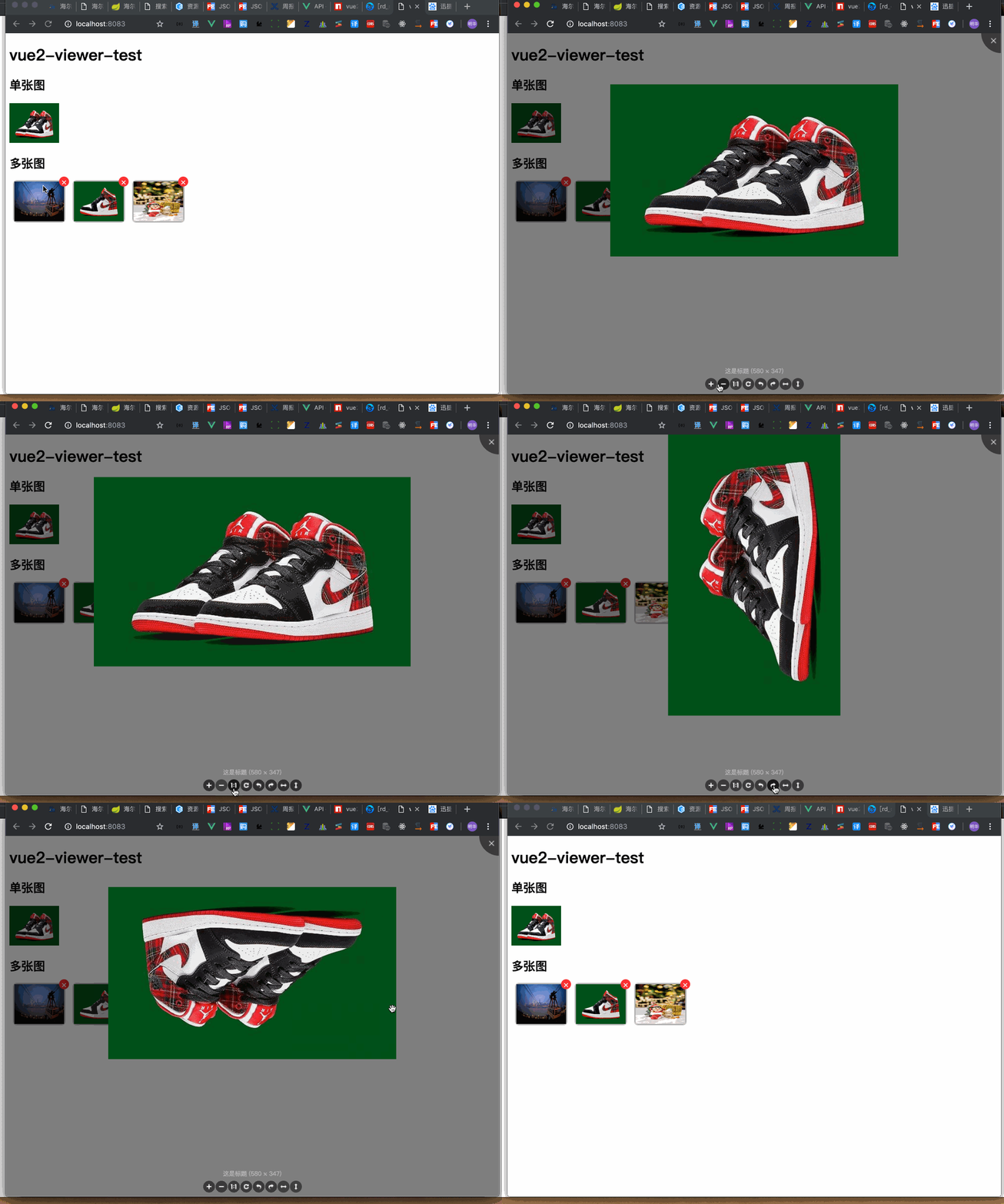
效果展示:
多图片模式
props
| 参数 | 说明 | 类型 | 必须 |
|---|---|---|---|
| thumb | 要显示的小图列表的链接数组 | array | true |
| full | 点击放大后的大图的链接数组 | array | true |
| title | 点击放大后大图下面要展示的图片说明数组,与图片一一对应 | array | false |
| list-ul-class | 默认小图的列表外层 ul 的自定义 class 用于自定义列表的样式,包括 ul 内部的 slot 的内容的样式都可以通过这个方式自定义 | string | false |
Scoped Slot
| name | 说明 |
|---|---|
| ~ | 列表中的每一个元素中除了默认图以外的内容 |
示例:
<vue-viewer
multiple
:thumb="imageList"
list-ul-class="image-list"
:full="imageList"
>
<!--在列表中加入右上角删除按钮-->
<template slot-scope="target">
<span class="icon-remove" @click.stop="onRemove(target.index)" style=""
>×</span
>
</template>
</vue-viewer>
<script>
export default {
name: "app",
data() {
return {
msg: "vue2-viewer-test",
imageList: [
"https://timgsa.baidu.com/timg?image&quality=80&size=b9999_10000&sec=1550224739247&di=512032866bea6329b1e46c735d50ac8b&imgtype=0&src=http%3A%2F%2Fimglf2.ph.126.net%2FdHH6OM2rD8JucPGAotUfag%3D%3D%2F6608219914074710297.jpg",
"https://ss0.baidu.com/6ONWsjip0QIZ8tyhnq/it/u=488030022,1694816207&fm=173&app=25&f=JPEG?w=580&h=347&s=A08FB35A5E0616C664F5631C030010D6",
"https://ss0.baidu.com/6ONWsjip0QIZ8tyhnq/it/u=2574767313,3929397124&fm=173&app=25&f=JPEG?w=580&h=868&s=B784EEA3460236E17A1F137F0300A058",
],
};
},
methods: {
onRemove(index) {
alert(index);
},
},
};
</script>
<style>
.image-list {
margin: 0;
padding: 0;
}
.image-list li {
display: inline-block;
margin: 0 10px;
list-style: none;
position: relative;
}
.image-list li img {
box-shadow: 0 0 5px #333;
}
.icon-remove {
width: 20px;
height: 20px;
text-align: center;
line-height: 20px;
background: #f33;
position: absolute;
top: -10px;
right: -10px;
border-radius: 10px;
cursor: pointer;
color: #fff;
}
a {
color: #42b983;
}
</style>效果展示:
