

Package Exports
- 0xtrace
Readme
0xtrace
AI observability infrastructure for LLM applications. Intercept every call, visualize prompt deltas, and kill context bloat before it kills your budget.
The Problem
Building LLM agents in production is flying blind. Context windows silently expand as system prompts grow, tool outputs inject massive JSON payloads, and RAG pipelines append thousands of tokens per step. By Step 6 of an agent loop you're paying for 80k tokens — and you have no idea what's in there.
Standard logging doesn't help. You need to see exactly what changed between Step 4 and Step 5.
The Solution
0xtrace wraps your LLM client with a zero-overhead proxy that intercepts every call asynchronously. It stores prompt structures using a keyframe + delta model — full snapshot on Step 1, strict JSON diffs on every subsequent step. The dashboard renders those diffs as a visual X-Ray, exposing rogue context injections instantly.
Architecture
Your AI App └── wrapOpenAI(client, tracer) ← proxy intercepts every call, <2ms overhead └── POST /api/ingest ← validates API key → injects project_id → Redis └── Upstash Redis ← absorbs infinite loops, never blocks └── cron drain ← batches 100 traces/min into Supabase └── Dashboard ← scoped per project, full diff replay Key design decisions:
- Non-blocking capture — telemetry fires in a microtask (
Promise.resolve().then()), zero latency added to your agent - Queue buffer — Redis absorbs burst traffic; direct Postgres writes would collapse under agent loops
- Diff-only storage — Step 1 stores the full prompt array, Steps 2–N store only
{added, removed, tokenDelta}. ~85% storage reduction on multi-step agents - Multi-tenant RLS — every data row is scoped to a project; Supabase Row Level Security enforced at the database layer
Tech Stack
| Layer | Technology |
|---|---|
| Framework | Next.js 16 (App Router, React Server Components) |
| Database | Supabase (PostgreSQL + Row Level Security) |
| Queue | Upstash Redis |
| Auth | Supabase Auth (GitHub OAuth) |
| Styling | Tailwind CSS (dark-mode, developer-focused) |
| Language | TypeScript (strict mode, zero any) |
| Deploy | Vercel (Hobby) + cron-job.org |
| SDK | npm 0xtrace — published, open source |
SDK
Install the tracer in your AI application:
npm install 0xtraceimport OpenAI from "openai";
import { Tracer, wrapOpenAI } from "0xtrace";
const tracer = new Tracer({
ingestUrl: "https://0xtrace-mu.vercel.app/api/ingest",
apiKey: process.env.INGEST_API_KEY,
});
// Works with any OpenAI-compatible provider (OpenAI, Groq, Together, etc.)
const client = wrapOpenAI(new OpenAI({
apiKey: process.env.GROQ_API_KEY,
baseURL: "https://api.groq.com/openai/v1",
}), tracer);
// Every call is now automatically traced — no other changes needed
const response = await client.chat.completions.create({ ... });Every chat.completions.create call is intercepted, measured, and sent to your dashboard asynchronously. Your application sees zero added latency.
Self-Hosting
1. Clone & Install
git clone https://github.com/Sidhant0707/0xtrace.git
cd 0xtrace
npm install
2. Environment Variables
# .env.local
NEXT_PUBLIC_SUPABASE_URL=
NEXT_PUBLIC_SUPABASE_ANON_KEY=
SUPABASE_SERVICE_ROLE_KEY=
UPSTASH_REDIS_REST_URL=
UPSTASH_REDIS_REST_TOKEN=
CRON_SECRET=
NEXT_PUBLIC_APP_URL=http://localhost:3000
3. Database
Run the SQL migrations in your Supabase SQL Editor:
-- profiles, projects, api_keys tables with RLS
-- llm_calls + prompt_snapshots with project_id scoping
-- See /supabase/migrations/ for full schema
4. Run
npm run devVisit http://localhost:3000 → sign in with GitHub → create your first project → copy your API key.
Dashboard Features
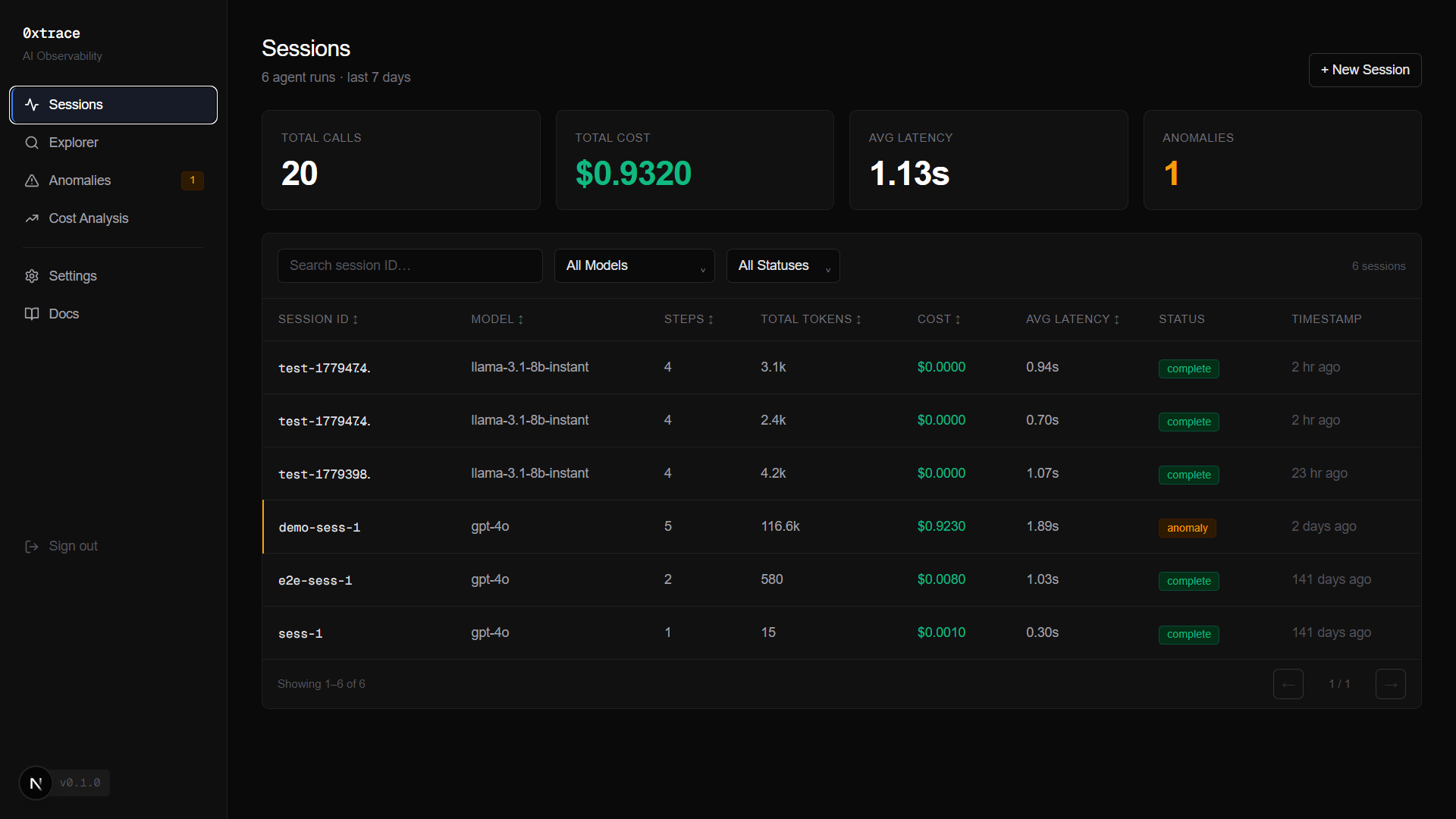
- Sessions — every agent run as a timeline, grouped by session ID
- Explorer — raw call browser, filterable by model, status, session prefix
- Diff X-Ray — step-by-step prompt delta visualizer with
+added / −removeddiff view - Cost Analysis — daily spend chart, model breakdown, top sessions by cost, latency distribution
- Anomaly Detection — token explosion, high latency, cost spikes, SDK-flagged calls
- Settings — API key management (generate, revoke), project deletion with cascade