

Package Exports
- @backtest-kit/cli
Readme

📟 @backtest-kit/cli
Zero-boilerplate CLI for launching backtests, paper trading, and live trading. Run any backtest-kit strategy from the command line — no setup code required.
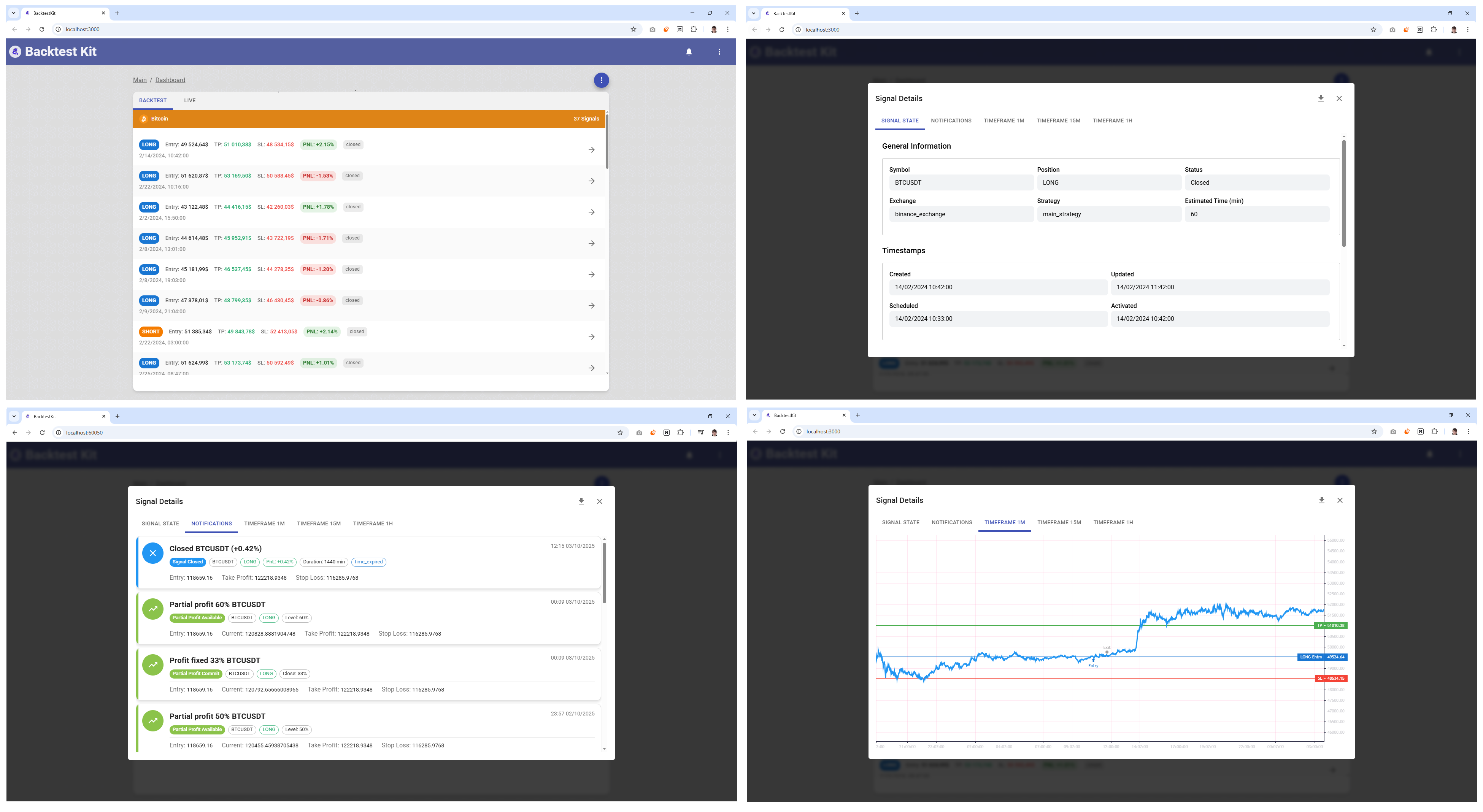



Point the CLI at your strategy file, choose a mode, and it handles exchange connectivity, candle caching, UI dashboard, and Telegram notifications for you.
📚 Backtest Kit Docs | 🌟 GitHub
✨ Features
- 🚀 Zero Config: Run
npx @backtest-kit/cli --backtest ./strategy.mjs— no boilerplate needed - 🔄 Three Modes: Backtest on historical data, paper trade on live prices, or deploy live bots
- 💾 Auto Candle Cache: Warms OHLCV cache for all required intervals before backtest starts
- 🌐 Web Dashboard: Launch
@backtest-kit/uiwith a single--uiflag - 📬 Telegram Alerts: Send formatted trade notifications with charts via
--telegram - 🔌 Default Binance: CCXT Binance exchange schema registered automatically when none is provided
- 🧩 Module Hooks: Drop a
modules/live.module.mjsfile to handle every position lifecycle event - 🔑 Pluggable Logger: Override the built-in logger with
setLogger()from your strategy module - 🛑 Graceful Shutdown: SIGINT stops the active run and cleans up all subscriptions safely
📋 What It Does
@backtest-kit/cli wraps the backtest-kit engine and resolves all scaffolding automatically:
| Mode | Command Line Args | Description |
|---|---|---|
| Backtest | --backtest |
Run strategy on historical candle data |
| Paper | --paper |
Live prices, no real orders |
| Live | --live |
Real trades via exchange API |
| UI Dashboard | --ui |
Web dashboard at http://localhost:60050 |
| Telegram | --telegram |
Trade notifications with price charts |
🚀 Installation
Add @backtest-kit/cli to your project and wire it up in package.json scripts:
npm install @backtest-kit/cli{
"scripts": {
"backtest": "npx @backtest-kit/cli --backtest ./src/index.mjs",
"paper": "npx @backtest-kit/cli --paper ./src/index.mjs",
"start": "npx @backtest-kit/cli --live ./src/index.mjs"
},
"dependencies": {
"@backtest-kit/cli": "latest",
"backtest-kit": "latest",
"ccxt": "latest"
}
}Or run once without installing:
npx @backtest-kit/cli --backtest ./src/index.mjs📖 Quick Start
Create your strategy entry point (src/index.mjs). The file registers schemas via backtest-kit — @backtest-kit/cli is only the runner:
// src/index.mjs
import { addStrategySchema, addExchangeSchema, addFrameSchema } from 'backtest-kit';
import ccxt from 'ccxt';

// Register exchange
addExchangeSchema({
  exchangeName: 'binance',
  getCandles: async (symbol, interval, since, limit) => {
    const exchange = new ccxt.binance();
    const ohlcv = await exchange.fetchOHLCV(symbol, interval, since.getTime(), limit);
    return ohlcv.map(([timestamp, open, high, low, close, volume]) => ({
      timestamp, open, high, low, close, volume,
    }));
  },
  formatPrice: (symbol, price) => price.toFixed(2),
  formatQuantity: (symbol, quantity) => quantity.toFixed(8),
});

// Register frame (backtest only)
addFrameSchema({
  frameName: 'feb-2024',
  interval: '1m',
  startDate: new Date('2024-02-01'),
  endDate: new Date('2024-02-29'),
});

// Register strategy
addStrategySchema({
  strategyName: 'my-strategy',
  interval: '15m',
  getSignal: async (symbol) => {
    // return signal or null
    return null;
  },
});
Run a backtest:
npm run backtest -- --symbol BTCUSDTRun with UI dashboard and Telegram:
npm run backtest -- --symbol BTCUSDT --ui --telegramRun live trading:
npm start -- --symbol BTCUSDT --ui🎛️ CLI Flags
| Command Line Args | Type | Description |
|---|---|---|
--backtest |
boolean | Run historical backtest (default: false) |
--paper |
boolean | Paper trading (live prices, no orders) (default: false) |
--live |
boolean | Run live trading (default: false) |
--ui |
boolean | Start web UI dashboard (default: false) |
--telegram |
boolean | Enable Telegram notifications (default: false) |
--verbose |
boolean | Log each candle fetch (default: false) |
--noCache |
boolean | Skip candle cache warming before backtest (default: false) |
--symbol |
string | Trading pair (default: "BTCUSDT") |
--strategy |
string | Strategy name (default: first registered) |
--exchange |
string | Exchange name (default: first registered) |
--frame |
string | Backtest frame name (default: first registered) |
--cacheInterval |
string | Intervals to pre-cache before backtest (default: "1m, 15m, 30m, 4h") |
Positional argument (required): path to your strategy entry point file (set once in package.json scripts).
{
  "scripts": {
    "backtest": "npx @backtest-kit/cli --backtest ./src/index.mjs"
  }
}
🏃 Execution Modes
Backtest
Runs the strategy against historical candle data using a registered FrameSchema.
{
  "scripts": {
    "backtest": "npx @backtest-kit/cli --backtest --symbol ETHUSDT --strategy my-strategy --exchange binance --frame feb-2024 --cacheInterval \"1m, 15m, 1h, 4h\" ./src/index.mjs"
  }
}
npm run backtestBefore running, the CLI warms the candle cache for every interval in --cacheInterval. On the next run, cached data is used directly — no API calls needed. Pass --noCache to skip this step entirely.
Paper Trading
Connects to the live exchange but does not place real orders. Identical code path to live — safe for strategy validation.
{
  "scripts": {
    "paper": "npx @backtest-kit/cli --paper --symbol BTCUSDT ./src/index.mjs"
  }
}
npm run paperLive Trading
Deploys a real trading bot. Requires exchange API keys configured in your .env or environment.
{
  "scripts": {
    "start": "npx @backtest-kit/cli --live --ui --telegram --symbol BTCUSDT ./src/index.mjs"
  }
}
npm start🗂️ Monorepo Usage
@backtest-kit/cli works out of the box in a monorepo where each strategy lives in its own subdirectory. When the CLI loads your entry point file, it automatically changes the working directory to the file's location — so all relative paths (dump/, modules/, template/) resolve inside that strategy's folder, not the project root.
How It Works
Internally, ResolveService does the following before executing your entry point:
process.chdir(path.dirname(entryPoint))  // cwd → strategy directory
dotenv.config({ path: rootDir + '/.env' })            // load root .env first
dotenv.config({ path: strategyDir + '/.env', override: true })  // strategy .env overrides
Everything that follows — candle cache warming, report generation, module loading, template resolution — uses the new cwd automatically.
Project Structure
monorepo/
├── package.json              # root scripts (one per strategy)
├── .env                      # shared API keys (exchange, Telegram, etc.)
└── strategies/
    ├── oct_2025/
    │   ├── index.mjs         # entry point — registers exchange/frame/strategy schemas
    │   ├── .env              # overrides root .env for this strategy (optional)
    │   ├── modules/          # live.module.mjs specific to this strategy
    │   ├── template/         # custom Mustache templates (optional)
    │   └── dump/             # auto-created: candle cache + backtest reports
    └── dec_2025/
        ├── index.mjs
        ├── .env
        └── dump/
Root package.json
{
  "scripts": {
    "backtest:oct": "npx @backtest-kit/cli --backtest ./strategies/oct_2025/index.mjs",
    "backtest:dec": "npx @backtest-kit/cli --backtest ./strategies/dec_2025/index.mjs"
  },
  "dependencies": {
    "@backtest-kit/cli": "latest",
    "backtest-kit": "latest",
    "ccxt": "latest"
  }
}
npm run backtest:oct
npm run backtest:decIsolated Resources Per Strategy
| Resource | Path (relative to strategy dir) | Isolated |
|---|---|---|
| Candle cache | ./dump/data/candle/ |
✅ per-strategy |
| Backtest reports | ./dump/ |
✅ per-strategy |
| Live module | ./modules/live.module.mjs |
✅ per-strategy |
| Telegram templates | ./template/*.mustache |
✅ per-strategy |
| Environment variables | ./.env (overrides root) |
✅ per-strategy |
Each strategy run produces its own dump/ directory, making it straightforward to compare results across time periods — both by inspection and by pointing an AI agent at a specific strategy folder.
🔔 Integrations
Web Dashboard (--ui)
Starts @backtest-kit/ui server. Access the interactive dashboard at:
http://localhost:60050Customize host/port via environment variables CC_WWWROOT_HOST and CC_WWWROOT_PORT.
Telegram Notifications (--telegram)
Sends formatted HTML messages with 1m / 15m / 1h price charts to your Telegram channel for every position event: opened, closed, scheduled, cancelled, risk rejection, partial profit/loss, trailing stop/take, and breakeven.
Requires CC_TELEGRAM_TOKEN and CC_TELEGRAM_CHANNEL in your environment.
🧩 Live Module Hooks
Create a modules/live.module.mjs file in your project root to receive lifecycle callbacks for every trading event:
// modules/live.module.mjs

export default class {

  onOpened(event) {
    console.log('Position opened', event.symbol, event.priceOpen);
  }

  onClosed(event) {
    console.log('Position closed', event.symbol, event.priceClosed);
  }

  onScheduled(event) {
    console.log('Signal scheduled', event.id);
  }

  onCancelled(event) {
    console.log('Signal cancelled', event.id);
  }

  onRisk(event) {
    console.warn('Risk rejection', event.reason);
  }

  onPartialProfit(event) {
    console.log('Partial profit taken', event.symbol);
  }

  onPartialLoss(event) {
    console.log('Partial loss taken', event.symbol);
  }

  onTrailingTake(event) {
    console.log('Trailing take adjusted', event.symbol);
  }

  onTrailingStop(event) {
    console.log('Trailing stop adjusted', event.symbol);
  }

  onBreakeven(event) {
    console.log('Breakeven triggered', event.symbol);
  }
}
All methods are optional — implement only the events you care about. The module is loaded dynamically from {cwd}/modules/live.module.mjs (supports .cjs and .mjs extensions).
TypeScript Interface
import type { ILiveModule } from '@backtest-kit/cli';

export default class MyModule implements ILiveModule {
  onOpened(event) { /* ... */ }
  onClosed(event) { /* ... */ }
}
🌍 Environment Variables
Create a .env file in your project root:
# Telegram notifications (required for --telegram)
CC_TELEGRAM_TOKEN=your_bot_token_here
CC_TELEGRAM_CHANNEL=-100123456789

# Web UI server (optional, defaults shown)
CC_WWWROOT_HOST=0.0.0.0
CC_WWWROOT_PORT=60050

# Custom QuickChart service URL (optional)
CC_QUICKCHART_HOST=| Variable | Default | Description |
|---|---|---|
CC_TELEGRAM_TOKEN |
— | Telegram bot token (from @BotFather) |
CC_TELEGRAM_CHANNEL |
— | Telegram channel or chat ID |
CC_WWWROOT_HOST |
0.0.0.0 |
UI server bind address |
CC_WWWROOT_PORT |
60050 |
UI server port |
CC_QUICKCHART_HOST |
— | Self-hosted QuickChart instance URL |
⚙️ Default Behaviors
When your strategy module does not register an exchange, frame, or strategy name, the CLI falls back to built-in defaults and prints a console warning:
| Component | Default | Warning |
|---|---|---|
| Exchange | CCXT Binance (default_exchange) |
Warning: The default exchange schema is set to CCXT Binance... |
| Frame | February 2024 (default_frame) |
Warning: The default frame schema is set to February 2024... |
| Symbol | BTCUSDT |
— |
| Cache intervals | 1m, 15m, 30m, 4h |
Used if --cacheInterval not provided; skip entirely with --noCache |
Note: The default exchange schema does not support order book fetching in backtest mode. If your strategy calls
getOrderBook()during backtest, you must register a custom exchange schema with your own snapshot storage.
🔧 Programmatic API
In addition to the CLI, @backtest-kit/cli can be used as a library — call run() directly from your own script without spawning a child process or parsing CLI flags.
run(mode, args)
import { run } from '@backtest-kit/cli';

await run(mode, args);| Parameter | Description |
|---|---|
mode |
"backtest" | "paper" | "live" — Execution mode |
args |
Mode-specific options (all optional — same defaults as CLI) |
run() can be called only once per process. A second call throws "Should be called only once".
Payload fields
Backtest (mode: "backtest"):
| Field | Type | Description |
|---|---|---|
entryPoint |
string |
Path to strategy entry point file |
symbol |
string |
Trading pair (default: "BTCUSDT") |
strategy |
string |
Strategy name (default: first registered) |
exchange |
string |
Exchange name (default: first registered) |
frame |
string |
Frame name (default: first registered) |
cacheInterval |
CandleInterval[] |
Intervals to pre-cache (default: ["1m","15m","30m","1h","4h"]) |
noCache |
boolean |
Skip candle cache warming (default: false) |
verbose |
boolean |
Log each candle fetch (default: false) |
Paper and Live (mode: "paper" / mode: "live"):
| Field | Type | Description |
|---|---|---|
entryPoint |
string |
Path to strategy entry point file |
symbol |
string |
Trading pair (default: "BTCUSDT") |
strategy |
string |
Strategy name (default: first registered) |
exchange |
string |
Exchange name (default: first registered) |
verbose |
boolean |
Log each candle fetch (default: false) |
Examples
Backtest:
import { run } from '@backtest-kit/cli';

await run('backtest', {
  entryPoint: './src/index.mjs',
  symbol: 'ETHUSDT',
  frame: 'feb-2024',
  cacheInterval: ['1m', '15m', '1h'],
  verbose: true,
});
Paper trading:
import { run } from '@backtest-kit/cli';

await run('paper', {
  entryPoint: './src/index.mjs',
  symbol: 'BTCUSDT',
});
Live trading:
import { run } from '@backtest-kit/cli';

await run('live', {
  entryPoint: './src/index.mjs',
  symbol: 'BTCUSDT',
  verbose: true,
});
💡 Why Use @backtest-kit/cli?
Instead of writing infrastructure code for every project:
❌ Without @backtest-kit/cli (manual setup)
// index.ts
import { setLogger, setConfig, Storage, Notification, Report, Markdown } from 'backtest-kit';
import { serve } from '@backtest-kit/ui';

setLogger({ log: console.log, ... });
Storage.enable();
Notification.enable();
Report.enable();
Markdown.disable();

// ... parse CLI args manually
// ... register exchange schema
// ... warm candle cache
// ... set up Telegram bot
// ... handle SIGINT gracefully
// ... load and run backtest
✅ With @backtest-kit/cli (one script)
{ "scripts": { "backtest": "npx @backtest-kit/cli --backtest --ui --telegram ./src/index.mjs" } }npm run backtestBenefits:
- 🚀 From zero to running backtest in seconds
- 💾 Automatic candle cache warming with retry logic
- 🌐 Production-ready web dashboard out of the box
- 📬 Telegram notifications with price charts — no chart code needed
- 🛑 Graceful shutdown on SIGINT — no hanging processes
- 🔌 Works with any
backtest-kitstrategy file as-is - 🧩 Module hooks for custom logic without touching the CLI internals
🤝 Contribute
Fork/PR on GitHub.
📜 License
MIT © tripolskypetr