

Package Exports
- @dhtmlx/richtext
- @dhtmlx/richtext/dist/richtext.es.js
This package does not declare an exports field, so the exports above have been automatically detected and optimized by JSPM instead. If any package subpath is missing, it is recommended to post an issue to the original package (@dhtmlx/richtext) to support the "exports" field. If that is not possible, create a JSPM override to customize the exports field for this package.
Readme
DHTMLX RichText — JavaScript Rich Text Editor (GPL Edition)




@dhtmlx/richtext is a JavaScript WYSIWYG rich text editor with HTML and Markdown input/output, a fully configurable toolbar, classic and document layout modes, image support, export to DOCX and PDF, DOCX import, and AI-ready content editing.
It is a standalone widget that works with plain JavaScript and integrates with React, Angular, Vue, and Svelte.
It is ideal for prototyping content editing interfaces, embedding a rich text editor in open-source applications, and evaluating DHTMLX RichText's core features under the GPL v2 license.
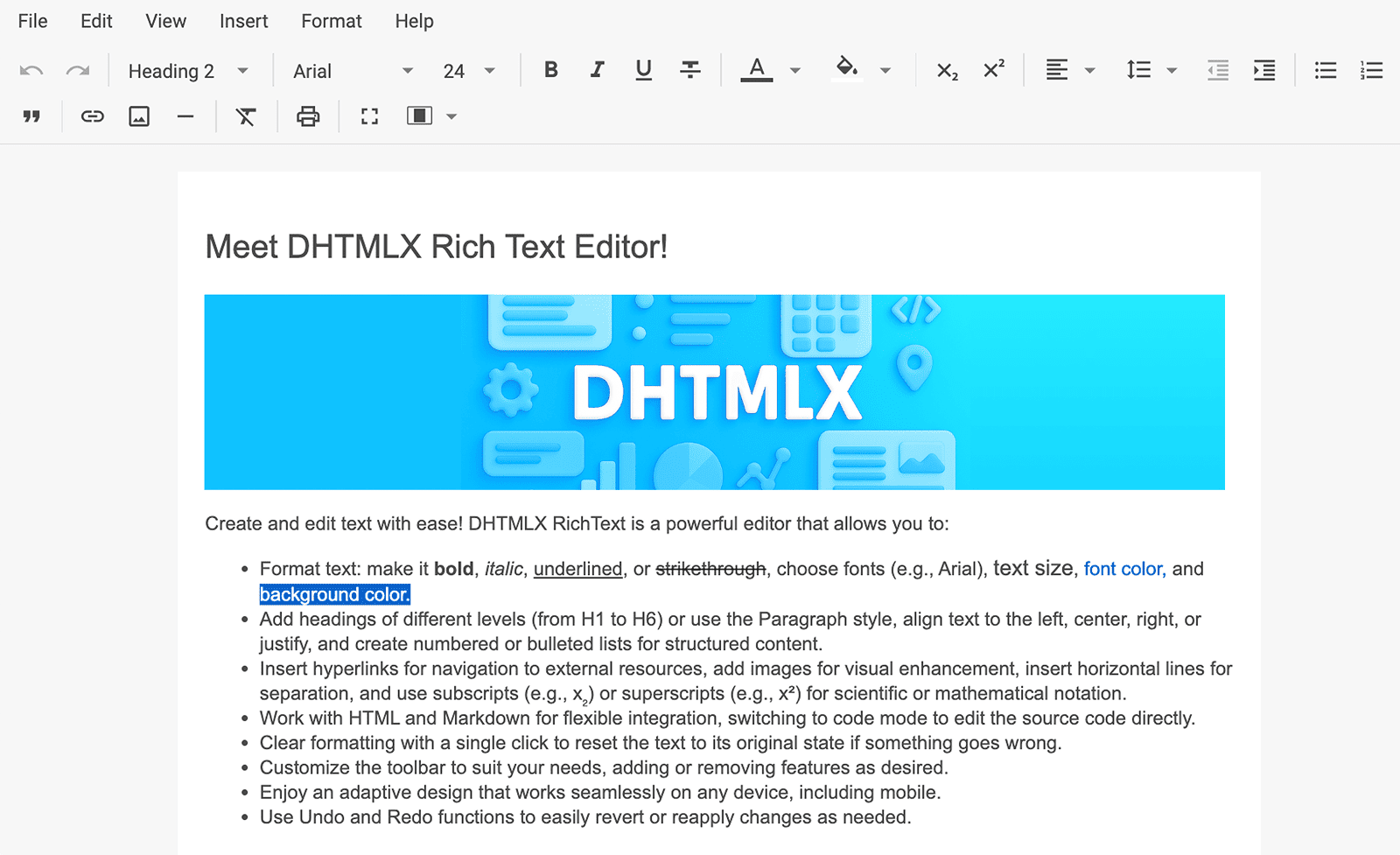
License
This edition of DHTMLX RichText is licensed under the GNU General Public License v2.0 (GPL v2).
You can redistribute this package and/or modify it under the terms of the GPL v2.
GPL v2 requires that any project using this package also be open source under a GPL-compatible license.
You may NOT use this package in closed-source, proprietary, or commercial applications without a separate commercial license. For commercial use, please obtain a commercial license of DHTMLX RichText.
This package is distributed in the hope that it will be useful, but WITHOUT ANY WARRANTY; without even the implied warranty of MERCHANTABILITY or FITNESS FOR A PARTICULAR PURPOSE. See the GPL v2 for more details.
Using DHTMLX RichText in a commercial or closed-source project?
You need a commercial license. DHTMLX offers Individual, Commercial, Enterprise, and Ultimate license tiers.
- Compare licenses and pricing
- Download a free 30-day trial of DHTMLX RichText
- Download 30-day trial versions of all DHTMLX components
- Contact us regarding licensing: info@dhtmlx.com
Copyright © 2026 XB Software Ltd.
What is DHTMLX RichText
DHTMLX RichText is a JavaScript WYSIWYG rich text editor for embedding content editing into web applications. It supports parsing and serialization of content in HTML and Markdown formats, provides a fully configurable toolbar and an optional menubar, and offers two layout modes: classic (toolbar-anchored) and document (page-style with A4/A5/A6/A7 sizes). Users can insert and resize images, apply rich text formatting, and export content to DOCX or PDF directly from the editor. The component exposes a clean JavaScript API for setting and getting content, reading document statistics, and responding to editing events, making it straightforward to integrate with AI services for content suggestions and autocompletion.
DHTMLX RichText is a standalone component. It is not part of the DHTMLX Suite library, is distributed and licensed separately, and does not require Suite as a dependency.
Use this GPL edition when you want to prototype a content editing feature, integrate a rich text editor into an open-source project, or evaluate DHTMLX RichText before obtaining a commercial license.
Quick Start
Install the package, import the styles, and initialize the editor in a container element.
Install
npm install @dhtmlx/richtextInclude in your project
import { Richtext } from "@dhtmlx/richtext";
import "@dhtmlx/richtext/dist/richtext.css";
Or with script tags pointing to local codebase files:
<script type="text/javascript" src="./codebase/richtext.js"></script>
<link rel="stylesheet" href="./codebase/richtext.css" />
The CSS import is required for default RichText styling and layout.
Initialize
import { Richtext } from "@dhtmlx/richtext";
import "@dhtmlx/richtext/dist/richtext.css";

const editor = new Richtext("#richtext_container", {
    layoutMode: "classic", // "classic" or "document"
    menubar: false, // show/hide the menubar (hidden by default)
    toolbar: [
        "undo",
        "redo",
        "separator",
        "bold",
        "italic",
        "underline",
        "strike",
        "separator",
        "font-family",
        "font-size",
        "separator",
        "text-color",
        "background-color",
        "separator",
        "bulleted-list",
        "numbered-list",
        "separator",
        "link",
        "image",
        "separator",
        "fullscreen",
        "mode",
    ],
});

// Set initial HTML content
editor.setValue("<h1>Hello, DHTMLX RichText!</h1><p>Start editing here.</p>");
Add a container element to your HTML:
<div id="richtext_container" style="width: 100%; height: 600px;"></div>Basic Usage — DHTMLX RichText
Getting and setting content
import { Richtext, markdown } from "@dhtmlx/richtext";
import "@dhtmlx/richtext/dist/richtext.css";

const editor = new Richtext("#richtext_container", {
    layoutMode: "document",
});

// Set content in HTML format
editor.setValue(
    "<h2>Weekly Report</h2><p>This week we completed the migration.</p>"
);

// Get content as HTML
const html = editor.getValue();

// Set content in Markdown format
editor.setValue(
    "## Weekly Report\n\nThis week we completed the migration.",
    markdown.fromMarkdown
);

// Get content as Markdown
const markdownValue = editor.getValue(markdown.toMarkdown);
Reacting to content changes
editor.api.on("change", function () {
    const content = editor.getValue();
    // auto-save or sync content to your backend
    saveToServer(content);
});
The change event fires after content modifications. Use getValue() without arguments to retrieve HTML, or pass markdown.toMarkdown to retrieve Markdown.
DHTMLX RichText Features
DHTMLX RichText includes the following features in the GPL edition.
| Feature | Details |
|---|---|
| HTML input and output | Parse HTML into the editor via setValue(html) and serialize back via getValue() |
| Markdown input and output | Parse Markdown with markdown.fromMarkdown and serialize it with markdown.toMarkdown |
| Classic layout mode | Toolbar anchored to the top of the editor area; editor fills the available container |
| Document layout mode | Page-style layout that automatically adapts between A4, A5, A6, and A7 based on the available width. |
| Configurable toolbar | Define toolbar controls as an array of strings and objects; hide toolbar with toolbar: false |
| Custom toolbar controls | Add custom buttons with labels, icons, styles, and handlers |
| Menubar | Optional menu bar with file, edit, view, insert, format, and help menus; hidden by default |
| Rich text formatting | Bold, italic, underline, strikethrough, font family, font size, text color, background color |
| Paragraph styles | Headings (H1–H6), blockquote, and paragraph formatting |
| Lists | Bulleted and numbered lists with indent/outdent controls |
| Links | Insert and edit hyperlinks |
| Image support | Insert images from URLs, upload them, or embed them as Base64 data; resize them in the editor. |
| Export to DOCX | Export editor content to a .docx file via the menubar or Event Bus API |
| Export to PDF | Export editor content to a .pdf file via the menubar or Event Bus API |
| Import from DOCX | Import .docx files into the editor with formatting preserved |
| Print content directly from the editor via the menubar | |
| Fullscreen mode | Enable via fullscreenMode: true config or a dedicated toolbar button |
| Keyboard shortcuts | Platform-aware shortcuts (Ctrl on Windows/Linux, ⌘ on macOS) for common formatting actions |
| Default styles | Apply default CSS styles per block type (h1, h2, p, etc.) via defaultStyles |
| Content statistics | Retrieve plain text with getValue(text.toText) to calculate statistics in your application |
| Localization | Use the built-in English, German, and Chinese locales through locale or editor.setLocale() |
| CSS variable theming | Customize colors, fonts, and spacing via CSS variables |
| AI integration | Clean API and content format compatibility for connecting AI content suggestion services |
| Event system | Subscribe to content changes and editor actions with editor.api.on(); intercept actions with editor.api.intercept() |
This table highlights key features. For the complete and up-to-date feature list, see the DHTMLX RichText documentation.
Framework Integration
DHTMLX RichText works with popular front-end frameworks including React, Angular, Vue, and Svelte. These integration guides apply to both the GPL edition and the commercial editions of DHTMLX RichText.
Documentation and Resources
- Product page – overview, screenshots, and key features.
- Documentation – getting started, guides, and configuration options.
- API reference – full JavaScript API.
- Live demos and samples – interactive examples of DHTMLX RichText features.
- Support forum – community Q&A and discussions for DHTMLX RichText.