

Package Exports
- @electric-sql/pglite
- @electric-sql/pglite/contrib/adminpack
- @electric-sql/pglite/contrib/amcheck
- @electric-sql/pglite/contrib/auto_explain
- @electric-sql/pglite/contrib/bloom
- @electric-sql/pglite/contrib/btree_gin
- @electric-sql/pglite/contrib/btree_gist
- @electric-sql/pglite/contrib/citext
- @electric-sql/pglite/contrib/cube
- @electric-sql/pglite/contrib/earthdistance
- @electric-sql/pglite/contrib/fuzzystrmatch
- @electric-sql/pglite/contrib/hstore
- @electric-sql/pglite/contrib/isn
- @electric-sql/pglite/contrib/lo
- @electric-sql/pglite/contrib/ltree
- @electric-sql/pglite/contrib/pg_trgm
- @electric-sql/pglite/contrib/seg
- @electric-sql/pglite/contrib/tablefunc
- @electric-sql/pglite/contrib/tcn
- @electric-sql/pglite/contrib/tsm_system_rows
- @electric-sql/pglite/contrib/tsm_system_time
- @electric-sql/pglite/contrib/uuid_ossp
- @electric-sql/pglite/live
- @electric-sql/pglite/nodefs
- @electric-sql/pglite/opfs-ahp
- @electric-sql/pglite/vector
- @electric-sql/pglite/worker
Readme

PGlite - the WASM build of Postgres from ElectricSQL.
Build reactive, realtime, local-first apps directly on Postgres.






PGlite - Postgres in WASM
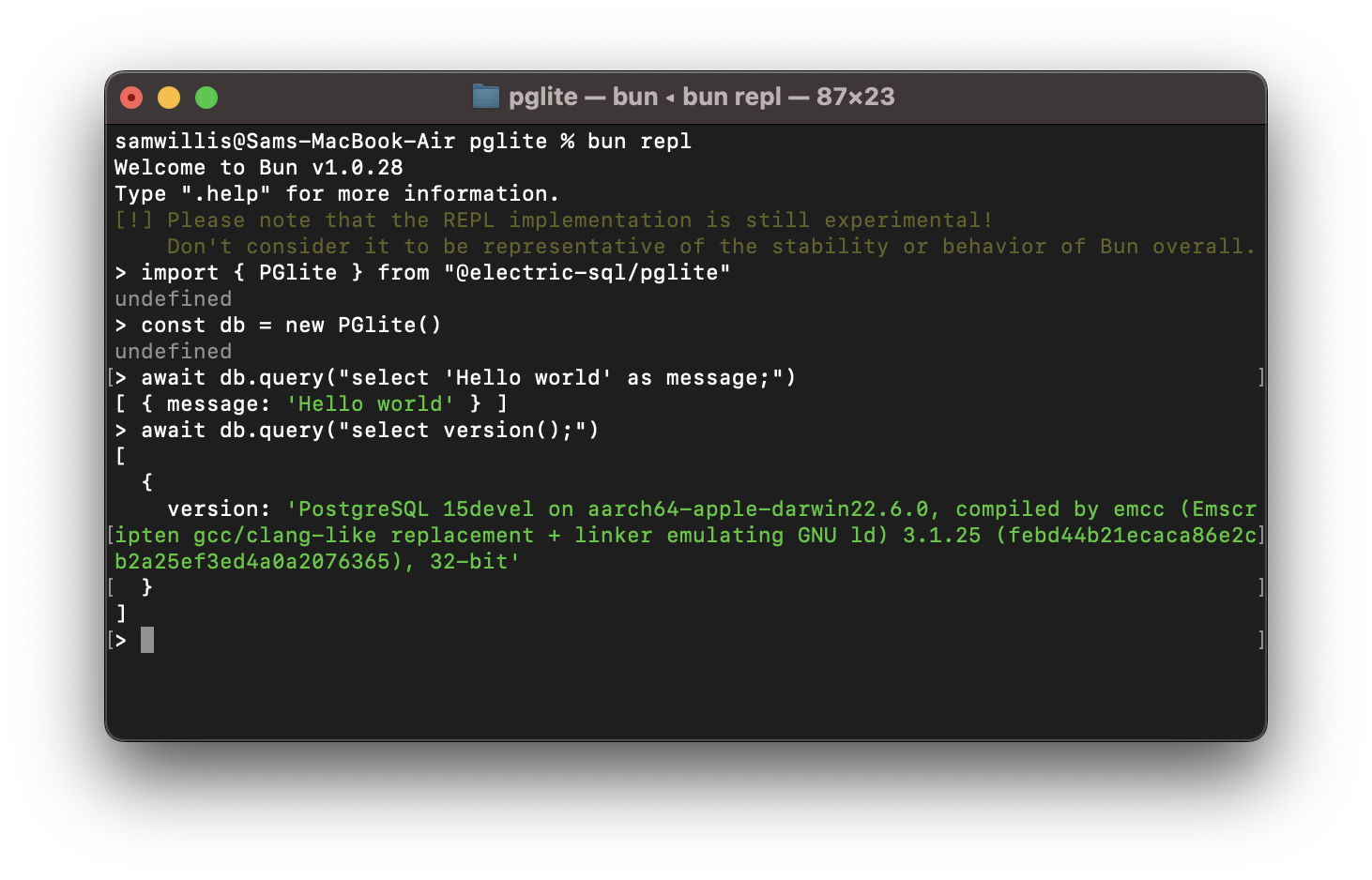
PGlite is a WASM Postgres build packaged into a TypeScript client library that enables you to run Postgres in the browser, Node.js and Bun, with no need to install any other dependencies. It is only 2.6mb gzipped.
import { PGlite } from "@electric-sql/pglite";

const db = new PGlite();
await db.query("select 'Hello world' as message;");
// -> { rows: [ { message: "Hello world" } ] }
It can be used as an ephemeral in-memory database, or with persistence either to the file system (Node/Bun) or indexedDB (Browser).
Unlike previous "Postgres in the browser" projects, PGlite does not use a Linux virtual machine - it is simply Postgres in WASM.
It is being developed at ElectricSQL in collaboration with Neon. We will continue to build on this experiment with the aim of creating a fully capable lightweight WASM Postgres with support for extensions such as pgvector.
Whats new in V0.1
Version 0.1 (up from 0.0.2) includes significant changes to the Postgres build - it's about 1/3 smaller at 2.6mb gzipped, and up to 2-3 times faster. We have also found a way to statically compile Postgres extensions into the build - the first of these is pl/pgsql with more coming soon.
Key changes in this release are:
- Support for parameterised queries #39
- An interactive transaction API #39
- pl/pgsql support #48
- Additional query options #51
- Run PGlite in a Web Workers #49
- Fix for running on Windows #54
- Fix for missing
pg_catalogandinformation_schematables and view #41
We have also published some benchmarks in comparison to a WASM SQLite build, and both native Postgres and SQLite. While PGlite is currently a little slower than WASM SQLite we have plans for further optimisations, including OPFS support and removing some the the Emscripten options that can add overhead.
Browser
It can be installed and imported using your usual package manager:
import { PGlite } from "@electric-sql/pglite";or using a CDN such as JSDeliver:
import { PGlite } from "https://cdn.jsdelivr.net/npm/@electric-sql/pglite/dist/index.js";Then for an in-memory Postgres:
const db = new PGlite()
await db.query("select 'Hello world' as message;")
// -> { rows: [ { message: "Hello world" } ] }
or to persist the database to indexedDB:
const db = new PGlite("idb://my-pgdata");Node/Bun
Install into your project:
npm install @electric-sql/pgliteTo use the in-memory Postgres:
import { PGlite } from "@electric-sql/pglite";

const db = new PGlite();
await db.query("select 'Hello world' as message;");
// -> { rows: [ { message: "Hello world" } ] }
or to persist to the filesystem:
const db = new PGlite("./path/to/pgdata");Deno
To use the in-memory Postgres, create a file server.ts:
import { PGlite } from "npm:@electric-sql/pglite";

Deno.serve(async (_request: Request) => {
  const db = new PGlite();
  const query = await db.query("select 'Hello world' as message;");

  return new Response(JSON.stringify(query));
});
Then run the file with deno run --allow-net --allow-read server.ts.
API Reference
Main Constructor:
new PGlite(dataDir: string, options: PGliteOptions)
A new pglite instance is created using the new PGlite() constructor.
dataDir
Path to the directory to store the Postgres database. You can provide a url scheme for various storage backends:
file://or unprefixed: File system storage, available in Node and Bun.idb://: IndexedDB storage, available in the browser.memory://: In-memory ephemeral storage, available in all platforms.
options:
debug: 1-5 - the Postgres debug level. Logs are sent to the console.relaxedDurability: boolean - under relaxed durability mode PGlite will not wait for flushes to storage to complete when using the indexedDB file system.
Methods:
.query<T>(query: string, params?: any[], options?: QueryOptions): Promise<Results<T>>
Execute a single statement, optionally with parameters.
Uses the extended query Postgres wire protocol.
Returns single result object.
Example:
await pg.query(
  'INSERT INTO test (name) VALUES ($1);',
  [ 'test' ]
);
// { affectedRows: 1 },
QueryOptions:
The query and exec methods take an optional options objects with the following parameters:
rowMode: "object" | "array"The returned row object type, either an object offieldName: valuemappings or an array of positional values. Defaults to"object".parsers: ParserOptionsAn object of type{[[pgType: number]: (value: string) => any;]}mapping Postgres data type id to parser function. For convenance thepglitepackage exports a const for most common Postgres types:import { types } from "@electric-sql/pglite"; await pg.query(` SELECT * FROM test WHERE name = $1; `, ["test"], { rowMode: "array", parsers: { [types.TEXT]: (value) => value.toUpperCase(), } });
blob: Blob | FileAttach aBloborFileobject to the query that can used with aCOPY FROMcommand by using the virtual/dev/blobdevice, see importing and exporting.
.exec(query: string, options?: QueryOptions): Promise<Array<Results>>
Execute one or more statements. (note that parameters are not supported)
This is useful for applying database migrations, or running multi-statement sql that doesn't use parameters.
Uses the simple query Postgres wire protocol.
Returns array of result objects, one for each statement.
Example:
await pg.exec(`
  CREATE TABLE IF NOT EXISTS test (
    id SERIAL PRIMARY KEY,
    name TEXT
  );
  INSERT INTO test (name) VALUES ('test');
  SELECT * FROM test;
`);
// [
//   { affectedRows: 0 },
//   { affectedRows: 1 },
//   {
//     rows: [
//       { id: 1, name: 'test' }
//     ]
//     affectedRows: 0,
//     fields: [
//       { name: 'id', dataTypeID: '23' },
//       { name: 'name', dataTypeID: '25' },
//     ]
//   }
// ]
.transaction<T>(callback: (tx: Transaction) => Promise<T>)
To start an interactive transaction pass a callback to the transaction method. It is passed a Transaction object which can be used to perform operations within the transaction.
Transaction objects:
tx.query<T>(query: string, params?: any[], options?: QueryOptions): Promise<Results<T>>The same as the main.querymethod.tx.exec(query: string, options?: QueryOptions): Promise<Array<Results>>The same as the main.execmethod.tx.rollback()Rollback and close the current transaction.
Example:
await pg.transaction(async (tx) => {
  await tx.query(
    'INSERT INTO test (name) VALUES ('$1');',
    [ 'test' ]
  );
  return await ts.query('SELECT * FROM test;');
});
.close(): Promise<void>
Close the database, ensuring it is shut down cleanly.
.listen(channel: string, callback: (payload: string) => void): Promise<void>
Subscribe to a pg_notify channel. The callback will receive the payload from the notification.
Returns an unsubscribe function to unsubscribe from the channel.
Example:
const unsub = await pg.listen('test', (payload) => {
  console.log('Received:', payload);
});
await pg.query("NOTIFY test, 'Hello, world!'");
.unlisten(channel: string, callback?: (payload: string) => void): Promise<void>
Unsubscribe from the channel. If a callback is provided it removes only that callback from the subscription, when no callback is provided is unsubscribes all callbacks for the channel.
onNotification(callback: (channel: string, payload: string) => void): () => void
Add an event handler for all notifications received from Postgres.
Note: This does not subscribe to the notification, you will have to manually subscribe with LISTEN channel_name.
offNotification(callback: (channel: string, payload: string) => void): void
Remove an event handler for all notifications received from Postgres.
Properties:
.readyboolean (read only): Whether the database is ready to accept queries..closedboolean (read only): Whether the database is closed and no longer accepting queries..waitReadyPromise: Promise that resolves when the database is ready to use. Note that queries will wait for this if called before the database has fully initialised, and so it's not necessary to wait for it explicitly.
Results Objects:
Result objects have the following properties:
rows: Row<T>[]- The rows retuned by the queryaffectedRows?: number- Count of the rows affected by the query. Note this is not the count of rows returned, it is the number or rows in the database changed by the query.fields: { name: string; dataTypeID: number }[]- Field name and Postgres data type ID for each field returned.blob: Blob- ABlobcontaining the data written to the virtual/dev/blob/device by aCOPY TOcommand. See importing and exporting.
Row Objects:
Rows objects are a key / value mapping for each row returned by the query.
The .query<T>() method can take a TypeScript type describing the expected shape of the returned rows. (Note: this is not validated at run time, the result only cast to the provided type)
Web Workers:
It's likely that you will want to run PGlite in a Web Worker so that it doesn't block the main thread. To aid in this we provide a PGliteWorker with the same API as the core PGlite but it runs Postgres in a dedicated Web Worker.
First you need to create a js file for your worker instance, initiate PGlite with the worker extension, and start it:
// my-pglite-worker.js
import { PGlite } from "@electric-sql/pglite";
import { worker } from "@electric-sql/pglite/worker";

worker({
  async init() {
    return new PGlite();
  },
});
Then connect the PGliteWorker to your new worker process:
import { PGliteWorker } from "@electric-sql/pglite/worker";

const pg = new PGliteWorker(
  new Worker(new URL("./my-pglite-worker.js", import.meta.url), {
    type: "module",
  })
);

await pg.exec(`
  CREATE TABLE IF NOT EXISTS test (
    id SERIAL PRIMARY KEY,
    name TEXT
  );
`);
Work in progress: We plan to expand this API to allow sharing of the worker PGlite across browser tabs.
Importing and exporting with COPY TO/FROM
PGlite has support importing and exporting via COPY TO/FROM by using a virtual /dev/blob device.
To import a file pass the File or Blob in the query options as blob, and copy from the /dev/blob device.
await pg.query("COPY my_table FROM '/dev/blob';", [], {
  blob: MyBlob
})
To export a table or query to a file you just have to write to the /dev/blob device, the file will be retied as blob on the query results:
const ret = await pg.query("COPY my_table TO '/dev/blob';")
// ret.blob is a `Blob` object with the data from the copy.
Extensions
PGlite supports the pl/pgsql procedural language extension, this is included and enabled by default.
In future we plan to support additional extensions, see the roadmap.
Live Queries
The "live" extension enables you to subscribe to a query and receve updated results when the underlying tables change.
To use the extension it needs adding to the PGlite instance when creating it:
import { PGlite } from "@electric-sql/pglite";
import { live } from "@electric-sql/pglite/live";

const pg = new PGlite({
  extensions: {
    live,
  },
});
There are three methods on the live namespace:
live.query()for basic live queries. With less machinery in PG it's quicker for small results sets and narrow rows.live.incrementalQuery()for incremental queries. It materialises the full result set on each update from only the changes emitted by thelive.changesapi. Perfect for feeding into React and good performance for large result sets and wide rows.live.changes()a lower level API that emits the changes (insert/update/delete) that can then be mapped to mutations in a UI or other datastore.
live.query()
This is very similar to a standard query, but takes an additional callback that receives the results whenever they change:
const ret = pg.live.query("SELECT * FROM test ORDER BY rand;", [], (res) => {
  // res is the same as a standard query result object
});
The returned value from the call is an object with this interface:
interface LiveQueryReturn<T> {
  initialResults: Results<T>;
  unsubscribe: () => Promise<void>;
  refresh: () => Promise<void>;
}initialResultsis the initial results set (also sent to the callbackunsubscribeallow you to unsubscribe from the live queryrefreshallows you to force a refresh of the query
Internally it watches for the tables that the query depends on, and reruns the query whenever they are changed.
live.incrementalQuery()
Similar to above, but maintains a temporary table inside of Postgres of the previous state. When the tables it depends on change the query is re-run and diffed with the last state. Only the changes from the last version of the query are copied from WASM into JS.
It requires an additional key argument, the name of a column (often a PK) to key the diff on.
const ret = pg.live.incrementalQuery(
  "SELECT * FROM test ORDER BY rand;", [], "id",
  (res) => {
    // res is the same as a standard query result object
  }
);
The returned value is of the same type as the query method above.
live.changes()
A lower level API which is the backend for the incrementalQuery, it emits the change that have happened. It requires a key to key the diff on:
const ret = pg.live.changes(
  "SELECT * FROM test ORDER BY rand;", [], "id",
  (res) => {
    // res is a change result object
  }
);
the returned value from the call is defined by this interface:
interface LiveChangesReturn<T = { [key: string]: any }> {
  fields: { name: string; dataTypeID: number }[];
  initialChanges: Array<Change<T>>;
  unsubscribe: () => Promise<void>;
  refresh: () => Promise<void>;
}
The results passed to the callback are array of Change objects:
type ChangeInsert<T> = {
  __changed_columns__: string[];
  __op__: "INSERT";
  __after__: number;
} & T;

type ChangeDelete<T> = {
  __changed_columns__: string[];
  __op__: "DELETE";
  __after__: undefined;
} & T;

type ChangeUpdate<T> = {
  __changed_columns__: string[];
  __op__: "UPDATE";
  __after__: number;
} & T;

type Change<T> = ChangeInsert<T> | ChangeDelete<T> | ChangeUpdate<T>;
Each Change includes the new values along with:
__changed_columns__the columns names that were changes__op__the operation that is required to update the state (INSERT,UPDATE,DELETE)__after__thekeyof the row that this row should be after, it will be included in__changed_columns__if it has been changed.
This API can be used to implement very efficient in-place DOM updates.
ORM support.
- Drizzle ORM supports PGlite, see their docs here.
How it works
PostgreSQL typically operates using a process forking model; whenever a client initiates a connection, a new process is forked to manage that connection. However, programs compiled with Emscripten - a C to WebAssembly (WASM) compiler - cannot fork new processes, and operates strictly in a single-process mode. As a result, PostgreSQL cannot be directly compiled to WASM for conventional operation.
Fortunately, PostgreSQL includes a "single user mode" primarily intended for command-line usage during bootstrapping and recovery procedures. Building upon this capability, PGlite introduces a input/output pathway that facilitates interaction with PostgreSQL when it is compiled to WASM within a JavaScript environment.
Limitations
- PGlite is single user/connection.
Roadmap
PGlite is Alpha and under active development, the current roadmap is:
- CI builds #19
- Support Postgres extensions, starting with:
- OPFS support in browser #9
- Muti-tab support in browser #32
- Syncing via ElectricSQL with a Postgres server electric/#1058
Repository Structure
The PGlite project is split into two parts:
/packages/pgliteThe TypeScript package for PGlite/postgres(git submodule) A fork of Postgres with changes to enable compiling to WASM: /electric-sql/postgres-wasm
Please use the issues in this main repository for filing issues related to either part of PGlite. Changes that affect both the TypeScript package and the Postgres source should be filed as two pull requests - one for each repository, and they should reference each other.
Building
There are a couple of prerequisites:
- the Postgres build toolchain - https://www.postgresql.org/download/
- emscripten version 3.1.56 - https://emscripten.org/docs/getting_started/downloads.html
To build, checkout the repo, then:
git submodule update --init
cd ./pglite/packages/pglite
emsdk install 3.1.56
emsdk activate 3.1.56
pnpm install
pnpm build
Acknowledgments
PGlite builds on the work of Stas Kelvich of Neon in this Postgres fork.
License
PGlite is dual-licensed under the terms of the Apache License 2.0 and the PostgreSQL License, you can choose which you prefer.
Changes to the Postgres source are licensed under the PostgreSQL License.