
Package Exports
- @git-validator/eslint-config
Readme
@git-validator/eslint-config




A strict eslint config for linting js / ts / package.json files. Based on standard.js without any stylistic opinions.
Feature
- Lint
js/mjs/cjs/jsx/ts/mts/cts/tsx/package.jsonfiles only. - One-line of config.
- Type safe. TypeScript friendly.
- Respect
.gitignore. - Based on standard.js.
- Have no stylistic opinions. Prettier friendly.
- ESLint Flat config, compose easily!
- Strict, but progressive.
- Modern. ESM first.
- React friendly.
- NestJS friendly.
Usage
Install it in the root of js / ts project.
npm install -D eslint @git-validator/eslint-configConfig eslint.config.js (for ESM).
import config from "@git-validator/eslint-config";

export default config;
If you are in CommonJS, config eslint.config.js bellow:
module.exports = import("@git-validator/eslint-config");Config package.json
{
  "scripts": {
    "lint": "eslint .",
    "lint:fix": "eslint . --fix"
  }
}
Note: TypeScript project is required a
tsconfig.jsonfile in the root.
Advanced Usage
Config Builder
The default config is very strict. If you don't like the default config, use Builder to omit or pick some rules.
import { Builder } from "@git-validator/eslint-config";

export default new Builder()
  .enablePackagejson({
    select: {
      mode: "pick",
      rules: ["packagejson/top-types"], // only these rules will work in 'pick' mode
    },
  })
  .enableTypescript({
    project: "tsconfig.json", // tsconfig.json path
    select: {
      mode: "omit",
      rules: ["no-var"], // these rules will not work in 'omit' mode
    },
  })
  .toConfig();
Type Infer
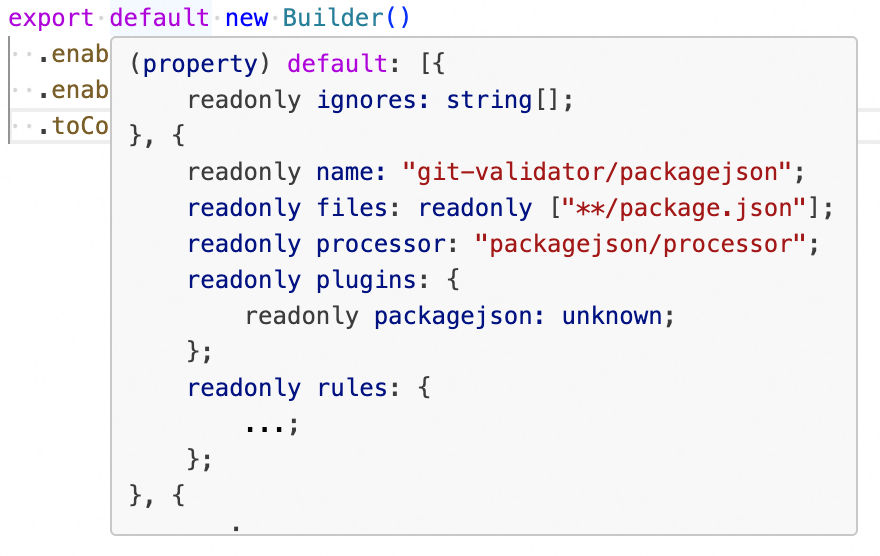
By using .toConfig() at the end, TypeScript will infer the config type correctly, which is consistent with the enabled rules. You can hover your mouse (in VSCode) to preview it.
License
MIT