
Package Exports
- @google/clasp
This package does not declare an exports field, so the exports above have been automatically detected and optimized by JSPM instead. If any package subpath is missing, it is recommended to post an issue to the original package (@google/clasp) to support the "exports" field. If that is not possible, create a JSPM override to customize the exports field for this package.
Readme
clasp




Develop Apps Script projects locally using clasp (Command Line Apps Script Projects).
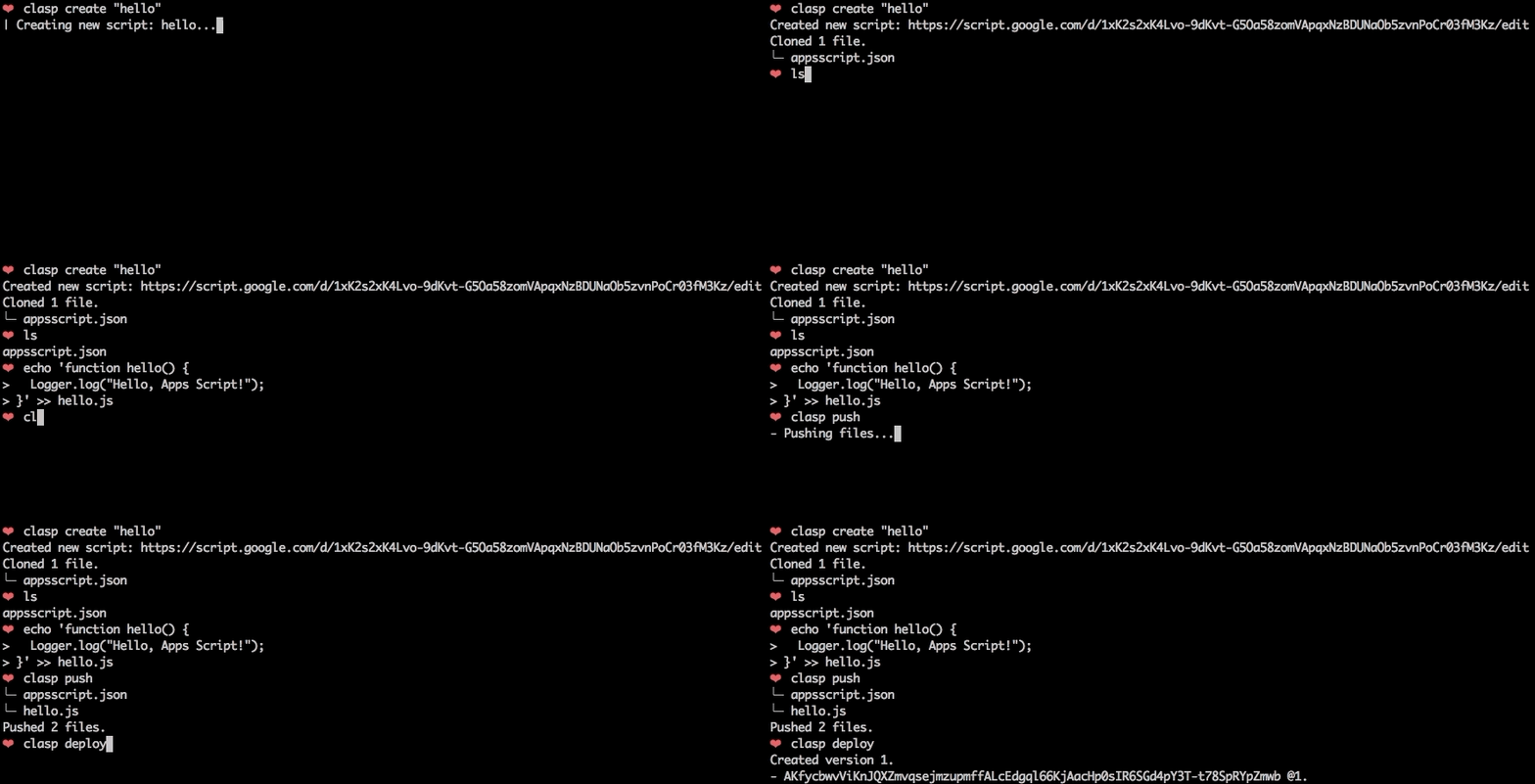
To get started, try out the codelab!
Features
🗺️ Develop Locally: clasp allows you to develop your Apps Script projects locally. That means you can check-in your code into source control, collaborate with other developers, and use your favorite tools to develop Apps Script.
🔢 Manage Deployment Versions: Create, update, and view your multiple deployments of your project.
📁 Structure Code: clasp automatically converts your flat project on script.google.com into folders. For example:
- On script.google.com:
tests/slides.gstests/sheets.gs
- locally:
tests/slides.jssheets.js
🔷 (experimental!) Write Apps Script in TypeScript: Write your Apps Script projects using TypeScript features:
- Arrow functions
- Optional structural typing
- Classes
- Type inference
- Interfaces
- And more...
Install
First download clasp:
sudo npm i @google/clasp -gThen enable Apps Script API: https://script.google.com/home/usersettings
(If that fails, run this:)
sudo npm i -g grpc @google/clasp --unsafe-permCommands
claspclasp login [--no-localhost]clasp logoutclasp create [scriptTitle] [scriptParentId]clasp clone <scriptId>clasp pullclasp push [--watch]clasp open [scriptId]clasp deploymentsclasp deploy [version] [description]clasp redeploy <deploymentId> <version> <description>clasp version [description]clasp versionsclasp listclasp logs [--json] [--open]
How To...
Login
Logs the user in. Saves the client credentials to an rc file.
Options
--no-localhost: Do not run a local server, manually enter code instead.--ownkey: Save .clasprc.json file to current working directory.
Logout
Logs out the user by deleting client credentials.
Examples
clasp logout
Create
Creates a new script project.
Options
scriptTitle: An optional project title.scriptParentId: An optional project parent Id. The Drive ID of a parent file that the created script project is bound to. This is usually the ID of a Google Doc, Google Sheet, Google Form, or Google Slides file. If not set, a standalone script project is created.
Examples
clasp createclasp create "My Script"clasp create "My Script" "1D_Gxyv*****************************NXO7o"
Pull
Fetches a project from either a provided or saved script id. Updates local files with Apps Script project.
Examples
clasp pull
Push
Force writes all local files to the script management server.
Examples
clasp push
Ignores files:
- That start with a .
- That don't have an accepted file extension
- That are ignored (filename matches a glob pattern in the ignore file)
Status
Lists files that will be written to the server on push.
Examples
clasp status
Ignores files:
- That start with a .
- That don't have an accepted file extension
- That are ignored (filename matches a glob pattern in the ignore file)
Open
Opens the clasp project on script.google.com. Provide a scriptId to open a different script.
Options
scriptId: The optional script project to open.
Examples
clasp openclasp open [scriptId]
Deployments
List deployments of a script
Examples
clasp deployments
Deploy
Creates a version and deploys a script. The response gives the version of the deployment.
Options
version: The version number.description: The deployment description.
Examples
clasp deployclasp deploy 4clasp deploy 7 "Updates sidebar logo."
Undeploy
Undeploys a deployment of a script.
Options
deploymentId: deploymentId The deployment ID.
Examples
clasp "undeploy 123"
Redeploy
Updates deployments of a script.
Options
deploymentId: deploymentId The deployment ID.version: version The target deployment version.description: description The reason why the script was redeployed.
Examples
clasp redeploy 123 3 "Why I updated the deployment"
Versions
List versions of a script.
Examples
clasp versions
Version
Creates an immutable version of the script.
Options
description: description The description of the script version.
Examples
clasp versionclasp version "Bump the version."
List
Lists your most recent 10 Apps Script projects.
Examples
clasp list # helloworld1 – xxxxxxxxxxxxxxxxxxxxxxxxxxxxxxxxxxxxxxxxxxxxxxxxxxxxxxxxx ...
Logs
Prints out 5 most recent the StackDriver logs.
Options
json: json Output logs in json format.open: open Open StackDriver logs in a browser.
Run
Remotely executes an Apps Script function. This function runs your script in the cloud. You must supply the functionName params. For now, it can only run functions that do not require other authorization.
Options
functionName: functionName The function in the script that you want to run.
Examples
clasp run 'sendEmail'
Help
Displays the help function.
Examples
clasp help
Get Project ID
- Run
clasp open. - Click
Resources > Cloud Platform project... - Copy the project ID
project-id-xxxxxxxxxxxxxxxxxxxinto.clasp.json. It should look like this:
{
  "scriptId":"14Ht4FoesbNDhRbbTMI_IyM9uQ27EXIP_p2rK8xCOECg5s9XKpHp4fh3f",
  "projectId": "project-id-xxxxxxxxxxxxxxxxxxx"
}
Now you can run clasp logs for this project.
Run clasp logs
Use clasp logs to see recent log messages from StackDriver. For example:
clasp logs
ERROR Sat Apr 07 2018 10:58:31 GMT-0700 (PDT) myFunction      my log error
INFO  Sat Apr 07 2018 10:58:31 GMT-0700 (PDT) myFunction      info message
Other Options
clasp logs --json: See the logs in JSON format.clasp logs --open: Open the StackDriver logs in your browser.
Ignore File (.claspignore)
Like .gitignore, .claspignore allows you to ignore files that you do not wish to not upload on clasp push. Steps:
- Create a file called
.claspignorein your project's root directory. - Add patterns to be excluded from
clasp push. Note: The.claspignorefile is parsed with Anymatch, which is different from.gitignore, especially for directories. To ignore a directory, use syntax like**/node_modules/**.
A sample .claspignore ignoring everything except the manifest and build/main.js:
**/**
!build/main.js
!appsscript.json
Project Settings File (.clasp.json)
When running clone or create, a file named .clasp.json is created in the current directory to describe clasp's configuration for the current project. The following configuration values can be used in it:
scriptId (required)
Specifies the id of the Google Script project that clasp will target. It is the part located inbetween /d/ and /edit in your project's URL: https://script.google.com/d/<SCRIPT_ID>/edit.
rootDir (optional)
Specifies the local directory in which clasp will store your project files. If not specified, clasp will default to the current directory.
Troubleshooting
The library requires Node version >= 4.7.4. Use this script to check your version and upgrade Node if necessary:
node -v # Check Node version
sudo npm install n -g
sudo n latest
Develop
The Apps Script CLI uses TypeScript to provide autocompletion and linting when developing. Use an IDE like Visual Studio Code for TypeScript autocompletion.
Setup
- Install
tsc:npm install -g typescript - Remove your local version of
clasp:sudo npm uninstall -g @google/clasp- This will prevent errors when updating
node_modules.
- This will prevent errors when updating
- Install dependencies:
npm i
After Making a Change
sudo npm run build;
clasp <command>
(If you see build errors, run sudo npm run build-fresh)
Run Tests
sudo npm run build;
npm run test
See tests/ for more information.
Lint
- Use
npm run lintto find common style errors. - Download sort-imports for VSC to automatically sort imports.
Generate Docs
The core "How To" section of the docs is generated from JSDoc comments from index.ts.
Run npm run docs to build the "How To" section. Copy/paste that section into the README.md.
Publishing clasp to npm (admin)
- Build
index.jslocally..gitignore/.npmignorewill hide js/ts files appropriately. - Bump version:
npm version [major|minor|patch] -m "Bump version to %s" - Publish with:
npm run publish
Contributing
The main purpose of this tool is to enable local Apps Script development. If you have a core feature or use-case you'd like to see, find a GitHub issue or create a detailed proposal of the use-case. PRs are very welcome! See the issues (especially good first issue and help wanted).
How to Submit a Pull Request
- Look over the test cases in
tests/test.ts, try cases that the PR may affect. - Run tslint:
npm run lint. - Submit a pull request after testing your feature to make sure it works.
⚡ Powered by the Apps Script API.