
Package Exports
- @hermenics/deepseek-code
This package does not declare an exports field, so the exports above have been automatically detected and optimized by JSPM instead. If any package subpath is missing, it is recommended to post an issue to the original package (@hermenics/deepseek-code) to support the "exports" field. If that is not possible, create a JSPM override to customize the exports field for this package.
Readme





An open-source, DeepSeek-powered coding assistant that lives in your terminal.
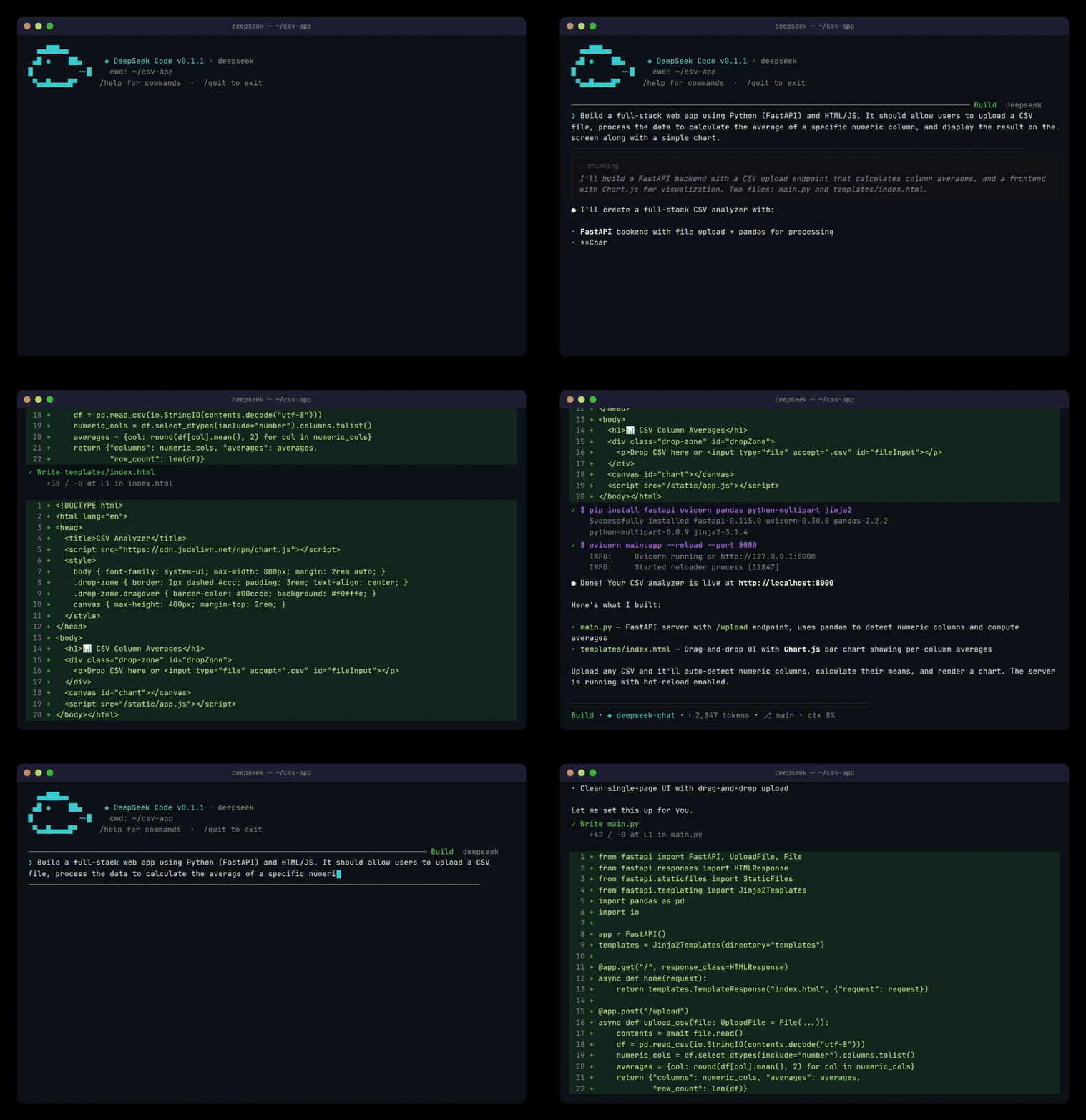
Simulated output for demonstration purposes.
Features
- Agentic coding — reads/writes files, runs shell commands, searches code, manages git
- Multi-provider — DeepSeek API, Amazon Bedrock, Google Vertex AI, or any local model (Ollama, LM Studio)
- Full TUI — alternate-screen interface with streamed thinking, rich markdown, and vim mode
- Sub-agents — spawn background agents for parallel tasks
- MCP support — connect to any Model Context Protocol server for extended tooling
- Extensible — slash commands, custom tools, memory, sessions, themes
Quick start
npm install -g @hermenics/deepseek-codeThen run deepseek inside any project. On first run you'll pick a provider and configure authentication.
For automation, use headless pipe mode:
echo "explain this project" | deepseek --pipe
cat src/index.tsx | deepseek --pipe --json "summarize"
Requirements
- Node.js 18+ or Bun 1.1+
- A supported LLM provider (see below)
Providers & authentication
| Provider | How to authenticate | Env / config keys |
|---|---|---|
| DeepSeek API (default) | API key from platform.deepseek.com | DEEPSEEK_API_KEY, DEEPSEEK_BASE_URL |
| Amazon Bedrock | AWS IAM credentials via ~/.aws/credentials |
AWS_REGION, AWS_PROFILE |
| Google Vertex AI | GCP service account JSON key | GCP_PROJECT, GCP_LOCATION, GCP_CREDENTIALS |
| Local (Ollama / LM Studio) | No auth — point to your local endpoint | LOCAL_BASE_URL, LOCAL_MODEL |
All config is saved to ~/.deepseek/config.json. Any config key can also be set as an environment variable.
Models
Switch models at any time with /model:
| Model ID | Description | Context |
|---|---|---|
deepseek-v4-flash |
Fast, general purpose (default) | 1M |
deepseek-v4-pro |
Advanced reasoning | 1M |
Each provider also exposes provider-specific models (Bedrock, Vertex, local).
Slash commands
| Command | Description |
|---|---|
/model |
Switch model |
/agent |
Spawn a sub-agent |
/memory |
Manage persistent memory |
/plan |
Enter plan mode |
/review |
Code review |
/vim |
Toggle vim keybindings |
/theme |
Change color theme |
/tools |
List available tools |
/permissions |
Explain mode, allow/deny rules, risk checks, and session approvals |
/help |
Show all commands |
Built-in tools
The agent has access to these tools out of the box:
ReadFile · WriteFile · PatchFile · Shell · Glob · Grep · Git · ReadFolder · WebFetch · SubAgent · Memory · Todo · Introspect · MoA
TUI behavior
- Runs on the terminal alternate screen — clean viewport, smooth scrolling
- Thinking output is streamed as full multiline blocks and persisted after each response
- Main-screen mode (experimental):
OTUI_USE_ALTERNATE_SCREEN=0 deepseek
Development
Prerequisites
- Bun >= 1.1
- Node.js >= 18 (for npm publishing)
Setup
git clone https://github.com/Hermenics/deepseek-code.git
cd deepseek-code
bun install
Commands
bun run dev          # Start in dev mode (watch)
bun run start        # Run from source
bun run build        # Production build
bun run typecheck    # Type check (tsc --noEmit)
bun test             # Run tests
Project structure
src/
├── agent/           # Core agent loop, providers (DeepSeek, Bedrock, Vertex)
├── commands/        # Slash command definitions
├── ui/              # React TUI components and app state
├── ink/             # Local Ink-compatible terminal renderer
├── tools/           # Agent tools (file ops, shell, git, search, etc.)
├── services/        # Cross-cutting services such as compaction
├── hooks/           # Pre/post tool execution hooks
└── index.tsx        # Entry point
tests/               # Test suite
Contributing
Contributions are welcome! Here's how to get started:
- Fork the repo and create a branch from
main - Install dependencies with
bun install - Make your changes — keep files under 500 lines
- Run checks before submitting:
bun run typecheck && bun test
- Open a PR with a clear description of what changed and why
Guidelines
- Follow existing code style (TypeScript, functional where possible)
- Write tests for new features — tests live in
tests/, never insrc/ - One concern per PR — don't bundle unrelated changes
- Commit messages should explain the "why", not just the "what"
Reporting bugs
File a GitHub issue with steps to reproduce, or use /help inside the TUI.
License
Made with ❤️ by Hermenics