

Package Exports
- @neofork/devlogr
- @neofork/devlogr/dist/index.js
This package does not declare an exports field, so the exports above have been automatically detected and optimized by JSPM instead. If any package subpath is missing, it is recommended to post an issue to the original package (@neofork/devlogr) to support the "exports" field. If that is not possible, create a JSPM override to customize the exports field for this package.
Readme
devlogr
Logs that look great in your terminal—and make sense in your CI.
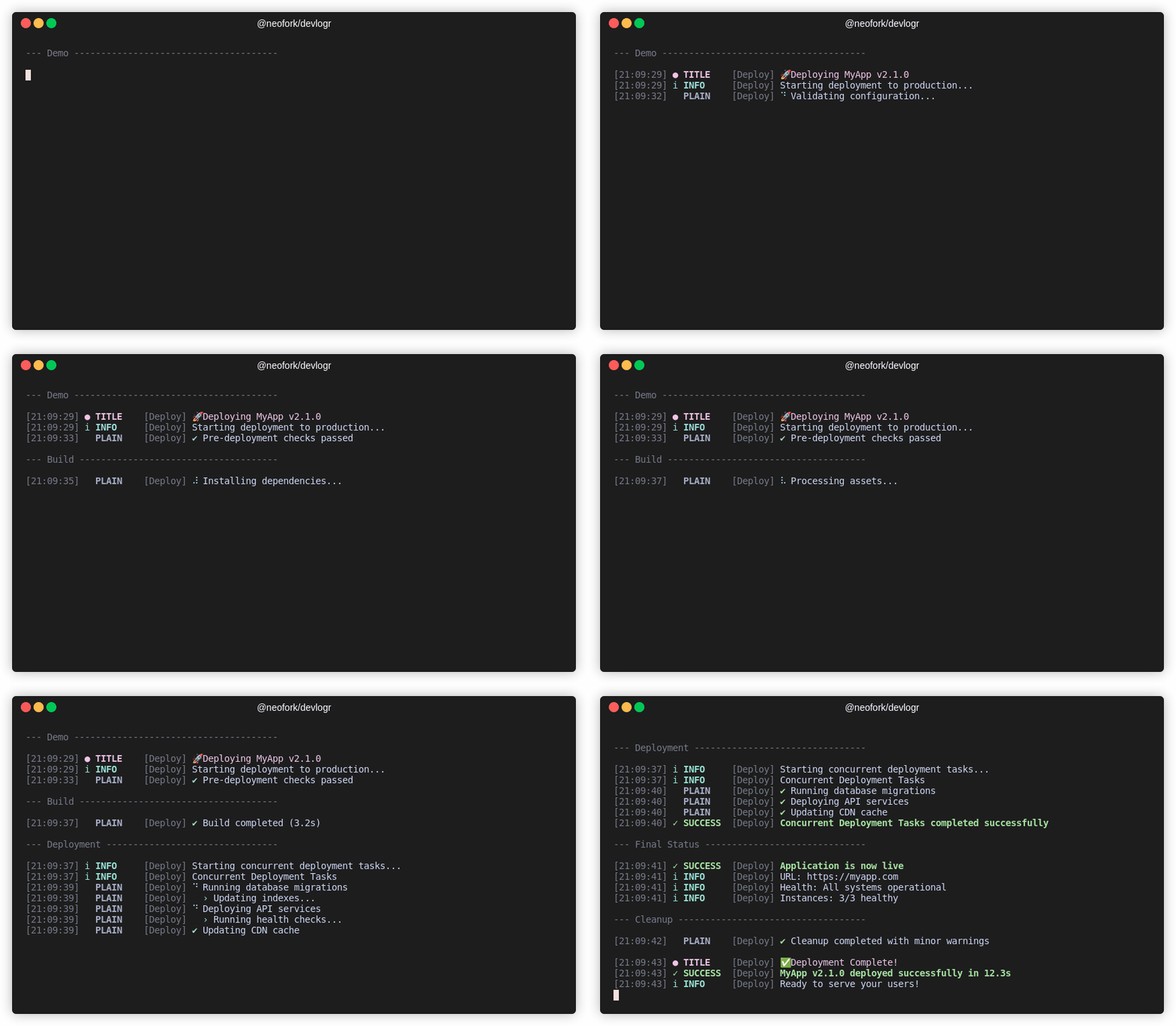
CLI-native, CI-compliant, beautifully minimal. No setup. All signal.
🎯 Built for real CLI tools
Most loggers are backend-first or just sad console.log() clones. devlogr isn’t.
This is structured logging with style—built for dev tools, task runners, release scripts, and CLI utilities that actually run in terminals—either locally or in CI pipelines.
No brittle hacks. No bland output. Just focused feedback, clean visuals, useful context, and a pinch of personality.
🚀 Quickstart
npm install @neofork/devlogrimport { createLogger } from '@neofork/devlogr';
const log = createLogger('my-cli');
log.title('🔧 Setup');
log.info('Starting process');
log.success('Complete!');
log.startSpinner('Working...');
log.updateSpinnerText('Still going...');
log.completeSpinnerWithSuccess('All done!');✨ Features & Smart Defaults
DevLogr is built for terminal life—smart, sharp, and ready to adapt without extra setup.
🎨 Designed for Humans
- 🌈 Stylish by Default – Clean layout, color-coded levels, emoji icons, and Unicode accents.
- 📦 Minimal Noise – Just signal. No clutter, no fluff.
- 🌀 Smooth Spinners – Animated tasks that degrade gracefully in CI.
🧠 Built to Adapt
- 🧬 Auto-Detects Your Terminal – Adjusts visuals for TTY, color, Unicode, and emoji support.
- 🤖 CI-Aware – Behaves properly in pipelines. No weird artifacts, no broken animations.
- 📄 JSON Mode – Machine-readable structured logs when you need them.
⚙️ Sensible Defaults, Full Control
- 🔍 Log Level Control – Set via
DEVLOGR_LOG_LEVEL(e.g.,debug,info,warn,error). - 🕰 Timestamps & Prefixes – Optional, configurable, respectful of your screen space.
- 🔐 Safe Logging – Handles circular refs and weird data without crashing.
- 🧪 Fully Tested – Over 200 real-world tests. It works.
DevLogr just works—beautiful in your terminal, clear in your CI, and quiet when it should be.
🧩 Logging Methods
log.error('Something broke');
log.warning('This might be an issue');
log.info('FYI');
log.debug('Debugging info');
log.success('It worked!');
log.task('Running something...');
log.title('🚀 Deployment Phase');
log.plain('No formatting here.');
🌀 Advanced Spinner System
DevLogr features a powerful spinner system for both simple and complex tasks, powered by Listr2.
Basic Spinner Control
log.startSpinner('Loading...');
log.updateSpinnerText('Still loading...');
log.succeedSpinner('Loaded');
log.failSpinner('Failed');
log.completeSpinnerWithSuccess('Mission accomplished');
Advanced Task Orchestration with Listr2
import { Logger } from '@neofork/devlogr';
import { ListrTask } from 'listr2';

const logger = new Logger('Deploy');

const deploymentTasks: ListrTask[] = [
  {
    title: 'Installing dependencies',
    task: async (ctx, task) => {
      task.output = 'Downloading packages...';
      await new Promise(resolve => setTimeout(resolve, 1000));
      task.output = 'Resolving dependencies...';
      await new Promise(resolve => setTimeout(resolve, 1000));
    },
  },
  {
    title: 'Database operations',
    task: () =>
      logger.createTaskList([
        {
          title: 'Creating tables',
          task: async () => await new Promise(resolve => setTimeout(resolve, 800)),
        },
        {
          title: 'Seeding data',
          task: async (ctx, task) => {
            task.output = 'Inserting records...';
            await new Promise(resolve => setTimeout(resolve, 600));
          },
        },
      ]),
  },
  {
    title: 'Running tests',
    task: async (ctx, task) => {
      task.output = 'All tests passed';
      await new Promise(resolve => setTimeout(resolve, 1200));
    },
  },
];

// Run sequential tasks
await logger.runTasks('Deployment Process', deploymentTasks);

// Run concurrent tasks
await logger.runTasks('Quality Checks', qualityTasks, { concurrent: true });
For more advanced examples including concurrent execution, nested hierarchies, error handling, and complex workflows, see the examples directory.
📚 Examples Directory
Want to see DevLogr in action? Check out:
- All logging methods
- Task sequencing & spinner chaining
- JSON mode
- Env var configurations
- Integration with
listr2
Run with:
npm run example:<name>See examples/README.md for full list.
📖 API Documentation
Auto-generated docs available at: https://neoforkdev.github.io/devlogr/
- Latest →
/latest/ - Versioned → tags like
/v0.0.1/
Generate locally:
npm run docs        # generate docs
npm run docs:serve  # serve locally
⚙️ Environment Variables
Configure behavior via env vars:
| Variable | Description | Example |
|---|---|---|
DEVLOGR_LOG_LEVEL |
Minimum log level (debug, etc.) |
debug |
DEVLOGR_OUTPUT_JSON |
Structured JSON logs | true |
DEVLOGR_SHOW_TIMESTAMP |
Show timestamps | true/iso |
DEVLOGR_SHOW_PREFIX |
Show level prefixes & logger name | true |
DEVLOGR_SHOW_COLOR |
Enable colors | true |
DEVLOGR_SHOW_EMOJI |
Enable emojis | true |
DEVLOGR_SHOW_UNICODE |
Enable Unicode symbols | true |
DEVLOGR_SHOW_ICONS |
Show all icons | true |
DEVLOGR_DISABLE_CI_DETECTION |
Disable automatic CI optimization | true |
NO_COLOR, NO_EMOJI, NO_UNICODE |
Global disable standards | 1 |
📜 License
MIT — Use, modify, and share as you like.
🤝 Contribute
Pull requests welcome! Tests required, style friendly, opinions optional.