

Package Exports
This package does not declare an exports field, so the exports above have been automatically detected and optimized by JSPM instead. If any package subpath is missing, it is recommended to post an issue to the original package (@open-native/core) to support the "exports" field. If that is not possible, create a JSPM override to customize the exports field for this package.
Readme
open-native
Today almost every other SDK, Api or software is trying to add first class support for React Native. There are more than 50K react native modules in github and you can almost find a module for your use case. Many such modules are maintained and backed by well known companies and used by thousands of devs and therefore are a stable and reliable solution for any specific use case.
This plugin will add complete support for React Native modules in NativeScript. Yes, all we need is a plugin to make React Native modules work. That's how great NativeScript is at giving access to platform APIs.
Architecture on android
Our goal is allow user's of this plugin to be able to install any react native module with a single command:
yarn add react-native-moduleTo make this possible, we have to ensure that we do not interfere with how React Native modules work at the surface level in Java/Obj-C code.
At first, let's look at how react native modules work:
At a basic level, native modules in React Native are installed from node_modules folder. React Native supports auto linking which automatically links the modules to the bridge however I will explain briefly how manual linking works which is the basis of auto-linking.
- A react native module is installed in node_modules folder. Each RN module on android is a complete android module that can be built independently.
yarn add react-native-module- First a link to the module's android/ folder is added in
settings.gradlefile
include ':react-native-module-test'
project(':react-native-module-test').projectDir = new File(rootProject.projectDir, '../../../react-native-module-test/android')- Then the module is added in dependencies inside
app/build.gradlefile.
implementation project(':react-native-module-test')- The module's
RN**Pacakge.javafile is imported inMainApplication.javafile where the react native bridge is initialized and is added to list of packages.
packages.add(new RNTestModulePackage())- When teh app launches, all native modules are loaded and there methods can then be accessed from JS Runtime.
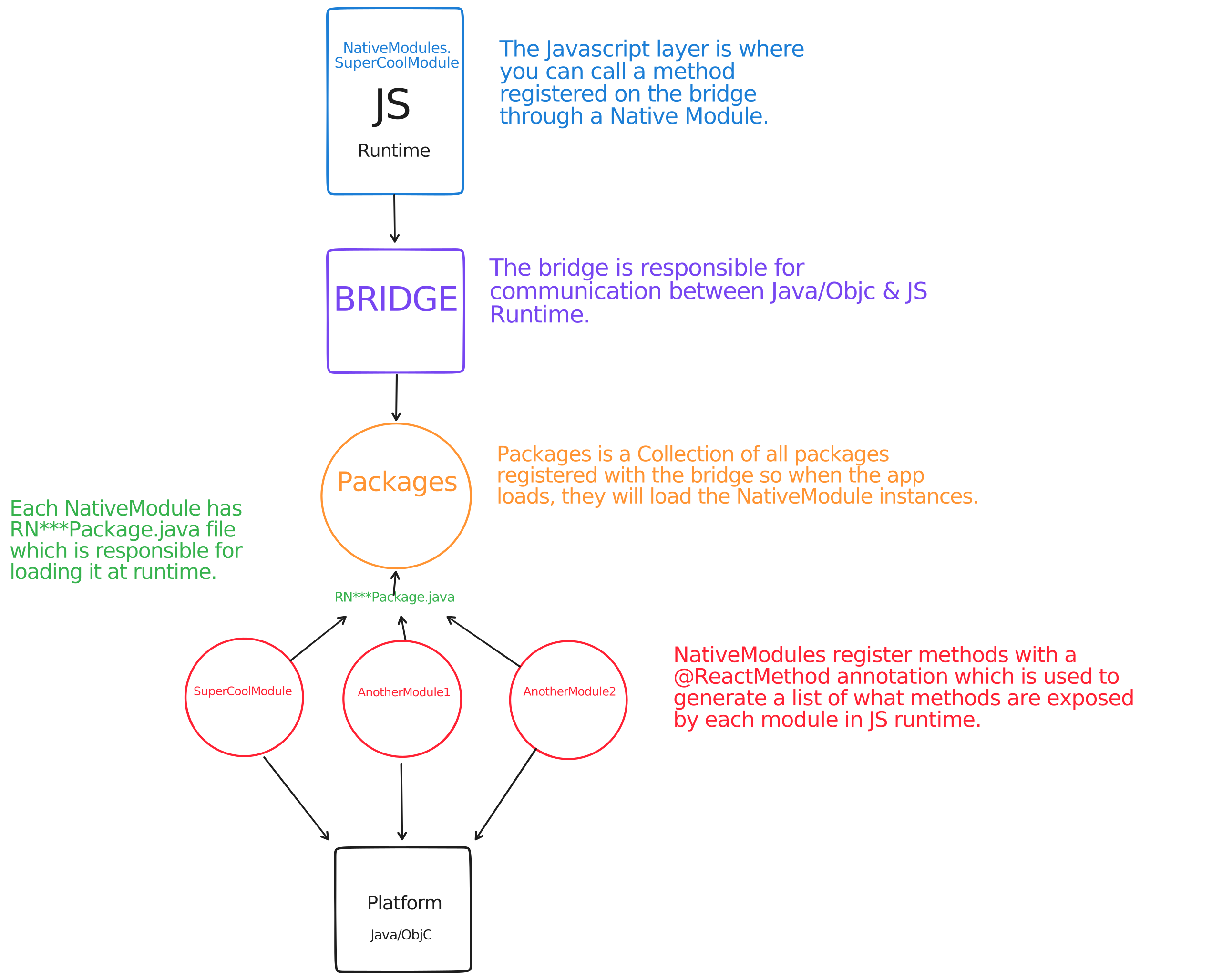
So now that we know how native modules function in React Native, let's look into how we are going to achieve the same in NativeScript. You will also be able to understand how this plugin is working on android. Some design decisions here might contradict with the usual NativeScript plugins, but that's expected in building unusual things.
NativeScript gives us direct access to platform APIs therefore we do not need a bridge/JSI interface like React Native to communicate with NativeModule therefore the difficult part is already done by NativeScript. We only need to write React Native's android layer and remove any references to the bridge/JSInstance. Let me explain this with an example:
Here's a Callback interace in React Native's bridge:
package com.facebook.react.bridge;

/**
 * Interface that represent javascript callback function which can be passed to the native module as
 * a method parameter.
 */
public interface Callback {

  /**
   * Schedule javascript function execution represented by this {@link Callback} instance
   *
   * @param args arguments passed to javascript callback method via bridge
   */
  public void invoke(Object... args);
}
In React Native, they have written it's implementation as follows:
package com.facebook.react.bridge;

/** Implementation of javascript callback function that use Bridge to schedule method execution */
public final class CallbackImpl implements Callback {

  private final JSInstance mJSInstance;
  private final int mCallbackId;
  private boolean mInvoked;

  public CallbackImpl(JSInstance jsInstance, int callbackId) {
    mJSInstance = jsInstance;
    mCallbackId = callbackId;
    mInvoked = false;
  }

  @Override
  public void invoke(Object... args) {
    if (mInvoked) {
      throw new RuntimeException(
          "Illegal callback invocation from native "
              + "module. This callback type only permits a single invocation from "
              + "native code.");
    }
    mJSInstance.invokeCallback(mCallbackId, Arguments.fromJavaArgs(args));
    mInvoked = true;
  }
}
As you can see, they are invoking the callback with an id on the JSInstance. We can do the same in NativeScript in a much simpler way:
new com.facebook.react.bridge.Callback({
  invoke: (args: native.Array<java.lang.Object>) => {
    // code here
  },
});
Yup, we don't need to write an implementation in Java, we can just write it in javascript and then pass it with our function invocation in native module. I was suprised when I frist saw this but that's it.
So like that we will add each Class/interface in Java and remove any bridge related stuff as it's not needed. While doing this, we must ensure the the Native Modules don't have to change anything and work as drop-in.
I have already implemented basic java classes required for Native Modules to function. You can find them in in react/react folder.
Here's a list of Features we need to implement for basic working react native module:
- Loading native_modules from node_modules directory
- Ensure that the native modules will use our local version of react native
- Registering modules with our own implementation of bridge
- Writing Javascript implementation
1. Loading Native Modules from node_modules directory
To simplify the process of linking Native modules & having full control over compiling our local version of react native, I have added the react/ folder which is a complete android application with two android modules.
1. react module: This is where all our android react native code lives.
2. bridge module:
This module allows us to dynamically link react module to our NativeScript app & with our Native modules. This module has only one java class called Bridge where we will register our React**Package.java for each Native Module similar to how react native does.
Let's see how a module & react native are linked to the app.
Step 1:
Android requires that if you need to use a local project and compile it from source, you must add it in settings.gradle file. Hence, we add our react native module in react/settings.gradle file:
include ':react' // react native
include ':bridge' // bridge module

include ':react-native-module-test'
project(':react-native-module-test').projectDir = new File(rootProject.projectDir, '../../../react-native-module-test/android')
// Currently this links to the local react-native-module-test/android folder however in a production it will link to native_modules/react-native-module-test/android folder instaed.
Step 2:
Add our native module as a dependency in react/bridge/build.gradle file.
dependencies {
    embed project(':react')
    embed project(':react-native-module-test')

}
One thing to note here is that we are using embed instead of implementation because we want to generate a single .aar file. We use com.github.kezong:fat-aar:1.3.8 gradle plugin for this purpose. This allows us to generate typings and easily manage all modules by generating and managing just one .aar file.
2. Using our local version of react native
The next challenge is to ensure that all native modules do not use the react native version published on maven, instead they should use the version available locally. For this we need to add a gradle configuration that replaces the com.react.facebook:react-native module with our local version:
In react/build.gradle file
configurations {
    all {
      resolutionStrategy {
        dependencySubstitution {
          substitute module("com.facebook.react:react-native") using project(":react") because "we will replace this with our local react"
        }
      }
    }
  }
3. Registering modules
Finally in Bridge.java inside bridge module we are adding our package:
import com.testmodule.RNTestModulePackage;

public class Bridge {
public void loadAllRegisteredModules(ReactApplicationContext context) {
    packages.add(new RNTestModulePackage());
That's all for the linking part.
4. Generating react.aar file
To generate a react.aar file we can simply run the following command:
cd react/bridge && ./gradlew exportAarThis will build the react.aar file and place it in platforms/android folder.
5. Generating typings
Once we have the react.aar file, generating typings is simple. Fromt the root directory of monorepo, run the typings.sh script:
./typing.shThis will generate typings for react and all linked native modules and place them in typings/android folder automatically.
6. Writing Javascript implementation
The final step is to write the JS implementation of the bridge and be able to access native modules. Here's a basic version that's currently working:
import { Utils } from '@nativescript/core';

export class ReactNative {
  bridge: com.bridge.Bridge;
  reactContext: com.facebook.react.bridge.ReactApplicationContext;
  init() {
    if (this.bridge) return;
    // Create a react context
    this.reactContext = new com.facebook.react.bridge.ReactApplicationContext(
      Utils.android.getApplicationContext()
    );
    // Initialize the bridge
    this.bridge = new com.bridge.Bridge();
    // load all registered modules
    this.bridge.loadAllRegisteredModules(this.reactContext);
  }

  getName() {
    if (!this.bridge) return;
    // Calling the getName method on our bridge module
    const RNTestModule = this.bridge.getJSModule('RNTestModule');
    console.log(RNTestModule?.getName());
  }
}
Ideally we will have to write a JS layer exactly like react native like this:
import { NativeModules } from 'react-native';

const RNTestModule = NativeModules.RNTestModule;

export default RNTestModule;
By doing this developers can use the existing javascript implementation of react native modules by importing from node_modules folder directly.
7. Bridge development workflow
One of the main reasons for having a react/ folder in the plugin is to allow easy development of react-native code in Java as it's a complete app can can be opened in Android Studio with all the modules linked and editable.
This makes the development workflow seemless. Another benefit is that as soon as you are done making changes, you can run the extractAar task which will place the newly compiled react.aar in platforms/android folder which rebuilds the NativeScript app and then installs and launches it and you can test newly made changes instantly.
Run the demo app
Make sure you have followed the Environement Setup guide. Once that's done, setup the workspace:
npm run setupRun npm start & And choose demo.android from the list.
Roadmap
You can find the roadmap in this issue. I am hoping to get this production ready as soon as I can.
Long live NativeScript.