

Package Exports
- @stackline/angular-highcharts
- @stackline/angular-highcharts/dist/index.js
This package does not declare an exports field, so the exports above have been automatically detected and optimized by JSPM instead. If any package subpath is missing, it is recommended to post an issue to the original package (@stackline/angular-highcharts) to support the "exports" field. If that is not possible, create a JSPM override to customize the exports field for this package.
Readme
@stackline/angular-highcharts
A maintained Angular 11 wrapper for Highcharts, Highstock, and Highmaps applications, with standard chart rendering, constructor switching, module registration, directive event outputs, native chart instance access, realtime data demos, and Angular-versioned release lines.






Documentation & Live Demos | Angular 11 Demo | StackBlitz | npm | Issues | Repository | Community Discussions
Angular 11 release: 11.0.0
Credits: Original Angular Highcharts wrapper lineage by Eugene Gluhotorenko. Current Stackline maintenance, Angular release-line packaging, docs, live tests, publishing, and repository stewardship by Alexandro Paixao Marques.
Why this library?
@stackline/angular-highcharts keeps the early Angular Highcharts wrapper API alive while making it usable in a maintained, versioned Stackline package line.
The goal is not to hide Highcharts. The package stays thin: your application still owns the real Highcharts options object, the Highcharts constructor choice, module registration, event handling, and native chart instance. The wrapper gives Angular templates a stable <chart> component, Angular event outputs, axis/series/point directives, and release families aligned to Angular majors.
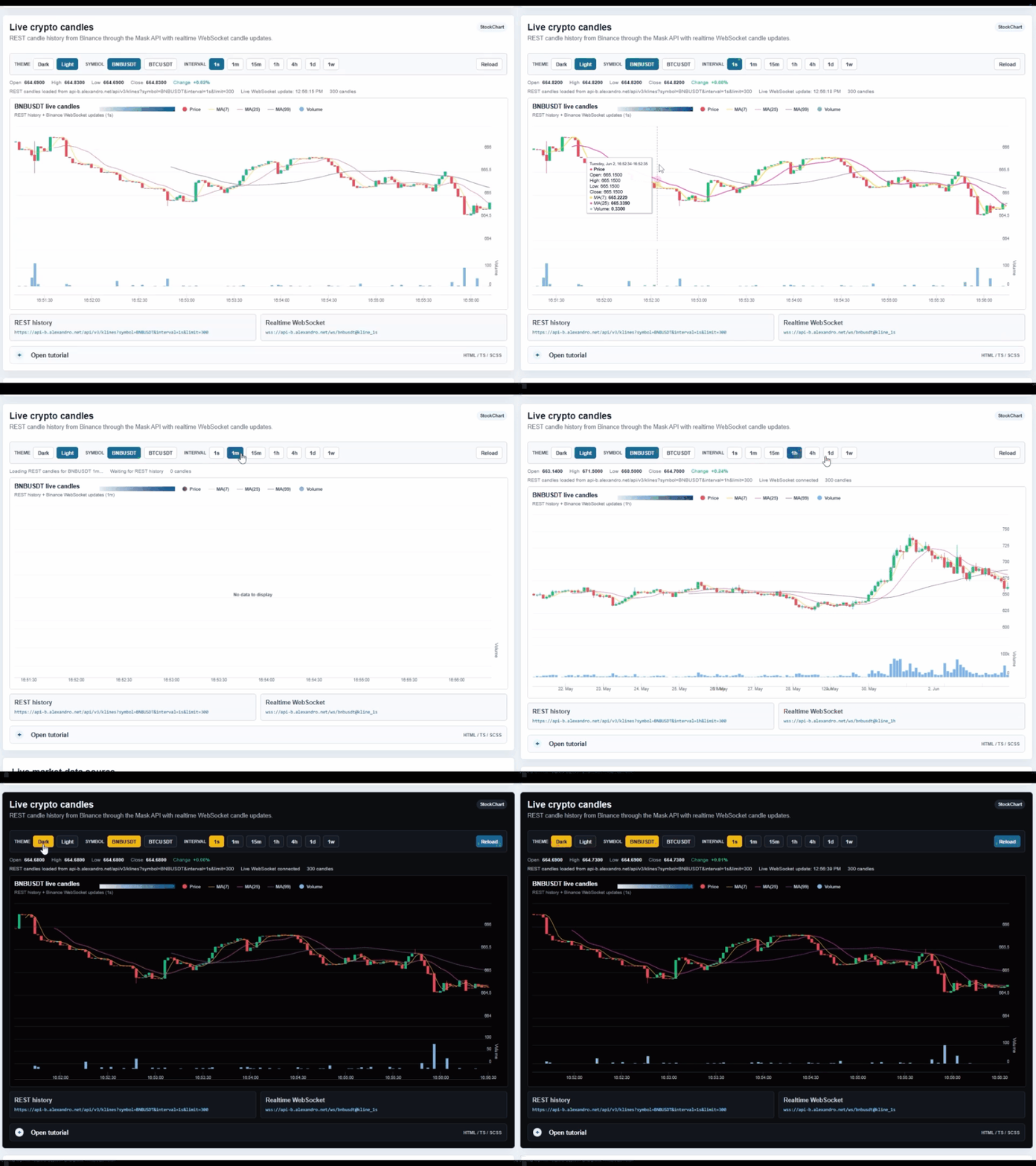
The Angular 11 package family is 11.0.0 and is intended for Angular 11.x applications. The live validation app for this line uses a real Angular 11 project, renders static chart examples, renders realtime market examples, and validates that dynamic charts update existing Highcharts instances instead of blinking through full object recreation.
Features
| Feature | Supported |
|---|---|
| Angular 11 tested release line | ✅ |
Standard Highcharts.Chart rendering |
✅ |
StockChart constructor support |
✅ |
| Highmaps constructor support when Highmaps is registered | ✅ |
Highcharts module registration through ChartModule.forRoot(...) |
✅ |
| Native Highcharts options object | ✅ |
Native chart instance access through (create) |
✅ |
| Chart event outputs | ✅ |
| Series event outputs | ✅ |
| Point event outputs | ✅ |
xAxis and yAxis directive outputs |
✅ |
zAxis directive outputs |
✅ |
colorAxis directive outputs |
✅ |
| Dynamic data updates | ✅ |
| Realtime WebSocket demo coverage | ✅ |
| REST history + live candle demo coverage | ✅ |
| Static examples for common chart types | ✅ |
| Versioned docs builds per Angular line | ✅ |
Table of Contents
- Angular Version Compatibility
- Installation
- Setup
- Basic Usage
- Constructor Switch
- Highcharts Modules
- Events and Directives
- Native Chart Instance
- Common Chart Types
- Dynamic Updates
- API Surface
- Wrapper Capabilities
- License
Angular Version Compatibility
Each package family targets one Angular major. Keep the package major aligned with the Angular major used by your application.
| Package family | Angular family | Peer range | Install |
|---|---|---|---|
11.x |
Angular 11.x |
>=11.0.0 <12.0.0 |
npm install @stackline/angular-highcharts@11.0.0 highcharts@10.3.3 --save-exact |
Installation
npm install @stackline/angular-highcharts@11.0.0 highcharts@10.3.3 --save-exactThe package declares highcharts as a peer dependency so your application can choose the Highcharts version and modules it needs.
Highcharts Compatibility
The Angular 11 validation app uses highcharts@10.3.3, which is the highest Highcharts version tested without Angular 11 CLI/Webpack syntax-loader changes.
Highcharts 11.x and 12.x were tested for this line and rejected because their distributed modules use newer JavaScript syntax than the Angular 11 default build pipeline accepts. If your application customizes Webpack/Babel to transpile package modules, you can run your own compatibility test, but the maintained Stackline Angular 11 line is published against 10.3.3.
Setup
1. Import the module
import { NgModule } from '@angular/core';
import { BrowserModule } from '@angular/platform-browser';
import { ChartModule } from '@stackline/angular-highcharts';

declare var require: any;

@NgModule({
  imports: [
    BrowserModule,
    ChartModule.forRoot(require('highcharts'))
  ]
})
export class AppModule {}
Basic Usage
1. Render a chart
<chart [options]="options"></chart>2. Keep options in the component
options = {
  chart: { type: 'line' },
  title: { text: 'Simple chart' },
  xAxis: { categories: ['Jan', 'Feb', 'Mar', 'Apr'] },
  yAxis: { title: { text: 'Revenue' } },
  series: [
    { name: 'Orders', data: [29.9, 71.5, 106.4, 129.2] }
  ]
};
Constructor Switch
Use the type input when the chart should be created with another Highcharts constructor.
<chart [type]="'StockChart'" [options]="stockOptions"></chart>stockOptions = {
rangeSelector: { selected: 1 },
title: { text: 'BNBUSDT candles' },
series: [
{
type: 'candlestick',
name: 'BNBUSDT',
data: []
}
]
};Common constructor values:
| Constructor | Usage |
|---|---|
Chart |
Default Highcharts charts. |
StockChart |
Highstock timelines, candlesticks, ranges, and financial charts. |
Map / mapChart style constructors |
Highmaps-style charts when the matching Highcharts build is registered. |
Highcharts Modules
Register Highcharts modules through ChartModule.forRoot(...). The wrapper calls each module with the Highcharts static object before charts are created.
import { NgModule } from '@angular/core';
import { BrowserModule } from '@angular/platform-browser';
import { ChartModule } from '@stackline/angular-highcharts';

declare var require: any;

@NgModule({
  imports: [
    BrowserModule,
    ChartModule.forRoot(
      require('highcharts'),
      require('highcharts/highcharts-more'),
      require('highcharts/modules/solid-gauge'),
      require('highcharts/modules/heatmap'),
      require('highcharts/modules/treemap'),
      require('highcharts/modules/funnel')
    )
  ]
})
export class AppModule {}
The live test matrix covers examples for line, spline, area, areaspline, column, bar, stacked column, pie, donut, scatter, bubble, combination, polar, gauge, solid gauge, heatmap, treemap, funnel, 3D column, StockChart, map-like charts, and no-data states.
Events and Directives
The wrapper exposes Angular outputs for Highcharts chart, series, point, and axis event families.
<chart
  [options]="directiveOptions"
  (create)="onChartCreate($event)"
  (load)="record('chart load')"
  (redraw)="record('chart redraw')"
  (selection)="record('chart selection')"
>
  <series
    (click)="record('series click')"
    (legendItemClick)="record('legend click')"
  >
    <point
      (click)="record('point click')"
      (mouseOver)="record('point hover')"
    ></point>
  </series>

  <xAxis (setExtremes)="record('xAxis extremes')"></xAxis>
  <yAxis (setExtremes)="record('yAxis extremes')"></yAxis>
  <zAxis (afterSetExtremes)="record('zAxis extremes')"></zAxis>
  <colorAxis (setExtremes)="record('colorAxis extremes')"></colorAxis>
</chart>events: string[] = [];
onChartCreate(chart: any) {
this.record('chart created with ' + chart.series.length + ' series');
}
record(message: string) {
this.events.unshift(new Date().toLocaleTimeString() + ' - ' + message);
this.events = this.events.slice(0, 8);
}Native Chart Instance
Use (create) to keep the native Highcharts instance. This is the right path for realtime dashboards because it lets you update series progressively instead of recreating the full options object.
<chart [options]="options" (create)="saveChart($event)"></chart>chart: any;
saveChart(chart: any) {
this.chart = chart;
}
addPoint(value: number) {
if (!this.chart || !this.chart.series.length) {
return;
}
this.chart.series[0].addPoint(value, true, false);
}
replaceSeries(data: number[]) {
if (!this.chart || !this.chart.series.length) {
return;
}
this.chart.series[0].setData(data, true, false);
}Common Chart Types
Use normal Highcharts options. The wrapper does not invent a second chart configuration language.
columnOptions = {
  chart: { type: 'column' },
  title: { text: 'Monthly sales' },
  xAxis: { categories: ['Jan', 'Feb', 'Mar', 'Apr'] },
  yAxis: { title: { text: 'Sales' } },
  series: [
    { name: 'Online', data: [12, 18, 24, 31] },
    { name: 'Retail', data: [8, 13, 19, 22] }
  ]
};

pieOptions = {
  chart: { type: 'pie' },
  title: { text: 'Share by channel' },
  series: [
    {
      name: 'Share',
      data: [
        ['Organic', 42],
        ['Paid', 28],
        ['Referral', 18],
        ['Direct', 12]
      ]
    }
  ]
};
Dynamic Updates
For dashboards and live screens, keep the native chart instance from (create)
and update series data directly. This avoids recreating the full chart surface
on every frame.
updateCandles(ohlcData: any[], volumeData: any[]) {
  if (!this.chart) {
    return;
  }

  this.chart.series[0].setData(ohlcData, false, false);
  this.chart.series[1].setData(volumeData, false, false);
  this.chart.redraw();
}
API Surface
<chart> inputs
| Input | Type | Description |
|---|---|---|
options |
any |
Native Highcharts options object. |
type |
string |
Highcharts constructor name. Defaults to Chart. |
<chart> outputs
| Output | Description |
|---|---|
create |
Emits the native chart instance after creation. |
load, redraw, selection, click |
Chart-level Highcharts events. |
addSeries, afterPrint, beforePrint, drilldown, drillup |
Additional chart lifecycle and interaction events. |
Directive outputs
| Directive | Events |
|---|---|
<series> |
Series event outputs such as click and legend interaction. |
<point> |
Point event outputs such as click, select, and mouse interaction. |
<xAxis>, <yAxis> |
Axis event outputs such as setExtremes and afterSetExtremes. |
<zAxis> |
3D / z-axis event outputs. |
<colorAxis> |
Heatmap, map, and color-scale event outputs. |
Wrapper Capabilities
| Capability | Example |
|---|---|
| Options API | <chart [options]="options"> |
| Constructor switch | <chart [type]="'StockChart'" [options]="options"> |
| Directive events | <series>, <point>, <xAxis>, <yAxis>, <zAxis>, <colorAxis> |
| Highcharts modules | more, 3d, heatmap, treemap, funnel, solid-gauge, stock, map, drilldown, sankey, dependency-wheel, networkgraph, sunburst, wordcloud, xrange, timeline, variwide, variable-pie, item, streamgraph, bullet, dumbbell, lollipop, pareto, histogram-bellcurve, tilemap, venn, arc-diagram, organization |
License
MIT