

Package Exports
This package does not declare an exports field, so the exports above have been automatically detected and optimized by JSPM instead. If any package subpath is missing, it is recommended to post an issue to the original package (@themion/gatsby-source-notion-api) to support the "exports" field. If that is not possible, create a JSPM override to customize the exports field for this package.
Readme

Gatsby Source Plugin Notion API


Gatsby source plugin for working with official Notion API.
Here's a Postman collection to play around with the API if you're interested: https://www.postman.com/notionhq/workspace/notion-s-public-api-workspace/overview
🚧 It's a work in progress
This is a source plugin for pulling content into Gatsby from official public Notion API (currently in beta). With this plugin, you will be able to query your Notion pages in Gatsby using GraphQL.
Here's my blog running on gatsby-source-notion-api
Features
- Get your Notion pages in Gatsby via GraphQL
- Convenient access to page properties
- Page contents in Markdown!
- Normalised page title
- All blocks styling represented in Markdown:
- bold (
**$VALUE**) - italic (
_$VALUE_) strikethrough(~~$VALUE~~)- underline (
<u>$VALUE</u>) code($VALUE)- color 🤷 (
<span notion-color="$COLOR">$VALUE</span>)
- bold (
- Access to raw data returned by Notion API
- Support for
markdown-remarkandmdx
Install
yarn add gatsby-source-notion-apior
npm install --save gatsby-source-notion-apiHow to use
Before using this plugin, make sure you
- Created a Notion integration (sign in to Notion, go to
Settings & Memberships→Integrations→Develop your own integrations, short link to the Integrations creation section). It's OK to use an internal one. Don't forget to copy the token: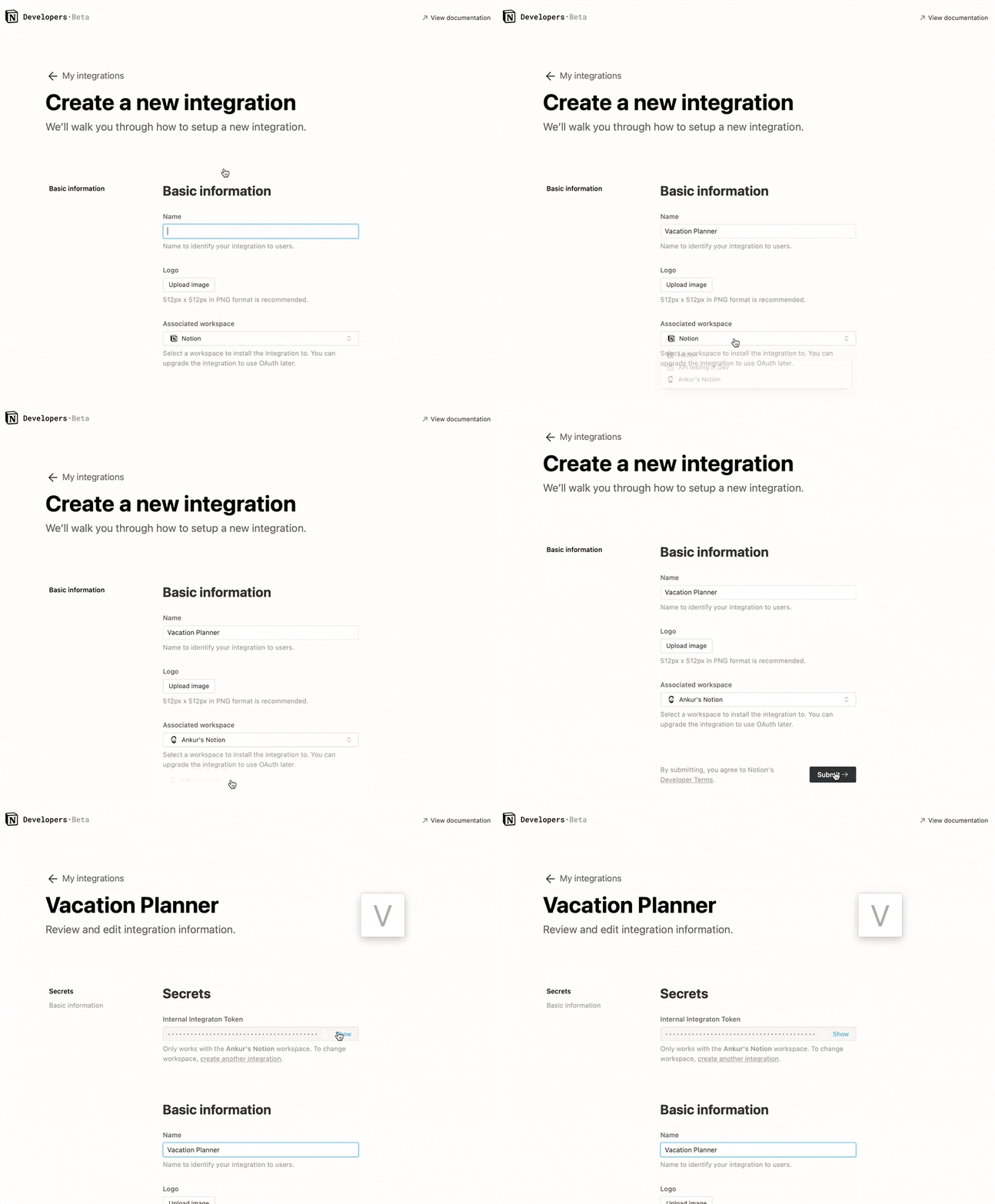
- Go to the database you want to have access to from Gatsby, and share it with the integration (
Share→ Select the integration in theInvitedropdown). Don't forget the database in the URL. It's a series of characters after the last slash and before the question mark.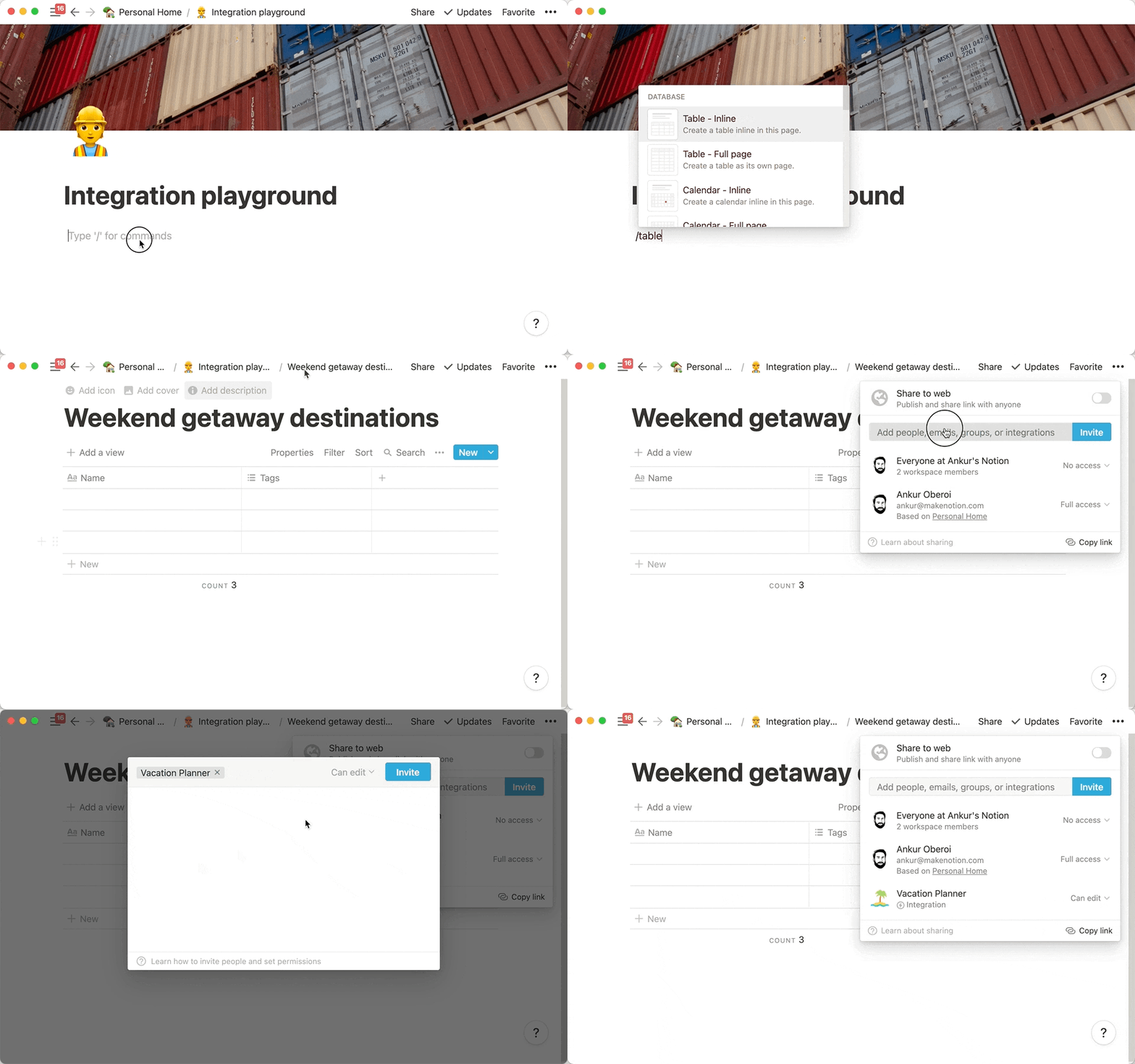 Here's a reference:
https://www.notion.so/{USER}/**{DATABASE_ID}**?{someotherirrelevantstuff}
Here's a reference:
https://www.notion.so/{USER}/**{DATABASE_ID}**?{someotherirrelevantstuff}
Then add this to your gatsby-config.json:
plugins: [
    {
        resolve: `gatsby-source-notion-api`,
        options: {
            token: `$INTEGRATION_TOKEN`,
            databaseId: `$DATABASE_ID`,
            propsToFrontmatter: true,
            lowerTitleLevel: true,
        },
    },
    // ...
]
Configuration options
token [string][required]
Integration token.
databaseId [string][required]
The identifier of the database you want to get pages from. The integration identified by provided token must have access to the database with given id.
propsToFrontmatter [boolean][defaults to true]
Put Notion page props to Markdown frontmatter. If you set this to false, you will need to query notion to get page props.
lowerTitleLevel [boolean][defaults to true]
Push headings one level down. # becomes ##, ## becomes ###, ### becomes ####. Notion is limited to only 3 levels of heading. You can create ####, #####, etc. - they will not be reflected in Notion, but they will work properly in the Markdown output. Is true by default.
How to query for nodes
You can query for pages with notion or grab all of them with allNotion. The raw content of the
page is available under raw property.
Query for all nodes
query {
    allNotion {
        edges {
            node {
                id
                parent
                children
                internal
                title
                properties {
                    My_Prop_1
                    My_Prop_2
                }
                archived
                createdAt
                updatedAt
                markdown
                raw
            }
        }
    }
}
Alternatively, you can use MarkdownRemark or MDX directly:
query {
    allMarkdownRemark {
        edges {
            node {
                frontmatter {
                    title
                }
                html
            }
        }
    }
}
Node properties
id
Unique page identifier. This is not a Notion page identifier. You can get the Notion page id under raw.id.
parent (Node)
Parend Node.
children
Blocks that belong to the page.
title (String)
Page title joined into one string.
properties
Properties of the page. An object with keys representing database columns (snake-cased), and the following value:
id (String)
Notion column id
key (String)
Readable name of the column (without snake case).
value (*)
Value of the column for the page. Might have different structure depending on the type.
type (String)
Notion type of the column.
archived (Boolean)
Boolean. Is true if the pages was marked removed but not removed permanently.
createdAt (Date)
Date of page creation.
updatedAt (Date)
Date of the last page update.
raw (*)
Untouched contents of whatever Notion API returned.
markdown (String)
Markdown contents of the page. Limited by blocks currently supported by Notion API. Unsupported blocks turn into HTML comments specifying that Notion marked this block as non-supported.
Since there's not semantic HTML analog for column lists and columns, these Notion blocks are transformed to <ColumnList> and <Column> components in the markdown. To customize these components, you can write custom components for these and include them in your MDXProvider.
Attaching images via "Files" property
If you want to turn images attached through the "Files" property into file nodes that you can use with gatsby-image, you need to attach remote file nodes to the "Files" property. In the example below, the propsToFrontmatter is set to true and the Hero Image Files property is used for images:
// ./gatsby-node.js
exports.onCreateNode = async ({ node, actions: { createNode }, createNodeId, getCache }) => {
    if (node.internal.type === "MarkdownRemark") {
        for (let i = 0; i < node.frontmatter["Hero Image"].length; i++) {
            const name = node.frontmatter["Hero Image"][i].name

            if (!name) {
                continue
            }

            if (name.startsWith("http")) {
                const fileNode = await createRemoteFileNode({
                    url: name,
                    parentNodeId: node.id,
                    createNode,
                    createNodeId,
                    getCache,
                })

                if (fileNode) {
                    node.frontmatter["Hero Image"][i].remoteImage___NODE = fileNode.id
                }
            }
        }
    }
}
Current state
- Due to the fact that Notion API only appeared recently, and it is still in beta, some blocks are marked "unsupported". Among others, images cannot be fetched for now
- Currently,
gatsby-source-notion-apican only work with one provided database. In further releases, all databases reachable by the Integration will be available for querying Nested blocks are currently skipped. E.g. if a list item has a nested sublist, it's contents will be omitted. This will be fixed in the nearest releasesNested blocks are supported as of0.4.0!Only raw content is available. Raw meaning whatever Notion returns. Further releases will aim at providing a more convenient data format apart from the raw one0.3.0features support for archived, createdAt, updatedAt, properties and title.
🎉 You did it
Thanks for reaching to the end of the readme!