
Package Exports
This package does not declare an exports field, so the exports above have been automatically detected and optimized by JSPM instead. If any package subpath is missing, it is recommended to post an issue to the original package (agentloopkit) to support the "exports" field. If that is not possible, create a JSPM override to customize the exports field for this package.
Readme
AgentLoopKit
A drop-in engineering loop for coding agents.
Your coding agent can write code. AgentLoopKit gives it the repo habits reviewers need: scoped task contracts, safety rules, verification evidence, review summaries, and clean handoffs.
Vibe coding produces code. Agentic engineering produces auditable work.
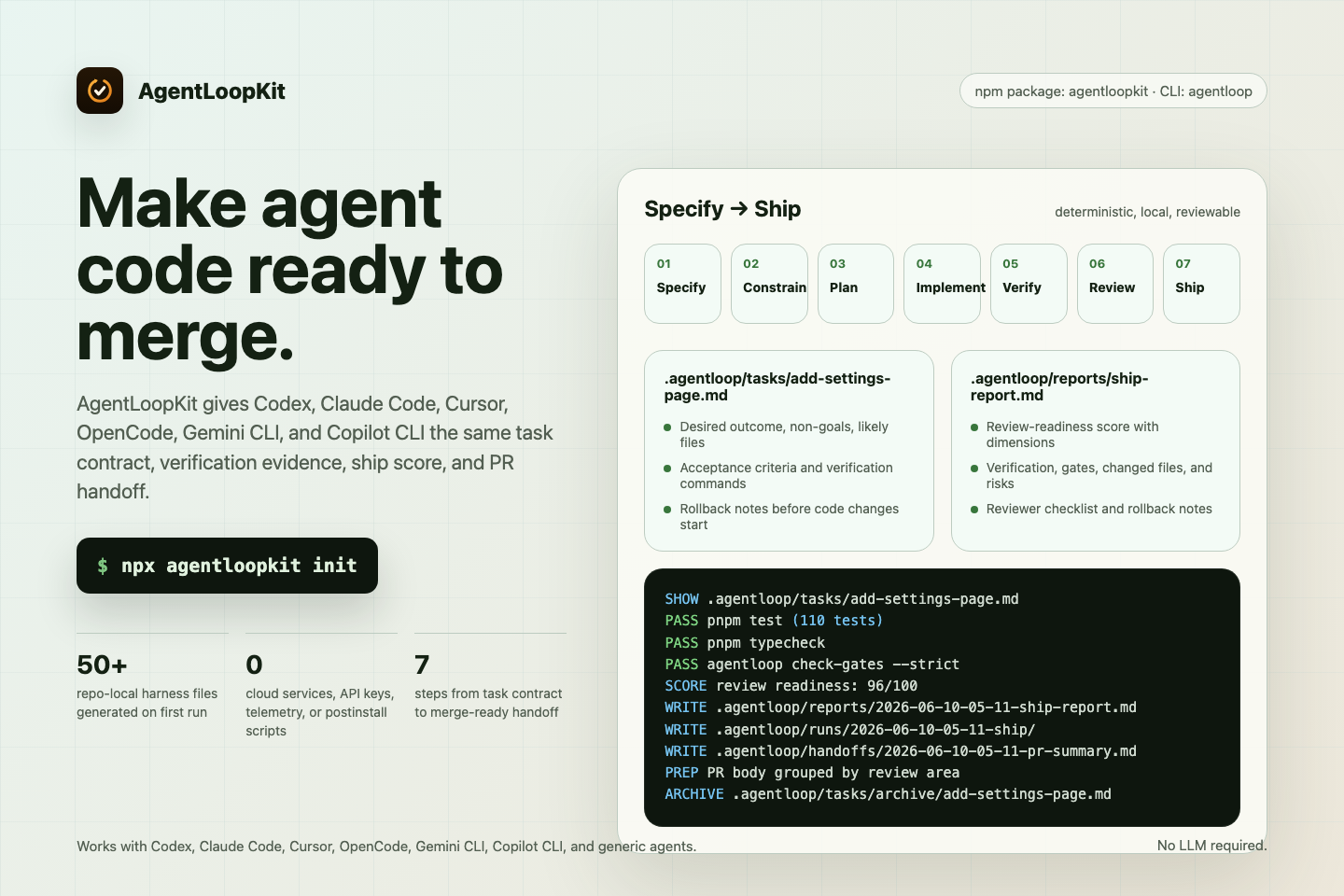
The screenshots and terminal demo in this README are generated from committed sources in docs/assets/readme/ with Playwright and VHS.
What It Is
AgentLoopKit is a repo-level toolkit for developers using Codex, Claude Code, Cursor, OpenCode, Gemini CLI, GitHub Copilot CLI, and other coding agents.
It does not replace your agent, IDE, or CLI. It gives those tools a repeatable engineering loop inside the repository they are editing.
AgentLoopKit generates:
AGENTS.mdAGENTLOOP.mdagentloop.config.json.agentloop/with task templates, gates, policies, reports, handoffs, and agent instructions
Why It Exists
Coding agents often move fast but leave reviewers with weak evidence: unclear scope, missing tests, broad diffs, and vague summaries. AgentLoopKit gives the agent a repo-local contract:
- Specify the task.
- Constrain risk.
- Plan the change.
- Implement the smallest useful diff.
- Verify with configured commands.
- Review the diff.
- Handoff with evidence.
Install
Use it with npx inside an existing repository:
npx agentloopkit init
npx agentloopkit init --dry-run
Pin the current version when you need repeatable CI or team setup:
npx --yes agentloopkit@0.24.1 version
npx --yes agentloopkit@0.24.1 init
Run the CLI after install:
npx agentloopkit doctor
npx agentloopkit create-task --title "Add settings page" --type feature
npx agentloopkit task list
npx agentloopkit task show .agentloop/tasks/2026-06-09-add-settings-page.md
npx agentloopkit task set .agentloop/tasks/2026-06-09-add-settings-page.md
npx agentloopkit task status .agentloop/tasks/2026-06-09-add-settings-page.md in-progress
npx agentloopkit status
npx agentloopkit next
npx agentloopkit verify
npx agentloopkit handoff
npx agentloopkit check-gates
npx agentloopkit check-gates --strict
npx agentloopkit report
npx agentloopkit badge
npx agentloopkit ci-summary
npx agentloopkit release-notes
npx agentloopkit npm-status
npx agentloopkit policy list
npx agentloopkit policy show security
npx agentloopkit policy status
npx agentloopkit task archive .agentloop/tasks/2026-06-09-add-settings-page.md
npx agentloopkit install-agent codex
npx agentloopkit install-agent all
npx agentloopkit completion zsh
npx agentloopkit completion powershell
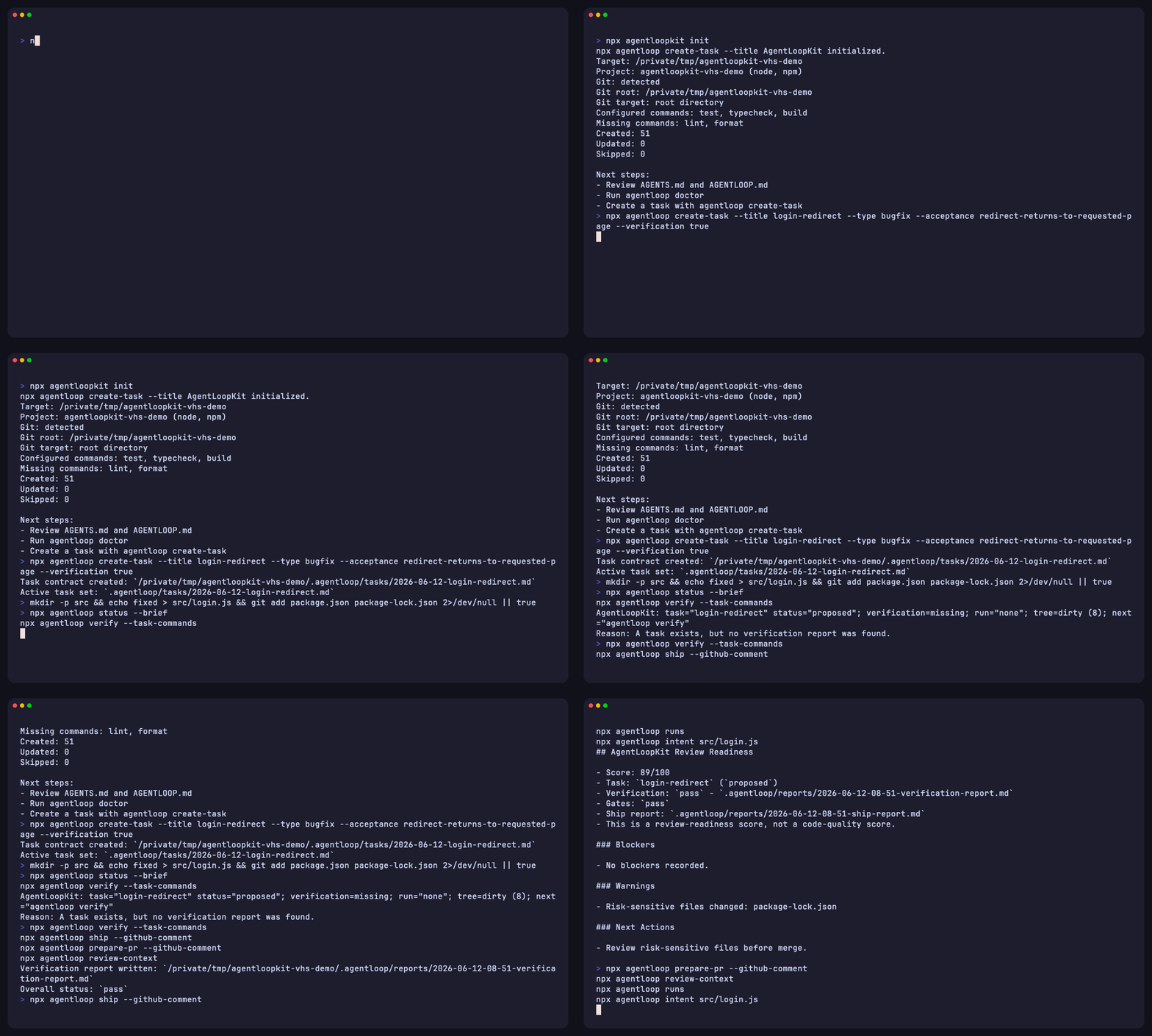
The VHS demo is generated from committed sources in this repository.
Pinned team usage:
pnpm add -D agentloopkit
pnpm agentloop init
Contributor usage:
git clone https://github.com/abhiyoheswaran1/agentloopkit
cd agentloopkit
pnpm install
pnpm test
pnpm build
CLI Commands
| Command | Purpose |
|---|---|
agentloop init |
Generate the repo harness and config |
agentloop init --dry-run |
Preview generated files without writing them |
agentloop doctor |
Check setup health, template version, commands, git state, and risk categories |
agentloop create-task |
Create a task contract in .agentloop/tasks/ |
agentloop task list |
List task contracts and show the pinned active task |
agentloop task show <path> |
Print a task contract without changing active state |
agentloop task set <path> |
Pin the active task for status and handoffs |
agentloop task status <path> <status> |
Update a task contract status line |
agentloop task archive <path> |
Move a task contract into .agentloop/tasks/archive/ |
agentloop task current |
Print the pinned active task |
agentloop task clear |
Clear the active task pointer |
agentloop status |
Show active task, latest report, dirty files, next step |
agentloop next |
Print only the next recommended loop action |
agentloop check-gates |
Check task, verification, handoff, harness, policy, and git evidence |
agentloop check-gates --strict |
Treat warning gates as failures for CI |
agentloop verify |
Run configured checks and write a verification report |
agentloop summarize |
Generate a deterministic PR or reviewer summary |
agentloop handoff |
Write a reviewer handoff summary |
agentloop report |
Write a local static HTML evidence report |
agentloop badge |
Write a local SVG evidence badge |
agentloop ci-summary |
Summarize CI context and local AgentLoop evidence |
agentloop release-notes |
Draft local release notes from changelog, git, task, and verification evidence |
agentloop npm-status |
Check npm registry status without publishing |
agentloop policy list |
List local safety policy files |
agentloop policy show <policy> |
Print a local safety policy without mutating files |
agentloop policy status |
Compare local policy files with bundled templates |
agentloop install-agent codex |
Add agent-specific instructions |
agentloop install-agent all |
Add all bundled agent instruction files |
agentloop list-templates |
List bundled templates |
agentloop completion <shell> |
Print bash, zsh, fish, or PowerShell completion scripts |
agentloop version |
Print the CLI version |
The package exposes two binaries:
agentloop init
agentloopkit init
Shell Completions
AgentLoopKit prints completion scripts to stdout. It does not edit .zshrc, .bashrc, fish config, PowerShell startup files, or other shell profile files.
Inspect a script before installing it:
agentloop completion zsh
agentloop completion bash
agentloop completion fish
agentloop completion powershell
agentloop completion pwsh
Example zsh setup:
mkdir -p ~/.zsh/completions
agentloop completion zsh > ~/.zsh/completions/_agentloop
Generated Files
.agentloop/
  manifest.json
  loops/
  gates/
  handoffs/
  agents/
  policies/
  tasks/
  reports/
  harness/
AGENTS.md
AGENTLOOP.md
agentloop.config.json
init appends to an existing AGENTS.md instead of overwriting it.
The package ships schema/agentloop.config.schema.json for editors and config validation. Generated configs use the GitHub raw schema URL for editor support; the CLI validates config locally and does not fetch that URL at runtime.
See docs/configuration.md for config fields and schema notes.
Fresh init also writes .agentloop/manifest.json so doctor can report which template generation created the local harness. See docs/template-migrations.md for manual upgrade guidance.
Agent Usage
Install instructions for the agent you use:
agentloop install-agent codex
agentloop install-agent claude-code
agentloop install-agent cursor
agentloop install-agent opencode
agentloop install-agent gemini-cli
agentloop install-agent github-copilot-cli
AgentLoopKit only writes safe repo-local Markdown instructions when exact third-party config conventions are uncertain.
Task Contracts
Create a contract before a coding session:
agentloop create-task --type feature --title "Add settings page" \
  --problem-statement "Users cannot manage account preferences" \
  --desired-outcome "Users can update settings from the app" \
  --likely-file src/settings \
  --forbidden-file migrations/ \
  --acceptance "Settings can be saved" \
  --verification "pnpm test" \
  --rollback "Remove the settings route"
Pin the contract when more than one task exists:
agentloop task list
agentloop task show .agentloop/tasks/2026-06-09-add-settings-page.md
agentloop task set .agentloop/tasks/2026-06-09-add-settings-page.md
agentloop task status .agentloop/tasks/2026-06-09-add-settings-page.md in-progress
agentloop task archive .agentloop/tasks/2026-06-09-add-settings-page.md
agentloop task current
agentloop task clear
task list --json gives agents a deterministic list with path, title, status, active, and modifiedAt. Listing tasks does not create or update .agentloop/state.json.
create-task --json returns the created task path and Markdown content so agents do not need to parse the human success line.
task show --json returns the selected task metadata and Markdown content without changing active state.
task status --json updates only the - Status: line. Supported values are proposed, in-progress, blocked, review, and done. Status is not verification evidence; run agentloop verify before claiming completion.
task archive --json moves one named Markdown contract into .agentloop/tasks/archive/, refuses to overwrite an existing archive file, and clears the active task pointer when it archives the active task. Archive after verification and handoff, not as a substitute for either.
Each contract records:
- problem statement
- desired outcome
- constraints
- non-goals
- assumptions
- likely files
- files not to touch
- acceptance criteria
- verification commands
- rollback notes
Verification Reports
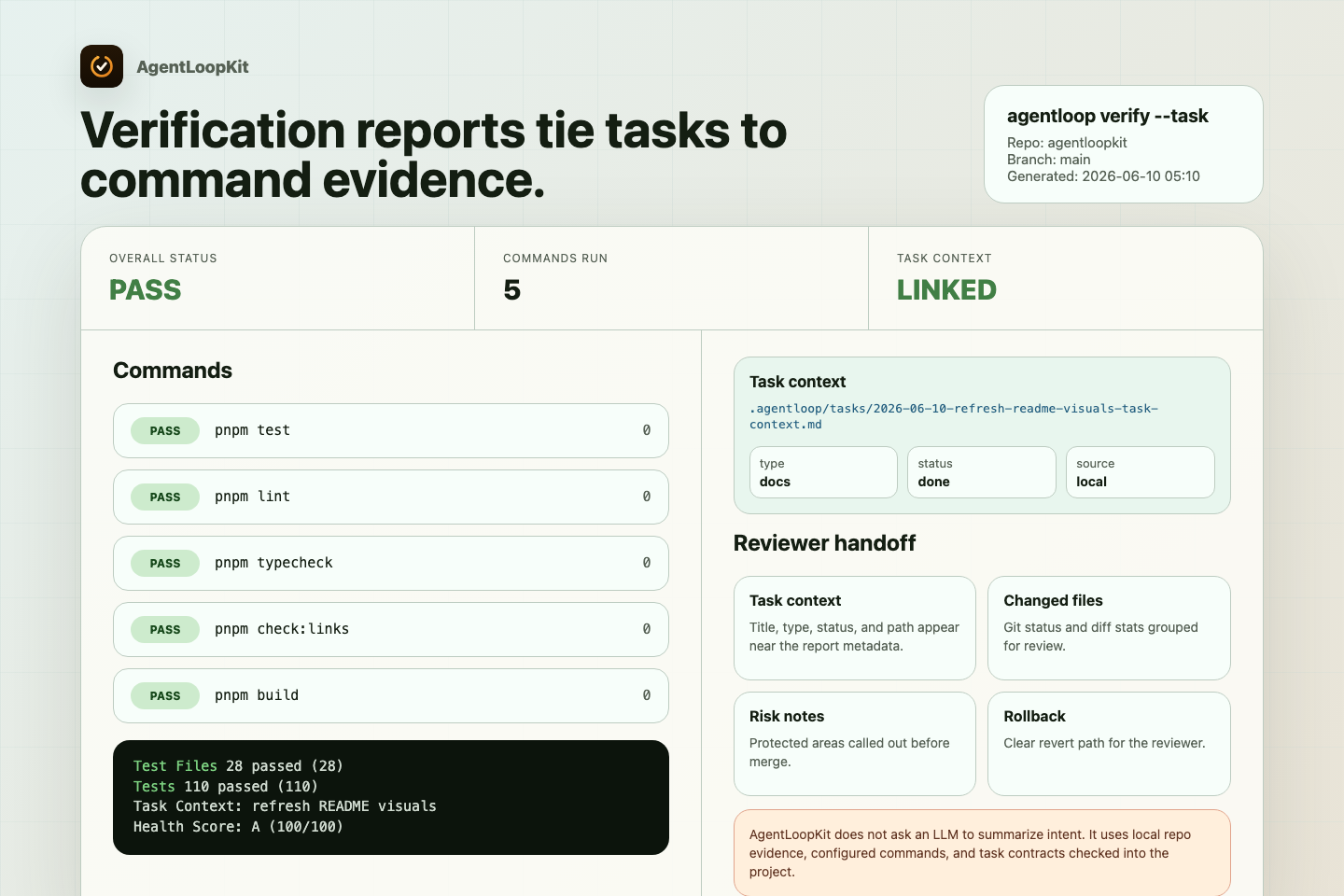
agentloop verify reads agentloop.config.json, runs configured commands, captures output excerpts, and writes a report:
.agentloop/reports/YYYY-MM-DD-HH-mm-verification-report.mdPass --task .agentloop/tasks/file.md to include task title, type, status, and path in the report. AgentLoopKit reads Markdown task contracts for this flag. It reports .env-style paths as unavailable instead of reading them.
It does not hide failures. Failed reports include a short failure summary with each failed command, exit code, and final useful output lines before the full command output. If long logs are truncated, the report keeps the first and last output so the final error stays visible. If no commands are configured, it writes a report saying nothing was verified.
When agentloop verify runs in GitHub Actions, the report records the workflow, event, ref, commit, run URL, and run attempt. Local reports stay quiet. AgentLoopKit does not read .env files or print arbitrary environment variables.
In monorepos, doctor warns on common workspace markers and suggests package-specific verification commands. Add package checks to the task contract when root commands do not cover the touched package, for example pnpm --filter web test or npm --workspace api test. AgentLoopKit records and runs configured commands; it does not infer package graphs or run workspace commands automatically.
doctor also reports potential risk files by category, such as migrations, auth, deployment, lockfiles, and env files. It lists path examples only. It does not read .env contents or claim to scan secrets.
See docs/doctor-risk-files.md for category examples, limits, and reviewer actions.
Status
agentloop status gives agents and humans a quick local readout:
- active task contract, using
agentloop task setwhen present - newest task contract when no active task is pinned
- latest verification report
- working tree state
- configured and missing commands
- next suggested command
Use JSON output in scripts:
agentloop status --jsonUse agentloop next when an agent or script only needs the next local command:
agentloop next
agentloop next --json
next uses the same decision rules as status. It does not run verification commands, create task state, call an LLM, make network requests, or read .env contents.
When an active in-progress task exists, an older verification report does not count as current evidence for that task.
See docs/status.md for output fields and next-action rules.
Gate Checks
agentloop check-gates checks review evidence without running tests or calling an LLM. It looks for:
- a task contract
- a generated verification report
- a generated handoff summary
- repo harness files
- core safety policies
- git working tree context
Use JSON output in scripts:
agentloop check-gates --json
agentloop check-gates --strict
Warnings keep exit code 0 by default. Use --strict in CI when warning gates should fail the command.
doctor checks setup health. check-gates checks whether the current work session has the evidence reviewers expect.
See docs/check-gates.md for gate statuses and exit-code behavior.
HTML Reports
agentloop report writes a local static HTML page from the current task contract, latest verification report, latest handoff, git status, diff stats, and deterministic review summary:
agentloop report
agentloop report --json
agentloop report --out .agentloop/reports/review.html
The command does not run tests, call an LLM, fetch assets, read .env contents, or send data anywhere. It writes one local file under .agentloop/reports/ by default. Use it after verify and handoff when you want a browser-readable artifact for a PR or CI upload.
See docs/html-reports.md for inputs, output paths, and safety behavior.
Evidence Badges
agentloop badge writes a local SVG badge from existing evidence:
agentloop badge
agentloop badge --source gates
agentloop badge --json
The default badge reads the latest verification report and writes .agentloop/reports/agentloop-verification.svg. Gate badges read local gate status and write .agentloop/reports/agentloop-gates.svg. The command does not run tests, call a badge service, read .env, or upload anything.
See docs/badges.md for badge sources and CI usage.
CI Summaries
agentloop ci-summary reads allowlisted CI provenance fields and existing AgentLoop artifacts:
agentloop ci-summary
agentloop ci-summary --json
agentloop ci-summary --write
In GitHub Actions, GitLab CI, and Buildkite it reports provider, workflow or pipeline, event, ref, commit, and run URL when those allowlisted fields are present. Unsupported CI providers report generic CI when CI=true is present. The command does not call provider APIs, read secrets, upload files, run tests, or dump arbitrary environment variables.
Use --write when CI should upload a small Markdown summary alongside verification reports, HTML reports, badges, and handoffs. Verification consumers still read *-verification-report.md; CI summary artifacts do not replace verification evidence.
See docs/ci-summary.md.
Release Notes
agentloop release-notes drafts local release notes from the repository state:
agentloop release-notes
agentloop release-notes --from v0.19.0 --to HEAD
agentloop release-notes --release-version 0.24.0
agentloop release-notes --json
agentloop release-notes --write
The command reads local package metadata, changelog entries, git history, changed files, working tree status, the active task, the latest verification report, and the latest CI summary when those artifacts exist. It does not create tags, publish packages, call GitHub or npm APIs, read tokens, upload files, or rewrite changelogs.
Use it before creating a GitHub release so the release note draft includes the same evidence reviewers see in AgentLoop handoffs.
See docs/release-notes.md.
agentloop npm-status checks whether npm latest matches the local package version:
agentloop npm-status
agentloop npm-status --json
agentloop npm-status --expect-current
agentloop npm-status --registry-json npm-view.json
Use it after a publish attempt before saying npm has caught up. It runs npm view unless you pass captured registry JSON. It does not publish packages, create tags, read tokens, read .env files, upload files, or change package metadata.
See docs/npm-status.md.
Policies
agentloop policy makes generated repo policy files visible from the CLI:
agentloop policy list
agentloop policy show security
agentloop policy status
agentloop policy list --json
agentloop policy status --json
The command reads Markdown files from .agentloop/policies/. policy status reports current, modified, missing, and extra files by comparing local Markdown with bundled templates. It does not enforce compliance, scan source code, fetch remote policy packs, or mutate policy files.
Local policy files are repo guidance. A modified policy can be intentional; review it like code instead of overwriting it to match the bundled template.
See docs/policies.md.
Security Reviews
Use security-review task contracts when a change touches auth, sessions, permissions, secrets, dependencies, deployment config, migrations, billing, or other sensitive areas.
AgentLoopKit helps reviewers see scope, checks run, checks skipped, risk notes, and rollback instructions. It does not scan code, certify compliance, or prove that code is secure.
See docs/security-review.md and examples/security-review/ for a copyable review task, verification report, and PR summary.
Dependency Upgrades
Use dependency-upgrade task contracts when an agent changes packages or lockfiles. AgentLoopKit records upgrade scope, lockfile impact, verification, risks, and rollback notes. It does not choose package versions, scan advisories, or call package registries.
See docs/dependency-upgrades.md and examples/dependency-upgrade/.
CI Recipes
Use agentloop check-gates --strict as a review-evidence gate in pull request CI. Use agentloop verify, agentloop handoff, agentloop report, agentloop badge, agentloop ci-summary --write, and agentloop release-notes --write in CI when you want evidence artifacts uploaded for reviewers.
CI-generated verification reports include GitHub Actions provenance when available, so reviewers can trace an artifact back to the workflow run that created it.
See docs/github-actions.md, examples/github-actions/, examples/gitlab-ci/, and examples/buildkite/ for copy-pasteable workflows. Pin agentloopkit@0.24.1 or a newer vetted release when reproducibility matters.
PR Summaries
agentloop handoff writes a reviewer-ready summary using deterministic inputs:
- git status
- git diff stats
- active task contract, or newest task when no active task is pinned
- latest verification report
- config settings
The summary groups changed files into review areas such as source, tests, docs, CI, config, AgentLoop artifacts, and risk-sensitive paths. It adds review-focus hints from file paths only.
It does not call an LLM.
Use agentloop summarize to preview the same output without writing a handoff file. agentloop summarize --write remains available for scripts.
Safety Principles
AgentLoopKit is intentionally boring:
- no postinstall scripts
- no telemetry
- no cloud backend
- no database
- no API keys
- no hidden network calls
- no reading
.envcontents - no destructive actions during install
Env files are reported by path only.
Compared With Plain AGENTS.md
AGENTS.md gives instructions. AgentLoopKit adds process artifacts:
- task contracts
- gates
- policies
- verification reports
- PR summaries
- rollback notes
The result is easier to review because the work produces evidence, not only code.
Compared With Prompt Collections
Prompt collections help an agent respond better. AgentLoopKit gives the repository a standing workflow that any compatible agent can read and follow.
Compared With Superpowers
Superpowers is a broader agent methodology and skills system. AgentLoopKit focuses on repo-level engineering loops, task contracts, verification evidence, and handoff artifacts.
They can be complementary. You can use AgentLoopKit alongside Superpowers.
AgentLoopKit has no affiliation with Superpowers.
Examples
See examples/ for sample generated harnesses:
examples/nextjs-appexamples/node-apiexamples/python-serviceexamples/docs-onlyexamples/empty-repoexamples/github-actionsexamples/security-reviewexamples/dependency-upgrade
See docs/stack-recipes.md for Next.js, React/Vite, Remix, SvelteKit, Node API, Django, FastAPI, Python, docs-only, empty-repo, and monorepo verification recipes.
Roadmap
See ROADMAP.md.
Contributing
See CONTRIBUTING.md for local setup and PR expectations. Maintainers can use docs/contributor-playbook.md for copyable good-first issue examples.
License
MIT.