
Package Exports
- cast-central
This package does not declare an exports field, so the exports above have been automatically detected and optimized by JSPM instead. If any package subpath is missing, it is recommended to post an issue to the original package (cast-central) to support the "exports" field. If that is not possible, create a JSPM override to customize the exports field for this package.
Readme
Cast Central
Welcome to 'cast-central' you're one stop shop for interfacing with casting devices (chromecast, or roku, send pull request is more is needed!) all in one place. Just start the 'cast-central-service' on a you're target linux machine and install the 'cast-central-client' to interface with it. Further information on what each gives you follows.
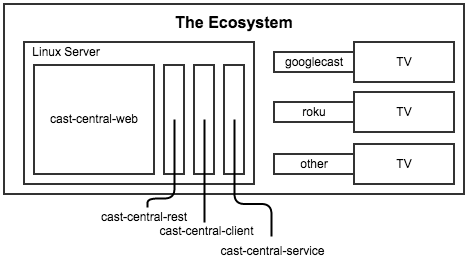
cast-central-service
This is the main service which controls all the casting devices on a single network. It has a notion of resources (which translate to processes) attached to one and only one casting device (or none). The idea is, for each casting device you can spawn a new resource to manage it giving you the ability to load media onto it, mute, set the volume, or whatever else that specific casting device allows.
The communication architecture uses 'node-ipc' a nodejs Inter Process Communication protocol for communicating over local sockets on a linux machine. No reason for using IPC over other forms of communication such as ZeroMQ, or just plain ole TCP, just felt like using IPC.
Below are the current actions the cast-central-service can perform:
Discovery
- MDNS: Multicast Domain Name Service (mDNS) is primarily used for discovery all the current version of Chromecasts on a network.
- SSDP: Simple Service Discovery Protocol (SSDP) used in earlier version of Chromecasts (now uses mDNS) but is the primary use for discovering roku's on the network.
Chromecast (courtesy of the 'node-castv2-client' and 'castv2-youtube' folks)
- Launch: Launches an application on the target casting device. Currently you options are only 'Youtube' or the 'DefaultMediaReceiver' applicaitons. More to come as needed.
- Load: Loads media onto an already launched application. The arguments required for this varies widely based on the currently launched application.
- Volume: Sets the volume on the target casting device (number between 0 and 100).
- Mute: Mutes or un mutes the target casting device (boolean).
- Seek: Seeks the currently playing/loaded media (float 0.0 - 1.0).
- Stop: Stops the currently playing/loaded media on the target casting device.
Roku (TODO)
This is in the works still.. It will be complete soon. You can follow this latest work on the 'develop' branch.
cast-central-client
This is the main interface for controlling the 'cast-central-service' while it's running. It is a full command line interface and allows for performing any action with the 'cast-central-service'.
Usage (because I'm lazy)
$ cast-central-client.js --help
Connect and control the cast-central-service.
Usage: node ./bin/cast-central-client.js <subset> <options>

Subset:
  resource	Controls what processes run within the cast-central-service
  cast		Sends commands for controlling casting devices

Options:
  -l, --list      Lists all currently running resources or casts available
  -n, --new       Starts a new resource (shouldn't be used)
  -d, --delete    Forcefully stops and deletes a resource
  -i, --id        Used when forcefully stopping a resource
  -p, --protocol  Cast discovery protocol to use [mdns, ssdp]                               [default: "mdns"]
  -s, --search    Search term to look for cast devices                                      [default: "googlecast"]
  -c, --cast      Name of cast device to communicate with
  -a, --app       Launch an application on the cast device [DefaultMediaReceiver, Youtube]
  -m, --media     Media to load onto launched application
  --load          Load media to the currently launched application
  --launch        Launch an application the casting device
  -v, --volume    Set the volume of the casting device                                      [default: -1]
  --mute          Mute the casting device [true, false]                                     [default: -1]
  -t, --timeout   Timeout in seconds to wait for connect [> 0]                              [default: 10]
  --seek          Seek the media currently being casted                                     [default: 0]
  --stop          Stop the currently launched app
  -h, --help      Shows this usage
Contribute
Feel free to fork and send pull requests whenever.. Please mind that this is definitely not my full time job but is a hobby and turns out to be pretty useful for controlling all of my chromecasts in one spot. Here are some things that will be in the works soon (unless someone else gets to them first).
In priority order:
- Add Roku support (once I buy one :-))
- Complete the unit tests.
- Complete the Documentation.