
Package Exports
- cf-nodejs-client
This package does not declare an exports field, so the exports above have been automatically detected and optimized by JSPM instead. If any package subpath is missing, it is recommended to post an issue to the original package (cf-nodejs-client) to support the "exports" field. If that is not possible, create a JSPM override to customize the exports field for this package.
Readme
cf-nodejs-client 



Note: This package is not ready for a production App yet.
This project provides a simple client library to interact with some components used on the Cloud Foundry Architecture:
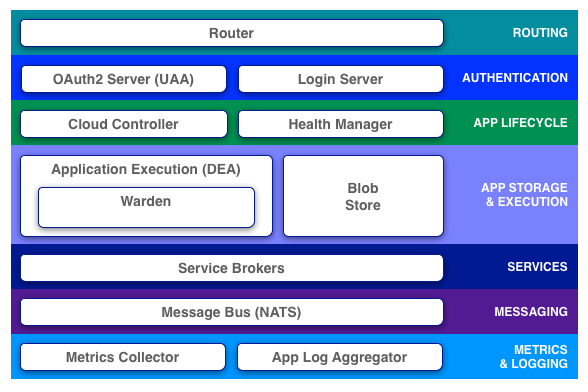
The features implemented are:
- Apps
- BuildPacks
- Domains
- Jobs
- Organizations
- Organizations Quota
- Routes
- Service Bindings
- Spaces
- Spaces Quota
- Stacks
- User Provided Services
- Users
Authentication layer:
- UAA Users
Logging & Metrics layer:
- Logs
Using this library, you could interact with PWS , Bluemix or a Local Cloud Foundry instance using Node.js.
Applications
Node.js with Express are a great combination to develop Web applications. If you observe the Sinatra market, you will notice that Node.js has a huge Traction.
The development doesn't cover the whole CC API. Main areas of development are:
App life cycle:
- Create an App
- Upload source code in .zip or .war (Support for Static, Node.js & JEE)
- Create an User Provided Services
- Associate Apps with an User Provided Services
- Start | Stop an App
- Scale Apps
- Simple Logs management
- Remove Apps
- Remove User Provided Services
PaaS Management:
- Organization quota
- Organization
- Space
- UAA Users
- Users
Getting Started
If you need to interact with a Cloud Foundry platform, install the package in your Node.js development:
npm install cf-nodejs-client --saveOnce you have installed the package define in a isolated config file the credentials to operate with the platform:
config.json
Interacting with Pivotal or Bluemix:
{
    "endpoint" : "https://api.run.pivotal.io", || "endpoint" : "https://api.eu-gb.bluemix.net",
    "username" : "xxx",
    "password" : "yyy"
}
With the credentials defined, create a new file to paste this code to authenticate with the platform.
example.js
"use strict";

var config = require('./config.json');//Load CF configuration

var CloudFoundry = require("cf-nodejs-client").CloudFoundry;
CloudFoundry = new CloudFoundry();
CloudFoundry.setEndPoint(config.endpoint);

CloudFoundry.getInfo().then(function (result) {
    return CloudFoundry.login(result.token_endpoint,config.username,config.password);
}).then(function (result) {
    console.log(result);
}).catch(function (reason) {
    console.error("Error: " + reason);
});
Save the file and test:
node example.js
Testing
This project has a test suite to ensure the reability of this project. Take a look the Tests cases developed with Mocha & Chai to understand some stuff about Cloud Foundry and the usage of this client. Besides, the project has invested some amount of time in testing phase to be the code with a nice coverage level.
The development has been tested with:
| Local Instance | PWS | Bluemix |
|---|---|---|
| 2.25.0 | 2.41.0 | 2.27.0 |
Note: Last test: 2015/10/29
Test suite:
npm test
Code coverage:
istanbul cover node_modules/mocha/bin/_mocha -- -R spec
Continous integration:
https://travis-ci.org/jabrena/cf-nodejs-client/
Versions
Take a look this doc to check the evolution of this Client for Cloud foundry.
Issues
If you have any question or doubt, please create an issue.
Juan Antonio