
Package Exports
- ckeditor5-code-snippet-plugin
This package does not declare an exports field, so the exports above have been automatically detected and optimized by JSPM instead. If any package subpath is missing, it is recommended to post an issue to the original package (ckeditor5-code-snippet-plugin) to support the "exports" field. If that is not possible, create a JSPM override to customize the exports field for this package.
Readme
CKEditor5 Code Snippet Plugin
This plugin helps your create a code block or snippet in your rich text.
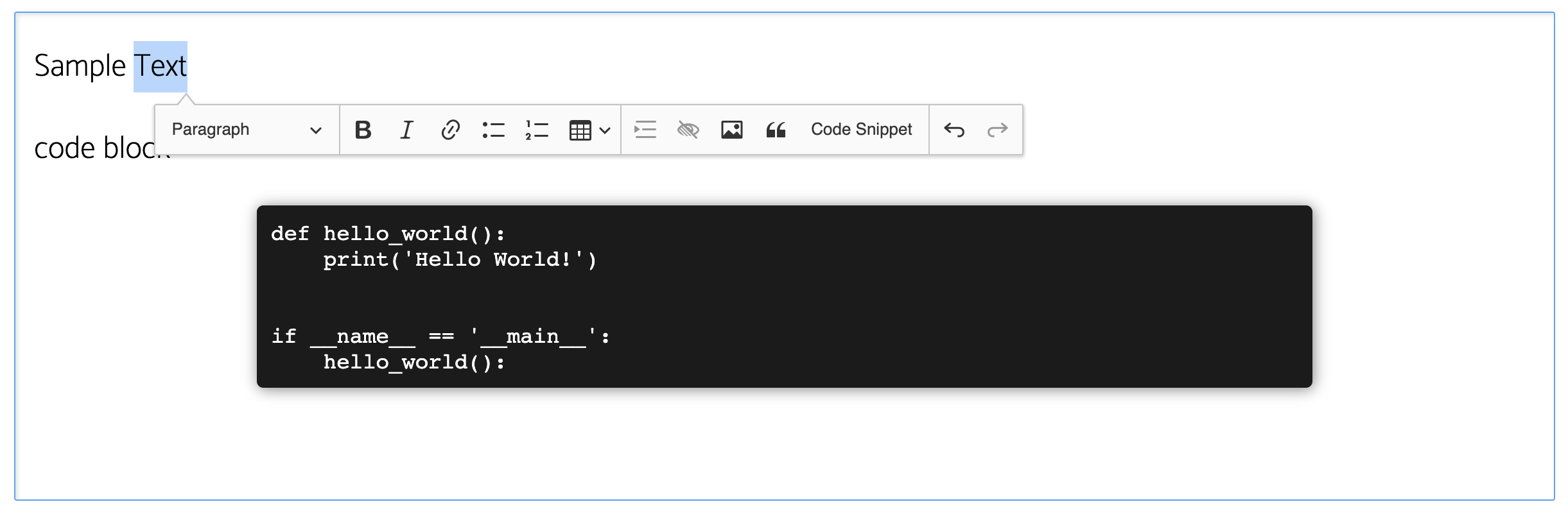
How to Use
To make use of this plugin, you will need to setup your editor using the framework. If you have not done so, below are links to the respective frontend framework specific docs for this. I will recommend you use a custom editor rather than the build.
Install this package using
npm i ckeditor5-code-snippet-plugin. This package contains the plugin that will help create preformatted text as well as the command and toolbar button.Import the CodeSnippet plugin into the file that contains your editor like so
import CodeSnippet from 'ckeditor-code-snippet-plugin/dist/codesnippet';- In the
configobject, addCodeSnippetto the list of plugins.
plugins: [
  ..., CodeSnippet, ...
],- Add the command to the list of
toolbarelements as well.
toolbar: [..., 'codeSnippet', ...],Styling the Preformatted Text
To add custom styles to the preformatted text, you will need to add the following class to your global style; code-snippet. You may notice that the style gets overwritten when the pre element is in focus. To modify the override, add and edit the following selector as well .ck .ck-editor__nested-editable.ck-editor__nested-editable_focused, .ck .ck-editor__nested-editable:focus.