
Package Exports
- cli-command
This package does not declare an exports field, so the exports above have been automatically detected and optimized by JSPM instead. If any package subpath is missing, it is recommended to post an issue to the original package (cli-command) to support the "exports" field. If that is not possible, create a JSPM override to customize the exports field for this package.
Readme
Command
Command execution for command line interfaces, a component of the toolkit.
This module is a binding of the define and argparse modules to provide option parsing and command execution for more complex programs. If your requirements are not very complex you may prefer to use argparse by itself.
Install
npm install cli-commandTest
npm testExamples
Example programs are in the bin directory, there are also a ton of examples in the test directory.
Configuration
Invoke the configuration method with an object to override the default configuration.
cli.configuration({stash: 'data'})bin: A specific directory to use when executing commands as external programs, defaults to the same directory as the parent executable.exit: Whether the default error handler will exit the process when an error occurs, default istrue.stash: The string name of a property that becomes an object to store option values, will be set on the program, this alleviates the potential for conflicts. If you wish to use this then the recommended value isdata. You may also pass in an existing object as the stash and the argument values will be set on the stash object.
Types
A flexible, extensible and intuitive type system allows coercion between the argument string values and javascript types.
Essentially the type coercion system is just a function that gets passed the string value of the argument, which allows simple coercion with parseInt etc.
Source: test/unit/coerce
var cli = require('cli-command')();
function range(val) {
  return val.split('..').map(Number);
}
function list(val) {
  return val.split(',');
}
cli
  .option('-i, --integer <n>', 'an integer argument', parseInt)
  .option('-f, --float <n>', 'a float argument', parseFloat)
  .option('-r, --range <a>..<b>', 'a range', range)
  .option('-l, --list <items>', 'a list', list)
// ...
The coercion function (referred to as a converter) may be more complex, the signature is:
function(value, arg, index)Where value is the argument string value, arg is the option definition and index is the position in an array (only for options that are repeatable). Functions are executed in the scope of the program so you can access all it's properties (this.name is very useful), run console.dir(this) to see the full list.
Native functions are good if you are willing to accept NaN as a possible value; for those cases where you must have a valid number you should use one of the pre-defined type coercion functions that will throw an error if the value is NaN. The type error will then be emitted as an error event (ETYPE). If there is no listener for error and etype a useful error message is printed and the program will exit, otherwise you are free to handle the error as you like.
Source test/unit/types
var cli = require('cli-command');
var types = cli.types;
var program = cli()
  .option('-f, --float <n>', 'a float argument', types.float);
// ...
Type List
array: Argument value must be coerced to anarray, useful if you wish to ensure that a non-repeatable option becomes an array, for repeatable options it will always be anarray. This method does not throw an error.boolean: Coerce the value to aboolean. Accepts the string valuestrueandfalse(case insensitive) and converts integers using the javascript notion of truthy, otherwise any positive length string is treated astrue. The method does not throw an error.date: Parse the value as aDateand throw an error if the value could not be parsed.float: Parse the value as a floating point number and throw an error if the result isNaN.integer: Parse the value as an integer and throw an error if the result isNaN.json: Parse the value as aJSONstring and throw an error if the value is malformed.number: Parse the value as anumberand throw an error if the result isNaN.path: Parse the value as a file system path, relative paths are resolved relative to the current working directory and tilde expansion is performed to resolve paths relative to the user's home directory. This method does not throw an error.string: Strictly speaking a noop, however it is declared if you wish to allow multiple types for an argument and fallback tostring. This method does not throw an error.url: Parse the value to an object containingURLinformation, this method will throw an error if nohostcould be determined from the value.
Type Map
As a convenience common native types are mapped from the constructor to the coercion function:
{
  Array: types.array,
  Boolean: types.boolean,
  Date: types.date,
  JSON: types.json,
  Number: types.number,
  String: types.string
}
Such that you can map types with:
cli.option('-n, --number <n>', 'a number argument', Number)The JSON type is an exception as it is not a constructor, however, it is supported as a shortcut for types.json.
Multiple Types
It is also possible to declare an option as being one of a list of types by specifying an array of functions:
cli.option('-d, --date <d>', 'a date or string', [Date, String])When an array is used coercion will be attempted for each listed type function, the first to succeed will become the option's value, if all type coercions fail then an ETYPE error event is emitted.
Custom Types
Declare a function to create your own custom type:
var ArgumentTypeError = require('cli-command').ArgumentTypeError;
function mime(value, arg, index) {
  // validate the value is a recognized mime type
  // and return it if valid
  throw new ArgumentTypeError('invalid mime type for %s, got %s',
    arg.names.join(' | '), value);
}
cli.option('-m, --mime-type <mime>', 'a mime type', mime)
If you throw Error rather than ArgumentTypeError that is fine, it will be wrapped in an ArgumentTypeError. You can utilize ArgumentTypeError for it's message parameter support.
Complex Types
Complex types differ in that the type function must be invoked when declaring the option and it returns a closure that is the converter.
List
Splits a value into an array based on a string or regexp delimiter.
types.list(String|RegExp)cli.option('-l, --list <list>',
'a comma-delimited list argument', types.list(/\s*,\s*/))Enum
Validates that a value exists in a list of acceptable values.
types.enum(Array)var list = ['css', 'scss', 'less'];
cli.option('-c, --css <value>',
'css preprocessor', types.enum(list))Object
Coalesces related options into an object. Note that the conflicts logic applies to object property names when the stash configuration property is not set.
types.object(String)cli
.option('-s, --scheme <scheme>',
'transport scheme', types.object('server'))
.option('-h, --host <host>',
'server hostname', types.object('server'))
.option('-p, --port <n>',
'server port', types.object('server'))Commands
Source: command
var path = require('path');
require('ttycolor')().defaults();
// use existing meta data (package.json)
var cli = require('../..')(
  path.join(__dirname, '..', 'package.json'));
cli
  .option('-f --file <file...>', 'files to copy')
  .option('-v --verbose', 'print more information')
  .version()
  .help();
cli.command('cp')
  .description('copy files')
  .action(function(cmd, options, raw) {
    // execute copy logic here, scope is the program instance (cli)
    console.log('files: %j', this.file);
  });
cli.parse();  // defaults to process.argv.slice(2)
Subcommands
If you wish to structure your program as a series of executables for each command (git style) use the alternative syntax:
Source: pkg
require('ttycolor')().defaults();
var cli = require('../..')();
cli
  .version()
  .help()
  .on('empty', function(help, version) {
    help.call(this, true);
    console.error(this.name() + ': command required');
  })
  .command('install', 'install packages')
var ps = cli.parse();   // execute pkg-install(1) upon install command
Source: pkg-install
require('ttycolor')().defaults();
var cli = require('../..')();
cli
  .usage('[options] <packages...>')
  .version()
  .help()
  .on('run', function() {
    console.log('install %s', this.args);
  })
  .on('empty', function(help, version) {
    help.call(this, true);  // invoke help on zero arguments
    console.error(this.name() + ': no packages specified');
  })
  .parse();
Errors
Handling errors in any program is important but doing it elegantly in a command line program can be tricky, so the error module has been integrated to make error handling consistent and robust.
The pre-defined error conditions are in en.json. The error module intentionally starts incorementing exit status codes from 128 so as not to conflict with low exit status codes, for example, node uses exit code 8 to indicate an uncaught exception. The command module uses exit codes from 64-127 and you are encouraged to start your exit codes from 128.
Error conditions encountered by the module are treated in an idiomatic manner, they are dispatched as an error event from the program. However, you may just want some default error handling, so if you have not registered an eror listener on the program by the time parse() is called then the default error handling will be used.
The default error handling prints useful messages to stderr with information about the error except for an uncaught exception which will also print the stack trace.
Source: error/custom
var path = require('path');
require('ttycolor')().defaults();
var pkg = path.normalize(
  path.join(__dirname, '..', '..', 'package.json'));
var cli = require('../..')(pkg, 'error/custom');
cli
  .on('error', function(e) {
    // map of error definitions is `this.errors`
    if(e.code == this.errors.EUNCAUGHT.code) {
      e.error(false); // omit stack trace
      e.exit();       // use error definition exit code
    }
    // pass other errors through to the default handler
    this.error(e);
  })
  .option('-n, --number [n]', 'a numeric value', Number)
  .version()
  .help()
  .parse();
throw new Error('a custom error message');
If you are only interested in a particular error you can listen for the error event by error definition key (note the event name is lowercase). When you listen for a particular error the generic error event is not dispatched for that error condition.
Source: error/event
var path = require('path');
require('ttycolor')().defaults();
var pkg = path.normalize(
  path.join(__dirname, '..', '..', 'package.json'));
var cli = require('../..')(pkg, 'error/event');
cli
  .on('etype', function(e) {
    console.error(this.name + ': %s', 'etype listener fired');
    // NOTE: if we did not invoke the default handler
    // NOTE: which exits the process on error by default
    // NOTE: then the default uncaught exception handling
    // NOTE: would also be triggered
    this.error(e);
  })
  .option('-n, --number [n]', 'a numeric value', Number)
  .version()
  .help()
  .parse();
throw new Error('an euncaught listener error message');
API
The define module is thoroughly documented so you should check that out to learn more about defining program options, if you want to dig under the hood a little also read the argparse documentation.
Methods
Conflicts
By default the module will set parsed options as properties of the program. This makes for very convenient access to option values, it is just this.option (or program.option if the scope is not the program).
However, there may be times when an argument key conflicts with an internal property or method. To prevent this you can either rename the option or set the configuration property stash to a string naming an object that will contain the option values, for example:
var cli = require('..');
cli.configuration({stash: 'data'});
// ...
cli.parse();
// now access the option values via cli.data
If a stash has not been configured and your program declares an option that would cause a conflict, the program will scream at you, literally scream.
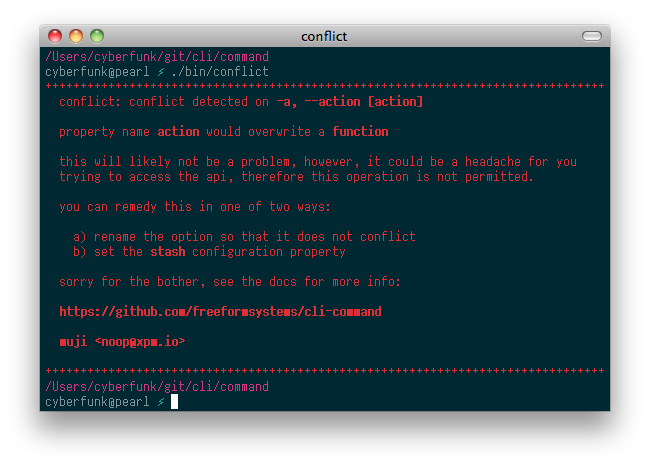
The conflict test executable illustrates this behaviour.