

Package Exports
- crann
- crann/react
Readme
Crann: Effortless State Synchronization for Web Extensions

npm i crann
Table of Contents
- Core Features
- Quick Start
- Configuration
- Store API (Service Worker)
- Agent API (Content Scripts, Popup, etc.)
- React Integration
- RPC Actions
- State Persistence
- Migration from v1
Core Features
- Minimal size (< 5kb gzipped)
- Multi-context sync - Content Scripts, Service Worker, Devtools, Sidepanels, Popup
- No message boilerplate - Eliminates
chrome.runtime.sendMessage/onMessage - Reactive updates - Subscribe to state changes
- Persistence - Optional local or session storage
- Full TypeScript - Complete type inference from config
- React hooks - First-class React integration via
crann/react - RPC Actions - Execute logic in the service worker from any context
Quick Start
1. Define Your Config
// config.ts
import { createConfig, Persist } from "crann";

export const config = createConfig({
  name: "myExtension", // Required: unique store name
  version: 1, // Optional: for migrations

  // Define your state
  isEnabled: { default: false },
  count: { default: 0, persist: Persist.Local },

  // Define actions (RPC)
  actions: {
    increment: {
      handler: async (ctx, amount: number = 1) => {
        return { count: ctx.state.count + amount };
      },
    },
  },
});
2. Initialize the Store (Service Worker)
// service-worker.ts
import { createStore } from "crann";
import { config } from "./config";

const store = createStore(config);

store.subscribe((state, changes) => {
  console.log("State changed:", changes);
});
3. Connect from Any Context
// popup.ts or content-script.ts
import { connectStore } from "crann";
import { config } from "./config";

const agent = connectStore(config);

agent.onReady(() => {
  console.log("Connected! Current state:", agent.getState());

  // Update state
  agent.setState({ isEnabled: true });

  // Call actions
  agent.actions.increment(5);
});
4. Use with React
// hooks.ts
import { createCrannHooks } from "crann/react";
import { config } from "./config";

export const { useCrannState, useCrannActions, useCrannReady } =
  createCrannHooks(config);

// Counter.tsx
function Counter() {
  const count = useCrannState((s) => s.count);
  const { increment } = useCrannActions();
  const isReady = useCrannReady();

  if (!isReady) return <div>Loading...</div>;

  return <button onClick={() => increment(1)}>Count: {count}</button>;
}
Configuration
The createConfig function defines your store schema:
import { createConfig, Scope, Persist } from "crann";

const config = createConfig({
  // Required: unique identifier for this store
  name: "myStore",

  // Optional: version number for migrations (default: 1)
  version: 1,

  // State definitions
  count: { default: 0 },

  // With persistence
  theme: {
    default: "light" as "light" | "dark",
    persist: Persist.Local, // Persist.Local | Persist.Session | Persist.None
  },

  // Agent-scoped state (each tab/frame gets its own copy)
  selectedElement: {
    default: null as HTMLElement | null,
    scope: Scope.Agent, // Scope.Shared (default) | Scope.Agent
  },

  // Actions (RPC handlers)
  actions: {
    doSomething: {
      handler: async (ctx, arg1: string, arg2: number) => {
        // ctx.state - current state
        // ctx.setState - update state
        // ctx.agentId - calling agent's ID
        return { result: "value" };
      },
      validate: (arg1, arg2) => {
        if (!arg1) throw new Error("arg1 required");
      },
    },
  },
});
Store API (Service Worker)
The Store runs in the service worker and manages all state:
import { createStore } from "crann";

const store = createStore(config, {
  debug: true, // Enable debug logging
});

// Get current state
const state = store.getState();

// Update state
await store.setState({ count: 5 });

// Get agent-scoped state for a specific agent
const agentState = store.getAgentState(agentId);

// Subscribe to all state changes
const unsubscribe = store.subscribe((state, changes, agentInfo) => {
  console.log("Changed:", changes);
});

// Listen for agent connections
store.onAgentConnect((agent) => {
  console.log(`Agent ${agent.id} connected from tab ${agent.tabId}`);
});

store.onAgentDisconnect((agent) => {
  console.log(`Agent ${agent.id} disconnected`);
});

// Get all connected agents
const agents = store.getAgents();
const contentScripts = store.getAgents({ context: "contentscript" });

// Clear all state to defaults
await store.clear();

// Destroy the store (cleanup)
store.destroy();
// Or clear persisted data on destroy:
store.destroy({ clearPersisted: true });
Agent API
Agents connect to the store from content scripts, popups, and other contexts:
import { connectStore } from "crann";

const agent = connectStore(config, {
  debug: true,
});

// Wait for connection to be ready
agent.onReady(() => {
  console.log("Connected!");
});

// Or use the promise
await agent.ready();

// Get current state
const state = agent.getState();

// Update state
await agent.setState({ count: 10 });

// Subscribe to changes
const unsubscribe = agent.subscribe((changes, state) => {
  console.log("State changed:", changes);
});

// Call actions (RPC)
const result = await agent.actions.doSomething("arg1", 42);

// Get agent info
const info = agent.getInfo();
// { id, tabId, frameId, context }

// Handle disconnect/reconnect
agent.onDisconnect(() => console.log("Disconnected"));
agent.onReconnect(() => console.log("Reconnected"));

// Clean up
agent.disconnect();
React Integration
Import from crann/react for React hooks:
import { createCrannHooks } from "crann/react";
import { config } from "./config";

// Create hooks bound to your config
export const {
  useCrannState,
  useCrannActions,
  useCrannReady,
  useAgent,
  CrannProvider,
} = createCrannHooks(config);
useCrannState
Two patterns for reading state:
// Selector pattern - returns selected value
const count = useCrannState((s) => s.count);
const theme = useCrannState((s) => s.settings.theme);

// Key pattern - returns [value, setValue] tuple
const [count, setCount] = useCrannState("count");
setCount(10); // Updates state
useCrannActions
Returns typed actions with stable references (won't cause re-renders):
const { increment, fetchData } = useCrannActions();

// Actions are async
await increment(5);
const result = await fetchData("https://api.example.com");
useCrannReady
Check connection status:
const isReady = useCrannReady();

if (!isReady) {
  return <LoadingSpinner />;
}
CrannProvider (Optional)
For testing or dependency injection:
// In tests
const mockAgent = createMockAgent();

render(
  <CrannProvider agent={mockAgent}>
    <MyComponent />
  </CrannProvider>
);
RPC Actions
Actions execute in the service worker but can be called from any context:
// In config
const config = createConfig({
  name: "myStore",
  count: { default: 0 },

  actions: {
    increment: {
      handler: async (ctx, amount: number = 1) => {
        const newCount = ctx.state.count + amount;
        // Option 1: Return state updates
        return { count: newCount };

        // Option 2: Use ctx.setState
        // await ctx.setState({ count: newCount });
        // return { success: true };
      },
    },

    fetchUser: {
      handler: async (ctx, userId: string) => {
        // Runs in service worker - can make network requests
        const response = await fetch(`/api/users/${userId}`);
        const user = await response.json();
        return { user };
      },
      validate: (userId) => {
        if (!userId) throw new Error("userId required");
      },
    },
  },
});

// From any context (popup, content script, etc.)
const agent = connectStore(config);
await agent.ready();

const result = await agent.actions.increment(5);
console.log(result.count); // 5

const { user } = await agent.actions.fetchUser("123");
console.log(user.name);
ActionContext
Action handlers receive a context object:
interface ActionContext<TState> {
  state: TState; // Current state snapshot
  setState: (partial: Partial<TState>) => Promise<void>; // Update state
  agentId: string; // Calling agent's ID
  agentLocation: BrowserLocation; // Tab/frame info
}
State Persistence
Control how state is persisted:
import { createConfig, Persist } from "crann";

const config = createConfig({
  name: "myStore",

  // No persistence (default) - resets on service worker restart
  volatile: { default: null },

  // Local storage - persists across browser sessions
  preferences: {
    default: { theme: "light" },
    persist: Persist.Local,
  },

  // Session storage - persists until browser closes
  sessionData: {
    default: {},
    persist: Persist.Session,
  },
});
Storage Keys
Crann uses structured storage keys: crann:{name}:v{version}:{key}
This prevents collisions and enables clean migrations.
Migration from v1
Key Changes
| v1 | v2 |
|---|---|
create() |
createStore() |
connect() |
connectStore() |
Partition.Instance |
Scope.Agent |
Partition.Service |
Scope.Shared |
crann.set() |
store.setState() |
crann.get() |
store.getState() |
callAction("name", arg) |
agent.actions.name(arg) |
| Config object literal | createConfig() |
Migration Steps
- Update config to use
createConfig():
// Before (v1)
const crann = create({
  count: { default: 0 },
});

// After (v2)
const config = createConfig({
  name: "myStore", // Required in v2
  count: { default: 0 },
});

const store = createStore(config);- Update terminology:
// Before (v1)
partition: Partition.Instance;

// After (v2)
scope: Scope.Agent;- Update React hooks:
// Before (v1)
import { useCrann } from "crann";
const { get, set, callAction } = useCrann();

// After (v2)
import { createCrannHooks } from "crann/react";
const { useCrannState, useCrannActions } = createCrannHooks(config);- Update action calls:
// Before (v1)
await callAction("increment", 5);

// After (v2)
await agent.actions.increment(5);
Why Crann?
Browser extensions have multiple isolated contexts (content scripts, popup, devtools, sidepanel) that need to share state. The traditional approach using sendMessage/onMessage forces a painful pattern:
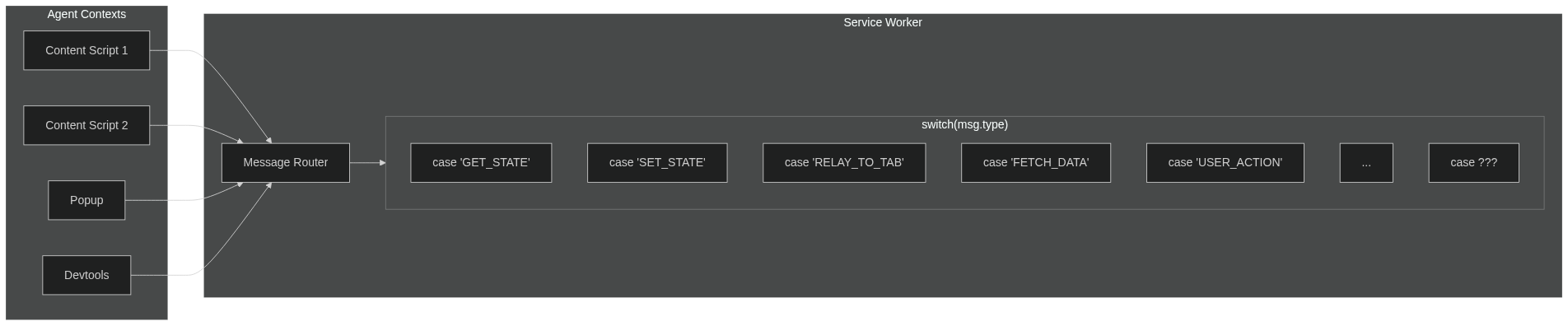
The problem with sendMessage / onMessage:
- Agents can't message each other directly—everything routes through the service worker
- Your service worker becomes a message router with growing
switch/casestatements - Every new feature means more message types, more handlers, more coupling
- Manual async handling (
return truein Chrome, different in Firefox) - Hand-rolled TypeScript types that may or may not stay in sync
With Crann:
- Define your state and actions in one place
- Agents sync automatically through the central store
- Full TypeScript inference—no manual type definitions
- No message routing, no relay logic, no
return true - Focus on your features, not the plumbing
License: ISC
Repository: github.com/moclei/crann