
Package Exports
- dfx-bootstrap-table
This package does not declare an exports field, so the exports above have been automatically detected and optimized by JSPM instead. If any package subpath is missing, it is recommended to post an issue to the original package (dfx-bootstrap-table) to support the "exports" field. If that is not possible, create a JSPM override to customize the exports field for this package.
Readme
dfx-bootstrap-table
An Angular Table CDK implementation for Bootstrap. Compatible with @ng-bootstrap/ng-bootstrap.

Description
The ngb-table provides a Bootstrap Design styled data-table that can be used to display rows of data.
This table builds on the foundation of the CDK data-table and uses a similar interface for its data input and template, except that its element and attribute selectors will be prefixed with ngb- instead of cdk-. For more information on the interface and a detailed look at how the table is implemented, see the guide covering the CDK data-table.
Information
- Usage
- Development notes
- Deployment notes
- Project website
- created with Angular, used libaries
Credits
Full credits go to the Angular and Angular Material Team. I literally copied most of their mat-table implementation and narrowed it down for Bootstrap.
Usage
Installation
npm install dfx-bootstrap-table@latest- If you have not already installed Bootstrap
npm install bootstrap@latest
- For sorting
npm install @angular/animations@latest
- If you are gonna use the filtering code
npm install @angular/forms@latest
Getting started (table with filtering and sorting)
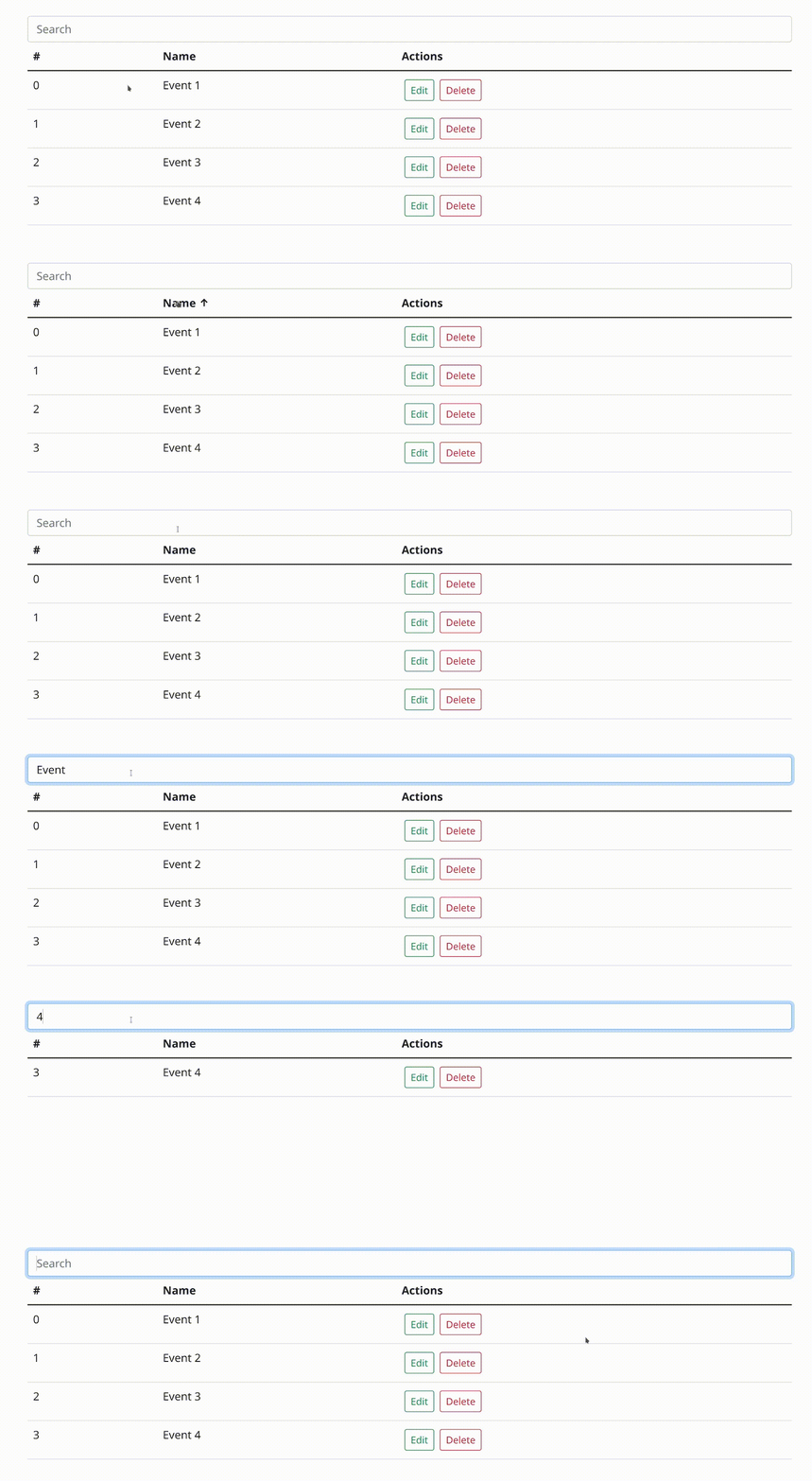 Click me (or the video) for a faster version
You can run the demo with npm run demo and vist it under http://localhost:4200. more here;
Every code piece is located in src/app/.
<!-- Filtering stuff -->
<form>
  <div class='input-group'>
    <input class='form-control' type='text' [formControl]='filter'
           placeholder='Search' />
  </div>
</form>

<table ngb-table [dataSource]='dataSource' ngb-sort>
  <ng-container ngbColumnDef='id'>
    <th *ngbHeaderCellDef ngb-header-cell ngb-sort-header>#</th>
    <td *ngbCellDef='let event' ngb-cell>{{ event.id }}</td>
  </ng-container>

  <ng-container ngbColumnDef='name'>
    <th *ngbHeaderCellDef ngb-header-cell ngb-sort-header>Name</th>
    <td *ngbCellDef='let event' ngb-cell>{{ event.name }}</td>
  </ng-container>

  <ng-container ngbColumnDef='actions'>
    <th *ngbHeaderCellDef ngb-header-cell>Actions</th>
    <td *ngbCellDef='let event' ngb-cell>
      <button
        type='button'
        class='btn btn-sm m-1 btn-outline-success'>
        Edit
      </button>
      <button
        type='button'
        class='btn btn-sm m-1 btn-outline-danger'>
        Delete
      </button>
    </td>
  </ng-container>

  <tr *ngbHeaderRowDef='columnsToDisplay' ngb-header-row></tr>
  <tr *ngbRowDef='let event; columns: columnsToDisplay' ngb-row></tr>
</table>export type eventModel = {
id: number,
name: string,
}
@Component({
selector: '...'
})
export class AppComponent implements OnInit {
// Filtering
public filter = new FormControl();
// Sorting
@ViewChild(NgbSort, {static: true}) sort: NgbSort | undefined;
public columnsToDisplay = ['id', 'name', 'actions'];
public dataSource: NgbTableDataSource<eventModel> = new NgbTableDataSource();
eventModels = [
{
id: 0,
name: 'Event 1'
},
{
id: 1,
name: 'Event 2'
},
{
id: 2,
name: 'Event 3'
},
{
id: 3,
name: 'Event 4'
},
];
ngOnInit(): void {
this.dataSource = new NgbTableDataSource<eventModel>(this.eventModels);
// Sort has to be set after template initializing
this.dataSource.sort = this.sort;
this.filter.valueChanges.subscribe((value) => {
this.dataSource.filter = value;
});
}
}import {BrowserAnimationsModule} from '@angular/platform-browser/animations';
import {ReactiveFormsModule} from '@angular/forms';
import {DfxTableModule, DfxSortModule} from 'dfx-bootstrap-table';
@NgModule({
declarations: [...],
imports: [
BrowserAnimationsModule, // (probably) only once in your project
ReactiveFormsModule, // only if you use the filtering code
DfxTableModule,
DfxSortModule,
],
})
export class EventsModule {
}Development
Everything important in this library is located in projects/dfx-bootstrap-table, thats the "real" library. (following commands still have to be executed at the root level)
Dependency installation
npm installRunning the demo
Install all dependencies. Then run:
npm run demoVisit the demo under http://localhost:4200
Starting in development environment
npm run-script watchBuilding a production version
npm run-script buildDeployment notes
dfx-bootstrap-table deployments are managed via .gitlab-ci
All builds are uploaded to releases.datepoll.org/common/dfx-bootstrap-table
Development builds
Commits to the develop branch create a dev build downloadable via this link.
Production builds
Tags create a release build downloadable via this link. Additionally a versioned zip is uploaded and the package is published to npm.