
Package Exports
- diandi-ele-form-upload-file
- diandi-ele-form-upload-file/lib/index.js
This package does not declare an exports field, so the exports above have been automatically detected and optimized by JSPM instead. If any package subpath is missing, it is recommended to post an issue to the original package (diandi-ele-form-upload-file) to support the "exports" field. If that is not possible, create a JSPM override to customize the exports field for this package.
Readme
vue-ele-form-upload-file | vue-ele-form 的文件上传扩展组件



介绍
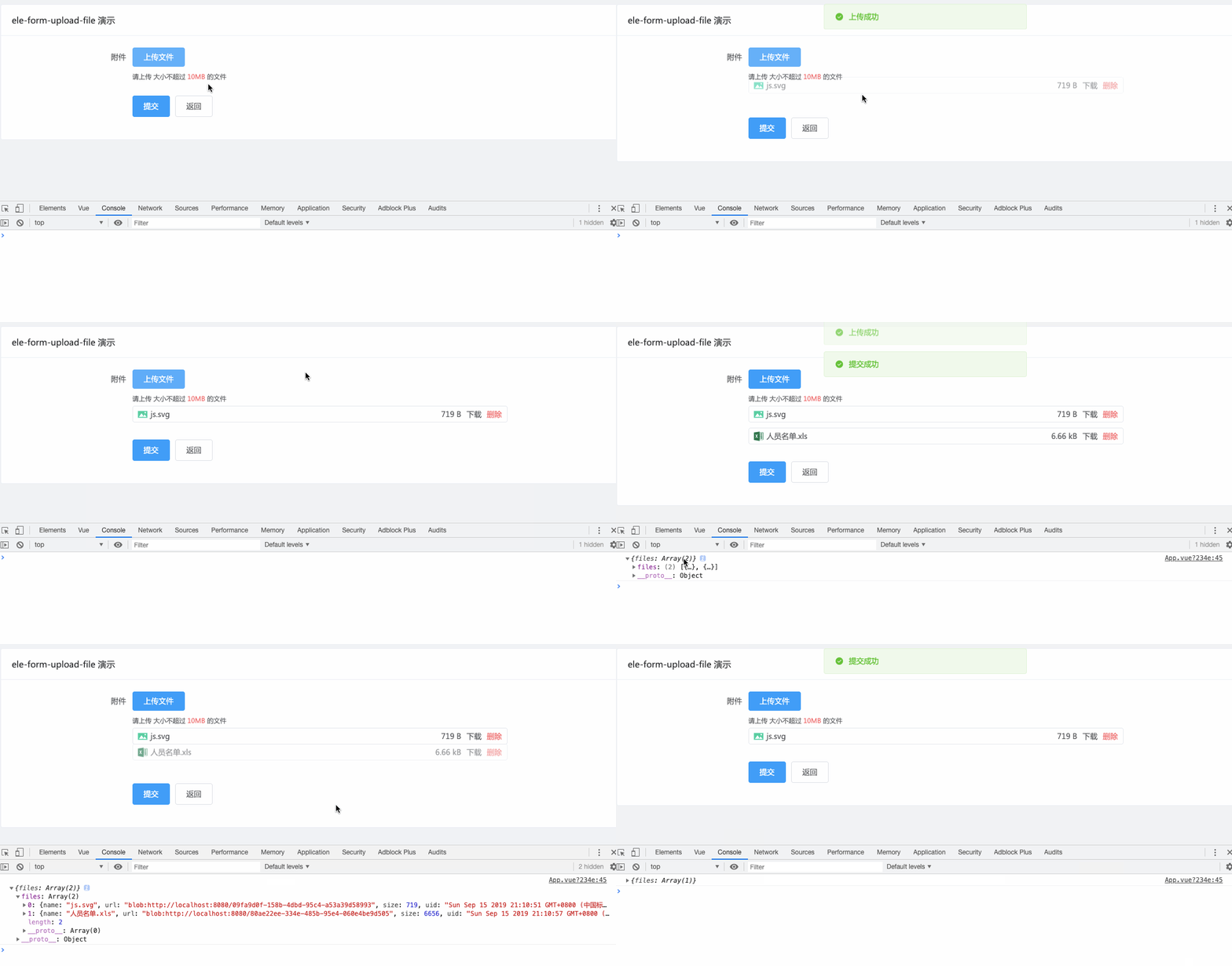
vue-ele-form-upload-file 做为 vue-ele-form 的第三方扩展, 通过对 vue-ele-upload-file 的封装, 使得上传更加方便和容易
安装
npm install vue-ele-form-upload-file --save使用
import EleForm from 'vue-ele-form'
import EleFormUploadFile from 'vue-ele-form-upload-file'

// 注册 upload-file 组件
Vue.component('upload-file', EleFormUploadFile)

// 注册 ele-form
Vue.use(EleForm, {
  // 对所有具有上传属性的组件适用
  upload: {
    fileSize: 10
  },
  // 专门设置全局的 upload-file 属性
  'upload-file': {
    action: 'https://jsonplaceholder.typicode.com/posts' // 上传地址
  }
})formDesc: {
xxx: {
label: 'xxx',
// 只需要在这里指定为 upload-file 即可
type: 'upload-file',
// 属性参考下面的 #attrs
attrs: {
// 上传地址
action: 'https://jsonplaceholder.typicode.com/posts',
isCanDelete: false,
// 上传后对响应处理, 拼接为一个URL地址
handleResponse(response, file) {
// 根据响应结果, 设置 URL
return {
name: file.name,
url: 'https://xxx.com/file/' + response.path, // 示例而已
size: file.size
}
}
}
}
}示例
<template>
  <el-card
    header="ele-form-upload-file 演示"
    shadow="never"
    style="max-width: 1250px;margin: 20px auto;"
  >
    <ele-form
      :form-data="formData"
      :form-desc="formDesc"
      :request-fn="handleRequest"
      @request-success="handleSuccess"
    />
  </el-card>
</template>

<script>
export default {
  data () {
    return {
      formData: {
        files: []
      },
      formDesc: {
        files: {
          label: '附件',
          type: 'upload-file',
          attrs: {
            action: 'https://jsonplaceholder.typicode.com/posts',
            responseFn (response, file) {
              return {
                name: file.name,
                url: URL.createObjectURL(file.raw),
                size: file.size
              }
            }
          }
        }
      }
    }
  },
  methods: {
    handleRequest (data) {
      console.log(data)
      return Promise.resolve()
    },
    handleSuccess () {
      this.$message.success('提交成功')
    }
  },
  mounted () {}
}
</script>

<style>
body {
  background-color: #f0f2f5;
}
</style>
attrs
具体属性含义, 可以参考 vue-ele-upload-file
attrs: {
  // 必选参数,上传的地址
  // 同 element-ui upload 组件
  action: {
    type: String,
    required: true
  },
  // 大小限制(MB)
  fileSize: Number,
  // 响应处理函数
  responseFn: Function,
  // 文件类型, 例如['png', 'jpg', 'jpeg']
  fileType: Array,
  // 提示
  placeholder: String,
  // 是否禁用
  disabled: Boolean,
  // 是否显示文件大小
  isShowSize: {
    type: Boolean,
    default: true
  },
  // 是否显示下载
  isCanDownload: {
    type: Boolean,
    default: true
  },
  // 是否可删除
  isCanDelete: {
    type: Boolean,
    default: true
  },
  // 是否可上传相同文件
  isCanUploadSame: {
    type: Boolean,
    default: true
  },
  // 是否显示提示
  isShowTip: {
    type: Boolean,
    default: true
  },
  // 设置上传的请求头部
  // 同 element-ui upload 组件
  headers: Object,
  // 是否支持多选文件
  // 同 element-ui upload 组件
  multiple: {
    type: Boolean,
    default: true
  },
  // 上传时附带的额外参数
  // 同 element-ui upload 组件
  data: Object,
  // 上传的文件字段名
  // 同 element-ui upload 组件
  name: {
    type: String,
    default: 'file'
  },
  // 支持发送 cookie 凭证信息
  // 同 element-ui upload 组件
  withCredentials: {
    type: Boolean,
    default: false
  },
  // 接受上传的文件类型
  // 同 element-ui upload 组件
  accept: String,
  // 最大允许上传个数
  // 同 element-ui upload 组件
  limit: Number
}