

Package Exports
- fastest-validator
This package does not declare an exports field, so the exports above have been automatically detected and optimized by JSPM instead. If any package subpath is missing, it is recommended to post an issue to the original package (fastest-validator) to support the "exports" field. If that is not possible, create a JSPM override to customize the exports field for this package.
Readme




fastest-validator 

⚡ The fastest JS validator library for NodeJS | Browser | Deno.
Key features
- blazing fast! Really!
- 20+ built-in validators
- many sanitizations
- custom validators & aliases
- nested objects & array handling
- strict object validation
- multiple validators
- customizable error messages
- programmable error object
- no dependencies
- unit tests & 100% coverage
How fast?
Very fast! 8 million validations/sec (on Intel i7-4770K, Node.JS: 12.14.1)
√ validate 8,678,752 rpsCompared to other popular libraries:
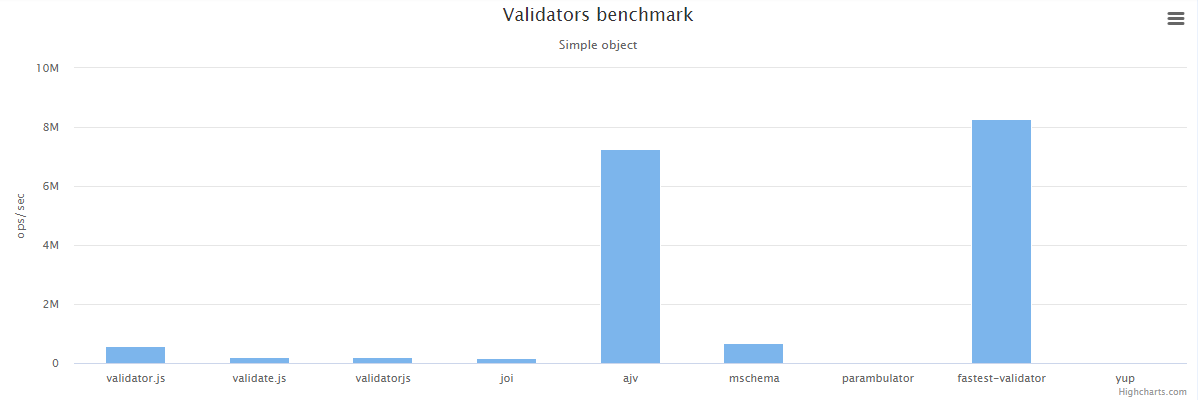
50x faster than Joi.
Would you like to test it?
$ git clone https://github.com/icebob/fastest-validator.git
$ cd fastest-validator
$ npm install
$ npm run bench
Table of contents
- Table of contents
- Optional, Required & Nullable fields
- Strict validation
- Multiple validators
- Root element schema
- Sanitizations
- Shorthand definitions
- Alias definition
- Default options
- Built-in validators
- Custom validator
- Custom error messages (l10n)
- Personalised Messages
- Message types
- Plugins
- Development
- Test
- Contribution
- License
- Contact
Installation
NPM
You can install it via NPM.
$ npm i fastest-validator --saveor
$ yarn add fastest-validatorUsage
Simple method
Call the validate method with the object and the schema.
If performance is important, you won't use this method because it's slow.
const Validator = require("fastest-validator");

const v = new Validator();

const schema = {
    id: { type: "number", positive: true, integer: true },
    name: { type: "string", min: 3, max: 255 },
    status: "boolean" // short-hand def
};

console.log(v.validate({ id: 5, name: "John", status: true }, schema));
// Returns: true

console.log(v.validate({ id: 5, name: "Al", status: true }, schema));
/* Returns an array with errors:
    [
        {
            type: 'stringMin',
            expected: 3,
            actual: 2,
            field: 'name',
            message: 'The \'name\' field length must be greater than or equal to 3 characters long!'
        }
    ]
*/Fast method
In this case, the first step is to compile the schema to a compiled "checker" function. After that, to validate your object, just call this "checker" function.
This method is the fastest.
const Validator = require("fastest-validator");

const v = new Validator();

const schema = {
    id: { type: "number", positive: true, integer: true },
    name: { type: "string", min: 3, max: 255 },
    status: "boolean" // short-hand def
};

const check = v.compile(schema);

console.log("First:", check({ id: 5, name: "John", status: true }));
// Returns: true

console.log("Second:", check({ id: 2, name: "Adam" }));
/* Returns an array with errors:
    [
        {
            type: 'required',
            field: 'status',
            message: 'The \'status\' field is required!'
        }
    ]
*/Browser usage
<script src="https://unpkg.com/fastest-validator"></script>var v = new FastestValidator();
const schema = {
id: { type: "number", positive: true, integer: true },
name: { type: "string", min: 3, max: 255 },
status: "boolean" // short-hand def
};
const check = v.compile(schema);
console.log(check({ id: 5, name: "John", status: true }));
// Returns: trueDeno usage
import FastestValidator from "https://dev.jspm.io/fastest-validator";

const v = new FastestValidator();
const check = v.compile({
    name: "string",
    age: "number",
});

console.log(check({ name: "Erf", age: 18 })); //true
Optional, Required & Nullable fields
Optional
Every field in the schema will be required by default. If you'd like to define optional fields, set optional: true.
const schema = {
    name: { type: "string" }, // required
    age: { type: "number", optional: true }
}

v.validate({ name: "John", age: 42 }, schema); // Valid
v.validate({ name: "John" }, schema); // Valid
v.validate({ age: 42 }, schema); // Fail because name is required
Nullable
If you want disallow undefined value but allow null value, use nullable instead of optional.
const schema = {
    age: { type: "number", nullable: true }
}

v.validate({ age: 42 }, schema); // Valid
v.validate({ age: null }, schema); // Valid
v.validate({ age: undefined }, schema); // Fail because undefined is disallowed
v.validate({}, schema); // Fail because undefined is disallowed
Strict validation
Object properties which are not specified on the schema are ignored by default. If you set the $$strict option to true any additional properties will result in an strictObject error.
const schema = {
    name: { type: "string" }, // required
    $$strict: true // no additional properties allowed
}

v.validate({ name: "John" }, schema); // Valid
v.validate({ name: "John", age: 42 }, schema); // Fail
Remove additional fields
To remove the additional fields in the object, set $$strict: "remove".
Multiple validators
It is possible to define more validators for a field. In this case, only one validator needs to succeed for the field to be valid.
const schema = {
    cache: [
        { type: "string" },
        { type: "boolean" }
    ]
}

v.validate({ cache: true }, schema); // Valid
v.validate({ cache: "redis://" }, schema); // Valid
v.validate({ cache: 150 }, schema); // Fail
Root element schema
Basically the validator expects that you want to validate a Javascript object. If you want others, you can define the root level schema, as well. In this case set the $$root: true property.
Example to validate a string variable instead of object
const schema = {
    $$root: true,
    type: "string",
    min: 3,
    max: 6
};

v.validate("John", schema); // Valid
v.validate("Al", schema); // Fail, too short.
Sanitizations
The library contains several sanitizers. Please note, the sanitizers change the original checked object.
Default values
The most common sanitizer is the default property. With it, you can define a default value for all properties. If the property value is null or undefined, the validator set the defined default value into the property.
Static Default value example:
const schema = {
    roles: { type: "array", items: "string", default: ["user"] },
    status: { type: "boolean", default: true },
};

const obj = {}

v.validate(obj, schema); // Valid
console.log(obj);
/*
{
    roles: ["user"],
    status: true
}
*/
Dynamic Default value:
Also you can use dynamic default value by defining a function that returns a value. For example, in the following code, if createdAt field not defined in object`, the validator sets the current time into the property:
const schema = {
    createdAt: {
        type: "date",
        default: () => new Date()
    }
};

const obj = {}

v.validate(obj, schema); // Valid
console.log(obj);
/*
{
    createdAt: Date(2020-07-25T13:17:41.052Z)
}
*/
Shorthand definitions
You can use string-based shorthand validation definitions in the schema.
const schema = {
    password: "string|min:6",
    age: "number|optional|integer|positive|min:0|max:99", // additional properties
    state: ["boolean", "number|min:0|max:1"] // multiple types
}
Array of X
const schema = {
    foo: "string[]" // means array of string
}

check({ foo: ["bar"] }) // true
Nested objects
const schema = {
   dot: {
      $$type: "object",
      x: "number",  // object props here
      y: "number",  // object props here
   },
   circle: {
      $$type: "object|optional", // using other shorthands
      o: {
         $$type: "object",
         x: "number",
         y: "number",
      },
      r: "number"
   }
};
Alias definition
You can define custom aliases.
v.alias('username', {
    type: 'string',
    min: 4,
    max: 30
    // ...
});

const schema = {
    username: "username|max:100", // Using the 'username' alias
    password: "string|min:6",
}
Default options
You can set default rule options.
var v = new FastestValidator({
    defaults: {
        object: {
            strict: "remove"
        }
    }
});
Built-in validators
any
This does not do type validation. Accepts any types.
const schema = {
    prop: { type: "any" }
}

v.validate({ prop: true }, schema); // Valid
v.validate({ prop: 100 }, schema); // Valid
v.validate({ prop: "John" }, schema); // Valid
array
This is an Array validator.
Simple example with strings:
const schema = {
    roles: { type: "array", items: "string" }
}

v.validate({ roles: ["user"] }, schema); // Valid
v.validate({ roles: [] }, schema); // Valid
v.validate({ roles: "user" }, schema); // Fail
Example with only positive numbers:
const schema = {
    list: { type: "array", min: 2, items: {
        type: "number", positive: true, integer: true
    } }
}

v.validate({ list: [2, 4] }, schema); // Valid
v.validate({ list: [1, 5, 8] }, schema); // Valid
v.validate({ list: [1] }, schema); // Fail (min 2 elements)
v.validate({ list: [1, -7] }, schema); // Fail (negative number)
Example with an object list:
const schema = {
    users: { type: "array", items: {
        type: "object", props: {
            id: { type: "number", positive: true },
            name: { type: "string", empty: false },
            status: "boolean"
        }
    } }
}

v.validate({
    users: [
        { id: 1, name: "John", status: true },
        { id: 2, name: "Jane", status: true },
        { id: 3, name: "Bill", status: false }
    ]
}, schema); // Valid
Example for enum:
const schema = {
    roles: { type: "array", items: "string", enum: [ "user", "admin" ] }
}

v.validate({ roles: ["user"] }, schema); // Valid
v.validate({ roles: ["user", "admin"] }, schema); // Valid
v.validate({ roles: ["guest"] }, schema); // Fail
Example for unique:
const schema = {
    roles: { type: "array", unique: true }
}

v.validate({ roles: ["user"] }, schema); // Valid
v.validate({ roles: [{role:"user"},{role:"admin"},{role:"user"}] }, schema); // Valid
v.validate({ roles: ["user", "admin", "user"] }, schema); // Fail
v.validate({ roles: [1, 2, 1] }, schema); // Fail
Properties
| Property | Default | Description |
|---|---|---|
empty |
true |
If true, the validator accepts an empty array []. |
min |
null |
Minimum count of elements. |
max |
null |
Maximum count of elements. |
length |
null |
Fix count of elements. |
contains |
null |
The array must contain this element too. |
unique |
null |
The array must be unique (array of objects is always unique). |
enum |
null |
Every element must be an element of the enum array. |
items |
null |
Schema for array items. |
boolean
This is a Boolean validator.
const schema = {
    status: { type: "boolean" }
}

v.validate({ status: true }, schema); // Valid
v.validate({ status: false }, schema); // Valid
v.validate({ status: 1 }, schema); // Fail
v.validate({ status: "true" }, schema); // Fail
Properties
| Property | Default | Description |
|---|---|---|
convert |
false |
if true and the type is not Boolean, it will be converted. 1, "true", "1", "on" will be true. 0, "false", "0", "off" will be false. It's a sanitizer, it will change the value in the original object. |
Example for convert:
v.validate({ status: "true" }, {
    status: { type: "boolean", convert: true}
}); // Valid
class
This is a Class validator to check the value is an instance of a Class.
const schema = {
    rawData: { type: "class", instanceOf: Buffer }
}

v.validate({ rawData: Buffer.from([1, 2, 3]) }, schema); // Valid
v.validate({ rawData: 100 }, schema); // Fail
Properties
| Property | Default | Description |
|---|---|---|
instanceOf |
null |
Checked Class. |
currency
This is a Currency validator to check if the value is a valid currency string.
const schema = {
    money_amount: { type: "currency", currencySymbol: '$' }
}

v.validate({ money_amount: '$12.99'}, schema); // Valid
v.validate({ money_amount: '$0.99'}, schema); // Valid
v.validate({ money_amount: '$12,345.99'}, schema); // Valid
v.validate({ money_amount: '$123,456.99'}, schema); // Valid

v.validate({ money_amount: '$1234,567.99'}, schema); // Fail
v.validate({ money_amount: '$1,23,456.99'}, schema); // Fail
v.validate({ money_amount: '$12,34.5.99' }, schema); // Fail
Properties
| Property | Default | Description |
|---|---|---|
currencySymbol |
null |
The currency symbol expected in string (as prefix). |
symbolOptional |
false |
Toggle to make the symbol optional in string, although, if present it would only allow the currencySymbol. |
thousandSeparator |
, |
Thousand place separator character. |
decimalSeparator |
. |
Decimal place character. |
customRegex |
null |
Custom regular expression, to validate currency strings (For eg: /[0-9]*/g). |
date
This is a Date validator.
const schema = {
    dob: { type: "date" }
}

v.validate({ dob: new Date() }, schema); // Valid
v.validate({ dob: new Date(1488876927958) }, schema); // Valid
v.validate({ dob: 1488876927958 }, schema); // Fail
Properties
| Property | Default | Description |
|---|---|---|
convert |
false |
if true and the type is not Date, try to convert with new Date(). It's a sanitizer, it will change the value in the original object. |
Example for convert:
v.validate({ dob: 1488876927958 }, {
    dob: { type: "date", convert: true}
}); // Valid
email
This is an e-mail address validator.
const schema = {
    email: { type: "email" }
}

v.validate({ email: "john.doe@gmail.com" }, schema); // Valid
v.validate({ email: "james.123.45@mail.co.uk" }, schema); // Valid
v.validate({ email: "abc@gmail" }, schema); // Fail
Properties
| Property | Default | Description |
|---|---|---|
empty |
false |
If true, the validator accepts an empty array "". |
mode |
quick |
Checker method. Can be quick or precise. |
normalize |
false |
Normalize the e-mail address (trim & lower-case). It's a sanitizer, it will change the value in the original object. |
enum
This is an enum validator.
const schema = {
    sex: { type: "enum", values: ["male", "female"] }
}

v.validate({ sex: "male" }, schema); // Valid
v.validate({ sex: "female" }, schema); // Valid
v.validate({ sex: "other" }, schema); // Fail
Properties
| Property | Default | Description |
|---|---|---|
values |
null |
The valid values. |
equal
This is an equal value validator. It checks a value with a static value or with another property.
Example with static value:
const schema = {
    agreeTerms: { type: "equal", value: true, strict: true } // strict means `===`
}

v.validate({ agreeTerms: true }, schema); // Valid
v.validate({ agreeTerms: false }, schema); // Fail
Example with other field:
const schema = {
    password: { type: "string", min: 6 },
    confirmPassword: { type: "equal", field: "password" }
}

v.validate({ password: "123456", confirmPassword: "123456" }, schema); // Valid
v.validate({ password: "123456", confirmPassword: "pass1234" }, schema); // Fail
Properties
| Property | Default | Description |
|---|---|---|
value |
undefined |
The expected value. It can be any primitive types. |
strict |
false |
if true, it uses strict equal === for checking. |
forbidden
This validator returns an error if the property exists in the object.
const schema = {
    password: { type: "forbidden" }
}

v.validate({ user: "John" }, schema); // Valid
v.validate({ user: "John", password: "pass1234" }, schema); // Fail
Properties
| Property | Default | Description |
|---|---|---|
remove |
false |
If true, the value will be removed in the original object. It's a sanitizer, it will change the value in the original object. |
Example for remove:
const schema = {
    user: { type: "string" },
    token: { type: "forbidden", remove: true }
};

const obj = {
    user: "John",
    token: "123456"
}

v.validate(obj, schema); // Valid
console.log(obj);
/*
{
    user: "John",
    token: undefined
}
*/
function
This a Function type validator.
const schema = {
    show: { type: "function" }
}

v.validate({ show: function() {} }, schema); // Valid
v.validate({ show: Date.now }, schema); // Valid
v.validate({ show: "function" }, schema); // Fail
luhn
This is an Luhn validator. Luhn algorithm checksum Credit Card numbers, IMEI numbers, National Provider Identifier numbers and others
const schema = {
    cc: { type: "luhn" }
}

v.validate({ cc: "452373989901198" }, schema); // Valid
v.validate({ cc: 452373989901198 }, schema); // Valid
v.validate({ cc: "4523-739-8990-1198" }, schema); // Valid
v.validate({ cc: "452373989901199" }, schema); // Fail
mac
This is an MAC addresses validator.
const schema = {
    mac: { type: "mac" }
}

v.validate({ mac: "01:C8:95:4B:65:FE" }, schema); // Valid
v.validate({ mac: "01:c8:95:4b:65:fe", schema); // Valid
v.validate({ mac: "01C8.954B.65FE" }, schema); // Valid
v.validate({ mac: "01c8.954b.65fe", schema); // Valid
v.validate({ mac: "01-C8-95-4B-65-FE" }, schema); // Valid
v.validate({ mac: "01-c8-95-4b-65-fe" }, schema); // Valid
v.validate({ mac: "01C8954B65FE" }, schema); // Fail
multi
This is a multiple definitions validator.
const schema = {
    status: { type: "multi", rules: [
        { type: "boolean" },
        { type: "number" }
    ], default: true }
}

v.validate({ status: true }, schema); // Valid
v.validate({ status: false }, schema); // Valid
v.validate({ status: 1 }, schema); // Valid
v.validate({ status: 0 }, schema); // Valid
v.validate({ status: "yes" }, schema); // Fail
Shorthand multiple definitions:
const schema = {
    status: [
        "boolean",
        "number"
    ]
}

v.validate({ status: true }, schema); // Valid
v.validate({ status: false }, schema); // Valid
v.validate({ status: 1 }, schema); // Valid
v.validate({ status: 0 }, schema); // Valid
v.validate({ status: "yes" }, schema); // Fail
number
This is a Number validator.
const schema = {
    age: { type: "number" }
}

v.validate({ age: 123 }, schema); // Valid
v.validate({ age: 5.65 }, schema); // Valid
v.validate({ age: "100" }, schema); // Fail
Properties
| Property | Default | Description |
|---|---|---|
min |
null |
Minimum value. |
max |
null |
Maximum value. |
equal |
null |
Fixed value. |
notEqual |
null |
Can't be equal to this value. |
integer |
false |
The value must be a non-decimal value. |
positive |
false |
The value must be greater than zero. |
negative |
false |
The value must be less than zero. |
convert |
false |
if true and the type is not Number, it's converted with Number(). It's a sanitizer, it will change the value in the original object. |
object
This is a nested object validator.
const schema = {
    address: { type: "object", strict: true, props: {
        country: { type: "string" },
        city: "string", // short-hand
        zip: "number" // short-hand
    } }
}

v.validate({
    address: {
        country: "Italy",
        city: "Rome",
        zip: 12345
    }
}, schema); // Valid

v.validate({
    address: {
        country: "Italy",
        city: "Rome"
    }
}, schema); // Fail ("The 'address.zip' field is required!")

v.validate({
    address: {
        country: "Italy",
        city: "Rome",
        zip: 12345,
        state: "IT"
    }
}, schema); // Fail ("The 'address.state' is an additional field!")
Properties
| Property | Default | Description |
|---|---|---|
strict |
false |
If true any properties which are not defined on the schema will throw an error. If remove all additional properties will be removed from the original object. It's a sanitizer, it will change the original object. |
minProps |
null |
If set to a number N, will throw an error if the object has fewer than N properties. |
maxProps |
null |
If set to a number N, will throw an error if the object has more than N properties. |
let schema = {
    address: { type: "object", strict: "remove", props: {
        country: { type: "string" },
        city: "string", // short-hand
        zip: "number" // short-hand
    } }
}

let obj = {
    address: {
        country: "Italy",
        city: "Rome",
        zip: 12345,
        state: "IT"
    }
};

v.validate(obj, schema); // Valid
console.log(obj);
/*
{
    address: {
        country: "Italy",
        city: "Rome",
        zip: 12345
    }
}
*/

schema = {
  address: {
    type: "object",
    minProps: 2,
    props: {
      country: { type: "string" },
      city: { type: "string", optional: true },
      zip: { type: "number", optional: true }
    }
  }
}

obj = {
    address: {
        country: "Italy",
        city: "Rome",
        zip: 12345,
        state: "IT"
    }
}

v.validate(obj, schema); // Valid

obj = {
    address: {
        country: "Italy",
    }
}

v.validate(obj, schema); // Fail
// [
//   {
//     type: 'objectMinProps',
//     message: "The object 'address' must contain at least 2 properties.",
//     field: 'address',
//     expected: 2,
//     actual: 1
//   }
// ]
string
This is a String validator.
const schema = {
    name: { type: "string" }
}

v.validate({ name: "John" }, schema); // Valid
v.validate({ name: "" }, schema); // Valid
v.validate({ name: 123 }, schema); // Fail
Properties
| Property | Default | Description |
|---|---|---|
empty |
true |
If true, the validator accepts an empty string "". |
min |
null |
Minimum value length. |
max |
null |
Maximum value length. |
length |
null |
Fixed value length. |
pattern |
null |
Regex pattern. |
contains |
null |
The value must contain this text. |
enum |
null |
The value must be an element of the enum array. |
alpha |
null |
The value must be an alphabetic string. |
numeric |
null |
The value must be a numeric string. |
alphanum |
null |
The value must be an alphanumeric string. |
alphadash |
null |
The value must be an alphabetic string that contains dashes. |
hex |
null |
The value must be a hex string. |
singleLine |
null |
The value must be a single line string. |
trim |
null |
If true, the value will be trimmed. It's a sanitizer, it will change the value in the original object. |
trimLeft |
null |
If true, the value will be left trimmed. It's a sanitizer, it will change the value in the original object. |
trimRight |
null |
If true, the value will be right trimmed. It's a sanitizer, it will change the value in the original object. |
padStart |
null |
If it's a number, the value will be left padded. It's a sanitizer, it will change the value in the original object. |
padEnd |
null |
If it's a number, the value will be right padded. It's a sanitizer, it will change the value in the original object. |
padChar |
" " |
The padding character for the padStart and padEnd. |
lowercase |
null |
If true, the value will be lower-cased. It's a sanitizer, it will change the value in the original object. |
uppercase |
null |
If true, the value will be upper-cased. It's a sanitizer, it will change the value in the original object. |
localeLowercase |
null |
If true, the value will be locale lower-cased. It's a sanitizer, it will change the value in the original object. |
localeUppercase |
null |
If true, the value will be locale upper-cased. It's a sanitizer, it will change the value in the original object. |
convert |
false |
if true and the type is not a String, it's converted with String(). It's a sanitizer, it will change the value in the original object. |
Sanitization example
const schema = {
    username: { type: "string", min: 3, trim: true, lowercase: true}
}

const obj = {
    username: "   Icebob  "
};

v.validate(obj, schema); // Valid
console.log(obj);
/*
{
    username: "icebob"
}
*/
tuple
This validator checks if a value is an Array with the elements order as described by the schema.
Simple example:
const schema = { list: "tuple" };

v.validate({ list: [] }, schema); // Valid
v.validate({ list: [1, 2] }, schema); // Valid
v.validate({ list: ["RON", 100, true] }, schema); // Valid
v.validate({ list: 94 }, schema); // Fail (not an array)
Example with items:
const schema = {
    grade: { type: "tuple", items: ["string", "number"] }
}

v.validate({ grade: ["David", 85] }, schema); // Valid
v.validate({ grade: [85, "David"] }, schema); // Fail (wrong position)
v.validate({ grade: ["Cami"] }, schema); // Fail (require 2 elements)
Example with a more detailed schema:
const schema = {
    location: { type: "tuple", items: [
        "string",
        { type: "tuple", empty: false, items: [
            { type: "number", min: 35, max: 45 },
            { type: "number", min: -75, max: -65 }
        ] }
    ] }
}

v.validate({ location: ['New York', [40.7127281, -74.0060152]] }, schema); // Valid
v.validate({ location: ['New York', [50.0000000, -74.0060152]] }, schema); // Fail
v.validate({ location: ['New York', []] }, schema); // Fail (empty array)
Properties
| Property | Default | Description |
|---|---|---|
empty |
true |
If true, the validator accepts an empty array []. |
items |
undefined |
Exact schema of the value items |
url
This is an URL validator.
const schema = {
    url: { type: "url" }
}

v.validate({ url: "http://google.com" }, schema); // Valid
v.validate({ url: "https://github.com/icebob" }, schema); // Valid
v.validate({ url: "www.facebook.com" }, schema); // Fail
Properties
| Property | Default | Description |
|---|---|---|
empty |
false |
If true, the validator accepts an empty string "". |
uuid
This is an UUID validator.
const schema = {
    uuid: { type: "uuid" }
}

v.validate({ uuid: "10ba038e-48da-487b-96e8-8d3b99b6d18a" }, schema); // Valid UUIDv4
v.validate({ uuid: "9a7b330a-a736-51e5-af7f-feaf819cdc9f" }, schema); // Valid UUIDv5
v.validate({ uuid: "10ba038e-48da-487b-96e8-8d3b99b6d18a", version: 5 }, schema); // Fail
Properties
| Property | Default | Description |
|---|---|---|
version |
4 |
UUID version in range 1-6. |
objectID
You can validate BSON/MongoDB ObjectID's
const  { ObjectID } = require("mongodb") // or anywhere else

const schema = {
    id: {
        type: "objectID",
        ObjectID // passing the ObjectID class
    }
}

const check = v.compile(schema);
check({ id: "5f082780b00cc7401fb8e8fc" }) // ok
check({ id: new ObjectID() }) // ok
check({ id: "5f082780b00cc7401fb8e8" }) // Error
Pro tip: By using defaults props for objectID rule, No longer needed to pass ObjectID class in validation schema:
const  { ObjectID } = require("mongodb") // or anywhere else

const v = new Validator({
    defaults: {
        objectID: {
            ObjectID
        }
    }
})

const schema = {
    id: "objectID"
}
Properties
| Property | Default | Description |
|---|---|---|
convert |
false |
If true, the validator converts ObjectID HexString representation to ObjectID instance, if hexString the validator converts to HexString |
Custom validator
You can also create your custom validator.
const v = new Validator({
    messages: {
        // Register our new error message text
        evenNumber: "The '{field}' field must be an even number! Actual: {actual}"
    }
});

// Register a custom 'even' validator
v.add("even", function({ schema, messages }, path, context) {
    return {
        source: `
            if (value % 2 != 0)
                ${this.makeError({ type: "evenNumber",  actual: "value", messages })}

            return value;
        `
    };
});

const schema = {
    name: { type: "string", min: 3, max: 255 },
    age: { type: "even" }
};

console.log(v.validate({ name: "John", age: 20 }, schema));
// Returns: true

console.log(v.validate({ name: "John", age: 19 }, schema));
/* Returns an array with errors:
    [{
        type: 'evenNumber',
        expected: null,
        actual: 19,
        field: 'age',
        message: 'The \'age\' field must be an even number! Actual: 19'
    }]
*/
Or you can use the custom type with an inline checker function:
const v = new Validator({
    useNewCustomCheckerFunction: true, // using new version
    messages: {
        // Register our new error message text
        weightMin: "The weight must be greater than {expected}! Actual: {actual}"
    }
});

const schema = {
    name: { type: "string", min: 3, max: 255 },
    weight: {
        type: "custom",
        minWeight: 10,
        check(value, errors, schema) {
            if (value < minWeight) errors.push({ type: "weightMin", expected: schema.minWeight, actual: value });
            if (value > 100) value = 100
            return value
        }
    }
};

console.log(v.validate({ name: "John", weight: 50 }, schema));
// Returns: true

console.log(v.validate({ name: "John", weight: 8 }, schema));
/* Returns an array with errors:
    [{
        type: 'weightMin',
        expected: 10,
        actual: 8,
        field: 'weight',
        message: 'The weight must be greater than 10! Actual: 8'
    }]
*/
const o = { name: "John", weight: 110 }
console.log(v.validate(o, schema));
/* Returns: true
   o.weight is 100
*/
Please note: the custom function must return the
value. It means you can also sanitize it.
Custom validation for built-in rules
You can define a custom function in the schema for built-in rules. With it you can extend any built-in rules.
const v = new Validator({
    useNewCustomCheckerFunction: true, // using new version
    messages: {
        // Register our new error message text
        phoneNumber: "The phone number must be started with '+'!"
    }
});

const schema = {
    name: { type: "string", min: 3, max: 255 },
    phone: { type: "string", length: 15, custom(v, errors) => {
            if (!v.startWith("+")) errors.push({ type: "phoneNumber" })
            return v.replace(/[^\d+]/g, ""); // Sanitize: remove all special chars except numbers
        }
    }
};

console.log(v.validate({ name: "John", phone: "+36-70-123-4567" }, schema));
// Returns: true

console.log(v.validate({ name: "John", phone: "36-70-123-4567" }, schema));
/* Returns an array with errors:
    [{
        message: "The phone number must be started with '+'!",
        field: 'phone',
        type: 'phoneNumber'
    }]
*/
Please note: the custom function must return the
value. It means you can also sanitize it.
Custom error messages (l10n)
You can set your custom messages in the validator constructor.
const Validator = require("fastest-validator");
const v = new Validator({
    messages: {
        stringMin: "A(z) '{field}' mező túl rövid. Minimum: {expected}, Jelenleg: {actual}",
        stringMax: "A(z) '{field}' mező túl hosszú. Minimum: {expected}, Jelenleg: {actual}"
    }
});

v.validate({ name: "John" }, { name: { type: "string", min: 6 }});
/* Returns:
[
    {
        type: 'stringMin',
        expected: 6,
        actual: 4,
        field: 'name',
        message: 'A(z) \'name\' mező túl rövid. Minimum: 6, Jelenleg: 4'
    }
]
*/
Personalised Messages
Sometimes the standard messages are too generic. You can customize messages per validation type per field:
const Validator = require("fastest-validator");
const v = new Validator();
const schema = {
    firstname: {
        type: "string",
        min: 6,
        messages: {
            string: "Please check your firstname",
            stringMin: "Your firstname is too short"
        }
    },
    lastname: {
        type: "string",
        min: 6,
        messages: {
            string: "Please check your lastname",
            stringMin: "Your lastname is too short"
        }
    }
}
v.validate({ firstname: "John", lastname: 23 }, schema );
/* Returns:
[
    {
        type: 'stringMin',
        expected: 6,
        actual: 4,
        field: 'firstname',
        message: 'Your firstname is too short'
    },
    {
        type: 'string',
        expected: undefined,
        actual: undefined,
        field: 'lastname',
        message: 'Please check your lastname'
    }
]
*/
Plugins
You can apply plugins:
// Plugin Side
function myPlugin(validator){
    // you can modify validator here
    // e.g.: validator.add(...)
}

// Validator Side
const v = new Validator();
v.plugin(myPlugin)
Message types
| Name | Default text |
|---|---|
required |
The '{field}' field is required. |
string |
The '{field}' field must be a string. |
stringEmpty |
The '{field}' field must not be empty. |
stringMin |
The '{field}' field length must be greater than or equal to {expected} characters long. |
stringMax |
The '{field}' field length must be less than or equal to {expected} characters long. |
stringLength |
The '{field}' field length must be {expected} characters long. |
stringPattern |
The '{field}' field fails to match the required pattern. |
stringContains |
The '{field}' field must contain the '{expected}' text. |
stringEnum |
The '{field}' field does not match any of the allowed values. |
stringNumeric |
The '{field}' field must be a numeric string. |
stringAlpha |
The '{field}' field must be an alphabetic string. |
stringAlphanum |
The '{field}' field must be an alphanumeric string. |
stringAlphadash |
The '{field}' field must be an alphadash string. |
stringHex |
The '{field}' field must be a hex string. |
stringSingleLine |
The '{field}' field must be a single line string. |
number |
The '{field}' field must be a number. |
numberMin |
The '{field}' field must be greater than or equal to {expected}. |
numberMax |
The '{field}' field must be less than or equal to {expected}. |
numberEqual |
The '{field}' field must be equal to {expected}. |
numberNotEqual |
The '{field}' field can't be equal to {expected}. |
numberInteger |
The '{field}' field must be an integer. |
numberPositive |
The '{field}' field must be a positive number. |
numberNegative |
The '{field}' field must be a negative number. |
array |
The '{field}' field must be an array. |
arrayEmpty |
The '{field}' field must not be an empty array. |
arrayMin |
The '{field}' field must contain at least {expected} items. |
arrayMax |
The '{field}' field must contain less than or equal to {expected} items. |
arrayLength |
The '{field}' field must contain {expected} items. |
arrayContains |
The '{field}' field must contain the '{expected}' item. |
arrayUnique |
The '{actual}' value in '{field}' field does not unique the '{expected}' values. |
arrayEnum |
The '{actual}' value in '{field}' field does not match any of the '{expected}' values. |
tuple |
The '{field}' field must be an array. |
tupleEmpty |
The '{field}' field must not be an empty array. |
tupleLength |
The '{field}' field must contain {expected} items. |
boolean |
The '{field}' field must be a boolean. |
function |
The '{field}' field must be a function. |
date |
The '{field}' field must be a Date. |
dateMin |
The '{field}' field must be greater than or equal to {expected}. |
dateMax |
The '{field}' field must be less than or equal to {expected}. |
forbidden |
The '{field}' field is forbidden. |
email |
The '{field}' field must be a valid e-mail. |
url |
The '{field}' field must be a valid URL. |
enumValue |
The '{field}' field value '{expected}' does not match any of the allowed values. |
equalValue |
The '{field}' field value must be equal to '{expected}'. |
equalField |
The '{field}' field value must be equal to '{expected}' field value. |
object |
The '{field}' must be an Object. |
objectStrict |
The object '{field}' contains forbidden keys: '{actual}'. |
objectMinProps |
"The object '{field}' must contain at least {expected} properties. |
objectMaxProps |
"The object '{field}' must contain {expected} properties at most. |
uuid |
The '{field}' field must be a valid UUID. |
uuidVersion |
The '{field}' field must be a valid UUID version provided. |
mac |
The '{field}' field must be a valid MAC address. |
luhn |
The '{field}' field must be a valid checksum luhn. |
Message fields
| Name | Description |
|---|---|
field |
The field name |
expected |
The expected value |
actual |
The actual value |
Development
npm run devTest
npm testCoverage report
-----------------|----------|----------|----------|----------|-------------------|
File             |  % Stmts | % Branch |  % Funcs |  % Lines | Uncovered Line #s |
-----------------|----------|----------|----------|----------|-------------------|
All files        |      100 |    97.73 |      100 |      100 |                   |
 lib             |      100 |      100 |      100 |      100 |                   |
  messages.js    |      100 |      100 |      100 |      100 |                   |
  validator.js   |      100 |      100 |      100 |      100 |                   |
 lib/helpers     |      100 |      100 |      100 |      100 |                   |
  deep-extend.js |      100 |      100 |      100 |      100 |                   |
  flatten.js     |      100 |      100 |      100 |      100 |                   |
 lib/rules       |      100 |    96.43 |      100 |      100 |                   |
  any.js         |      100 |      100 |      100 |      100 |                   |
  array.js       |      100 |      100 |      100 |      100 |                   |
  boolean.js     |      100 |      100 |      100 |      100 |                   |
  custom.js      |      100 |       50 |      100 |      100 |                 6 |
  date.js        |      100 |      100 |      100 |      100 |                   |
  email.js       |      100 |      100 |      100 |      100 |                   |
  enum.js        |      100 |       50 |      100 |      100 |                 6 |
  equal.js       |      100 |      100 |      100 |      100 |                   |
  forbidden.js   |      100 |      100 |      100 |      100 |                   |
  function.js    |      100 |      100 |      100 |      100 |                   |
  luhn.js        |      100 |      100 |      100 |      100 |                   |
  mac.js         |      100 |      100 |      100 |      100 |                   |
  multi.js       |      100 |      100 |      100 |      100 |                   |
  number.js      |      100 |      100 |      100 |      100 |                   |
  object.js      |      100 |      100 |      100 |      100 |                   |
  string.js      |      100 |    95.83 |      100 |      100 |             55,63 |
  tuple.js       |      100 |      100 |      100 |      100 |                   |
  url.js         |      100 |      100 |      100 |      100 |                   |
  uuid.js        |      100 |      100 |      100 |      100 |                   |
-----------------|----------|----------|----------|----------|-------------------|
Contribution
Please send pull requests improving the usage and fixing bugs, improving documentation and providing better examples, or providing some tests, because these things are important.
License
fastest-validator is available under the MIT license.
Contact
Copyright (C) 2019 Icebob

